The picks
STEM Gifts for Kids Who Love Video Games
A child who loves games does not want a science kit. They want the thing the game is made of - a controller, a screen full of lights, a robot that does what it is told.
By Sawyer V. · Published
The short answer
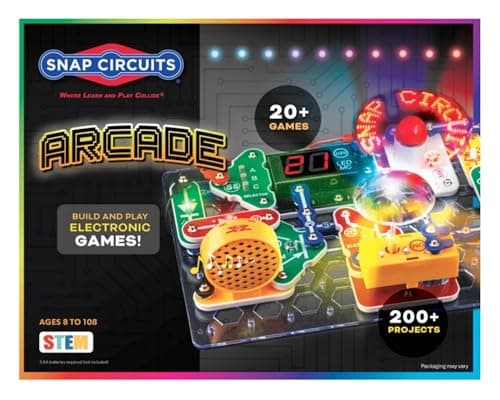
Buy the kit whose published output is a game. Snap Circuits Arcade publishes 36 parts, over 200 projects and “20+ games with fun sounds and lights” at ages 8+, with no soldering — it is the only kit in this catalog that counts its projects in games. Makey Makey Classic is next: it turns anything conductive into a controller for the games they already play.
Block & Beaker earns a commission when you buy through our links, at no cost to you. It never changes a ranking, and we say so plainly when the right answer is the cheaper set, or nothing at all. Full disclosure · How we pick.
At a glance
The picks, ranked
Tap any row to jump to the full reasoning. Prices come live from Amazon where we have them and read “check price” where we don’t — never a number we cannot stand behind today.
| # | Product | Best for | Price |
|---|---|---|---|
| 1 | Best overall — the projects are games Snap Circuits Arcade 36 snap-together parts, 200+ projects and 20+ buildable games with sounds and lights. | Eight and up, for a child who wants lights, buzzers and a score | |
| 2 | 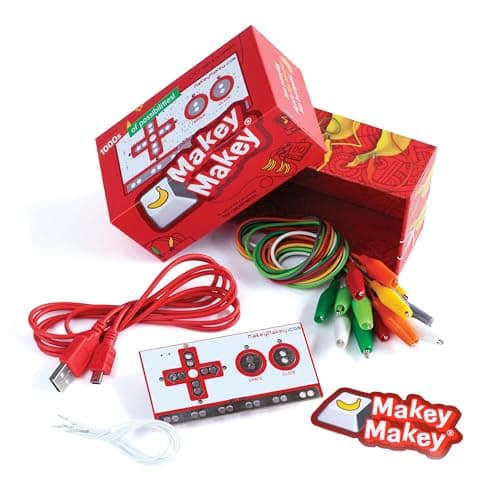 Best for the child who wants to build a controller Makey Makey Classic A board that registers as a USB keyboard, so bananas, foil and pencil lines become game controls. | Eight and up, in a house with a laptop or Chromebook | |
| 3 | 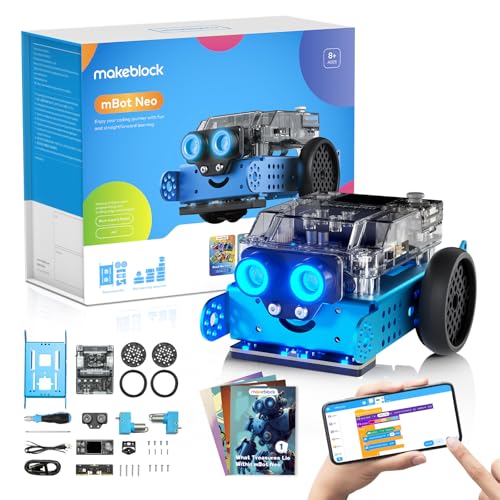 Best for a child who wants to write actual code Makeblock mBot Neo (mBot2) A programmable robot whose maker publishes a text-language path, not just block coding. | Eight and up, as the step from playing games to programming things | |
| 4 | 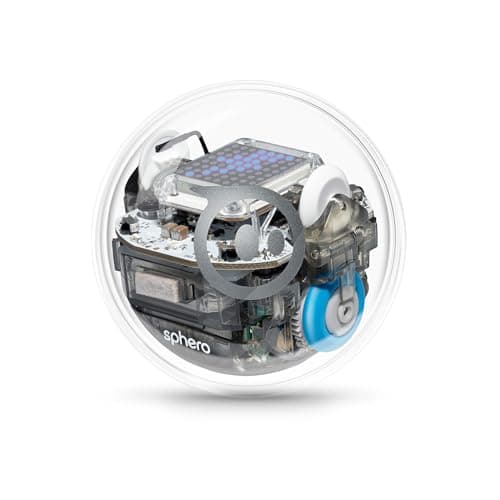 Best for competitive play with other children Sphero BOLT A programmable rolling robot with a published sensor set and multi-robot play. | Eight and up, where the games need more than one player | |
| 5 | 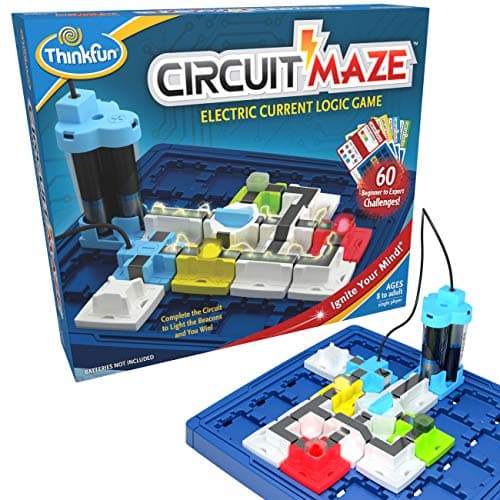 Best for a child who likes levels ThinkFun Circuit Maze Sixty beginner-to-expert challenges with real working LEDs and a single-player format. | Eight and up, solo, in short sessions | |
| — | 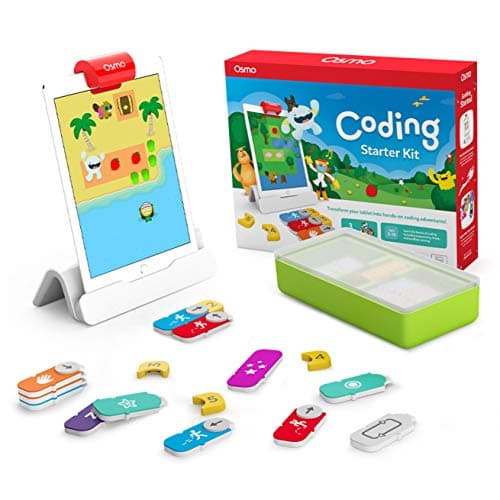 Not the answer to this question Osmo Coding Starter Kit for iPad Physical coding blocks that drive a character on a tablet screen. | A younger child in a committed iPad household |
6 picks, including 1 we tell you to skip. Ages shown are the manufacturer’s own rating, not ours.
What the published specs say about each pick
The arithmetic
Gifts for a gamer: what each one needs, and what it produces
| Snap Circuits Arcade | 36 parts, 200+ projects, 20+ games. No soldering. Batteries required. Ages 8+ |
|---|---|
| Makey Makey Classic | Board + 7 clips + 6 wires. Needs a computer. No software install. Ages 8+ |
| Makeblock mBot Neo | Programmable robot with a published text-language path. Screen required. Ages 8+ |
| Sphero BOLT | App-driven rolling robot, multi-robot play. Ages 8+ |
| ThinkFun Circuit Maze | 60 challenges, 1 player, working LEDs. Batteries required. Ages 8+ |
| Osmo Coding Starter Kit | Physical blocks, but a compatible iPad or Fire tablet is required. Ages 5-10 |
Why this works better than buying the opposite of a video game
The failed version of this present is a nature kit. Buying a games-obsessed child something deliberately unlike games is the most common way this goes wrong: the present reads as a correction, and a present that reads as a correction gets opened once.
Published game counts are a real signal. Snap Circuits Arcade is the one set in its own line that counts games rather than projects. That is the maker telling you the output is something to play with, not something to complete.
The loop matters more than the subject. Games are short sessions, immediate feedback, and rules you learn by failing. Circuit Maze’s 60 graded challenges and a robot arena are both that loop. A 75-experiment science lab is not, which is why it sits unopened next to a console.
Which one for which kind of gamer
Builders and Minecraft players: Snap Circuits Arcade. The appeal is the same — a small set of parts that combine into something that does a thing.
Players who mod, cheat and break things: Makey Makey. Clipping a controller together out of kitchen objects is the most direct version of that instinct available for $50.
Competitive players: Sphero BOLT, because the games have an opponent. Coding robot balls compares it against the cheaper Mini.
Players who want to make games: mBot Neo, then from toy to real code, which is the route out of block coding and into a language.
Say the unwelcome thing
Do not buy a tablet accessory to solve a screen problem
Osmo and the products like it are physical pieces in front of a tablet camera, and they publish a compatible iPad or Fire tablet as a requirement. There is nothing wrong with the product — it is on our coding list — but if the reason for the present is that a child spends every evening on a screen, a kit that needs the screen switched on to work cannot deliver the thing being bought. Buy it when you want a better tablet hour, not when you want a different hour.
So which one
One gift, ages eight and up: Snap Circuits Arcade — 20+ games, 36 parts, no soldering.
There is a laptop in the house: Makey Makey Classic, and a bunch of bananas.
Short sessions, small budget: ThinkFun Circuit Maze, 60 graded challenges.
They play against other people: Sphero BOLT.
They have started asking how games are made: the mBot Neo, and expect a screen to be involved.
Where to go next
STEM toys and screen time is the argument rather than the shopping list, screen-free STEM gifts is the list for a household that has decided against screens entirely, and circuit kits for kids is where the Arcade set sits in the wider electronics shelf.
In full
Every pick, and what is wrong with it
Published specifications only, each linked back to the page it came from. Where a manufacturer publishes nothing, the row says so — we do not fill blanks in.
1. Best overall — the projects are games
Snap Circuits Arcade
Snap Circuits · SCA-200 · maker rates it 8+
36 snap-together parts, 200+ projects and 20+ buildable games with sounds and lights.
- Parts
- 36
- Projects
- “over 200 exciting and unique projects”
- Games
- “Build 20+ games with fun sounds and lights”
- Named project
- “a spinning LED message — powered by circuits they engineered themselves”
Elenco publishes 36 parts, “over 200 exciting and unique projects” and “20+ games with fun sounds and lights” for ages 8 and up, with no soldering or tools required, and states that the set combines with other Snap Circuits kits.
Read the project count in the right units. Every other set in the Snap Circuits line measures itself in projects; this is the only one that publishes a game count, and a project that is also a game is the one a child shows somebody else. That is the difference between a kit that gets finished and a kit that gets abandoned, which is the subject of our abandoned-toy guide.
Set expectations about what the games are: reaction timers, light chases, sound effects, a spinning LED message. A child who expects console graphics will be unimpressed for about four minutes and then interested in why the buzzer works, which is the trade this whole page is built on.
See the full review, and Snap Circuits compared if the house already owns one of the other sets.
Replay signal
- Open-ended or one-shot
- Finite project book, open-ended grid — the parts recombine without the manual
- Does anything run out
- Nothing runs out except batteries
- Room to grow
- Published as combining with other Snap Circuits kits, which is the line's defining property
Why we say so: Elenco publishes 36 parts, 200+ projects and 20+ games with sounds and lights at 8 and up, with no soldering. The 20+ games figure is the one that makes this set different from the rest of the line: every other Snap set measures itself in projects, and a project that is also a game is the one a child shows somebody else.
What’s wrong with it
Batteries are required and not included, and the games are 1980s simple by design.
| Parts | 36 |
|---|---|
| Projects | “over 200 exciting and unique projects” |
| Games | “Build 20+ games with fun sounds and lights” |
| Named project | “a spinning LED message — powered by circuits they engineered themselves” |
| Soldering | “no soldering or tools required” |
| Batteries | Required, not included |
| Compatibility | “Combine with other Snap Circuits kits for even more projects” |
| Stated age | “children ages 8+” |
| Consumables | None beyond batteries |
Every figure above is from Snap Circuits (Elenco), Arcade SCA-200 — published listing copy. Blanks are shown as “not published” rather than filled in.
2. Best for the child who wants to build a controller
Makey Makey Classic
JoyLabz · Classic · maker rates it 8+
A board that registers as a USB keyboard, so bananas, foil and pencil lines become game controls.
- Contents
- Makey Makey board, USB cable, 7 alligator clips, 6 connector wires, visual project start guide, sticker
- Computer
- Required — Mac, Windows, Chromebook or Linux; any device that supports a USB keyboard or mouse
- Software
- “No programing knowledge needed. No software to install.”
- Stated age
- “Ages 8 to infinity”
JoyLabz publishes a Makey Makey board, USB cable, seven alligator clips, six connector wires and a start guide, states that the board works with “any device that supports a USB keyboard or mouse” across Mac, Windows, Chromebook and Linux, and publishes “No programing knowledge needed. No software to install.” Ages “8 to infinity”.
The published mechanism is the whole gift: the board pretends to be a keyboard, so whatever a child clips to it becomes a key. That means the games they already play, today, with a controller they made out of fruit this morning. No other product here plugs directly into the thing the child is already doing.
The honest limitation is the computer. On a tablet-only household this is the wrong present, and no amount of enthusiasm fixes that. See the full review and invention kits.
Replay signal
- Open-ended or one-shot
- Genuinely open-ended — any conductive object can be wired in as a control
- Does anything run out
- Nothing runs out
- Adult required
- Not after the first connection; nothing needs installing
Why we say so: JoyLabz publishes that no software install and no programming are needed, and that the board works on any device supporting a USB keyboard or mouse. That compatibility statement is the mechanism: the board registers as a keyboard, so whatever the child clips to it becomes a key.
What’s wrong with it
It needs a computer. Nothing happens without one, and the computer is not included.
| Contents | Makey Makey board, USB cable, 7 alligator clips, 6 connector wires, visual project start guide, sticker |
|---|---|
| Computer | Required — Mac, Windows, Chromebook or Linux; any device that supports a USB keyboard or mouse |
| Software | “No programing knowledge needed. No software to install.” |
| Stated age | “Ages 8 to infinity” |
| Consumables | None |
Every figure above is from JoyLabz, Makey Makey Classic. Blanks are shown as “not published” rather than filled in.
3. Best for a child who wants to write actual code
Makeblock mBot Neo (mBot2)
Makeblock · mBot2 · maker rates it 8+
A programmable robot whose maker publishes a text-language path, not just block coding.
- Controller
- CyberPi — Xtensa 32-bit LX6 dual-core at 240 MHz, 8 MB flash, 8 MB PSRAM
- Programming
- Scratch-style blocks, Python in mBlock, and Arduino C/C++ via the Arduino IDE
- Sensors
- On-board light, microphone, gyroscope and accelerometer, plus ultrasonic, quad RGB, temperature and IR modules
- Battery
- Built-in 2500 mAh LiPo, about 1 hour to charge, about 5 hours of play
The mBot Neo is the robot on this site whose published toolchain goes beyond drag-and- drop blocks, which is why it is the pick for a gamer who has started asking how games are made. Full published specifications are in the review, and programmable toys explains which toys in this category store a program at all and which are remote controls with a coding sticker on the box.
For this situation specifically, the appeal is that the output is still a game: a line-following race, an obstacle course, a two-robot fight over a cardboard arena. The child is writing the rules instead of following them.
It is a screen product and we are not pretending otherwise. If the goal is to reduce screen time rather than redirect it, start with our screen-free list instead.
Replay signal
- Open-ended or one-shot
- Open-ended at the top of the range — this is the one a child does not outgrow at eleven
- Does anything run out
- Nothing runs out; rechargeable
- Room to grow
- Blocks, then Python, then Arduino C on the same robot, with 60+ add-on modules
- Adult required
- Not for driving it. Probably for the first Python session
Why we say so: Makeblock publishes the processor, the three programming environments on one robot, the 2500 mAh battery figures and the 60+ compatible modules. Blocks-to-Python-to-C on one chassis is the published upgrade path, and it is why this survives the year a child gets bored of pressing buttons.
What’s wrong with it
The most expensive pick here, and the software lives on a screen.
| Controller | CyberPi — Xtensa 32-bit LX6 dual-core at 240 MHz, 8 MB flash, 8 MB PSRAM |
|---|---|
| Programming | Scratch-style blocks, Python in mBlock, and Arduino C/C++ via the Arduino IDE |
| Sensors | On-board light, microphone, gyroscope and accelerometer, plus ultrasonic, quad RGB, temperature and IR modules |
| Battery | Built-in 2500 mAh LiPo, about 1 hour to charge, about 5 hours of play |
| Expansion | 60+ compatible modules, up to 10 connected at once, 8 motor and servo ports |
| Stated age | Ages 8+ |
Every figure above is from Makeblock, mBot2 coding robot kit. Blanks are shown as “not published” rather than filled in.
4. Best for competitive play with other children
Sphero BOLT
Sphero · K002ROWFFP · maker rates it 8+
A programmable rolling robot with a published sensor set and multi-robot play.
- Display
- “advanced programmable sensors and 8x8 LED matrix”
- Programming
- “three ways to program (Draw, Blocks, and Text coding with JavaScript or Python)”
- Shell
- “durable and waterproof design”
- Battery
- “all-day battery life”, inductive charging
Sphero BOLT is the one robot in this catalog whose published feature set is built around games between robots rather than lessons. Specifications, battery life and the honest drawbacks are in the review; the family comparison is in coding robot balls.
For a games-first child the attraction is that it is a physical multiplayer game with rules they can rewrite. That is the same loop as the games they already like, which is why it holds up after the first week when a single-player kit might not.
Replay signal
- Open-ended or one-shot
- Open-ended — a programmable 8x8 display on a rolling robot has no finished state
- Does anything run out
- Nothing runs out; inductive charging rather than cells
- Room to grow
- Draw to Blocks to JavaScript or Python, on the same robot
- Adult required
- Not after the first pairing; the published lesson material is aimed at the child
Why we say so: Sphero publishes an 8x8 LED matrix, a waterproof shell, all-day battery life and text programming in JavaScript or Python. The matrix is the specification that separates this from every other coding ball: the robot can display what the program is doing, so a child debugs by looking at it rather than guessing.
What’s wrong with it
Driven from a phone or tablet app, so the screen stays in the room.
| Display | “advanced programmable sensors and 8x8 LED matrix” |
|---|---|
| Programming | “three ways to program (Draw, Blocks, and Text coding with JavaScript or Python)” |
| Shell | “durable and waterproof design” |
| Battery | “all-day battery life”, inductive charging |
| In the box | Inductive charging base with USB charging cable, and a 360-degree protractor with heading, directions and clock |
| Sensors named | Magnetometer, plus the programmable sensor set |
| Apps | Sphero Edu (Chrome, Mac, PC, iOS, Android, Kindle) and Sphero Play |
| Stated age | Ages 8+ |
| Consumables | None — rechargeable |
Every figure above is from Sphero, Sphero BOLT. Blanks are shown as “not published” rather than filled in.
5. Best for a child who likes levels
ThinkFun Circuit Maze
ThinkFun · 1008 · maker rates it 8+
Sixty beginner-to-expert challenges with real working LEDs and a single-player format.
- Stated age
- “age 8 and up”
- Players
- 1
- Format
- Beam-and-token circuit puzzles with real working LEDs
- Batteries
- Required (not included)
ThinkFun publishes 60 challenges from beginner to expert, a single-player beam-and-token format with real working LEDs, and an age of 8 and up. Batteries are required and not included.
Sixty numbered challenges in ascending difficulty is a level select, and a child who plays games is already fluent in that structure. It is the cheapest thing on this page and the one most likely to be picked up on a weekday evening, because the session length is one puzzle.
Finite is the honest word: when the 60 are done, the pieces still make a real circuit but the game is over. The usual next step is Snap Circuits, which is why we pair them — see Circuit Maze vs Snap Circuits and logic puzzle games.
Replay signal
- Open-ended or one-shot
- Finite challenge deck, but the pieces make a real circuit — free building afterward is possible
- Does anything run out
- Nothing runs out
- Room to grow
- Pairs naturally with a Snap Circuits set as the step from puzzle to real components
Why we say so: ThinkFun publishes the 8+ rating, the 60 challenges and the single-player circuit-puzzle format with working LEDs. The pairing with Snap Circuits is our routing advice and is stated as advice, not as a manufacturer claim.
What’s wrong with it
Sixty challenges is a finite game, and batteries are required but not included.
| Stated age | “age 8 and up” |
|---|---|
| Players | 1 |
| Format | Beam-and-token circuit puzzles with real working LEDs |
| Batteries | Required (not included) |
| Challenges | 60, beginner to expert |
Every figure above is from ThinkFun, Circuit Maze. Blanks are shown as “not published” rather than filled in.
Skip this one
Osmo Coding Starter Kit for iPad
Osmo · Coding Starter Kit · maker rates it 5-10
Physical coding blocks that drive a character on a tablet screen.
- Contents
- Osmo Base and Reflector for iPad, 31 magnetic coding blocks, stackable storage, 3 game apps
- Games
- Coding Awbie, Coding Jam, Coding Duo
- Screen required
- Yes — an iPad is required and is not included
- Compatibility
- All iPads except generations 1-4 and certain newer models; minimum iOS 11
Osmo publishes a physical block system that plays on a compatible iPad or Fire tablet with a reflector over the camera. It is a decent product and it appears as a pick on our coding gifts page, where the buyer has already accepted a tablet.
It is the skip here because of what this particular buyer is trying to do. The child already loves screens; the gift is supposed to put something physical in their hands that leads somewhere. A kit that needs the tablet switched on to function is the one purchase that definitely does not change the evening.
The useful distinction, published on every box in this category: does the toy need a screen, does it work better with one, or does it not need one at all. Our screen-free coding toys page sorts the coding shelf on exactly that question.
Replay signal
- Open-ended or one-shot
- Guided by the three games rather than open-ended; Coding Jam is the one with no ending
- Does anything run out
- Nothing physical runs out
- Room to grow
- Three games at rising difficulty, described by Osmo as beginner to expert
- Adult required
- Only to hand over the iPad — which is precisely the friction: this one competes with screen time rather than replacing it
Why we say so: Osmo publishes the 31-block count, the three named games, the iPad requirement and the compatibility list. The iPad dependency is a published requirement, and it is the fact most likely to decide whether this gets used.
What’s wrong with it
It requires a compatible iPad or Fire tablet, so the present is more screen time with a wooden interface.
| Contents | Osmo Base and Reflector for iPad, 31 magnetic coding blocks, stackable storage, 3 game apps |
|---|---|
| Games | Coding Awbie, Coding Jam, Coding Duo |
| Screen required | Yes — an iPad is required and is not included |
| Compatibility | All iPads except generations 1-4 and certain newer models; minimum iOS 11 |
| Stated age | Ages 5-10 |
Every figure above is from Osmo, Coding Starter Kit. Blanks are shown as “not published” rather than filled in.
We are not putting a buy button on this one. It is easy enough to find if you want it anyway — but we would rather send you to something that gets played with twice.
Questions people actually ask
Frequently asked
What do you buy a kid who only wants video games?
Snap Circuits Arcade. Elenco publishes 36 parts, over 200 projects and 20+ buildable games with sounds and lights for ages 8 and up, with no soldering required. It is the only kit in this catalog whose maker counts its projects in games rather than experiments, which is the detail that stops it reading as homework.
Can you get a STEM toy that works with the games they already play?
Makey Makey Classic. JoyLabz publishes that the board works with any device supporting a USB keyboard or mouse, needs no software installed and no programming knowledge, so a child can clip foil, fruit or pencil lines to it and use them as controls in a game they already own. It does require a computer. Makey Makey review.
Is Osmo a good gift for a child who plays too many video games?
No, and the reason is published: Osmo requires a compatible iPad or Fire tablet, so the physical blocks are an interface to more screen time rather than an alternative to it. It is a reasonable tablet product and appears on our coding gifts page; it just cannot do the job this particular present is being bought for. Screen-free coding toys.
What is a good gift for a 12-year-old who loves gaming?
The mBot Neo or Sphero BOLT, both published at 8 and up with no upper bound. The mBot Neo is the robot in this catalog with a published route from block coding into a text language, which is the question a twelve-year-old who plays games eventually asks; BOLT is the better pick if the games need an opponent. Coding toys for teens.
Do these need batteries or a computer?
Snap Circuits Arcade and Circuit Maze both publish batteries as required and not included. Makey Makey needs a computer with a USB port - Mac, Windows, Chromebook or Linux. mBot Neo and Sphero BOLT are programmed from a screen. Nothing on the list is useful straight out of the box without one of those three things. Battery guide for STEM toys.
Will a kit like this actually replace screen time?
It will not, and we would not sell it that way. What a published game count buys you is a present a games-first child will open twice instead of once. If the goal is genuinely less screen time rather than a redirect, our screen-free list is the honest place to start. Screen-free STEM gifts.
Sources
Where these figures came from
Every specification on this page traces to one of these. If a manufacturer publishes nothing on a point, the page says so rather than filling the gap.
Read next
Where to go from here
Back to Gift Guides, or read how we pick.