The picks
Screen-Free Coding Toys
For a four-year-old, the specification that matters is not the robot. It is whether the instructions have words on them.
By Sawyer V. · Published
The short answer
A coding toy for a four-year-old must program with pictures rather than words. The Code & Go Robot Mouse uses directional symbol cards, Matatalab publishes graphic-symbol blocks requiring no literacy, and Sphero indi is coded by laying colored cards on the floor. All three work before a child can read.
Block & Beaker earns a commission when you buy through our links, at no cost to you. It never changes a ranking, and we say so plainly when the right answer is the cheaper set, or nothing at all. Full disclosure · How we pick.
At a glance
The picks, ranked
Tap any row to jump to the full reasoning. Prices come live from Amazon where we have them and read “check price” where we don’t — never a number we cannot stand behind today.
| # | Product | Best for | Price |
|---|---|---|---|
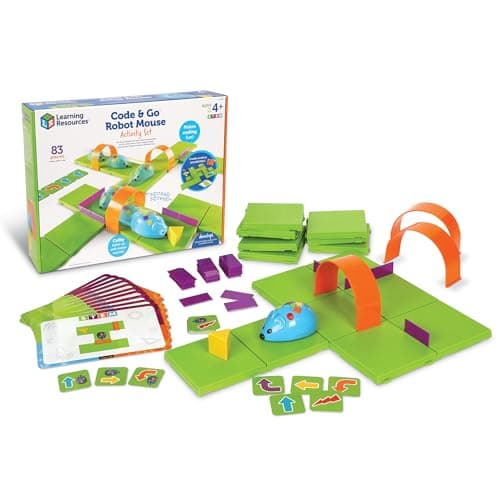
| 1 | Best for four-year-olds Code & Go Robot Mouse Activity Set Directional symbol cards, a rearrangeable 20-inch maze, and 83 pieces at the cheapest price in the category. | The first coding toy, before reading | |
| 2 | 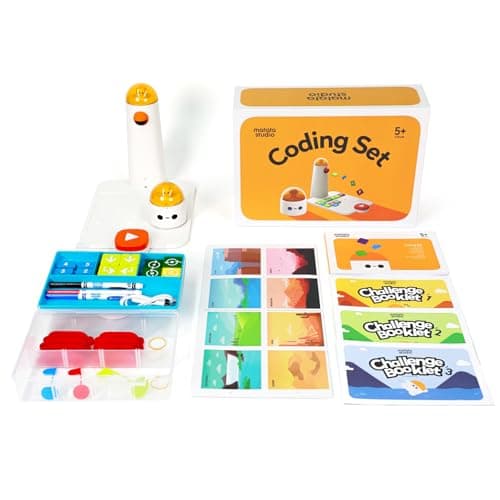 Best physical programming MatataStudio (Matatalab) Coding Set Thirty-seven tangible blocks laid out in a tray, read by a tower — the closest a pre-reader gets to writing code. | Four to nine, and a child who wants to see the whole program at once | |
| 3 | 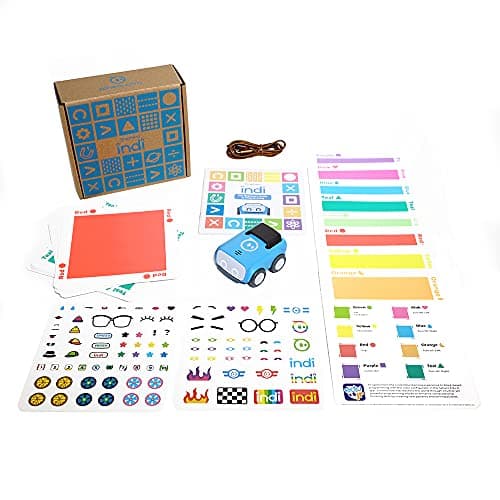 Best for whole-room play Sphero indi At-Home Learning Kit The floor is the program: lay color cards, the robot reads them as it drives over them. | Four and up, and a child who wants to be in the program rather than beside it | |
| 4 | 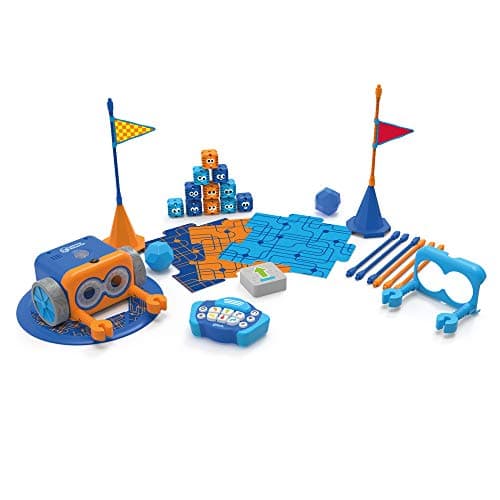 Best to grow into Botley 2.0 The Coding Robot Activity Set Screen-free with the highest published ceiling in the category — 150 steps. | Five and up, once the child can plan more than a few steps ahead | |
| — | 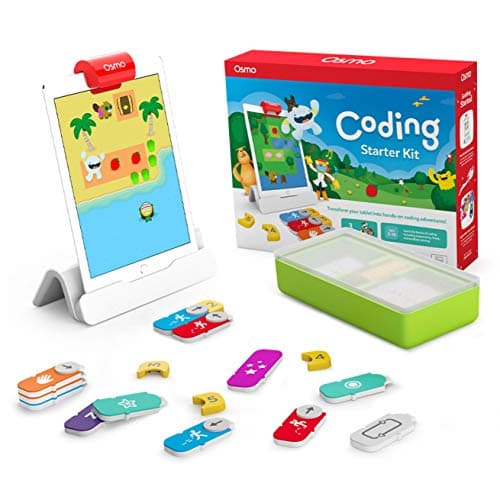 Not screen-free Osmo Coding Starter Kit for iPad Physical blocks, genuinely clever — and an iPad is a published requirement. | Nobody searching for this page |
5 picks, including 1 we tell you to skip. Ages shown are the manufacturer’s own rating, not ours.
The pre-reading test
Before anything else, check how the instructions are given. A coding toy whose buttons or cards carry words is an adult-operated toy for a four-year-old, however good it is otherwise — and adult-operated toys get used when an adult is free.
The three toys at the top of this page all publish this explicitly. Learning Resources states the Robot Mouse cards use directional symbols. MatataStudio states its blocks use intuitive graphic symbols and that no literacy is required. Sphero’s indi is coded by color, which needs no symbols at all.
That is the difference between a toy a four-year-old plays with and a toy a four-year-old is shown.
What screen-free actually buys you
Three practical things, none of them ideological.
No permission step. Using a screen-free robot does not require unlocking a device, and in most households that is the single biggest determinant of whether a coding toy gets picked up spontaneously.
No competition. A coding app on a tablet competes with every other app on that tablet, and it will lose to most of them. A robot on the floor competes with the other things on the floor.
Shared attention. Two children can watch a robot cross a room. Two children cannot easily share a tablet, and a sibling watching someone else use a screen is a familiar source of friction.
The honest counterweight: screens give richer, faster feedback and scale to genuinely complex programs. The right structure is screen-free first and screen-capable later, which is what makes indi’s published upgrade path the most interesting thing in this roundup.
How the three programming formats differ
The arithmetic
Three ways to program without reading
| Cards in a row (Robot Mouse) — cards supplied | 30 double-sided |
|---|---|
| Blocks in a tray (Matatalab) — blocks supplied | 37 |
| Cards on the floor (Sphero indi) — color cards | 30 |
| Remote buttons (Botley 2.0) — maximum sequence | 150 steps |
When to move on from screen-free
Usually around eight or nine, and the signal is boredom rather than age: the child starts making the program long for its own sake rather than to solve anything, which means the format has stopped posing problems.
At that point the options are a robot with a published upgrade path — indi into Sphero Edu Jr, or the buildable kits which run Scratch and then Python — or a screen-based environment. Both are legitimate, and the guide on coding toys versus coding apps takes the comparison properly.
Worth knowing before you buy
Two published requirements catch people out at this age. The Code & Go Robot Mouse needs three AAA batteries and Botley 2.0 needs five, and neither includes them.
The rechargeable options — Matatalab and indi — avoid that, but bring their own small friction: a robot that needs charging before use will be flat exactly when a four-year-old wants it. Charge it the night before a birthday, not on the morning.
What to buy
- Four, cannot read: Code & Go Robot Mouse.
- Four to six, wants to see the whole program: Matatalab.
- Four and up, one purchase for several years: Sphero indi.
- Five and up, already sequencing confidently: Botley 2.0.
For the full category including screen-based options, see coding robots. For picks by age, four-year-olds and five-year-olds.
In full
Every pick, and what is wrong with it
Published specifications only, each linked back to the page it came from. Where a manufacturer publishes nothing, the row says so — we do not fill blanks in.
1. Best for four-year-olds
Code & Go Robot Mouse Activity Set
Learning Resources · LER2831 · maker rates it 4+
Directional symbol cards, a rearrangeable 20-inch maze, and 83 pieces at the cheapest price in the category.
- Set size
- 83 pieces
- Contents
- Colby the robot mouse, 16 maze grids, 22 maze walls, 3 tunnels, 30 double-sided coding cards, 10 activity cards, cheese wedge, activity guide
- Maze size
- The 16 grids build a 20″ x 20″ board
- Screen required
- None
Learning Resources publishes 83 pieces: the mouse, 16 maze grids forming a 20-inch square board, 22 walls, 3 tunnels, 30 double-sided coding cards, 10 activity cards, a cheese wedge and a guide, rated 4+.
The cards carry directional symbols rather than words. That single specification is what makes it the right first coding toy: a four-year-old lays out six arrows, presses go, and watches the mouse do exactly what those arrows said. Nothing has to be read to anyone.
The rearrangeable maze is what stops it going stale. Because the child builds the problem, the toy does not have a fixed set of challenges to be worked through and finished.
Replay signal
- Open-ended or one-shot
- The mouse is fixed, but the maze is not — 16 grids and 22 walls is a new problem every time
- Does anything run out
- Nothing runs out
- Room to grow
- The 10 activity cards are a starting ladder; after that the child sets the puzzles
- Adult required
- Reading is not required — the coding cards use directional symbols, so a four-year-old can work alone
Why we say so: Learning Resources publishes the 83-piece contents including 16 rearrangeable grids and 22 walls, and states the cards are picture-based. A rearrangeable maze is why this does not become a solved puzzle after one weekend.
What’s wrong with it
Simple by design. There is no depth to grow into beyond building harder mazes, so it is a two-year toy rather than a five-year one.
| Set size | 83 pieces |
|---|---|
| Contents | Colby the robot mouse, 16 maze grids, 22 maze walls, 3 tunnels, 30 double-sided coding cards, 10 activity cards, cheese wedge, activity guide |
| Maze size | The 16 grids build a 20″ x 20″ board |
| Screen required | None |
| Batteries | 3 x AAA (not included) |
| Stated age | Ages 4+ |
Every figure above is from Learning Resources, Code & Go Robot Mouse Activity Set. Blanks are shown as “not published” rather than filled in.
2. Best physical programming
MatataStudio (Matatalab) Coding Set
MatataStudio · Coding Set · maker rates it 4+
Thirty-seven tangible blocks laid out in a tray, read by a tower — the closest a pre-reader gets to writing code.
- Contents
- Robot car, command tower, control board, 37 coding blocks, 8 obstacles, 3 flags, 3 challenge booklets, nature map
- Screen required
- None — “screen-free, app-free and internet-free”
- Literacy required
- None — blocks use “intuitive graphic symbols” and directional language
- Power
- Rechargeable — 500 mAh cell in the robot, 2000 mAh in the command tower, USB-C
MatataStudio publishes the robot car, command tower, control board, 37 coding blocks, 8 obstacles, 3 flags, 3 challenge booklets and a nature map, for ages 4 to 9, screen-free and app-free with graphic symbols requiring no literacy.
The blocks-in-a-tray format is genuinely different from cards on the floor. The whole program sits in front of the child in one place, which means they can look at it, change one block, and run it again — the actual loop of programming, at four.
The three challenge booklets give structure first, and the nature map supports free play afterward. Both units charge over USB-C rather than eating AAA cells.
Replay signal
- Open-ended or one-shot
- Semi-open: three challenge booklets first, then free building on the map
- Does anything run out
- Nothing runs out, and it recharges rather than eating AAAs
- Room to grow
- Add-on sets extend the same command tower into music and drawing
- Adult required
- No reading needed, so a four-year-old can set up a run unaided
Why we say so: MatataStudio publishes the full contents list, the rechargeable cell capacities, and states the blocks use graphic symbols so no literacy is required.
What’s wrong with it
Two rechargeable units to keep charged, and the tower has to be lined up properly each session.
| Contents | Robot car, command tower, control board, 37 coding blocks, 8 obstacles, 3 flags, 3 challenge booklets, nature map |
|---|---|
| Screen required | None — “screen-free, app-free and internet-free” |
| Literacy required | None — blocks use “intuitive graphic symbols” and directional language |
| Power | Rechargeable — 500 mAh cell in the robot, 2000 mAh in the command tower, USB-C |
| Stated age | Ages 4 to 9 |
Every figure above is from MatataStudio, Coding Set. Blanks are shown as “not published” rather than filled in.
3. Best for whole-room play
Sphero indi At-Home Learning Kit
Sphero · indi · maker rates it 4+
The floor is the program: lay color cards, the robot reads them as it drives over them.
- Contents
- 1 indi robot, 30 color cards, charging cable, 2 sticker sheets, activity booklet, tape to fix the cards down
- Card mix
- 5 green, 4 yellow, 3 red, 2 purple, 3 teal, 3 orange, 5 blue, 5 pink
- How it is coded
- An on-board color sensor reads the cards; no screen needed
- Play time
- “2+ hours of play on a full charge”, USB charging
Sphero publishes an on-board color sensor as the programming mechanism, with 30 color cards in a published color breakdown, a charging cable, sticker sheets, an activity booklet and tape. Play time is published at 2+ hours per charge, and the robot optionally accepts drag-and-drop block coding in the free Sphero Edu Jr app.
Because the program is physically laid out across a room, a four-year-old walks through their own code. That is unusually concrete, and it is why this works for children who find cards-in-a-row too abstract.
It is also the only pick here with a published route onto a screen later, on the same hardware, which makes it the longest-lived purchase in this roundup.
Replay signal
- Open-ended or one-shot
- Very open-ended for the age: the child lays the track out across the whole floor
- Does anything run out
- Nothing runs out; recharges by USB
- Room to grow
- Screen-free cards first, then the same robot accepts block coding in the free app when the child is ready
- Adult required
- Not after setup — the program is the floor, and the child builds it
Why we say so: Sphero publishes the 30-card color breakdown, the on-board color sensor as the programming method, the 2+ hours per charge, and the optional step up to drag-and-drop blocks in Sphero Edu Jr.
What’s wrong with it
Thirty cards taped across a floor is a lot of floor, and tidying up means unsticking them all.
| Contents | 1 indi robot, 30 color cards, charging cable, 2 sticker sheets, activity booklet, tape to fix the cards down |
|---|---|
| Card mix | 5 green, 4 yellow, 3 red, 2 purple, 3 teal, 3 orange, 5 blue, 5 pink |
| How it is coded | An on-board color sensor reads the cards; no screen needed |
| Play time | “2+ hours of play on a full charge”, USB charging |
| Optional app | Sphero Edu Jr drag-and-drop blocks |
| Stated age | Ages 4 and up |
Every figure above is from Sphero, indi At-Home Learning Kit. Blanks are shown as “not published” rather than filled in.
4. Best to grow into
Botley 2.0 The Coding Robot Activity Set
Learning Resources · LER2938 · maker rates it 5+
Screen-free with the highest published ceiling in the category — 150 steps.
- Set size
- 78 pieces
- Contents
- Botley 2.0, remote programmer, 2 face plates, 40 coding cards, 6 double-sided boards, 27 obstacle pieces, starter guide
- Maximum program length
- “coding sequences of up to 150 steps”
- Movement
- Six directions, plus 16 coded interactions
Learning Resources publishes the 78-piece set, 150-step maximum sequences, six directions and 16 interactions, with 100% screen-free play, rated 5+ or grades K-2.
This is the screen-free toy with the most room above it. A child who has outgrown six-card sequences on a mouse can build a 30-step route here and still be nowhere near the limit.
It sits below the card-based picks on this particular page only because programming happens on a remote rather than by laying pictures out — a small difference that matters at four and stops mattering by six.
Replay signal
- Open-ended or one-shot
- Open-ended once the cards are understood — the child builds the maze, not just the program
- Does anything run out
- Nothing runs out except batteries
- Room to grow
- A 150-step ceiling means the challenge scales for years past the first week
- Adult required
- Needed for the first session, then not — there is no app account and nothing to log into
Why we say so: Learning Resources publishes the 78-piece contents, the 150-step maximum sequence, the six directions and 16 interactions, and states the set is 100% screen-free with no tablet or app required.
What’s wrong with it
The remote programmer has directional buttons rather than pictures, which makes it slightly less immediate at four than a card-based toy.
| Set size | 78 pieces |
|---|---|
| Contents | Botley 2.0, remote programmer, 2 face plates, 40 coding cards, 6 double-sided boards, 27 obstacle pieces, starter guide |
| Maximum program length | “coding sequences of up to 150 steps” |
| Movement | Six directions, plus 16 coded interactions |
| Screen required | None — “100% screen-free play” |
| Batteries | “Requires 5 AAA batteries (not included)” |
| Stated age | 5+ (K-2nd grade) |
Every figure above is from Learning Resources, Botley 2.0 Activity Set. Blanks are shown as “not published” rather than filled in.
Skip this one
Osmo Coding Starter Kit for iPad
Osmo · Coding Starter Kit · maker rates it 5-10
Physical blocks, genuinely clever — and an iPad is a published requirement.
- Contents
- Osmo Base and Reflector for iPad, 31 magnetic coding blocks, stackable storage, 3 game apps
- Games
- Coding Awbie, Coding Jam, Coding Duo
- Screen required
- Yes — an iPad is required and is not included
- Compatibility
- All iPads except generations 1-4 and certain newer models; minimum iOS 11
Osmo publishes the Coding Starter Kit as an Osmo Base and reflector, 31 magnetic coding blocks, stackable storage and three game apps — Coding Awbie, Coding Jam and Coding Duo — for ages 5-10, requiring an iPad that is not included.
The hybrid design is genuinely inventive: the child arranges physical blocks and the iPad’s camera reads them. But an iPad is a published requirement, and this page exists for people who specifically do not want that.
It appears on screen-free lists constantly because the blocks are tangible. They are, and the device still has to be unlocked, charged and available. If a screen is acceptable, Osmo is a good product — just not on this page.
Replay signal
- Open-ended or one-shot
- Guided by the three games rather than open-ended; Coding Jam is the one with no ending
- Does anything run out
- Nothing physical runs out
- Room to grow
- Three games at rising difficulty, described by Osmo as beginner to expert
- Adult required
- Only to hand over the iPad — which is precisely the friction: this one competes with screen time rather than replacing it
Why we say so: Osmo publishes the 31-block count, the three named games, the iPad requirement and the compatibility list. The iPad dependency is a published requirement, and it is the fact most likely to decide whether this gets used.
What’s wrong with it
It is frequently listed as screen-free because the blocks are tangible. Osmo publishes an iPad as required, and that is the fact that matters here.
| Contents | Osmo Base and Reflector for iPad, 31 magnetic coding blocks, stackable storage, 3 game apps |
|---|---|
| Games | Coding Awbie, Coding Jam, Coding Duo |
| Screen required | Yes — an iPad is required and is not included |
| Compatibility | All iPads except generations 1-4 and certain newer models; minimum iOS 11 |
| Stated age | Ages 5-10 |
Every figure above is from Osmo, Coding Starter Kit. Blanks are shown as “not published” rather than filled in.
We are not putting a buy button on this one. It is easy enough to find if you want it anyway — but we would rather send you to something that gets played with twice.
Questions people actually ask
Frequently asked
What coding toy works for a child who cannot read?
Any of the three that program with pictures or color. Learning Resources publishes directional symbol cards for the Robot Mouse, MatataStudio publishes graphic-symbol blocks requiring no literacy, and Sphero indi is coded by laying colored cards on the floor.
Is Osmo screen-free?
No. Osmo publishes an iPad as a requirement for its coding kits. It appears on screen-free lists because the coding blocks are physical, but the device still has to be unlocked, charged and available — which is the thing this category exists to avoid.
Why does screen-free matter for coding toys?
Three practical reasons: no permission step before playing, no competition with every other app on the tablet, and two children can watch a robot cross a room in a way they cannot share a screen.
When should a child move on from screen-free coding?
Usually eight or nine, and the signal is boredom rather than age — the child starts making programs long for their own sake, which means the format has stopped posing problems. A robot with a published upgrade path, or a buildable kit that runs Scratch and Python, is the next step. Robot kits that scale.
Sources
Where these figures came from
Every specification on this page traces to one of these. If a manufacturer publishes nothing on a point, the page says so rather than filling the gap.
Read next
Where to go from here
Back to Coding & Robotics, or read how we pick.