Guide and picks
Coding Toys vs Coding Apps
Apps teach more, faster. Toys get used more often. Both facts are true and the second one usually wins.
By Sawyer V. · Published
The short answer
Coding apps teach more per hour and coding toys get used more hours. Under about eight, buy the toy: a screen-free robot requires no permission, no unlocking and no negotiation, so it gets picked up spontaneously. Over eight, buy hardware that accepts real code — Makeblock publishes Python support on the mBot2.
Block & Beaker earns a commission when you buy through our links, at no cost to you. It never changes a ranking, and we say so plainly when the right answer is the cheaper set, or nothing at all. Full disclosure · How we pick.
At a glance
The picks, ranked
Tap any row to jump to the full reasoning. Prices come live from Amazon where we have them and read “check price” where we don’t — never a number we cannot stand behind today.
| # | Product | Best for | Price |
|---|---|---|---|
| 1 | Best screen-free Botley 2.0 The Coding Robot Activity Set A 150-step ceiling with nothing to unlock, charge or ask permission for. | Five to eight, and any household negotiating screen time | |
| 2 | 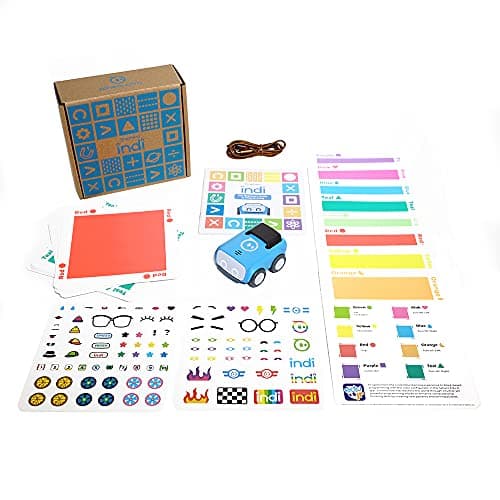 Best of both Sphero indi At-Home Learning Kit Color cards with no screen now, drag-and-drop blocks in a free app when the child is ready. | Four to nine, where you want to defer the screen decision | |
| 3 | 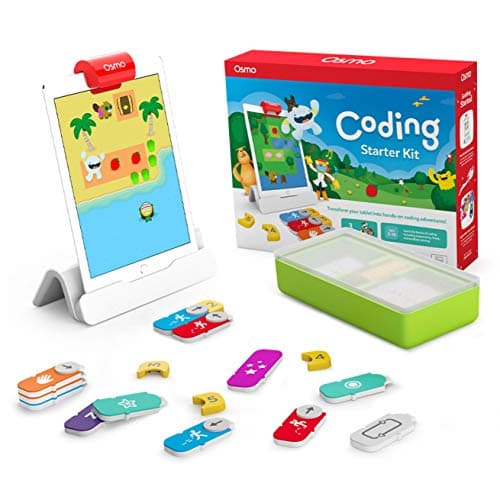 Best hybrid Osmo Coding Starter Kit for iPad Physical blocks read by an iPad camera — screen feedback with hands on real objects. | Five to ten, in a household where the iPad is already in daily use | |
| 4 | 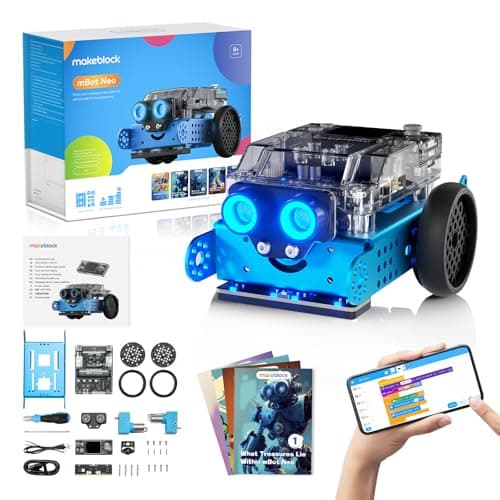 Best for real code Makeblock mBot Neo (mBot2) Blocks, then Python, then Arduino C on one robot — the screen argument resolved by making the screen write to hardware. | Eight and up, where the child is heading toward actual programming | |
| — | 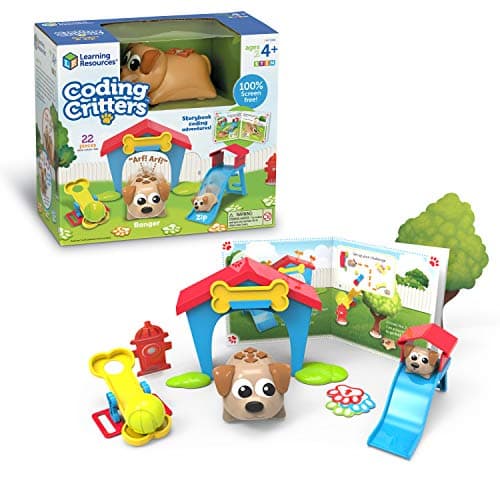 The one to skip Coding Critters Ranger & Zip Screen-free, charming, and with a coding ceiling low enough that it does not settle the argument either way. | A pretend-play toy, not a coding decision |
5 picks, including 1 we tell you to skip. Ages shown are the manufacturer’s own rating, not ours.
What each is genuinely better at
Apps teach more per hour. Instant feedback, no batteries, unlimited undo, and complexity that scales without buying anything. A block editor can express loops, conditionals, variables and functions; a card-driven robot mostly cannot.
Toys get used more hours. No device to unlock, no permission to seek, no competing apps one tap away. A robot on the floor is available; an app is available if the tablet is.
The multiplication that matters is hours times learning-per-hour, and for younger children the first term dominates by enough to decide it.
The arithmetic
What each requires before anything happens
| Screen-free robot | Batteries or charge. Nothing else |
|---|---|
| Hybrid (Osmo) | A compatible iPad, charged and available |
| App only | A device, charged, unlocked and permitted |
| Programmable robot (mBot2) | A computer, plus the robot charged |
The sequence we would recommend
Four to five: physical only, and it must need no reading. Picture cards or colored tiles. The child owns the whole activity.
Five to eight: still physical, with a higher ceiling. Botley’s published 150 steps is more program than most children in this band will write anywhere.
Eight to ten: introduce a screen, ideally one that controls hardware. Block coding on a robot, so the output is still in the room.
Ten and up: real code. Python on hardware is the best version of this, because the bugs are visible and the reward is physical.
What we are not going to claim
We are not going to tell you screens are harmful. That literature is contested, much of what gets quoted about it is oversimplified, and we have no expertise to adjudicate it.
The argument on this page is narrower and checkable: a toy requiring fewer preconditions gets used more often. That is about friction rather than about screens, and it would apply equally to a physical toy locked in a cupboard.
Where a household has no screen-time constraint and a spare tablet, a hybrid product like Osmo is a genuinely strong choice and our reasoning does not count against it.
Say the unwelcome thing
Do not buy an app-dependent toy for a household you cannot see
As a gift, an iPad requirement is a dependency you cannot verify. Osmo publishes a compatibility list excluding several iPad generations, and a recipient without a compatible device has a base and some blocks.
Buy self-contained for gifts. Buy hybrid for your own household, where you know what devices exist.
Where to go next
For the full physical category see coding robots and screen-free coding toys. For the no-batteries version of the argument, coding board games teach the same reasoning with cardboard.
In full
Every pick, and what is wrong with it
Published specifications only, each linked back to the page it came from. Where a manufacturer publishes nothing, the row says so — we do not fill blanks in.
1. Best screen-free
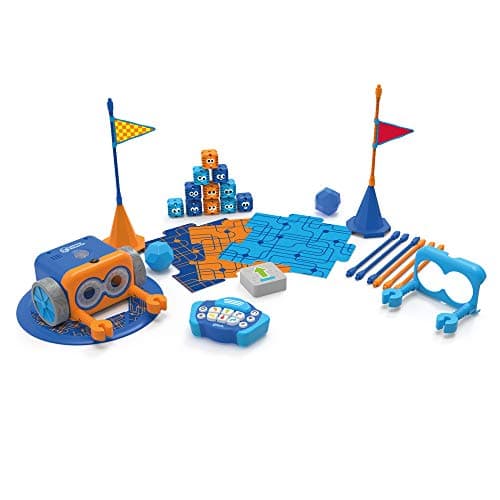
Botley 2.0 The Coding Robot Activity Set
Learning Resources · LER2938 · maker rates it 5+
A 150-step ceiling with nothing to unlock, charge or ask permission for.
- Set size
- 78 pieces
- Contents
- Botley 2.0, remote programmer, 2 face plates, 40 coding cards, 6 double-sided boards, 27 obstacle pieces, starter guide
- Maximum program length
- “coding sequences of up to 150 steps”
- Movement
- Six directions, plus 16 coded interactions
Learning Resources publishes 78 pieces, sequences of up to 150 steps, six directions, 16 interactions and 100% screen-free play with no tablet or app required, rated 5+.
The published screen independence is the whole argument. A toy that needs no device competes with the other things on the floor rather than with every app on a tablet.
The 150-step ceiling means it is not obviously worse than a screen on capability either. That is a longer program than most children write in a block editor in their first two years.
Replay signal
- Open-ended or one-shot
- Open-ended once the cards are understood — the child builds the maze, not just the program
- Does anything run out
- Nothing runs out except batteries
- Room to grow
- A 150-step ceiling means the challenge scales for years past the first week
- Adult required
- Needed for the first session, then not — there is no app account and nothing to log into
Why we say so: Learning Resources publishes the 78-piece contents, the 150-step maximum sequence, the six directions and 16 interactions, and states the set is 100% screen-free with no tablet or app required.
What’s wrong with it
Five AAA batteries not included, and the feedback is slower and coarser than a screen's.
| Set size | 78 pieces |
|---|---|
| Contents | Botley 2.0, remote programmer, 2 face plates, 40 coding cards, 6 double-sided boards, 27 obstacle pieces, starter guide |
| Maximum program length | “coding sequences of up to 150 steps” |
| Movement | Six directions, plus 16 coded interactions |
| Screen required | None — “100% screen-free play” |
| Batteries | “Requires 5 AAA batteries (not included)” |
| Stated age | 5+ (K-2nd grade) |
Every figure above is from Learning Resources, Botley 2.0 Activity Set. Blanks are shown as “not published” rather than filled in.
2. Best of both
Sphero indi At-Home Learning Kit
Sphero · indi · maker rates it 4+
Color cards with no screen now, drag-and-drop blocks in a free app when the child is ready.
- Contents
- 1 indi robot, 30 color cards, charging cable, 2 sticker sheets, activity booklet, tape to fix the cards down
- Card mix
- 5 green, 4 yellow, 3 red, 2 purple, 3 teal, 3 orange, 5 blue, 5 pink
- How it is coded
- An on-board color sensor reads the cards; no screen needed
- Play time
- “2+ hours of play on a full charge”, USB charging
Sphero publishes an on-board color sensor as the programming mechanism, 30 color cards, 2+ hours of play per charge, and optional drag-and-drop block coding in the free Sphero Edu Jr app, rated 4 and up.
This is the honest resolution of the argument on this page. Physical first, screen later, same hardware — so the household does not have to choose a side at the point of purchase.
It is also the only pick here where the upgrade is published by the manufacturer rather than inferred by us.
Replay signal
- Open-ended or one-shot
- Very open-ended for the age: the child lays the track out across the whole floor
- Does anything run out
- Nothing runs out; recharges by USB
- Room to grow
- Screen-free cards first, then the same robot accepts block coding in the free app when the child is ready
- Adult required
- Not after setup — the program is the floor, and the child builds it
Why we say so: Sphero publishes the 30-card color breakdown, the on-board color sensor as the programming method, the 2+ hours per charge, and the optional step up to drag-and-drop blocks in Sphero Edu Jr.
What’s wrong with it
The card program is taped to the floor, which is a lot of floor and a lot of tape.
| Contents | 1 indi robot, 30 color cards, charging cable, 2 sticker sheets, activity booklet, tape to fix the cards down |
|---|---|
| Card mix | 5 green, 4 yellow, 3 red, 2 purple, 3 teal, 3 orange, 5 blue, 5 pink |
| How it is coded | An on-board color sensor reads the cards; no screen needed |
| Play time | “2+ hours of play on a full charge”, USB charging |
| Optional app | Sphero Edu Jr drag-and-drop blocks |
| Stated age | Ages 4 and up |
Every figure above is from Sphero, indi At-Home Learning Kit. Blanks are shown as “not published” rather than filled in.
3. Best hybrid
Osmo Coding Starter Kit for iPad
Osmo · Coding Starter Kit · maker rates it 5-10
Physical blocks read by an iPad camera — screen feedback with hands on real objects.
- Contents
- Osmo Base and Reflector for iPad, 31 magnetic coding blocks, stackable storage, 3 game apps
- Games
- Coding Awbie, Coding Jam, Coding Duo
- Screen required
- Yes — an iPad is required and is not included
- Compatibility
- All iPads except generations 1-4 and certain newer models; minimum iOS 11
Osmo publishes an Osmo Base and reflector, 31 magnetic coding blocks, stackable storage and three game apps — Coding Awbie, Coding Jam and Coding Duo — for ages 5-10, requiring an iPad, minimum iOS 11.
The hybrid design gets the best of the screen argument: rich, immediate feedback, with the child’s hands on physical blocks rather than a touchscreen.
The cost is the dependency. In a household where the iPad is negotiated, this becomes another thing to negotiate, and that is the single biggest determinant of whether it gets used.
Replay signal
- Open-ended or one-shot
- Guided by the three games rather than open-ended; Coding Jam is the one with no ending
- Does anything run out
- Nothing physical runs out
- Room to grow
- Three games at rising difficulty, described by Osmo as beginner to expert
- Adult required
- Only to hand over the iPad — which is precisely the friction: this one competes with screen time rather than replacing it
Why we say so: Osmo publishes the 31-block count, the three named games, the iPad requirement and the compatibility list. The iPad dependency is a published requirement, and it is the fact most likely to decide whether this gets used.
What’s wrong with it
An iPad is a published requirement with a compatibility list, and the toy competes with everything else on that device.
| Contents | Osmo Base and Reflector for iPad, 31 magnetic coding blocks, stackable storage, 3 game apps |
|---|---|
| Games | Coding Awbie, Coding Jam, Coding Duo |
| Screen required | Yes — an iPad is required and is not included |
| Compatibility | All iPads except generations 1-4 and certain newer models; minimum iOS 11 |
| Stated age | Ages 5-10 |
Every figure above is from Osmo, Coding Starter Kit. Blanks are shown as “not published” rather than filled in.
4. Best for real code
Makeblock mBot Neo (mBot2)
Makeblock · mBot2 · maker rates it 8+
Blocks, then Python, then Arduino C on one robot — the screen argument resolved by making the screen write to hardware.
- Controller
- CyberPi — Xtensa 32-bit LX6 dual-core at 240 MHz, 8 MB flash, 8 MB PSRAM
- Programming
- Scratch-style blocks, Python in mBlock, and Arduino C/C++ via the Arduino IDE
- Sensors
- On-board light, microphone, gyroscope and accelerometer, plus ultrasonic, quad RGB, temperature and IR modules
- Battery
- Built-in 2500 mAh LiPo, about 1 hour to charge, about 5 hours of play
Makeblock publishes a CyberPi controller with Scratch-style blocks, Python in mBlock and Arduino C/C++ via the Arduino IDE, on-board and add-on sensors, 60-plus compatible modules and a 2500 mAh battery, rated 8+.
This is where the toys-versus-apps question dissolves. The child writes real code on a screen, and the result is a physical machine doing something in the room.
That combination is better than either alone: the feedback loop is a screen’s, and the reward is a robot’s.
Replay signal
- Open-ended or one-shot
- Open-ended at the top of the range — this is the one a child does not outgrow at eleven
- Does anything run out
- Nothing runs out; rechargeable
- Room to grow
- Blocks, then Python, then Arduino C on the same robot, with 60+ add-on modules
- Adult required
- Not for driving it. Probably for the first Python session
Why we say so: Makeblock publishes the processor, the three programming environments on one robot, the 2500 mAh battery figures and the 60+ compatible modules. Blocks-to-Python-to-C on one chassis is the published upgrade path, and it is why this survives the year a child gets bored of pressing buttons.
What’s wrong with it
Expensive, and a child who never leaves the block editor is paying for capability they will not use.
| Controller | CyberPi — Xtensa 32-bit LX6 dual-core at 240 MHz, 8 MB flash, 8 MB PSRAM |
|---|---|
| Programming | Scratch-style blocks, Python in mBlock, and Arduino C/C++ via the Arduino IDE |
| Sensors | On-board light, microphone, gyroscope and accelerometer, plus ultrasonic, quad RGB, temperature and IR modules |
| Battery | Built-in 2500 mAh LiPo, about 1 hour to charge, about 5 hours of play |
| Expansion | 60+ compatible modules, up to 10 connected at once, 8 motor and servo ports |
| Stated age | Ages 8+ |
Every figure above is from Makeblock, mBot2 coding robot kit. Blanks are shown as “not published” rather than filled in.
Skip this one
Coding Critters Ranger & Zip
Learning Resources · LER3081 · maker rates it 4+
Screen-free, charming, and with a coding ceiling low enough that it does not settle the argument either way.
- Set size
- 22 pieces
- Screen required
- None — “100% screen-free coding”
- Format
- Interactive pet plus playset and a storybook of coding activities
- Stated age
- Ages 4+
Learning Resources publishes a 22-piece set built around an interactive pet, a playset and a storybook of coding activities, 100% screen-free, rated 4+.
It is included here because it is often cited as the screen-free answer, and it does not really function as one: the absence of a published step count reflects a narrative format rather than a programmable system.
If the goal is screen-free coding, the Robot Mouse or Botley do the job at similar money. If the goal is a lovely toy for a four-year-old, this is that.
Replay signal
- Open-ended or one-shot
- Half toy, half coding set — the pretend play carries on long after the programming stops
- Does anything run out
- Nothing runs out
- Room to grow
- Little: the coding ceiling here is low by design
- Adult required
- The storybook is read-aloud at four; the pet is not
Why we say so: Learning Resources publishes the 22-piece count, the screen-free format and the storybook-led activity structure. We call the coding ceiling low because the published format is a storybook sequence rather than a programmable step count — compare Botley's published 150-step maximum.
What’s wrong with it
No published step ceiling, because the format is a storybook sequence rather than a programmable one.
| Set size | 22 pieces |
|---|---|
| Screen required | None — “100% screen-free coding” |
| Format | Interactive pet plus playset and a storybook of coding activities |
| Stated age | Ages 4+ |
| Consumables | None |
Every figure above is from Learning Resources, Coding Critters. Blanks are shown as “not published” rather than filled in.
We are not putting a buy button on this one. It is easy enough to find if you want it anyway — but we would rather send you to something that gets played with twice.
Questions people actually ask
Frequently asked
Are coding toys better than coding apps?
Apps teach more per hour; toys get used more hours. Under about eight the second factor dominates, because a screen-free robot requires no device, no unlocking and no permission. Over eight, hardware that accepts real code gets the best of both.
At what age should a child move to screen-based coding?
Around eight to ten, and ideally to a screen that controls hardware so the output is still in the room. Before that, physical toys with a high published step ceiling — Botley publishes 150 steps — cover more than most children will write in a block editor anyway.
Is Osmo a good compromise between toys and apps?
It is a genuinely good hybrid — physical blocks with screen feedback — in a household where the iPad is already in daily use. As a gift it is riskier, because Osmo publishes a compatibility list excluding several iPad generations and you cannot verify what the recipient owns.
Do you think screens are bad for children?
We are not making that claim — the literature is contested and we have no expertise to adjudicate it. The argument here is narrower: a toy requiring fewer preconditions gets used more often. That is about friction, and it would apply equally to a physical toy locked in a cupboard.
Sources
Where these figures came from
Every specification on this page traces to one of these. If a manufacturer publishes nothing on a point, the page says so rather than filling the gap.
Read next
Where to go from here
Back to Guides, or read how we pick.