The picks
Snap Circuits Alternatives
Most people looking for an alternative want one of three different things. Only one of them is another electronics kit.
By Sawyer V. · Published
The short answer
Work out the reason first. Too young? A circuit logic game at 8+ with 60 self-checking challenges. Too childish? A robot published for Python. Too expensive? The Classic set is already the best ratio in the line at 5.1 projects per part, so a cheaper Snap set is usually the wrong economy.
Block & Beaker earns a commission when you buy through our links, at no cost to you. It never changes a ranking, and we say so plainly when the right answer is the cheaper set, or nothing at all. Full disclosure · How we pick.
At a glance
The picks, ranked
Tap any row to jump to the full reasoning. Prices come live from Amazon where we have them and read “check price” where we don’t — never a number we cannot stand behind today.
| # | Product | Best for | Price |
|---|---|---|---|
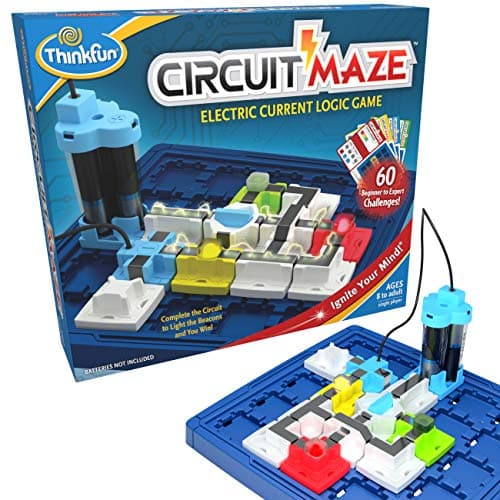
| 1 | Best alternative for a puzzle-minded child ThinkFun Circuit Maze Sixty circuit challenges with real working LEDs, so the answer is a light rather than a page. | Eight and up, where a construction kit feels open-ended in a bad way | |
| 2 | 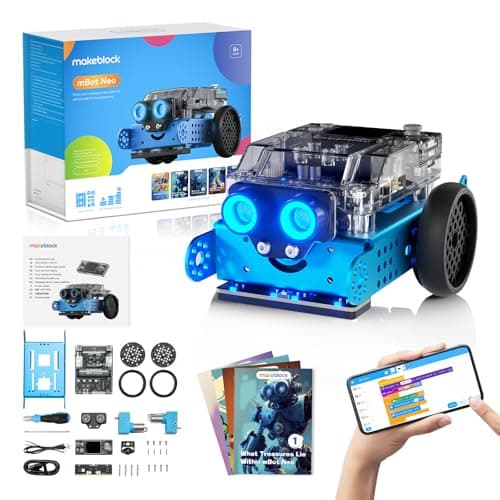 Best alternative for an older child Makeblock mBot Neo (mBot2) Blocks, Python and Arduino C on one published 240 MHz controller with 60+ modules. | Eight and up, and still interesting at fifteen | |
| 3 | 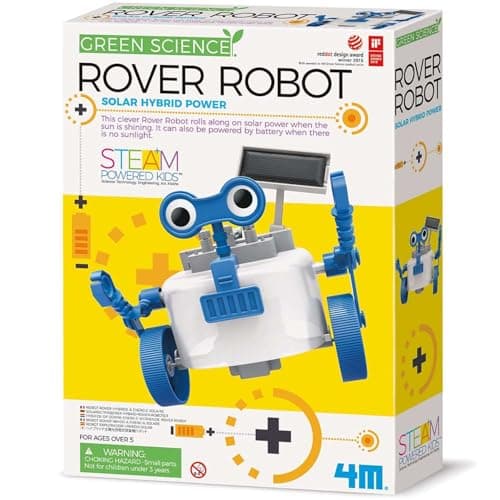 Best cheap first circuit 4M Green Science Solar Rover A single build with a real photovoltaic cell and no batteries at all. | A small budget, or a child who wants one thing that works | |
| 4 | 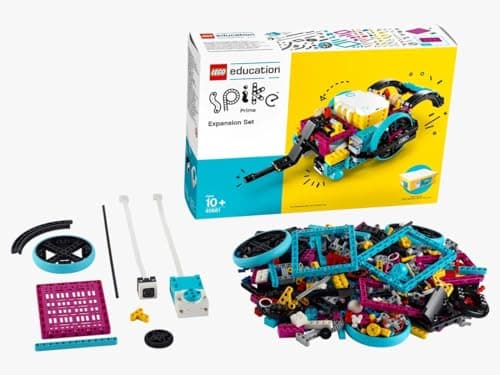 Best alternative if building matters more than circuits LEGO Education SPIKE Essential Set 449 pieces with two motors, a color sensor and a rechargeable hub, with icon and word coding. | Six and up, where the machine should be the child's design | |
| — | 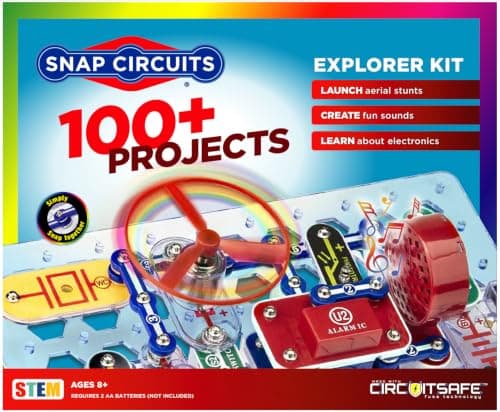 Not the cheaper answer Snap Circuits Jr. The obvious budget alternative within the line, and usually a false economy. | Five to seven only |
5 picks, including 1 we tell you to skip. Ages shown are the manufacturer’s own rating, not ours.
Three reasons people look for an alternative
Snap Circuits is our top pick in the electronics roundup, so this page exists to serve the buyers it does not suit. There are three common reasons, and they point in different directions.
The arithmetic
The reason, and what to buy
| Child is under eight | A circuit logic game, or wait — nothing here is rated lower |
|---|---|
| Child finds it babyish | A robot publishing a real language |
| Open-ended feels daunting | A 60-challenge puzzle with correct answers |
| Budget | A solar build or a logic game — not a smaller Snap set |
| Wants to build the machine | A LEGO robotics set |
| Wants real components | Nothing here — see the honest note below |
The thing no alternative here fixes
Worth stating plainly. Snap Circuits parts are color-coded modules on carriers, designed so that nothing can be connected dangerously and no component can be damaged. Every alternative on this page shares that property.
A teenager heading towards electronics as a subject will eventually want breadboards, discrete components and a soldering iron. We do not recommend specific soldering equipment, because we have not tested any and this is a category where an unverified recommendation could put a fifteen-year-old in front of a hot iron with bad advice.
What we can say is where these kits stop, and that stopping point is the same for all of them.
Why buying down the Snap range is usually wrong
This is the most common mistake made by people arriving at this question with a budget.
Elenco publishes both project counts and part counts across the whole line, which makes the comparison arithmetic rather than opinion: 305 projects from 60+ parts on the Classic is 5.1 each, 500+ from 75+ on the Pro is 6.7, and 750+ from 80+ on Extreme is 9.4.
Elenco also states that the Classic manual contains every project from the cheaper SC-100 plus 200 more. So the smaller set is a strict subset — buying it to save money means buying a fraction of the same product.
If the child is too young
Everything on this page is rated 8+ except SPIKE Essential at 6+. That is not coincidence: following a numbered circuit diagram is a reading-and-patience task, and the ratings reflect it.
For a five or six-year-old who wants to make something light up, the honest answer is that this category starts later. A screen-free coding robot rated 4+ delivers cause and effect at the right age — see screen-free coding toys.
Worth knowing before you buy
Every kit here runs on AA cells, a rechargeable pack or a solar cell, deliberately. Nothing on this page is preparation for working on anything that plugs into a wall, and mains electronics is a different category with different risks.
When to stay with Snap Circuits
If the child is eight to twelve, can follow a numbered diagram, and the household wants one electronics purchase that lasts years, the Classic set remains the right answer. Nothing on this page beats 305 projects with no consumables at that price.
The alternatives here are for a specific mismatch — age, temperament, budget or interest — rather than a general improvement.
Say the unwelcome thing
Do not buy a themed electronics set as a substitute
Themed sets narrow the project list to the theme, and breadth is the entire value of a first electronics kit. Elenco publishes Green as an alternative-energy set: a good subject and a poor starting point.
Buy a general set first and let the child pick a direction.
Where to go next
Snap Circuits: every set compared covers the line itself. What electronics kits actually teach is the honest account of the format, and electronics kits for teenagers covers the older end.
In full
Every pick, and what is wrong with it
Published specifications only, each linked back to the page it came from. Where a manufacturer publishes nothing, the row says so — we do not fill blanks in.
1. Best alternative for a puzzle-minded child
ThinkFun Circuit Maze
ThinkFun · 1008 · maker rates it 8+
Sixty circuit challenges with real working LEDs, so the answer is a light rather than a page.
- Stated age
- “age 8 and up”
- Players
- 1
- Format
- Beam-and-token circuit puzzles with real working LEDs
- Batteries
- Required (not included)
ThinkFun publishes 60 challenges from beginner to expert, beam-and-token circuit puzzles with real working LEDs, single player, age 8 and up, with batteries required and not included.
This is the alternative for a child who finds a 305-project manual daunting. A puzzle has one right answer and tells you when you have it; a construction kit asks the child to decide what to build, which some children find liberating and others find blank.
It also teaches the single idea that transfers best from this whole category: a circuit must form a complete loop. Sixty repetitions of that, with an LED confirming it each time, is genuinely good preparation.
Replay signal
- Open-ended or one-shot
- Finite challenge deck, but the pieces make a real circuit — free building afterward is possible
- Does anything run out
- Nothing runs out
- Room to grow
- Pairs naturally with a Snap Circuits set as the step from puzzle to real components
Why we say so: ThinkFun publishes the 8+ rating, the 60 challenges and the single-player circuit-puzzle format with working LEDs. The pairing with Snap Circuits is our routing advice and is stated as advice, not as a manufacturer claim.
What’s wrong with it
A finite challenge deck, and batteries are required and not included.
| Stated age | “age 8 and up” |
|---|---|
| Players | 1 |
| Format | Beam-and-token circuit puzzles with real working LEDs |
| Batteries | Required (not included) |
| Challenges | 60, beginner to expert |
Every figure above is from ThinkFun, Circuit Maze. Blanks are shown as “not published” rather than filled in.
2. Best alternative for an older child
Makeblock mBot Neo (mBot2)
Makeblock · mBot2 · maker rates it 8+
Blocks, Python and Arduino C on one published 240 MHz controller with 60+ modules.
- Controller
- CyberPi — Xtensa 32-bit LX6 dual-core at 240 MHz, 8 MB flash, 8 MB PSRAM
- Programming
- Scratch-style blocks, Python in mBlock, and Arduino C/C++ via the Arduino IDE
- Sensors
- On-board light, microphone, gyroscope and accelerometer, plus ultrasonic, quad RGB, temperature and IR modules
- Battery
- Built-in 2500 mAh LiPo, about 1 hour to charge, about 5 hours of play
Makeblock publishes the CyberPi controller — an Xtensa 32-bit LX6 dual-core at 240 MHz with 8 MB flash and 8 MB PSRAM — programmable with Scratch-style blocks, Python in mBlock and Arduino C/C++, with on-board light, microphone, gyroscope and accelerometer sensors, a 2500 mAh battery giving about five hours from an hour of charging, and 60+ compatible modules, rated 8+.
The commonest complaint about Snap Circuits from an older child is that the snap format is visibly designed so nothing can be wired wrongly. That is correct for an eight-year-old and constraining at fourteen.
A robot that publishes a real language solves that. The electronics are still modular, but the code is not a toy version of anything.
Replay signal
- Open-ended or one-shot
- Open-ended at the top of the range — this is the one a child does not outgrow at eleven
- Does anything run out
- Nothing runs out; rechargeable
- Room to grow
- Blocks, then Python, then Arduino C on the same robot, with 60+ add-on modules
- Adult required
- Not for driving it. Probably for the first Python session
Why we say so: Makeblock publishes the processor, the three programming environments on one robot, the 2500 mAh battery figures and the 60+ compatible modules. Blocks-to-Python-to-C on one chassis is the published upgrade path, and it is why this survives the year a child gets bored of pressing buttons.
What’s wrong with it
Considerably more expensive, and the first Python session needs an adult.
| Controller | CyberPi — Xtensa 32-bit LX6 dual-core at 240 MHz, 8 MB flash, 8 MB PSRAM |
|---|---|
| Programming | Scratch-style blocks, Python in mBlock, and Arduino C/C++ via the Arduino IDE |
| Sensors | On-board light, microphone, gyroscope and accelerometer, plus ultrasonic, quad RGB, temperature and IR modules |
| Battery | Built-in 2500 mAh LiPo, about 1 hour to charge, about 5 hours of play |
| Expansion | 60+ compatible modules, up to 10 connected at once, 8 motor and servo ports |
| Stated age | Ages 8+ |
Every figure above is from Makeblock, mBot2 coding robot kit. Blanks are shown as “not published” rather than filled in.
3. Best cheap first circuit
4M Green Science Solar Rover
4M · Green Science Solar Rover · maker rates it 5+
A single build with a real photovoltaic cell and no batteries at all.
- Power
- Solar panel in sunlight, battery in its absence — hybrid
- Batteries
- 1 x AAA (not included)
- Build
- One solar-powered rover, assembled by the child
- Stated age
- Ages 5+
4M publishes a Green Science solar rover — a single buildable vehicle driven by a solar cell rather than a battery.
As an alternative it is honest about being smaller. One completed machine that visibly runs on sunlight is a different kind of satisfaction from project 47 of 305, and for a child unsure whether they like electronics it is a much cheaper way to find out.
The published catch is daylight. Indoor lighting will not drive it, which disappoints more buyers than any other property of the kit.
Replay signal
- Open-ended or one-shot
- One-shot build, then a working toy — the rover survives the assembly
- Does anything run out
- Nothing runs out
- Room to grow
- Little. It builds one thing and that thing then drives around
- Adult required
- For the first assembly at five; not for running it
Why we say so: 4M publishes a hybrid solar-and-battery drive requiring one AAA. The hybrid is the useful detail: a purely solar toy is a disappointment on a cloudy afternoon, and the battery fallback means the thing still moves indoors.
What’s wrong with it
One project rather than 305, and it needs genuine direct sunlight to run.
| Power | Solar panel in sunlight, battery in its absence — hybrid |
|---|---|
| Batteries | 1 x AAA (not included) |
| Build | One solar-powered rover, assembled by the child |
| Stated age | Ages 5+ |
| Consumables | None beyond the battery |
Every figure above is from 4M, Green Science Solar Rover. Blanks are shown as “not published” rather than filled in.
4. Best alternative if building matters more than circuits
LEGO Education SPIKE Essential Set
LEGO Education · 45345 · maker rates it 6+ (grades 1-5)
449 pieces with two motors, a color sensor and a rechargeable hub, with icon and word coding.
- Pieces
- 449
- Motors
- 2 small motors
- Sensors
- Color sensor; 6-axis gyro in the hub
- Display
- 3x3 color light matrix
LEGO Education publishes 449 pieces, 2 small motors, a color sensor, a 6-axis gyro in the hub, a 3×3 color light matrix and a rechargeable Li-ion hub with 2 I/O ports and Bluetooth, with the SPIKE App offering icon-based and word-based coding, rated 6+ for grades 1-5.
Snap Circuits builds circuits on a fixed baseplate. SPIKE builds a machine whose shape the child decides, then programs it. For a child whose real interest is making things move, that is the better fit.
Replay signal
- Open-ended or one-shot
- Open-ended — it is a LEGO system with motors, so the build is never fixed
- Does anything run out
- Nothing runs out; the hub is rechargeable rather than battery-fed
- Room to grow
- Icon coding first, then word-based Scratch blocks in the same app, on the same hardware
- Adult required
- For the first build and the app setup; not after that
Why we say so: LEGO Education publishes 449 pieces, two motors, a color sensor and a rechargeable hub, with an app offering both icon-based and word-based coding. Two coding modes on one set is the published progression — a six-year-old starts on icons and moves to Scratch-style words without new hardware.
What’s wrong with it
Priced and specified for classrooms, and an app is required to program it.
| Pieces | 449 |
|---|---|
| Motors | 2 small motors |
| Sensors | Color sensor; 6-axis gyro in the hub |
| Display | 3x3 color light matrix |
| Hub | Small hub, 2 input/output ports, Bluetooth, rechargeable Li-ion with micro USB |
| Software | SPIKE App — icon-based and word-based coding built on Scratch |
| Stated age | 6+, grades 1-5 |
Every figure above is from LEGO Education, SPIKE Essential Set 45345. Blanks are shown as “not published” rather than filled in.
Skip this one
Snap Circuits Jr.
Elenco · SC-100 · maker rates it 8+
The obvious budget alternative within the line, and usually a false economy.
- Projects
- Over 100
- Parts
- 30
- Projects per part
- 3.3
- Stated age
- Ages 8+
Snap Circuits Jr. is a genuine introduction for a young child and a poor way to save money for an eight-year-old.
Elenco publishes the arithmetic that makes this clear: the Classic set covers 305 projects from 60+ parts — 5.1 projects per part, the best ratio in the line — and its manual already contains every project from the smaller set plus 200 more.
Buying down within the range therefore means paying for a subset. If budget is the constraint, a circuit logic game or the solar rover is the better cheap purchase.
Replay signal
- Open-ended or one-shot
- Semi-open. The manual is a ladder, but 30 parts is enough vocabulary to go off-book
- Does anything run out
- Nothing runs out
- Room to grow
- Every SC-100 project is reprinted in the SC-300 manual, so the step up loses nothing
Why we say so: Elenco publishes over 100 projects from 30 parts, and publishes that the SC-300 manual contains all of the SC-100 projects plus 200 more. That overlap is what makes the upgrade path a genuine upgrade rather than a re-buy.
What’s wrong with it
The shortest project ladder and the lowest ratio in the range.
| Projects | Over 100 |
|---|---|
| Parts | 30 |
| Projects per part | 3.3 |
| Stated age | Ages 8+ |
| Projects include | FM radio, AM radio, digital voice recorder, burglar alarm, doorbell |
| Tools needed | None — snap-together parts “require no tools and ensure correct connections” |
| Consumables | None |
Every figure above is from Elenco, Snap Circuits Jr. 100 Experiments. Blanks are shown as “not published” rather than filled in.
We are not putting a buy button on this one. It is easy enough to find if you want it anyway — but we would rather send you to something that gets played with twice.
Questions people actually ask
Frequently asked
What is a good alternative to Snap Circuits?
It depends on the reason. For a child who finds an open-ended kit daunting, ThinkFun's Circuit Maze publishes 60 self-checking challenges with real working LEDs at 8+. For an older child who finds the snap format childish, the Makeblock mBot Neo publishes Python and Arduino C alongside blocks. For a small budget, a solar build beats a smaller Snap set.
Is a cheaper Snap Circuits set a good way to save money?
Usually not. Elenco publishes that the Classic SC-300 manual contains every project from the cheaper SC-100 plus 200 more, and the Classic scores 5.1 projects per part against lower ratios further down the range. Buying down means paying for a strict subset of the same product. Every set compared.
What can a child under 8 use instead of Snap Circuits?
Realistically, not an electronics kit — almost everything in the category is rated 8+ because following a numbered circuit diagram is a reading-and-patience task. A screen-free coding robot rated 4+ delivers cause and effect at the right age instead.
Do any of these alternatives involve real components or soldering?
No. Every kit here uses modules designed so nothing can be wired wrongly, which is the point of the format and also its ceiling. A teenager heading towards electronics as a subject will eventually want breadboards, discrete components and a soldering iron — none of which we recommend specific products for, because we have not tested any.
Sources
Where these figures came from
Every specification on this page traces to one of these. If a manufacturer publishes nothing on a point, the page says so rather than filling the gap.
Read next
Where to go from here
Back to Electronics, or read how we pick.