Head to head
Makey Makey vs littleBits
The two leading invention kits make opposite assumptions about the computer. That single difference decides almost every household.
By Sawyer V. · Published
The short answer
Makey Makey needs a computer: JoyLabz publishes a board that acts as a keyboard, so it works only when plugged in, rated 8+. littleBits needs none: Sphero publishes 29 screen-free Bits with sensors and motors, for grades 2-7. Makey Makey for computer inventions; littleBits for standalone gadgets.
Block & Beaker earns a commission when you buy through our links, at no cost to you. It never changes a ranking, and we say so plainly when the right answer is the cheaper set, or nothing at all. Full disclosure · How we pick.
At a glance
The picks, ranked
Tap any row to jump to the full reasoning. Prices come live from Amazon where we have them and read “check price” where we don’t — never a number we cannot stand behind today.
| # | Product | Best for | Price |
|---|---|---|---|
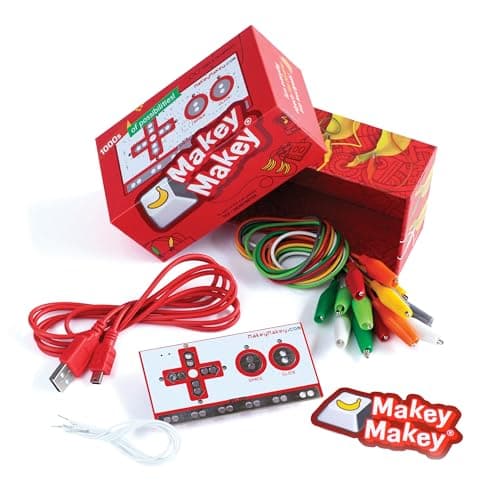
| 1 | Better with a computer Makey Makey Classic Any conductive object becomes a keyboard key, with nothing to install. | Eight and up, where a computer is free to use | |
| 2 | 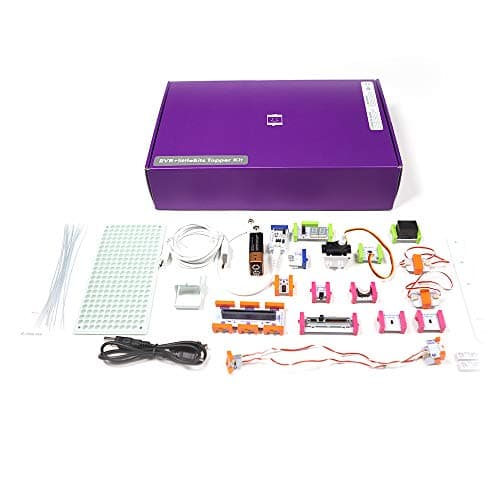 Better standalone littleBits Invention Kit 29 Bits with real sensors, a servo and two motors, published as screen-free. | Grades 2-7, with no computer in the loop | |
| 3 | A third option Circuit Scribe Basic Kit A conductive ink pen and 6 modules, for light-up cards and drawings. | Drawn inventions | Sold direct by Circuit Scribe → Not stocked on Amazon. This link goes to the maker and we earn nothing on it. |
| — | 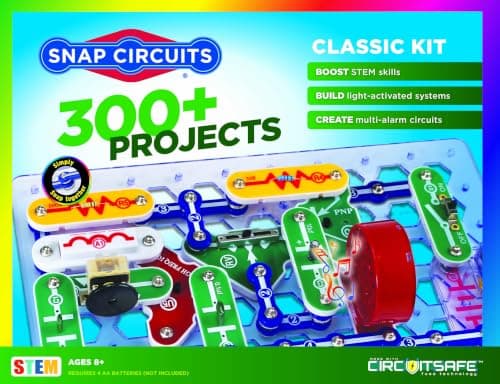 Not an invention kit Snap Circuits Classic Cross-shopped with both, and built around following 305 projects. | Eight and up, for learning circuits |
4 picks, including 1 we tell you to skip. Ages shown are the manufacturer’s own rating, not ours.
Side by side
The arithmetic
Published specifications
| Computer | Makey Makey: required | littleBits: not used |
|---|---|
| Power | Makey Makey: USB | littleBits: 9V battery |
| Components | Makey Makey: board, 7 clips, 6 wires | littleBits: 29 Bits |
| Sensors | Makey Makey: any conductive object | littleBits: proximity, light, sound, temperature |
| Outputs | Makey Makey: the computer | littleBits: servo, motors, LEDs, buzzer |
| Stated age | Makey Makey 8+ | littleBits grades 2-7 |
Two opposite assumptions
Makey Makey assumes a computer and makes the physical world into its input. The invention lives on the screen — a game, a piano, a slideshow.
littleBits assumes no computer and makes a self-contained gadget. The invention lives on the table — something that moves, lights or beeps on its own.
Which child suits which
Loves games and music: Makey Makey. Controlling software with everyday objects is its whole appeal.
Loves building gadgets: littleBits. Sensors and motors make things that react in the real world.
Worth knowing before you buy
Makey Makey works with any conductive object, including water — keep liquids well away from the computer. littleBits runs on a 9V battery and includes two DC motors, so fingers and hair stay clear of moving parts.
So which one
A computer the child can use freely: Makey Makey.
No computer, or screens being reduced: littleBits.
Both: reasonable, because they solve different problems rather than the same one twice.
Say the unwelcome thing
Do not buy Makey Makey without checking the computer
JoyLabz publishes that it works through a USB keyboard or mouse connection. No computer free for the child means no invention, however good the idea.
Where to go next
Invention kits for kids covers the category. STEM toys and screen time covers the device question across the site.
In full
Every pick, and what is wrong with it
Published specifications only, each linked back to the page it came from. Where a manufacturer publishes nothing, the row says so — we do not fill blanks in.
1. Better with a computer
Makey Makey Classic
JoyLabz · Classic · maker rates it 8+
Any conductive object becomes a keyboard key, with nothing to install.
- Contents
- Makey Makey board, USB cable, 7 alligator clips, 6 connector wires, visual project start guide, sticker
- Computer
- Required — Mac, Windows, Chromebook or Linux; any device that supports a USB keyboard or mouse
- Software
- “No programing knowledge needed. No software to install.”
- Stated age
- “Ages 8 to infinity”
JoyLabz publishes the board, a USB cable, 7 alligator clips, 6 connector wires, a visual start guide and a sticker, for “ages 8 to infinity,” working on Mac, Windows, Chromebook and Linux with no software and no programming.
The immediacy is unmatched: plug in, clip on, and an everyday object becomes a key. For a child who wants to control games and music with the physical world, nothing here is faster.
Replay signal
- Open-ended or one-shot
- Genuinely open-ended — any conductive object can be wired in as a control
- Does anything run out
- Nothing runs out
- Adult required
- Not after the first connection; nothing needs installing
Why we say so: JoyLabz publishes that no software install and no programming are needed, and that the board works on any device supporting a USB keyboard or mouse. That compatibility statement is the mechanism: the board registers as a keyboard, so whatever the child clips to it becomes a key.
What’s wrong with it
Does nothing without a computer.
| Contents | Makey Makey board, USB cable, 7 alligator clips, 6 connector wires, visual project start guide, sticker |
|---|---|
| Computer | Required — Mac, Windows, Chromebook or Linux; any device that supports a USB keyboard or mouse |
| Software | “No programing knowledge needed. No software to install.” |
| Stated age | “Ages 8 to infinity” |
| Consumables | None |
Every figure above is from JoyLabz, Makey Makey Classic. Blanks are shown as “not published” rather than filled in.
2. Better standalone
littleBits Invention Kit
Sphero · Invention Kit · maker rates it Grades 2-7
29 Bits with real sensors, a servo and two motors, published as screen-free.
- Bits
- 29 in total — 2 power, 7 wire, 12 input and 8 output Bits
- Inputs
- Toggle switch, 2 buttons, 2 slide dimmers, remote trigger, pulse, threshold, and proximity, temperature, light and sound sensors
- Outputs
- LED, buzzer, bargraph, servo, RGB LED, number display, 2 DC motors
- Power
- 1 x 9V battery; a USB power Bit is also included
Sphero publishes 29 Bits — 12 inputs including proximity, temperature, light and sound sensors, and 8 outputs including a servo, an RGB LED and two DC motors — powered by a 9V battery, screen-free, with 10 challenge cards, for grades 2-7.
A littleBits invention runs on its own. An alarm, a night-light or a motorized contraption sits on a shelf and reacts to the room with no computer attached.
Replay signal
- Open-ended or one-shot
- Open-ended — any input can drive any output, so the gadget is the child's design
- Does anything run out
- Nothing runs out apart from the 9V battery
- Room to grow
- Twelve inputs and eight outputs is enough to build working gadgets rather than demonstrations
Why we say so: Sphero publishes 29 Bits including proximity, temperature, light and sound sensors, a servo and two DC motors, run from a 9V battery and published as screen-free. Real sensors driving real motors is what separates an invention kit from a circuit tutorial.
What’s wrong with it
A 9V battery, and a larger component set to manage.
| Bits | 29 in total — 2 power, 7 wire, 12 input and 8 output Bits |
|---|---|
| Inputs | Toggle switch, 2 buttons, 2 slide dimmers, remote trigger, pulse, threshold, and proximity, temperature, light and sound sensors |
| Outputs | LED, buzzer, bargraph, servo, RGB LED, number display, 2 DC motors |
| Power | 1 x 9V battery; a USB power Bit is also included |
| Screen | Published as screen-free |
| Challenges | 10 challenge cards, with further lessons via Sphero Central |
| Stated grade | Grades 2-7 |
Every figure above is from Sphero, littleBits Invention Kit. Blanks are shown as “not published” rather than filled in.
3. A third option
Circuit Scribe Basic Kit
Circuit Scribe · Basic Kit · maker rates it Not published
A conductive ink pen and 6 modules, for light-up cards and drawings.
- Modules
- 6 — a 9V battery adapter with 9V battery, 2 LEDs, a switch, a blinker and a dimmer
- Pen
- Conductive ink pen — draws working circuits on paper
- Also included
- Circuit stencil, jumper sticker sheet, steel canvas
- Projects
- Inventor's Notebook with 8 pages of circuit drawing projects
Circuit Scribe publishes a conductive ink pen, six modules and a steel canvas. It publishes no age for this kit.
Screen-free like littleBits, and far smaller — the right choice for a child who wants inventions on paper.
Replay signal
- Open-ended or one-shot
- Open-ended once the notebook is done — any drawing can become a circuit
- Does anything run out
- The ink runs out; the six modules and the steel canvas do not
- Room to grow
- A Basic Kit Plus publishes a 27-page workbook covering series, parallel and short circuits
Why we say so: Circuit Scribe publishes six magnetic modules including a blinker and a dimmer, a conductive ink pen and a steel canvas. Drawing the wire is the specification that matters — the child sees the circuit as a line they made, which is closer to a real schematic than any snap-together format.
What’s wrong with it
Six modules and consumable ink.
| Modules | 6 — a 9V battery adapter with 9V battery, 2 LEDs, a switch, a blinker and a dimmer |
|---|---|
| Pen | Conductive ink pen — draws working circuits on paper |
| Also included | Circuit stencil, jumper sticker sheet, steel canvas |
| Projects | Inventor's Notebook with 8 pages of circuit drawing projects |
| Stated age | Not published — Circuit Scribe calls it “an entry level kit” |
| Where to buy | Direct from Circuit Scribe; Amazon no longer carries this kit |
| Consumables | The pen's ink is used up; modules and canvas are reusable |
Every figure above is from Circuit Scribe, Basic Kit. Blanks are shown as “not published” rather than filled in.
Not stocked on Amazon. This link goes to the maker and we earn nothing on it.
Skip this one
Snap Circuits Classic
Elenco · SC-300 · maker rates it 8+
Cross-shopped with both, and built around following 305 projects.
- Projects
- “Build over 300 exciting projects” — manual covers projects 1-305
- Parts
- “Contains over 60 Snap-Together parts”
- Projects per part
- 5.1 — the highest ratio in the line
- Stated age
- “Ages 8+” and “Not for Children under 3 yrs.”
Elenco publishes 305 projects from 60+ parts, rated 8+.
It is the best first circuit kit and a different goal from either of these. See circuit kits for kids.
Replay signal
- Open-ended or one-shot
- The sweet spot of the line — enough parts to invent with, cheap enough not to be an event
- Does anything run out
- Nothing runs out
- Room to grow
- 305 published projects is years of Sunday afternoons at one a week
Why we say so: Elenco publishes 305 numbered projects against 60+ parts. Five projects per part is the highest ratio anywhere in the Snap Circuits line, which is the arithmetic reason this is the set to buy rather than the cheap one or the big one.
What’s wrong with it
A manual-led circuit kit rather than a make-a-gadget one.
| Projects | “Build over 300 exciting projects” — manual covers projects 1-305 |
|---|---|
| Parts | “Contains over 60 Snap-Together parts” |
| Projects per part | 5.1 — the highest ratio in the line |
| Stated age | “Ages 8+” and “Not for Children under 3 yrs.” |
| Batteries | “Requires 4 ‘AA’ batteries (not included)” |
| Relationship to SC-100 | Manual includes all SC-100 projects plus 200 new ones |
Every figure above is from Elenco, Snap Circuits Classic. Blanks are shown as “not published” rather than filled in.
We are not putting a buy button on this one. It is easy enough to find if you want it anyway — but we would rather send you to something that gets played with twice.
Questions people actually ask
Frequently asked
Is Makey Makey or littleBits better?
It depends on the computer. JoyLabz publishes Makey Makey as a board that acts as a keyboard, so it needs a computer, rated 8+. Sphero publishes littleBits as 29 screen-free Bits with sensors and motors for grades 2-7. Makey Makey for computer-based inventions; littleBits for standalone gadgets.
Does littleBits need a computer?
No. Sphero publishes the littleBits Invention Kit as screen-free, running on a 9V battery. An invention built from its Bits works on its own, with no computer attached.
Can Makey Makey and littleBits be used together?
They are separate products that solve different problems, so owning both is not duplication. Makey Makey turns physical objects into computer inputs; littleBits builds self-contained gadgets with sensors and motors.
What age is Makey Makey for?
JoyLabz publishes 'ages 8 to infinity'. It needs no programming and no software install — just a computer that supports a USB keyboard or mouse. Invention kits for kids.
Sources
Where these figures came from
Every specification on this page traces to one of these. If a manufacturer publishes nothing on a point, the page says so rather than filling the gap.
Read next
Where to go from here
Back to Electronics, or read how we pick.