The picks
Electronics Starter Kits for Kids
What to buy when the snap-together sets have been outgrown — and why that is a smaller shelf than it looks.
By Sawyer V. · Published
The short answer
For most children the electronics starter kit is Snap Circuits Classic — 305 published projects from 60-plus parts, with no soldering and connections that cannot be made wrong. The genuine step beyond it is not a bigger snap set but a programmable robot, where the circuit does something the child wrote.
Block & Beaker earns a commission when you buy through our links, at no cost to you. It never changes a ranking, and we say so plainly when the right answer is the cheaper set, or nothing at all. Full disclosure · How we pick.
At a glance
The picks, ranked
Tap any row to jump to the full reasoning. Prices come live from Amazon where we have them and read “check price” where we don’t — never a number we cannot stand behind today.
| # | Product | Best for | Price |
|---|---|---|---|
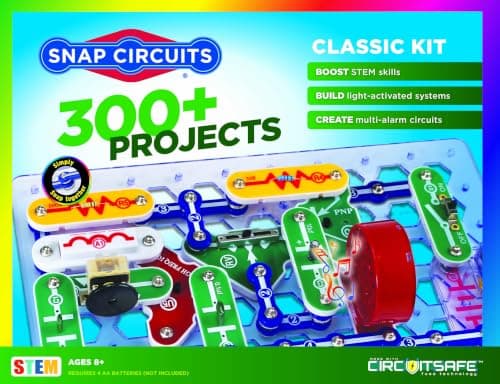
| 1 | The actual starter kit Snap Circuits Classic Three hundred and five published projects, no soldering, and a design that makes wrong connections impossible. | Eight and up, first electronics purchase | |
| 2 | 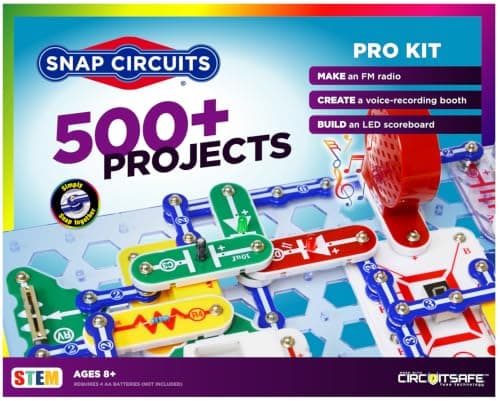 Best bridge to programming Snap Circuits Pro Seventy-three published computer-interfaced experiments — the circuit starts taking instructions. | A child who has finished the Classic and has a computer | |
| 3 | 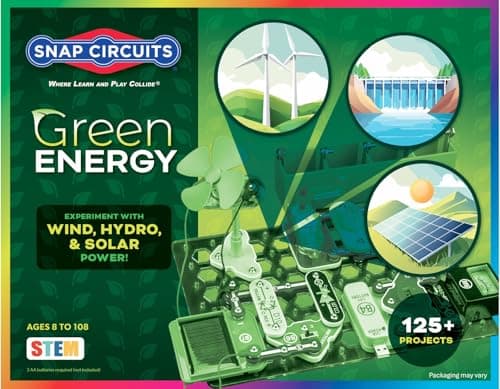 Best themed add-on Snap Circuits Green Solar and alternative energy components that cross-connect with the rest of the line. | A child interested in energy, who already owns a Snap set | |
| 4 | 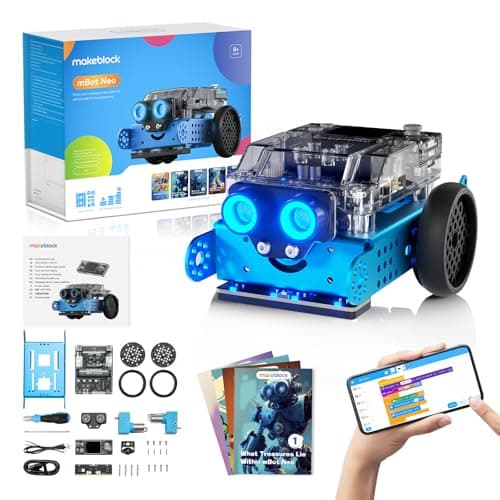 The genuine step up Makeblock mBot Neo (mBot2) The next real move is not more components, it is a circuit that runs code the child wrote. | Ten and up, once snap circuits have been outgrown | |
| — | 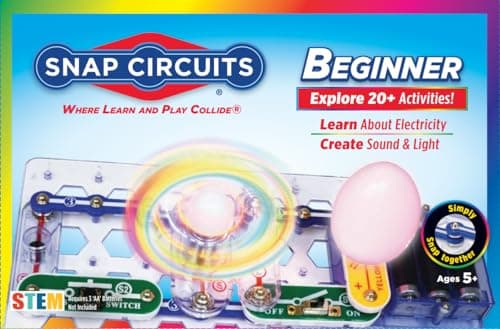 The one to skip Snap Circuits Beginner Fourteen parts and 21 projects — an introduction rather than a starter kit. | Five to seven only |
5 picks, including 1 we tell you to skip. Ages shown are the manufacturer’s own rating, not ours.
The honest shape of this category
Children’s electronics is a narrow shelf, and it is worth saying so plainly rather than padding a roundup with near-identical products.
At the bottom, snap-together systems dominate for a good reason: they remove wiring errors and soldering, which are the two things that end a first session. At the top, Arduino and breadboard kits take over, and those are genuinely aimed at teenagers and adults regardless of what the packaging says.
Between them is a gap. What fills it, in practice, is not another electronics kit — it is robotics, where the electronics acquire a purpose the child chose.
What a starter kit needs to contain
Four things, in order of how often they are missing.
Enough parts to go off-manual. This is the one that gets cut. A kit whose every build consumes most of the box cannot support experimentation. Sixty parts is roughly the threshold; fourteen is not close.
A manual with explanations, not just diagrams. Following a picture teaches assembly. Reading why the capacitor delays the buzzer teaches electronics.
Connections that cannot be made wrong. Elenco publishes this as a design property. It matters enormously at eight, and it stops mattering at fourteen.
A visible output. A light, a sound, a motor. A circuit whose result is a reading on a meter is a lesson; a circuit that makes a noise is a toy, and toys get rebuilt.
The arithmetic
Parts, and what they let a child do
| Snap Circuits Beginner | 14 parts / 21 projects |
|---|---|
| Snap Circuits Jr. | 30 parts / 100+ projects |
| Snap Circuits Classic | 60+ parts / 305 projects |
| Snap Circuits Green | 45+ parts / 125+ projects |
| Snap Circuits Pro | 75+ parts / 500+ projects |
| Threshold for building off-manual | around 60 parts |
What about Arduino kits?
They come up constantly in this search, and the honest answer is that age guidance on them is unreliable in a specific and checkable way: retailer listings and manufacturers frequently disagree, with retailers stating 8+ with adult guidance and the manufacturer’s own site stating 12+ for the same product.
Where they disagree, we would take the manufacturer’s number. The gap generally reflects how much adult time the build actually needs, and an Arduino kit that stalls half-assembled on a kitchen table is a worse outcome than no kit.
For a child under twelve who wants what an Arduino kit promises — real components, real code — a robot with a published block-to-Python path gets them there with far less chance of stalling.
Worth knowing before you buy
Nothing in this roundup involves mains electricity, soldering or heat. Snap Circuits sets run on four AA cells and Elenco publishes that the parts ensure correct connections; the mBot2 runs on a sealed rechargeable pack.
The one genuine caution is upstream of the products: if a child moves on to breadboards and loose components, soldering and mains-powered projects follow quickly, and that is the point at which supervision stops being optional. It is worth knowing that is where this road goes.
Say the unwelcome thing
Do not buy a second snap-together set as the upgrade
The instinct after a child finishes the Classic is to buy a bigger snap set. The published numbers argue against it: from the Pro to the Extreme, parts rise by about five while projects rise by 250, so most of the upgrade is manual.
The real upgrade is a change of kind, not size — the computer-interfaced experiments in the Pro, or a programmable robot. Both give the electronics something to do.
What to buy
- First electronics purchase, 8+: Snap Circuits Classic.
- Five to seven: Snap Circuits Beginner, accepting it is short.
- Finished the Classic, has a computer: Snap Circuits Profor the 73 computer-interfaced experiments.
- Finished the Classic, wants more: a programmable robot, not a bigger snap set.
The full Snap Circuits line comparison has every set in one table with the projects-per-part arithmetic. For the no-batteries version of the same reasoning, circuit logic puzzles.
In full
Every pick, and what is wrong with it
Published specifications only, each linked back to the page it came from. Where a manufacturer publishes nothing, the row says so — we do not fill blanks in.
1. The actual starter kit
Snap Circuits Classic
Elenco · SC-300 · maker rates it 8+
Three hundred and five published projects, no soldering, and a design that makes wrong connections impossible.
- Projects
- “Build over 300 exciting projects” — manual covers projects 1-305
- Parts
- “Contains over 60 Snap-Together parts”
- Projects per part
- 5.1 — the highest ratio in the line
- Stated age
- “Ages 8+” and “Not for Children under 3 yrs.”
Elenco publishes 305 projects from over 60 snap-together parts, rated 8+, with four AA batteries required. The parts “require no tools and ensure correct connections.”
That last phrase is the reason this is the starter kit rather than a box of loose components. The two things that end a first electronics session are a wiring mistake nobody can find and a soldering iron. Snap Circuits removes both by design.
The tradeoff is transferability. A child who has built 305 snap circuits understands series and parallel, switches, capacitors and motors — but has never stripped a wire. That gap is real, and it is the right gap to accept at eight.
Replay signal
- Open-ended or one-shot
- The sweet spot of the line — enough parts to invent with, cheap enough not to be an event
- Does anything run out
- Nothing runs out
- Room to grow
- 305 published projects is years of Sunday afternoons at one a week
Why we say so: Elenco publishes 305 numbered projects against 60+ parts. Five projects per part is the highest ratio anywhere in the Snap Circuits line, which is the arithmetic reason this is the set to buy rather than the cheap one or the big one.
What’s wrong with it
The components are proprietary snap modules, so nothing here transfers to a breadboard or a school electronics class.
| Projects | “Build over 300 exciting projects” — manual covers projects 1-305 |
|---|---|
| Parts | “Contains over 60 Snap-Together parts” |
| Projects per part | 5.1 — the highest ratio in the line |
| Stated age | “Ages 8+” and “Not for Children under 3 yrs.” |
| Batteries | “Requires 4 ‘AA’ batteries (not included)” |
| Relationship to SC-100 | Manual includes all SC-100 projects plus 200 new ones |
Every figure above is from Elenco, Snap Circuits Classic. Blanks are shown as “not published” rather than filled in.
2. Best bridge to programming
Snap Circuits Pro
Elenco · SC-500 · maker rates it 8+
Seventy-three published computer-interfaced experiments — the circuit starts taking instructions.
- Projects
- “Build over 500 exciting projects”
- Parts
- “Contains over 75 snap-together parts”
- Computer-interfaced experiments
- “Includes 73 computer interfaced experiments”
- Projects per part
- 6.7
Elenco publishes over 500 projects from over 75 parts including 73 computer interfaced experiments, rated 8+.
Those 73 experiments are the genuine bridge between electronics and coding. A circuit that responds to something typed on a computer is the first time those two ideas meet, and for a child who has done both separately it is a genuine moment.
Buy on that number alone. If nobody will connect it to a computer, the money is better spent elsewhere.
Replay signal
- Open-ended or one-shot
- Open-ended, and the computer-interfaced projects give it somewhere to go after the manual
- Does anything run out
- Nothing runs out
- Room to grow
- 73 published computer-interfaced experiments is a second product hiding inside the first
Why we say so: Elenco publishes 500+ projects from 75+ parts and specifically 73 computer-interfaced experiments. That last number is the only thing separating the Pro from the Classic, and it is the only reason to pay the difference.
What’s wrong with it
Only worth the premium if the computer half gets used. Without it, fifteen extra parts is a thin upgrade.
| Projects | “Build over 500 exciting projects” |
|---|---|
| Parts | “Contains over 75 snap-together parts” |
| Computer-interfaced experiments | “Includes 73 computer interfaced experiments” |
| Projects per part | 6.7 |
| Stated age | “Ages 8+” |
| Batteries | “Requires 4 ‘AA’ batteries (not included)” |
Every figure above is from Elenco, Snap Circuits Pro. Blanks are shown as “not published” rather than filled in.
3. Best themed add-on
Snap Circuits Green
Elenco · SCG-125 · maker rates it 8+
Solar and alternative energy components that cross-connect with the rest of the line.
- Projects
- Over 125
- Parts
- 45+
- Projects per part
- 2.8
- Stated age
- Ages 8 and up
Elenco publishes over 125 projects from 45-plus parts, rated 8 and up, focused on alternative energy, with parts cross-compatible across the Snap Circuits line.
Cross-compatibility is what makes this work as an add-on. A household that owns the Classic gains solar components that plug into circuits they already know how to build, which is a much better experience than starting a new box from scratch.
Bought first, it is a narrower set at a similar price to a far larger one.
Replay signal
- Open-ended or one-shot
- Themed rather than general-purpose, which narrows it
- Does anything run out
- Nothing runs out
- Room to grow
- Parts are cross-compatible with the rest of the Snap Circuits line
Why we say so: Elenco publishes 125+ projects from 45+ parts for the Green set. Against the Classic's 305 projects from 60+ parts, the Green set is a theme rather than a step up — worth knowing before you buy it as one.
What’s wrong with it
One hundred and twenty-five projects at a price close to the 305-project Classic. It is only good value as a second set.
| Projects | Over 125 |
|---|---|
| Parts | 45+ |
| Projects per part | 2.8 |
| Stated age | Ages 8 and up |
| Focus | Alternative energy |
| Consumables | None |
Every figure above is from Elenco, Snap Circuits Green. Blanks are shown as “not published” rather than filled in.
4. The genuine step up
Makeblock mBot Neo (mBot2)
Makeblock · mBot2 · maker rates it 8+
The next real move is not more components, it is a circuit that runs code the child wrote.
- Controller
- CyberPi — Xtensa 32-bit LX6 dual-core at 240 MHz, 8 MB flash, 8 MB PSRAM
- Programming
- Scratch-style blocks, Python in mBlock, and Arduino C/C++ via the Arduino IDE
- Sensors
- On-board light, microphone, gyroscope and accelerometer, plus ultrasonic, quad RGB, temperature and IR modules
- Battery
- Built-in 2500 mAh LiPo, about 1 hour to charge, about 5 hours of play
Makeblock publishes a CyberPi controller, on-board light, microphone, gyroscope and accelerometer sensors plus ultrasonic, quad RGB, temperature and IR modules, three programming environments — blocks, Python and Arduino C — 60-plus compatible modules and a 2500 mAh battery, rated 8+.
We are including a robot in an electronics roundup deliberately, because it is the honest answer to “what comes after Snap Circuits?” The shelf of children’s electronics kits above Snap Circuits is thin, and most of what is on it is Arduino kits pitched at teenagers.
What a robot adds is purpose. A circuit that lights an LED is a demonstration; a circuit that makes a robot avoid a wall because of something the child typed is a system. That is the next idea, and it arrives here rather than in a bigger box of components.
Replay signal
- Open-ended or one-shot
- Open-ended at the top of the range — this is the one a child does not outgrow at eleven
- Does anything run out
- Nothing runs out; rechargeable
- Room to grow
- Blocks, then Python, then Arduino C on the same robot, with 60+ add-on modules
- Adult required
- Not for driving it. Probably for the first Python session
Why we say so: Makeblock publishes the processor, the three programming environments on one robot, the 2500 mAh battery figures and the 60+ compatible modules. Blocks-to-Python-to-C on one chassis is the published upgrade path, and it is why this survives the year a child gets bored of pressing buttons.
What’s wrong with it
Considerably more expensive than any Snap set, and the electronics are largely pre-made modules rather than components to reason about.
| Controller | CyberPi — Xtensa 32-bit LX6 dual-core at 240 MHz, 8 MB flash, 8 MB PSRAM |
|---|---|
| Programming | Scratch-style blocks, Python in mBlock, and Arduino C/C++ via the Arduino IDE |
| Sensors | On-board light, microphone, gyroscope and accelerometer, plus ultrasonic, quad RGB, temperature and IR modules |
| Battery | Built-in 2500 mAh LiPo, about 1 hour to charge, about 5 hours of play |
| Expansion | 60+ compatible modules, up to 10 connected at once, 8 motor and servo ports |
| Stated age | Ages 8+ |
Every figure above is from Makeblock, mBot2 coding robot kit. Blanks are shown as “not published” rather than filled in.
Skip this one
Snap Circuits Beginner
Elenco · SCB-20 · maker rates it 5-8
Fourteen parts and 21 projects — an introduction rather than a starter kit.
- Projects
- 21
- Parts
- 14
- Projects per part
- 1.5
- Stated age
- Ages 5-8
Elenco publishes 21 projects from 14 parts, rated 5 to 8.
For a five or six-year-old this is the only Snap Circuits set available and it does its job. For the eight-year-old this page is mostly written for, it is the wrong purchase: the Classic publishes fifteen times the projects for around three times the price.
The parts do carry forward, so it is not wasted if an upgrade follows. But if the choice is being made now, make it once.
Replay signal
- Open-ended or one-shot
- Limited. 14 parts is a small vocabulary, and once the 21 projects are built the set goes quiet
- Does anything run out
- Nothing runs out
- Room to grow
- Parts work with the bigger sets, so it is not a dead end — but it is a short road
Why we say so: Elenco publishes 21 projects from 14 parts. That ratio is the whole story: this is the entry rung, and the number to hold it against is the 305 projects the Classic set publishes from 60+ parts.
What’s wrong with it
For anyone eight or over it is a third of the price of the Classic for a fifteenth of the content.
| Projects | 21 |
|---|---|
| Parts | 14 |
| Projects per part | 1.5 |
| Stated age | Ages 5-8 |
| Tools needed | None — parts snap together |
| Consumables | None |
Every figure above is from Elenco, Snap Circuits Beginner. Blanks are shown as “not published” rather than filled in.
We are not putting a buy button on this one. It is easy enough to find if you want it anyway — but we would rather send you to something that gets played with twice.
Questions people actually ask
Frequently asked
What is the best electronics starter kit for a child?
Snap Circuits Classic for almost anyone aged eight or over. Elenco publishes 305 projects from over 60 parts, with no soldering and connections designed so they cannot be made wrong — which removes the two things that end most first electronics sessions.
What comes after Snap Circuits?
Not a bigger snap set. The published numbers show parts barely growing above the Classic while projects double, so the upgrade is mostly manual. The real next step is either the Pro's 73 computer-interfaced experiments or a programmable robot, where the circuit runs code the child wrote. Robot kits that scale.
Are Arduino kits suitable for kids?
Age guidance on them is unreliable — retailer listings and manufacturers frequently disagree, with retailers saying 8+ with adult guidance and the maker's own site saying 12+. Take the manufacturer's figure; the gap reflects how much adult time the build actually needs.
How many parts should an electronics kit have?
Enough that one project does not consume the box. Around sixty is the point where a child can leave a build standing and still have components to experiment with — which is our judgment rather than a published figure, but it is the reasoning behind why we recommend the Classic over the Jr set.
Sources
Where these figures came from
Every specification on this page traces to one of these. If a manufacturer publishes nothing on a point, the page says so rather than filling the gap.
Read next
Where to go from here
Back to Electronics, or read how we pick.