Head to head
Sphero BOLT vs mBot Neo
Nearly the same money, the same published age, the same language. One arrives finished and the other arrives in pieces — that is the entire decision.
By Sawyer V. · Published
The short answer
Buy mBot Neo if the child wants to understand the machine: Makeblock publishes about 100 parts, a 240 MHz controller, four on-board sensors and three environments including Arduino C. Buy Sphero BOLT if they want to program something that already works: Sphero publishes an 8x8 LED matrix, a waterproof shell and all-day battery, with nothing to build and nothing to lose.
Block & Beaker earns a commission when you buy through our links, at no cost to you. It never changes a ranking, and we say so plainly when the right answer is the cheaper set, or nothing at all. Full disclosure · How we pick.
At a glance
The picks, ranked
Tap any row to jump to the full reasoning. Prices come live from Amazon where we have them and read “check price” where we don’t — never a number we cannot stand behind today.
| # | Product | Best for | Price |
|---|---|---|---|
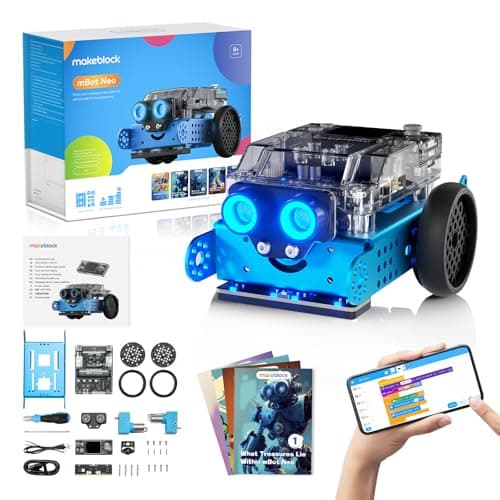
| 1 | Best if they want to build it Makeblock mBot Neo (mBot2) About 100 parts, a 240 MHz controller, and blocks to Python to Arduino C. | Eight and up, with a computer and an hour for assembly | |
| 2 | 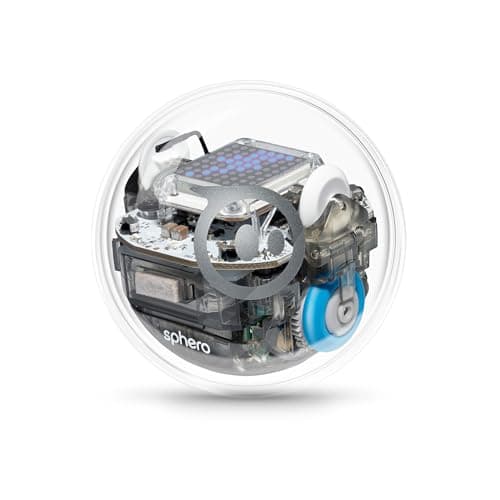 Best if it has to work in five minutes Sphero BOLT An 8x8 programmable matrix, waterproof shell, all-day battery, JavaScript or Python. | Eight and up, where a gift should be usable on the day | |
| 3 | 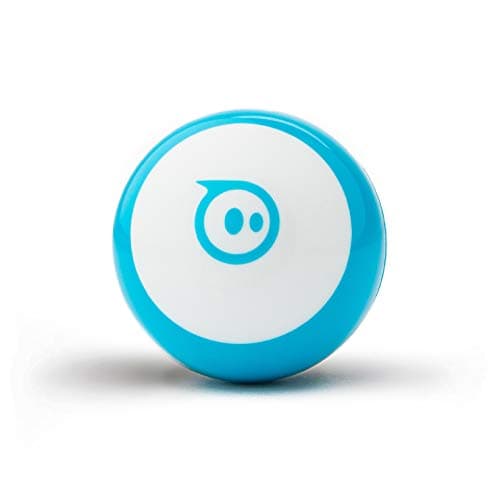 Same idea, a fifth of the money Sphero Mini The same three canvases as BOLT on a ping-pong-ball-sized robot. | Eight and up, trying coding for the first time | |
| — | 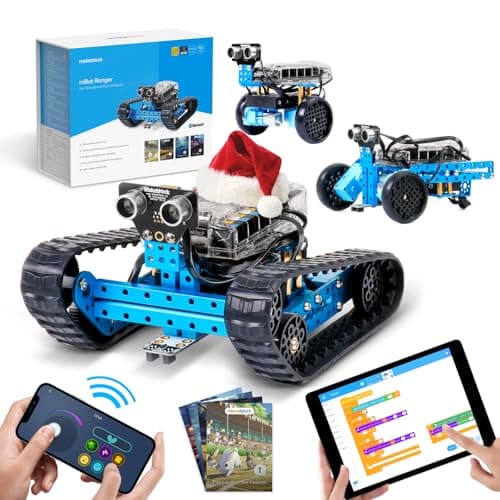 Three builds instead of one Makeblock mBot Ranger Three published build forms from about 100 parts, with 10 expansion ports. | Eight and up, for a child who will rebuild it |
4 picks, including 1 we tell you to skip. Ages shown are the manufacturer’s own rating, not ours.
Published side by side
The arithmetic
BOLT against mBot Neo, as published
| Stated age | Both ages 8+ |
|---|---|
| Assembly | BOLT: none, sealed · mBot Neo: about 100 parts |
| Languages | BOLT: Draw, Blocks, JavaScript or Python · mBot Neo: blocks, Python, Arduino C/C++ |
| Output | BOLT: 8x8 programmable LED matrix · mBot Neo: no display published |
| Sensors | BOLT: magnetometer plus programmable set · mBot Neo: 4 on-board plus 4 named modules |
| Battery | BOLT: “all-day”, inductive · mBot Neo: 2500 mAh, ~5 hours from ~1 hour |
| Durability | BOLT: “durable and waterproof” · mBot Neo: an open chassis |
| Expansion | BOLT: none published · mBot Neo: 60+ modules, 8 motor and servo ports |
Buy mBot Neo if
The child asks how things work. About 100 parts is an hour of assembly and a permanent understanding of why a robot turns when one wheel slows.
There is a computer they can use. Python in mBlock and Arduino C/C++ in the Arduino IDE both assume a real machine, not a tablet.
You want one purchase to last to fifteen. Arduino C is a published ceiling that a sealed ball does not have.
They will add to it. 60+ modules and 8 ports is an upgrade path; it is also a standing invitation to spend more.
Buy BOLT if
It is a gift that has to work on the day. Nothing to assemble, nothing to install, nothing to lose.
The child is eight, not twelve. Draw is a lower first rung than blocks, and BOLT publishes it.
It will be used outdoors or near water. Sphero publishes waterproofing; Makeblock publishes an open chassis.
You want the program to be visible. The 8x8 matrix is the only output device in this comparison, and it is what makes a bug readable.
Worth knowing before you buy
So which one
They take things apart: mBot Neo.
They want to code today: Sphero BOLT.
Nobody has coded before: Sphero Mini first, and decide later.
They will rebuild it repeatedly: mBot Ranger publishes three forms from the same parts.
Say the unwelcome thing
Do not buy the kit for a child who will not finish the build
About 100 parts is the published figure and it is a real evening. A child who wanted a robot and received a bag of components sometimes never gets to the code at all, and the box becomes a reproach. If you are not sure which kind of child this is, the sealed robot is the safer gift and the kit is the better birthday for a child who has already asked for one.
Where to go next
Robot kits covers the buildable side, coding robot balls covers the sealed side, and coding toys for tweens covers the age where both become realistic.
In full
Every pick, and what is wrong with it
Published specifications only, each linked back to the page it came from. Where a manufacturer publishes nothing, the row says so — we do not fill blanks in.
1. Best if they want to build it
Makeblock mBot Neo (mBot2)
Makeblock · mBot2 · maker rates it 8+
About 100 parts, a 240 MHz controller, and blocks to Python to Arduino C.
- Controller
- CyberPi — Xtensa 32-bit LX6 dual-core at 240 MHz, 8 MB flash, 8 MB PSRAM
- Programming
- Scratch-style blocks, Python in mBlock, and Arduino C/C++ via the Arduino IDE
- Sensors
- On-board light, microphone, gyroscope and accelerometer, plus ultrasonic, quad RGB, temperature and IR modules
- Battery
- Built-in 2500 mAh LiPo, about 1 hour to charge, about 5 hours of play
Makeblock publishes the CyberPi controller as an Xtensa 32-bit LX6 dual-core at 240 MHz with 8 MB flash and 8 MB PSRAM, three environments — Scratch-style blocks, Python in mBlock and Arduino C/C++ via the Arduino IDE — on-board light, microphone, gyroscope and accelerometer sensors plus ultrasonic, quad RGB, temperature and IR modules, a built-in 2500 mAh LiPo giving about five hours of play from about an hour of charging, and 60+ compatible modules with 8 motor and servo ports, rated ages 8+.
Arduino C is the published ceiling and it is higher than anything Sphero offers. A fourteen-year-old on the Arduino IDE is doing the same thing a hobbyist does, on the same toolchain.
Four sensors on the board rather than in a bag matters too: programs can react to the room on day one. See the mBot Neo review.
Replay signal
- Open-ended or one-shot
- Open-ended at the top of the range — this is the one a child does not outgrow at eleven
- Does anything run out
- Nothing runs out; rechargeable
- Room to grow
- Blocks, then Python, then Arduino C on the same robot, with 60+ add-on modules
- Adult required
- Not for driving it. Probably for the first Python session
Why we say so: Makeblock publishes the processor, the three programming environments on one robot, the 2500 mAh battery figures and the 60+ compatible modules. Blocks-to-Python-to-C on one chassis is the published upgrade path, and it is why this survives the year a child gets bored of pressing buttons.
What’s wrong with it
A real assembly job, and the module catalog will absorb any budget you give it.
| Controller | CyberPi — Xtensa 32-bit LX6 dual-core at 240 MHz, 8 MB flash, 8 MB PSRAM |
|---|---|
| Programming | Scratch-style blocks, Python in mBlock, and Arduino C/C++ via the Arduino IDE |
| Sensors | On-board light, microphone, gyroscope and accelerometer, plus ultrasonic, quad RGB, temperature and IR modules |
| Battery | Built-in 2500 mAh LiPo, about 1 hour to charge, about 5 hours of play |
| Expansion | 60+ compatible modules, up to 10 connected at once, 8 motor and servo ports |
| Stated age | Ages 8+ |
Every figure above is from Makeblock, mBot2 coding robot kit. Blanks are shown as “not published” rather than filled in.
2. Best if it has to work in five minutes
Sphero BOLT
Sphero · K002ROWFFP · maker rates it 8+
An 8x8 programmable matrix, waterproof shell, all-day battery, JavaScript or Python.
- Display
- “advanced programmable sensors and 8x8 LED matrix”
- Programming
- “three ways to program (Draw, Blocks, and Text coding with JavaScript or Python)”
- Shell
- “durable and waterproof design”
- Battery
- “all-day battery life”, inductive charging
Sphero publishes “advanced programmable sensors and 8x8 LED matrix”, “three ways to program (Draw, Blocks, and Text coding with JavaScript or Python)”, a “durable and waterproof design”, “all-day battery life” with inductive charging, and an inductive charging base plus a 360-degree protractor with heading, directions and clock, rated ages 8+.
Three canvases is the published advantage over a kit. mBot starts a child in blocks; BOLT starts them in Draw, which is a finger on a screen, and walks up from there. For a child who is not yet reading fluently that lower rung is real.
Waterproof and all-day are the two specs a kit cannot match, and they decide where the robot gets used. See the BOLT review.
Replay signal
- Open-ended or one-shot
- Open-ended — a programmable 8x8 display on a rolling robot has no finished state
- Does anything run out
- Nothing runs out; inductive charging rather than cells
- Room to grow
- Draw to Blocks to JavaScript or Python, on the same robot
- Adult required
- Not after the first pairing; the published lesson material is aimed at the child
Why we say so: Sphero publishes an 8x8 LED matrix, a waterproof shell, all-day battery life and text programming in JavaScript or Python. The matrix is the specification that separates this from every other coding ball: the robot can display what the program is doing, so a child debugs by looking at it rather than guessing.
What’s wrong with it
Sealed. There is no mechanism to see and nothing to modify but the code.
| Display | “advanced programmable sensors and 8x8 LED matrix” |
|---|---|
| Programming | “three ways to program (Draw, Blocks, and Text coding with JavaScript or Python)” |
| Shell | “durable and waterproof design” |
| Battery | “all-day battery life”, inductive charging |
| In the box | Inductive charging base with USB charging cable, and a 360-degree protractor with heading, directions and clock |
| Sensors named | Magnetometer, plus the programmable sensor set |
| Apps | Sphero Edu (Chrome, Mac, PC, iOS, Android, Kindle) and Sphero Play |
| Stated age | Ages 8+ |
| Consumables | None — rechargeable |
Every figure above is from Sphero, Sphero BOLT. Blanks are shown as “not published” rather than filled in.
3. Same idea, a fifth of the money
Sphero Mini
Sphero · M001BRW-049 (Mini Blue) · maker rates it 8+
The same three canvases as BOLT on a ping-pong-ball-sized robot.
- Size
- “about the same size as a ping pong ball”
- Programming
- “three programming canvases: Draw, Blocks, and Text” in the Sphero Edu app
- Sensors
- “a gyroscope, motor encoders, and accelerometer”, plus a codeable LED
- Playtime
- “45 Min Playtime”, charged over micro USB
Sphero publishes three programming canvases in the Sphero Edu app, a gyroscope, motor encoders and an accelerometer, a codeable LED, “45 Min Playtime” and 3 cones and 6 bowling pins, rated ages 8+.
Worth naming on a page about a $160-180 decision: if nobody in the house has coded before, the cheap robot publishes the same curriculum and answers the question of whether this child cares. See Mini against BOLT.
Replay signal
- Open-ended or one-shot
- Open-ended once the activity library opens up — the robot is a controller, a game piece and a programming target
- Does anything run out
- Nothing runs out; rechargeable
- Room to grow
- Draw, then Blocks, then text — the same three canvases the larger Sphero robots publish
- Adult required
- A phone or tablet has to be free, and Sphero publishes adult supervision under eight
Why we say so: Sphero publishes three programming canvases — Draw, Blocks and Text — on a robot the size of a ping pong ball, and a 45-minute playtime. Read those two figures together: the canvases are the same ladder the $179 BOLT publishes, and the 45 minutes is the honest reason this is the cheap one.
What’s wrong with it
45 published minutes of playtime, and a single LED instead of a matrix.
| Size | “about the same size as a ping pong ball” |
|---|---|
| Programming | “three programming canvases: Draw, Blocks, and Text” in the Sphero Edu app |
| Sensors | “a gyroscope, motor encoders, and accelerometer”, plus a codeable LED |
| Playtime | “45 Min Playtime”, charged over micro USB |
| In the box | Robot, micro USB charging cable, 3 Mini Traffic Cones and 6 Mini Bowling Pins |
| Apps | Sphero Edu (iOS, Android, Amazon Fire OS, macOS, Windows, Chrome OS) and Sphero Play (iOS, Android, Fire OS) |
| Shell | Interchangeable — published as designed to open up |
| Stated age | Ages 8+ |
| Consumables | None — rechargeable |
Every figure above is from Sphero, Sphero Mini. Blanks are shown as “not published” rather than filled in.
Skip this one
Makeblock mBot Ranger
Makeblock · mBot Ranger · maker rates it 8+
Three published build forms from about 100 parts, with 10 expansion ports.
- Build forms
- 3 — a robot tank, a self-balancing robot and a racing car
- Parts
- “about 100 parts”
- Expansion
- 10 expansion ports
- Compatibility
- “fully compatible with 500+ Makeblock parts, LEGO bricks, and supports Arduino”
Makeblock publishes three build forms — a robot tank, a self-balancing robot and a racing car — from “about 100 parts”, 10 expansion ports, compatibility with “500+ Makeblock parts, LEGO bricks, and supports Arduino”, and mBlock with visual and text programming. Age 8+ on Makeblock’s site; the Amazon listing title says Ages 10+.
Marked skip for the specific reason that it muddies this comparison rather than resolving it: three builds is a better answer than one only if the child actually rebuilds, and the maker cannot agree with itself on the age. See the mBot Ranger review.
Replay signal
- Open-ended or one-shot
- Three published builds, then a kit compatible with 500+ Makeblock parts and LEGO bricks
- Does anything run out
- Nothing runs out apart from batteries
- Room to grow
- Block coding first, then Arduino in the same mBlock software, on the same robot
- Adult required
- For the first build at the young end of the range — about 100 parts is a real assembly job
Why we say so: Makeblock publishes three build forms from about 100 parts, 10 expansion ports and compatibility with 500+ Makeblock parts and LEGO bricks, programmed in mBlock from blocks to Arduino. Building the robot before programming it is the published design, and it is what makes this a robot kit rather than a coding robot.
What’s wrong with it
Makeblock's site says 8+ while the Amazon listing title says 10+ — the maker is inconsistent.
| Build forms | 3 — a robot tank, a self-balancing robot and a racing car |
|---|---|
| Parts | “about 100 parts” |
| Expansion | 10 expansion ports |
| Compatibility | “fully compatible with 500+ Makeblock parts, LEGO bricks, and supports Arduino” |
| Programming | mBlock, “offering both visual and text-based programming” — blocks up to Arduino |
| Sensors named | Infrared, light and line-following (Makeblock's launch post) |
| Control | Makeblock remote-control app |
| Stated age | Age 8+ on Makeblock's site; the Amazon listing title says Ages 10+ |
| Batteries | Not stated on the Makeblock pages we could read |
Every figure above is from Makeblock, mBot Ranger robot building kit. Blanks are shown as “not published” rather than filled in.
We are not putting a buy button on this one. It is easy enough to find if you want it anyway — but we would rather send you to something that gets played with twice.
Questions people actually ask
Frequently asked
Sphero BOLT or mBot Neo?
mBot Neo if the child wants to build the robot - Makeblock publishes about 100 parts, a 240 MHz controller and Arduino C/C++. BOLT if it should work out of the box - Sphero publishes a sealed waterproof shell, an 8x8 programmable LED matrix and all-day battery. Both publish ages 8+.
Which goes further for an older child?
mBot Neo, on the published ceiling. Makeblock names Arduino C/C++ in the Arduino IDE, which is the same toolchain an adult hobbyist uses. Sphero's highest published rung for BOLT is text coding in JavaScript or Python. From toy to real code.
Does mBot Neo have a screen or display?
Makeblock publishes no display for the robot itself. Sphero publishes an 8x8 programmable LED matrix on BOLT, which is the only output device in this comparison and the reason a program's state can be read off the robot.
Which has the better battery?
Close. Sphero publishes "all-day battery life" with inductive charging for BOLT; Makeblock publishes a 2500 mAh LiPo giving about five hours of play from about an hour of charging for mBot Neo.
Can either be used outdoors?
BOLT - Sphero publishes a "durable and waterproof design". Makeblock publishes an open chassis for mBot Neo with exposed boards and modules, which is a dry-surface robot.
Is there a cheaper way to find out if a child likes coding?
Sphero Mini. It publishes the same three canvases as BOLT - Draw, Blocks and Text - at a fifth of the price, with a 45-minute playtime as the trade. Sphero Mini vs BOLT.
Sources
Where these figures came from
Every specification on this page traces to one of these. If a manufacturer publishes nothing on a point, the page says so rather than filling the gap.
Read next
Where to go from here
Back to Coding & Robotics, or read how we pick.