Single review
Sphero BOLT Review
Reviewed from Sphero's published specifications. We have not driven it, and the whole review is about one thing a rolling robot normally cannot do: report back.
By Sawyer V. · Published
The short answer
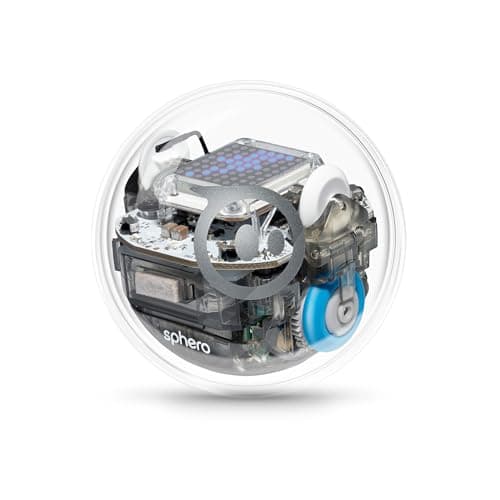
Sphero BOLT is the coding robot to buy when the program needs to be visible. Sphero publishes “advanced programmable sensors and 8x8 LED matrix”, “three ways to program (Draw, Blocks, and Text coding with JavaScript or Python)”, a “durable and waterproof design” and “all-day battery life” with inductive charging, rated ages 8+. The matrix is the reason to pay four times Mini’s price; the three canvases are not.
Block & Beaker earns a commission when you buy through our links, at no cost to you. It never changes a ranking, and we say so plainly when the right answer is the cheaper set, or nothing at all. Full disclosure · How we pick.
At a glance
The picks, ranked
Tap any row to jump to the full reasoning. Prices come live from Amazon where we have them and read “check price” where we don’t — never a number we cannot stand behind today.
| # | Product | Best for | Price |
|---|---|---|---|
| 1 | The product Sphero BOLT An 8x8 programmable LED matrix, JavaScript or Python, waterproof, all-day battery. | Eight to fourteen, indoors or out, where the code should outlast the novelty | |
| 2 | 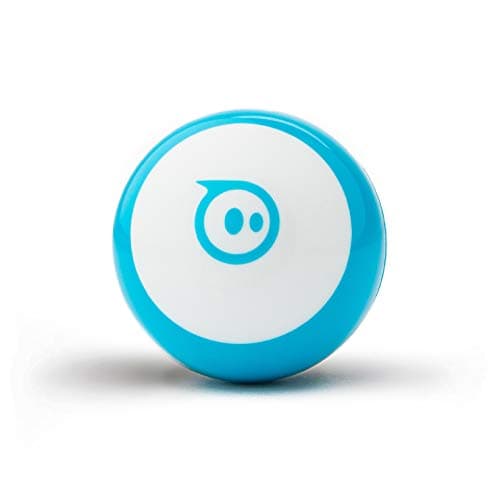 Same canvases, a quarter of the price Sphero Mini Draw, Blocks and Text on a ping-pong-ball-sized robot, with cones and pins. | Eight and up, first coding robot | |
| 3 | 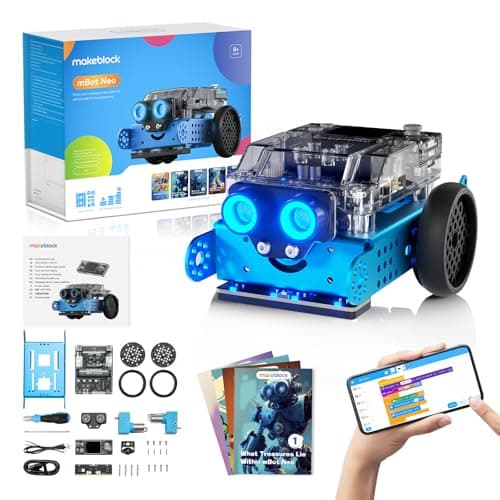 Similar money, opposite philosophy Makeblock mBot Neo (mBot2) About 100 parts, a 240 MHz controller, and blocks to Python to Arduino C. | Eight and up, for a child who wants to build the machine | |
| — |  Wrong robot if they are under eight Sphero indi At-Home Learning Kit Color cards read by an on-board sensor, and 2+ hours per charge. | Four to seven, with no device |
4 picks, including 1 we tell you to skip. Ages shown are the manufacturer’s own rating, not ours.
What we can tell you, and what we cannot
We have not driven it. No lab, no samples, no test children, and no star rating on this page or in its structured data.
Three absences, stated rather than filled in. Sphero publishes no top speed, no dimensions and no battery capacity in hours for BOLT on the page we read — “all-day battery life” is the claim, and it is a claim rather than a figure. It also publishes no IP rating alongside “waterproof”, so treat that as splash-and-puddle rather than submersion.
The specification that decides it
The arithmetic
Sphero BOLT, published
| Display | “advanced programmable sensors and 8x8 LED matrix” |
|---|---|
| Programming | “three ways to program (Draw, Blocks, and Text coding with JavaScript or Python)” |
| Shell | “durable and waterproof design” |
| Battery | “all-day battery life”; inductive charging base with USB cable |
| In the box | Charging base and cable, 360-degree protractor with heading, directions and clock |
| Sensors named | Magnetometer, plus the programmable sensor set |
| Apps | Sphero Edu for Chrome, Mac, PC, iOS, Android and Kindle; Sphero Play for home |
| Stated age | Ages 8+ |
| Top speed, dimensions, IP rating | Not published on the page we read |
| Consumables | None — rechargeable, no cells to replace |
| Price band | The most expensive coding ball on this site; close to a buildable robot kit |
What the numbers mean in practice
An output device changes how coding feels. Without one, the only question a child can ask a program is “where did you go”. With 64 pixels they can ask “what is the sensor reading”, “which branch did you take”, “what number are you on” — and get an answer on the robot rather than on a laptop they may not have.
All-day battery is the difference between available and charging. Sphero publishes 45 minutes for Mini and “all-day” for BOLT. A robot that is ready whenever the child is gets used far more than one that needs planning.
Waterproof moves the robot outdoors. Published as durable and waterproof, which puts a driveway, a yard and a bath in play. That matters more than it sounds for a rolling robot, because flat outdoor surfaces are bigger than indoor ones.
Inductive charging removes the one failure point. No port to break, no cell to lose, and the base doubles as the place the robot lives. Compare that with the 5 AAA batteries a screen-free robot publishes.
Who it is really for
The published 8+ is a floor and the value is not evenly spread across it. An eight-year-old gets a durable robot and the Draw canvas; the matrix and Python are largely wasted on them and Mini would have taught the same thing.
From about ten the picture inverts. A child who has met blocks elsewhere — Scratch at school, an Osmo kit, a cheaper robot — arrives wanting to type, and BOLT is the only ball on this site that publishes Python. The matrix stops being a novelty and becomes the print statement.
It is also the obvious classroom buy in this line, and Sphero writes it that way: the published copy leads on durability, battery and lesson material rather than on play. A robot that survives thirty children and charges inductively in a case is solving a different problem from a robot that lives on one child’s desk. See coding robots for classrooms.
The honest limit is that nothing here is buildable. At this price Makeblock publishes about 100 parts and Arduino C, and a child who wants to know why the robot turns will get more from that. BOLT is the better programming surface; mBot is the better machine.
Worth knowing before you buy
Who should skip it
A first-time coder at eight. Mini publishes the same three canvases for a quarter of the money. Buy BOLT when the child has outgrown something.
A child who wants to build. Sealed shell, no chassis, no modules. mBot Neo publishes about 100 parts at the same age.
Anyone without a device. Three canvases, all in an app. indi is the screen-free robot in this line.
Anyone buying on speed or specs sheets. Sphero publishes no top speed, no dimensions and no IP rating here, so there are figures you simply cannot compare.
Say the unwelcome thing
Do not buy BOLT as a first coding robot just because it is the best one
It is the best robot in the line and often the wrong first purchase. The matrix and Python are the premium, and both pay off only once a child has outgrown blocks. Start with the robot that publishes the same three canvases for a quarter of the price, find out whether this child actually codes, and buy the display when they ask for somewhere to print.
Where it sits
Sphero BOLT appears in coding robot balls and in the two comparisons that decide most purchases at this price — Mini against BOLT and BOLT against mBot Neo. For where text coding leads, see from toy to real code.
In full
Every pick, and what is wrong with it
Published specifications only, each linked back to the page it came from. Where a manufacturer publishes nothing, the row says so — we do not fill blanks in.
1. The product
Sphero BOLT
Sphero · K002ROWFFP · maker rates it 8+
An 8x8 programmable LED matrix, JavaScript or Python, waterproof, all-day battery.
- Display
- “advanced programmable sensors and 8x8 LED matrix”
- Programming
- “three ways to program (Draw, Blocks, and Text coding with JavaScript or Python)”
- Shell
- “durable and waterproof design”
- Battery
- “all-day battery life”, inductive charging
Sphero publishes “advanced programmable sensors and 8x8 LED matrix”, “three ways to program (Draw, Blocks, and Text coding with JavaScript or Python)”, a “durable and waterproof design” that “can withstand even the most imaginative, out-of-the-box ideas”, “all-day battery life”, an inductive charging base with USB charging cable, a 360-degree protractor with heading, directions and clock, and a magnetometer among its sensors. Sphero Edu is published for Chrome, Mac, PC, iOS, Android and Kindle. Rated ages 8+.
Sixty-four pixels is the whole argument for this robot. Every other rolling robot can only answer a child by moving, which means a wrong program and a flat battery look the same. A robot that can display a number, an arrow or a face can be asked what it thinks — and a child who can print a variable is debugging rather than re-guessing.
Python is the second published difference and it has the longer tail. Sphero names JavaScript or Python for BOLT’s Text canvas; a twelve-year-old who outgrows blocks lands on a language they will meet again in school and after it.
The 360-degree protractor is a small, telling inclusion. Heading is the one concept that trips children up on a robot that can face any direction, and Sphero ships a physical mat for it rather than leaving it to the app.
Replay signal
- Open-ended or one-shot
- Open-ended — a programmable 8x8 display on a rolling robot has no finished state
- Does anything run out
- Nothing runs out; inductive charging rather than cells
- Room to grow
- Draw to Blocks to JavaScript or Python, on the same robot
- Adult required
- Not after the first pairing; the published lesson material is aimed at the child
Why we say so: Sphero publishes an 8x8 LED matrix, a waterproof shell, all-day battery life and text programming in JavaScript or Python. The matrix is the specification that separates this from every other coding ball: the robot can display what the program is doing, so a child debugs by looking at it rather than guessing.
What’s wrong with it
Four times the price of Mini for the same three programming canvases.
| Display | “advanced programmable sensors and 8x8 LED matrix” |
|---|---|
| Programming | “three ways to program (Draw, Blocks, and Text coding with JavaScript or Python)” |
| Shell | “durable and waterproof design” |
| Battery | “all-day battery life”, inductive charging |
| In the box | Inductive charging base with USB charging cable, and a 360-degree protractor with heading, directions and clock |
| Sensors named | Magnetometer, plus the programmable sensor set |
| Apps | Sphero Edu (Chrome, Mac, PC, iOS, Android, Kindle) and Sphero Play |
| Stated age | Ages 8+ |
| Consumables | None — rechargeable |
Every figure above is from Sphero, Sphero BOLT. Blanks are shown as “not published” rather than filled in.
2. Same canvases, a quarter of the price
Sphero Mini
Sphero · M001BRW-049 (Mini Blue) · maker rates it 8+
Draw, Blocks and Text on a ping-pong-ball-sized robot, with cones and pins.
- Size
- “about the same size as a ping pong ball”
- Programming
- “three programming canvases: Draw, Blocks, and Text” in the Sphero Edu app
- Sensors
- “a gyroscope, motor encoders, and accelerometer”, plus a codeable LED
- Playtime
- “45 Min Playtime”, charged over micro USB
Sphero publishes three programming canvases in Sphero Edu, a gyroscope, motor encoders and an accelerometer, a codeable LED, “45 Min Playtime”, and 3 cones and 6 bowling pins, rated ages 8+.
This is the comparison that matters most before buying BOLT, and it is worth being blunt: the coding path is identical. If you are paying for BOLT, pay for the matrix, the battery, the shell or Python — not for a better curriculum.
See Mini against BOLT and the Sphero Mini review.
Replay signal
- Open-ended or one-shot
- Open-ended once the activity library opens up — the robot is a controller, a game piece and a programming target
- Does anything run out
- Nothing runs out; rechargeable
- Room to grow
- Draw, then Blocks, then text — the same three canvases the larger Sphero robots publish
- Adult required
- A phone or tablet has to be free, and Sphero publishes adult supervision under eight
Why we say so: Sphero publishes three programming canvases — Draw, Blocks and Text — on a robot the size of a ping pong ball, and a 45-minute playtime. Read those two figures together: the canvases are the same ladder the $179 BOLT publishes, and the 45 minutes is the honest reason this is the cheap one.
What’s wrong with it
45 published minutes of playtime, and one codeable LED instead of a matrix.
| Size | “about the same size as a ping pong ball” |
|---|---|
| Programming | “three programming canvases: Draw, Blocks, and Text” in the Sphero Edu app |
| Sensors | “a gyroscope, motor encoders, and accelerometer”, plus a codeable LED |
| Playtime | “45 Min Playtime”, charged over micro USB |
| In the box | Robot, micro USB charging cable, 3 Mini Traffic Cones and 6 Mini Bowling Pins |
| Apps | Sphero Edu (iOS, Android, Amazon Fire OS, macOS, Windows, Chrome OS) and Sphero Play (iOS, Android, Fire OS) |
| Shell | Interchangeable — published as designed to open up |
| Stated age | Ages 8+ |
| Consumables | None — rechargeable |
Every figure above is from Sphero, Sphero Mini. Blanks are shown as “not published” rather than filled in.
3. Similar money, opposite philosophy
Makeblock mBot Neo (mBot2)
Makeblock · mBot2 · maker rates it 8+
About 100 parts, a 240 MHz controller, and blocks to Python to Arduino C.
- Controller
- CyberPi — Xtensa 32-bit LX6 dual-core at 240 MHz, 8 MB flash, 8 MB PSRAM
- Programming
- Scratch-style blocks, Python in mBlock, and Arduino C/C++ via the Arduino IDE
- Sensors
- On-board light, microphone, gyroscope and accelerometer, plus ultrasonic, quad RGB, temperature and IR modules
- Battery
- Built-in 2500 mAh LiPo, about 1 hour to charge, about 5 hours of play
Makeblock publishes the CyberPi controller at 240 MHz with 8 MB flash and 8 MB PSRAM, three environments including Python in mBlock and Arduino C/C++ via the Arduino IDE, four on-board sensors plus named modules, a 2500 mAh LiPo giving about five hours of play, and 60+ compatible modules, rated ages 8+.
At this price it is the real alternative, and the fork is clean: BOLT is a programming target that already works, mBot is a machine you assemble. Arduino C is a higher published ceiling than anything Sphero names.
Replay signal
- Open-ended or one-shot
- Open-ended at the top of the range — this is the one a child does not outgrow at eleven
- Does anything run out
- Nothing runs out; rechargeable
- Room to grow
- Blocks, then Python, then Arduino C on the same robot, with 60+ add-on modules
- Adult required
- Not for driving it. Probably for the first Python session
Why we say so: Makeblock publishes the processor, the three programming environments on one robot, the 2500 mAh battery figures and the 60+ compatible modules. Blocks-to-Python-to-C on one chassis is the published upgrade path, and it is why this survives the year a child gets bored of pressing buttons.
What’s wrong with it
An assembly job and a computer, with no display and an open chassis.
| Controller | CyberPi — Xtensa 32-bit LX6 dual-core at 240 MHz, 8 MB flash, 8 MB PSRAM |
|---|---|
| Programming | Scratch-style blocks, Python in mBlock, and Arduino C/C++ via the Arduino IDE |
| Sensors | On-board light, microphone, gyroscope and accelerometer, plus ultrasonic, quad RGB, temperature and IR modules |
| Battery | Built-in 2500 mAh LiPo, about 1 hour to charge, about 5 hours of play |
| Expansion | 60+ compatible modules, up to 10 connected at once, 8 motor and servo ports |
| Stated age | Ages 8+ |
Every figure above is from Makeblock, mBot2 coding robot kit. Blanks are shown as “not published” rather than filled in.
Skip this one
Sphero indi At-Home Learning Kit
Sphero · indi · maker rates it 4+
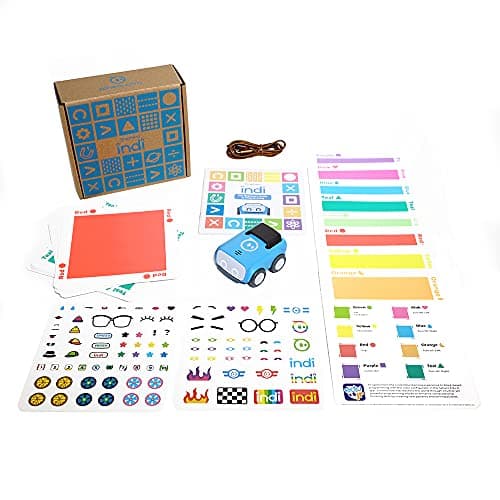
Color cards read by an on-board sensor, and 2+ hours per charge.
- Contents
- 1 indi robot, 30 color cards, charging cable, 2 sticker sheets, activity booklet, tape to fix the cards down
- Card mix
- 5 green, 4 yellow, 3 red, 2 purple, 3 teal, 3 orange, 5 blue, 5 pink
- How it is coded
- An on-board color sensor reads the cards; no screen needed
- Play time
- “2+ hours of play on a full charge”, USB charging
Sphero publishes 1 indi robot, 30 color cards, an on-board color sensor needing no screen, “2+ hours of play on a full charge” and an optional Sphero Edu Jr drag-and-drop block app, rated ages 4 and up.
Marked skip in the sense this page means: it is the correct robot for a six-year-old and the wrong one for a reader who came here for a programmable display. BOLT’s published floor is eight and that is where its value starts.
See the indi review.
Replay signal
- Open-ended or one-shot
- Very open-ended for the age: the child lays the track out across the whole floor
- Does anything run out
- Nothing runs out; recharges by USB
- Room to grow
- Screen-free cards first, then the same robot accepts block coding in the free app when the child is ready
- Adult required
- Not after setup — the program is the floor, and the child builds it
Why we say so: Sphero publishes the 30-card color breakdown, the on-board color sensor as the programming method, the 2+ hours per charge, and the optional step up to drag-and-drop blocks in Sphero Edu Jr.
What’s wrong with it
Published 4+ with no text path of its own — the app is optional blocks only.
| Contents | 1 indi robot, 30 color cards, charging cable, 2 sticker sheets, activity booklet, tape to fix the cards down |
|---|---|
| Card mix | 5 green, 4 yellow, 3 red, 2 purple, 3 teal, 3 orange, 5 blue, 5 pink |
| How it is coded | An on-board color sensor reads the cards; no screen needed |
| Play time | “2+ hours of play on a full charge”, USB charging |
| Optional app | Sphero Edu Jr drag-and-drop blocks |
| Stated age | Ages 4 and up |
Every figure above is from Sphero, indi At-Home Learning Kit. Blanks are shown as “not published” rather than filled in.
We are not putting a buy button on this one. It is easy enough to find if you want it anyway — but we would rather send you to something that gets played with twice.
Questions people actually ask
Frequently asked
Is Sphero BOLT worth it?
For a child who has outgrown block coding, yes. Sphero publishes an 8x8 programmable LED matrix - the only output device among coding balls - plus text coding in JavaScript or Python, a waterproof shell and all-day battery life. For a first coding robot, Sphero Mini publishes the same three canvases for a quarter of the price. Sphero Mini vs BOLT.
What age is Sphero BOLT for?
Sphero publishes ages 8+. In practice the premium features - the matrix and Python - start earning their keep around ten, when a child has met block coding elsewhere and wants to type.
Can Sphero BOLT be programmed in Python?
Yes. Sphero publishes "three ways to program (Draw, Blocks, and Text coding with JavaScript or Python)". It is the only robot in the Sphero range on this site that names Python. From toy to real code.
What does the 8x8 LED matrix do?
It gives a program somewhere to print. A child can display a sensor reading, a number or a character, so a bug can be read off the robot instead of inferred from how it moved. Every other coding ball answers only by moving.
Is Sphero BOLT waterproof?
Sphero publishes a "durable and waterproof design". It publishes no IP rating alongside that, so treat it as rain, spills and puddles rather than submersion.
How long does the battery last?
Sphero publishes "all-day battery life" with an inductive charging base, which is a claim rather than a figure - no hour count is published. For comparison it publishes a specific "45 Min Playtime" for Sphero Mini.
Sphero BOLT or a buildable robot kit?
BOLT if it should work on the day and be programmed outdoors; a kit if the child wants to understand the machine. Makeblock publishes about 100 parts, a 240 MHz controller and Arduino C/C++ for mBot Neo at the same published age and a similar price. Sphero BOLT vs mBot Neo.
Sources
Where these figures came from
Every specification on this page traces to one of these. If a manufacturer publishes nothing on a point, the page says so rather than filling the gap.
Read next
Where to go from here
Back to Reviews, or read how we pick.