The picks
Coding Toys for Two or More Children
Most coding robots are single-user by design. A few are not, and the difference decides whether the second child watches or plays.
By Sawyer V. · Published
The short answer
Coding toys with one robot and one remote produce one player and one spectator. The published exceptions are toys where the program lives on the floor or the table — color cards, picture cards and board games — because several children can lay out a route at once.
Block & Beaker earns a commission when you buy through our links, at no cost to you. It never changes a ranking, and we say so plainly when the right answer is the cheaper set, or nothing at all. Full disclosure · How we pick.
At a glance
The picks, ranked
Tap any row to jump to the full reasoning. Prices come live from Amazon where we have them and read “check price” where we don’t — never a number we cannot stand behind today.
| # | Product | Best for | Price |
|---|---|---|---|
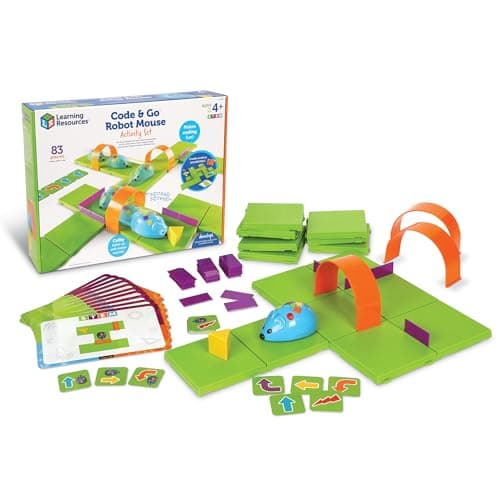
| 1 | Best for siblings Code & Go Robot Mouse Activity Set The maze is built by hand and the program is laid on a table, so two children can both be doing something. | Two children aged four to seven | |
| 2 | Best for a group ThinkFun Robot Turtles Published as a 2-5 player board game, which is the only genuinely multiplayer coding product here. | Two to five players, including an adult | |
| 3 | 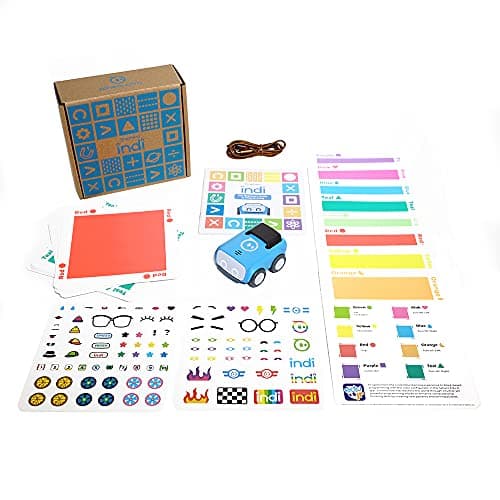 Best floor-scale option Sphero indi At-Home Learning Kit The program is a route across a floor, which two children can build from opposite ends. | Two children with a big room | |
| 4 | 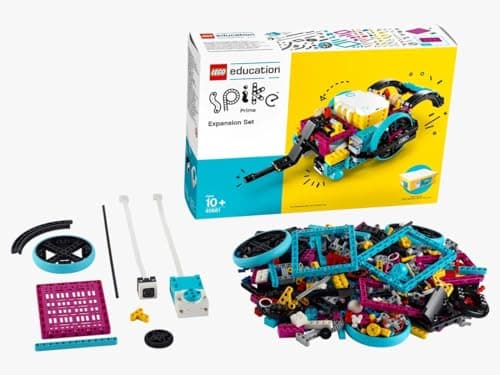 Best for a classroom LEGO Education SPIKE Essential Set Published by LEGO Education for grades 1-5, which is a classroom product rather than a toy. | Grades 1-5, in a group setting | |
| — | 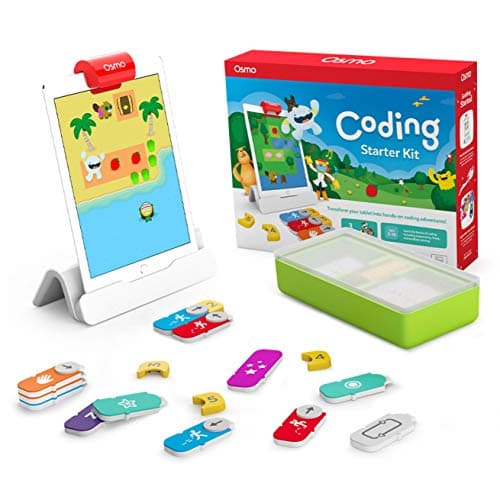 Do not buy this for two children Osmo Coding Starter Kit for iPad A single screen and a single set of blocks, which is one player and one onlooker. | One child with sole access to an iPad |
5 picks, including 1 we tell you to skip. Ages shown are the manufacturer’s own rating, not ours.
Why most coding toys fail with two children
The problem is structural rather than commercial. A coding robot is one object. If the program is entered into that object — on a remote, on a screen, on the robot itself — then only one child can be programming.
The toys that work with more than one child share a property: the program exists outside the robot. Cards on a table, color tiles on a floor, a board on a rug. Anything laid out in space can be laid out by several pairs of hands.
The arithmetic
Where the program lives
| Robot Mouse | Picture cards on a table — shareable |
|---|---|
| Sphero indi | Color cards across a floor — shareable |
| Robot Turtles | A board, 2-5 players — designed for it |
| Botley 2.0 | A handheld remote — one child at a time |
| Osmo Coding | Blocks in front of one screen — one child at a time |
The second job trick
Where a toy has only one program, look for a second job. The Robot Mouse has one: somebody has to build the maze from 16 grids and 22 walls, and that is real work rather than a consolation prize.
Botley publishes 27 obstacle pieces for the same reason. One child can build the course while the other writes the program, and then they swap. It is not as good as two programmers, and it is much better than one child watching.
Buying for a mixed-age pair
The usual sibling problem is that the older child takes over. Two published specifications reduce that.
Picture-based instructions. When the younger child can read the cards as well as the older one, the older one has no excuse to run the whole thing. The Robot Mouse and Matatalab both publish this.
A wide published age range. Matatalab publishes 4 to 9, which genuinely covers a sibling pair. A toy rated 5+ bought for a seven-year-old and a four-year-old only really belongs to one of them.
Worth knowing before you buy
Buying for a mixed-age household means the youngest child’s age rating governs, not the recipient’s. Small parts do not know whose birthday it was, and a 4+ rating in a house with a two-year-old is still a small-parts decision.
Where to go next
For the whole category ranked, coding robots. For gifts meant to be shared, STEM gifts two children can share. For the progression afterwards, from coding toy to real code.
In full
Every pick, and what is wrong with it
Published specifications only, each linked back to the page it came from. Where a manufacturer publishes nothing, the row says so — we do not fill blanks in.
1. Best for siblings
Code & Go Robot Mouse Activity Set
Learning Resources · LER2831 · maker rates it 4+
The maze is built by hand and the program is laid on a table, so two children can both be doing something.
- Set size
- 83 pieces
- Contents
- Colby the robot mouse, 16 maze grids, 22 maze walls, 3 tunnels, 30 double-sided coding cards, 10 activity cards, cheese wedge, activity guide
- Maze size
- The 16 grids build a 20″ x 20″ board
- Screen required
- None
Learning Resources publishes 83 pieces, 16 rearrangeable grids forming a 20 × 20 inch board, 22 walls, 3 tunnels and 30 picture-based cards, rated 4+.
This works with two children because there are two jobs. One builds the maze, the other builds the program, and both are real work. A robot with a fixed course and a button has only one job.
The picture cards also mean an older sibling does not have to read for a younger one, which removes the usual reason the older child takes over.
Replay signal
- Open-ended or one-shot
- The mouse is fixed, but the maze is not — 16 grids and 22 walls is a new problem every time
- Does anything run out
- Nothing runs out
- Room to grow
- The 10 activity cards are a starting ladder; after that the child sets the puzzles
- Adult required
- Reading is not required — the coding cards use directional symbols, so a four-year-old can work alone
Why we say so: Learning Resources publishes the 83-piece contents including 16 rearrangeable grids and 22 walls, and states the cards are picture-based. A rearrangeable maze is why this does not become a solved puzzle after one weekend.
What’s wrong with it
One mouse. If both children want to press the button, that is still a negotiation.
| Set size | 83 pieces |
|---|---|
| Contents | Colby the robot mouse, 16 maze grids, 22 maze walls, 3 tunnels, 30 double-sided coding cards, 10 activity cards, cheese wedge, activity guide |
| Maze size | The 16 grids build a 20″ x 20″ board |
| Screen required | None |
| Batteries | 3 x AAA (not included) |
| Stated age | Ages 4+ |
Every figure above is from Learning Resources, Code & Go Robot Mouse Activity Set. Blanks are shown as “not published” rather than filled in.
2. Best for a group
ThinkFun Robot Turtles
ThinkFun · 1900 · maker rates it 4+
Published as a 2-5 player board game, which is the only genuinely multiplayer coding product here.
- Stated age
- Ages 4 and up
- Players
- 2-5, one of whom is an adult acting as “the computer”
- Batteries
- None
- Format
- Board game teaching programming fundamentals
ThinkFun publishes Robot Turtles as a board game for 2-5 players, one of whom is an adult acting as the computer, rated 4 and up, with no batteries.
For a family evening or a group of cousins this is the right product, and it teaches the same sequencing ideas as any robot. The adult requirement is the format rather than a caveat — it is a game, and somebody has to run it.
Replay signal
- Open-ended or one-shot
- Open-ended, because the adult builds the board — difficulty scales with the child rather than with a deck
- Does anything run out
- Nothing runs out
- Room to grow
- The published rules add function cards and obstacles as the child improves
- Adult required
- Yes, always — an adult plays the computer. That is the design, and it is the whole cost
Why we say so: ThinkFun publishes the 4+ rating and the rule that an adult executes the child's program. An adult being structurally required is the single biggest predictor of whether a toy actually gets used, so it belongs in the headline rather than the small print.
What’s wrong with it
An adult acts as the computer, so it does not work as a toy children use alone.
| Stated age | Ages 4 and up |
|---|---|
| Players | 2-5, one of whom is an adult acting as “the computer” |
| Batteries | None |
| Format | Board game teaching programming fundamentals |
| Consumables | None |
Every figure above is from ThinkFun games. Blanks are shown as “not published” rather than filled in.
3. Best floor-scale option
Sphero indi At-Home Learning Kit
Sphero · indi · maker rates it 4+
The program is a route across a floor, which two children can build from opposite ends.
- Contents
- 1 indi robot, 30 color cards, charging cable, 2 sticker sheets, activity booklet, tape to fix the cards down
- Card mix
- 5 green, 4 yellow, 3 red, 2 purple, 3 teal, 3 orange, 5 blue, 5 pink
- How it is coded
- An on-board color sensor reads the cards; no screen needed
- Play time
- “2+ hours of play on a full charge”, USB charging
Sphero publishes an on-board color sensor as the programming mechanism, with a card mix of 5 green, 4 yellow, 3 red, 2 purple, 3 teal, 3 orange, 5 blue and 5 pink, 2+ hours per charge, rated 4+.
Because the program is physically large, two children genuinely can work on different sections of the same route. That is rare in this category and it is a property of the mechanism rather than a feature anybody advertised.
Replay signal
- Open-ended or one-shot
- Very open-ended for the age: the child lays the track out across the whole floor
- Does anything run out
- Nothing runs out; recharges by USB
- Room to grow
- Screen-free cards first, then the same robot accepts block coding in the free app when the child is ready
- Adult required
- Not after setup — the program is the floor, and the child builds it
Why we say so: Sphero publishes the 30-card color breakdown, the on-board color sensor as the programming method, the 2+ hours per charge, and the optional step up to drag-and-drop blocks in Sphero Edu Jr.
What’s wrong with it
One robot and 30 cards. A large layout keeps two busy; a small one does not.
| Contents | 1 indi robot, 30 color cards, charging cable, 2 sticker sheets, activity booklet, tape to fix the cards down |
|---|---|
| Card mix | 5 green, 4 yellow, 3 red, 2 purple, 3 teal, 3 orange, 5 blue, 5 pink |
| How it is coded | An on-board color sensor reads the cards; no screen needed |
| Play time | “2+ hours of play on a full charge”, USB charging |
| Optional app | Sphero Edu Jr drag-and-drop blocks |
| Stated age | Ages 4 and up |
Every figure above is from Sphero, indi At-Home Learning Kit. Blanks are shown as “not published” rather than filled in.
4. Best for a classroom
LEGO Education SPIKE Essential Set
LEGO Education · 45345 · maker rates it 6+ (grades 1-5)
Published by LEGO Education for grades 1-5, which is a classroom product rather than a toy.
- Pieces
- 449
- Motors
- 2 small motors
- Sensors
- Color sensor; 6-axis gyro in the hub
- Display
- 3x3 color light matrix
LEGO Education publishes 449 pieces, two small motors, a color sensor, a six-axis gyro and a 3 × 3 color light matrix, rated 6+ for grades 1-5.
The reason this suits groups is that building and coding are separable. Two children can split the work honestly, and neither is waiting.
Replay signal
- Open-ended or one-shot
- Open-ended — it is a LEGO system with motors, so the build is never fixed
- Does anything run out
- Nothing runs out; the hub is rechargeable rather than battery-fed
- Room to grow
- Icon coding first, then word-based Scratch blocks in the same app, on the same hardware
- Adult required
- For the first build and the app setup; not after that
Why we say so: LEGO Education publishes 449 pieces, two motors, a color sensor and a rechargeable hub, with an app offering both icon-based and word-based coding. Two coding modes on one set is the published progression — a six-year-old starts on icons and moves to Scratch-style words without new hardware.
What’s wrong with it
Priced and specified for institutions, not for one child at home.
| Pieces | 449 |
|---|---|
| Motors | 2 small motors |
| Sensors | Color sensor; 6-axis gyro in the hub |
| Display | 3x3 color light matrix |
| Hub | Small hub, 2 input/output ports, Bluetooth, rechargeable Li-ion with micro USB |
| Software | SPIKE App — icon-based and word-based coding built on Scratch |
| Stated age | 6+, grades 1-5 |
Every figure above is from LEGO Education, SPIKE Essential Set 45345. Blanks are shown as “not published” rather than filled in.
Skip this one
Osmo Coding Starter Kit for iPad
Osmo · Coding Starter Kit · maker rates it 5-10
A single screen and a single set of blocks, which is one player and one onlooker.
- Contents
- Osmo Base and Reflector for iPad, 31 magnetic coding blocks, stackable storage, 3 game apps
- Games
- Coding Awbie, Coding Jam, Coding Duo
- Screen required
- Yes — an iPad is required and is not included
- Compatibility
- All iPads except generations 1-4 and certain newer models; minimum iOS 11
Osmo publishes three coding games, a hard iPad requirement — all iPads except generations 1-4 and certain newer models, minimum iOS 11 — and a 5-10 age range.
A screen has one viewing position and the blocks are a single set. Whatever the intention, in practice one child holds the blocks and the other watches, which is the exact failure this page exists to avoid.
Replay signal
- Open-ended or one-shot
- Guided by the three games rather than open-ended; Coding Jam is the one with no ending
- Does anything run out
- Nothing physical runs out
- Room to grow
- Three games at rising difficulty, described by Osmo as beginner to expert
- Adult required
- Only to hand over the iPad — which is precisely the friction: this one competes with screen time rather than replacing it
Why we say so: Osmo publishes the 31-block count, the three named games, the iPad requirement and the compatibility list. The iPad dependency is a published requirement, and it is the fact most likely to decide whether this gets used.
What’s wrong with it
Published as requiring an iPad that is not included, with one physical block set.
| Contents | Osmo Base and Reflector for iPad, 31 magnetic coding blocks, stackable storage, 3 game apps |
|---|---|
| Games | Coding Awbie, Coding Jam, Coding Duo |
| Screen required | Yes — an iPad is required and is not included |
| Compatibility | All iPads except generations 1-4 and certain newer models; minimum iOS 11 |
| Stated age | Ages 5-10 |
Every figure above is from Osmo, Coding Starter Kit. Blanks are shown as “not published” rather than filled in.
We are not putting a buy button on this one. It is easy enough to find if you want it anyway — but we would rather send you to something that gets played with twice.
Questions people actually ask
Frequently asked
Which coding toy is best for two children?
One where the program is laid out in space rather than entered into a device. The Code & Go Robot Mouse works well because building the 16-grid maze and building the program are two separate jobs, and its picture-based cards mean a younger sibling is not dependent on an older one to read them.
Are there any multiplayer coding toys?
Robot Turtles is the only genuinely multiplayer product we cover — ThinkFun publishes it as a 2-5 player board game, with an adult acting as the computer. Everything else is a single-user robot that can be shared by taking turns.
Do coding robots work in a classroom?
LEGO Education publishes SPIKE Essential for grades 1-5, which is explicitly a classroom product — 449 pieces, two motors, a color sensor and a gyro. Because building and coding are separable, two children can divide the work without either one waiting.
How do you stop an older sibling taking over a coding toy?
Buy one with picture-based instructions and a wide published age range. If the younger child can read the cards independently, the older one has no practical reason to run everything. Matatalab publishes graphic symbols requiring no literacy and an age range of 4 to 9, which covers a sibling pair honestly.
Sources
Where these figures came from
Every specification on this page traces to one of these. If a manufacturer publishes nothing on a point, the page says so rather than filling the gap.
Read next
Where to go from here
Back to Coding & Robotics, or read how we pick.