The picks
Robot Kits for Kids
The difference between a robot toy and a robot kit is whether the child is allowed to change it.
By Sawyer V. · Published
The short answer
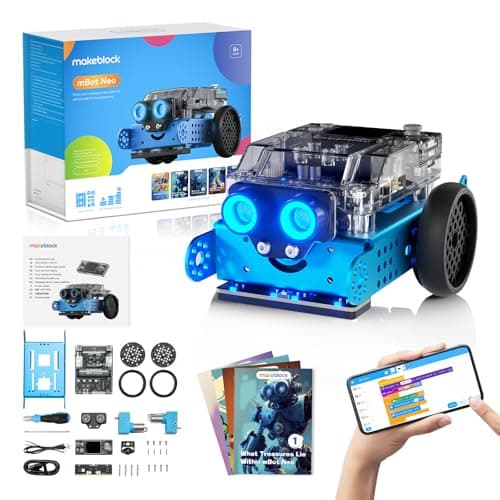
Buy the one with a published upgrade path. Makeblock’s mBot2 runs Scratch-style blocks, then Python in mBlock, then Arduino C — three programming environments on one chassis, with 60-plus compatible modules. That is what stops a robot kit being outgrown at eleven.
Block & Beaker earns a commission when you buy through our links, at no cost to you. It never changes a ranking, and we say so plainly when the right answer is the cheaper set, or nothing at all. Full disclosure · How we pick.
At a glance
The picks, ranked
Tap any row to jump to the full reasoning. Prices come live from Amazon where we have them and read “check price” where we don’t — never a number we cannot stand behind today.
| # | Product | Best for | Price |
|---|---|---|---|
| 1 | Best overall Makeblock mBot Neo (mBot2) Blocks, then Python, then Arduino C on the same robot, with 60+ modules to bolt on. | Eight and up, and the last robot you need to buy | |
| 2 | 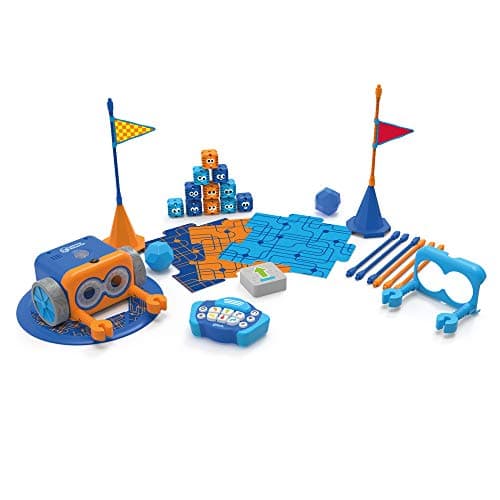 Best entry point Botley 2.0 The Coding Robot Activity Set Not a kit, and the right purchase anyway for anyone under about eight. | Five to eight, before a buildable kit makes sense | |
| 3 | 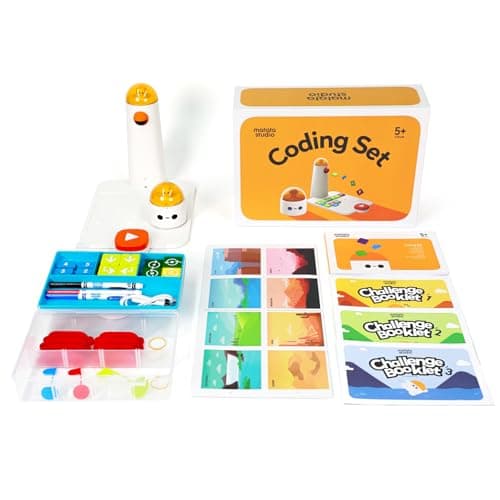 Best for younger builders MatataStudio (Matatalab) Coding Set A modular system with add-ons, so the hardware changes even though the child does not assemble it. | Four to nine, as the step before a real kit | |
| 4 | 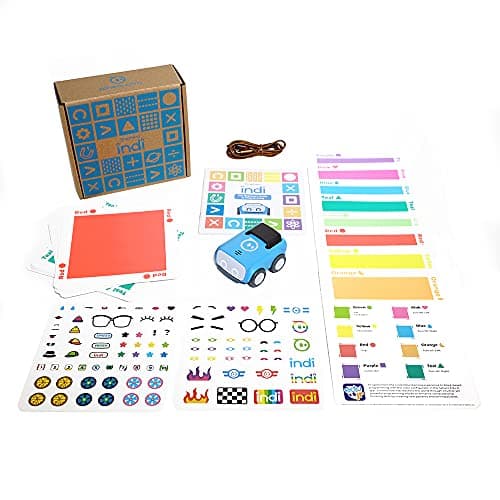 Best cheap route to real code Sphero indi At-Home Learning Kit Color cards now, drag-and-drop blocks in a free app later, on the same robot. | Four to nine, on a budget, with a screen path later | |
| — | 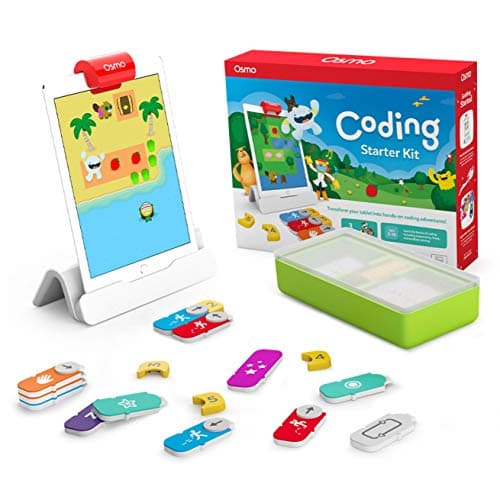 Not a robot kit Osmo Coding Starter Kit for iPad Three coding games on an iPad with tangible blocks — no robot, nothing built, nothing modified. | A different question entirely |
5 picks, including 1 we tell you to skip. Ages shown are the manufacturer’s own rating, not ours.
The distinction that matters: toy, expandable, kit
Three different products get sold as robot kits, and knowing which one you are buying prevents most of the disappointment in this category.
A robot toy arrives assembled and does what it was designed to do. Botley is a robot toy, and an excellent one. The child programs its behavior and cannot change its capabilities.
An expandable robot arrives assembled and accepts add-ons. Matatalab is expandable — the same command tower gains music and drawing. The child extends what it does without learning what is inside.
A robot kit is assembled by the child and modified afterward. The mBot2 publishes eight motor and servo ports and 60-plus compatible modules with up to ten connected at once. That is a machine the child configures rather than a machine they operate.
All three are legitimate purchases at different ages. The failure is buying a toy for a child who wanted a kit, which produces a robot that is driven around twice and shelved.
The upgrade path is the specification to compare
The arithmetic
How far each one goes
| mBot2 — programming environments published | Blocks, Python, Arduino C |
|---|---|
| mBot2 — compatible modules | 60+ |
| mBot2 — modules connectable at once | 10 |
| Sphero indi — programming environments | Color cards, block coding |
| Matatalab — programming environments | Physical blocks only |
| Botley 2.0 — programming environments | Remote sequencing only |
What to expect from the build itself
Honestly: less than the word “kit” implies. Modern children’s robot kits are largely screwed together from pre-assembled modules — a chassis, a controller board, sensors that plug in. There is no soldering, and the assembly is typically an evening rather than a project.
That is the right design decision, and it is worth setting expectations around. The learning is not in the assembly; it is in what happens afterward, when the child adds a sensor and has to work out how to use it. A kit that took a week to build and could not then be changed would be a worse product.
What this means practically: do not buy a kit hoping for a long shared building project. Buy it for the six months after the building, and check that the platform has somewhere to go.
Worth knowing before you buy
Age ratings in this category diverge between manufacturers and retailers in a way worth knowing about. Makeblock publishes the mBot2 for ages 8+. Elsewhere in the buildable-robot category, retailer listings and manufacturer sites disagree — some Arduino-based kits are listed at 8+ with adult guidance by retailers and 12+ by the maker.
Where they disagree, take the manufacturer’s number as the honest one. The gap usually reflects how much adult time the build genuinely needs, and a kit that stalls half-assembled is worse than no kit.
Say the unwelcome thing
Do not buy a kit for a child under eight
Buildable robot kits assume a child can follow assembly instructions and tolerate a build that does not work first time. Below about eight that is an adult project with a child watching, which is not what anyone bought it for.
Under eight, buy a robot toy — Botley or the Robot Mouse — and get sequencing and debugging established. The kit lands much better two years later.
What to buy
- Under eight: not a kit. Botley 2.0 or the Robot Mouse.
- Eight and up, serious about it: mBot2, for the three published programming environments.
- Four to nine, wants to expand rather than build: Matatalab with add-ons.
- Budget, wants a real code path: Sphero indi.
For the wider category see coding robots, and for electronics rather than robotics — Snap Circuits teaches the components a robot is made of, for considerably less money.
In full
Every pick, and what is wrong with it
Published specifications only, each linked back to the page it came from. Where a manufacturer publishes nothing, the row says so — we do not fill blanks in.
1. Best overall
Makeblock mBot Neo (mBot2)
Makeblock · mBot2 · maker rates it 8+
Blocks, then Python, then Arduino C on the same robot, with 60+ modules to bolt on.
- Controller
- CyberPi — Xtensa 32-bit LX6 dual-core at 240 MHz, 8 MB flash, 8 MB PSRAM
- Programming
- Scratch-style blocks, Python in mBlock, and Arduino C/C++ via the Arduino IDE
- Sensors
- On-board light, microphone, gyroscope and accelerometer, plus ultrasonic, quad RGB, temperature and IR modules
- Battery
- Built-in 2500 mAh LiPo, about 1 hour to charge, about 5 hours of play
Makeblock publishes the specification in unusual detail: a CyberPi controller with an Xtensa 32-bit LX6 dual-core at 240 MHz, 8 MB flash and 8 MB PSRAM; on-board light sensor, microphone, gyroscope and accelerometer plus ultrasonic, quad RGB, temperature and IR modules; a built-in 2500 mAh LiPo giving about five hours of play from a one-hour charge; eight motor and servo ports and more than 60 compatible modules with up to ten connected at once.
The three programming environments are the reason to buy it. Scratch-style blocks at eight, Python in mBlock at ten or eleven, and Arduino C after that — all on the same hardware, published by the manufacturer as a path rather than inferred by us.
That is what a robot kit is for. A robot toy does what it was designed to do; a robot kit does what the child makes it do, and keeps doing so as the child gets better.
Replay signal
- Open-ended or one-shot
- Open-ended at the top of the range — this is the one a child does not outgrow at eleven
- Does anything run out
- Nothing runs out; rechargeable
- Room to grow
- Blocks, then Python, then Arduino C on the same robot, with 60+ add-on modules
- Adult required
- Not for driving it. Probably for the first Python session
Why we say so: Makeblock publishes the processor, the three programming environments on one robot, the 2500 mAh battery figures and the 60+ compatible modules. Blocks-to-Python-to-C on one chassis is the published upgrade path, and it is why this survives the year a child gets bored of pressing buttons.
What’s wrong with it
The price is real, and a child who only ever uses the block editor is paying for two-thirds of a product they never open.
| Controller | CyberPi — Xtensa 32-bit LX6 dual-core at 240 MHz, 8 MB flash, 8 MB PSRAM |
|---|---|
| Programming | Scratch-style blocks, Python in mBlock, and Arduino C/C++ via the Arduino IDE |
| Sensors | On-board light, microphone, gyroscope and accelerometer, plus ultrasonic, quad RGB, temperature and IR modules |
| Battery | Built-in 2500 mAh LiPo, about 1 hour to charge, about 5 hours of play |
| Expansion | 60+ compatible modules, up to 10 connected at once, 8 motor and servo ports |
| Stated age | Ages 8+ |
Every figure above is from Makeblock, mBot2 coding robot kit. Blanks are shown as “not published” rather than filled in.
2. Best entry point
Botley 2.0 The Coding Robot Activity Set
Learning Resources · LER2938 · maker rates it 5+
Not a kit, and the right purchase anyway for anyone under about eight.
- Set size
- 78 pieces
- Contents
- Botley 2.0, remote programmer, 2 face plates, 40 coding cards, 6 double-sided boards, 27 obstacle pieces, starter guide
- Maximum program length
- “coding sequences of up to 150 steps”
- Movement
- Six directions, plus 16 coded interactions
Learning Resources publishes 78 pieces, a 150-step maximum sequence, six directions and 16 interactions, screen-free, rated 5+.
Buildable robot kits start at eight and mostly assume some patience with instructions. Below that, a child who is given a kit ends up watching an adult assemble it, which is the opposite of the intended experience.
Botley is on this page as the honest recommendation for the age below the category. Get the sequencing and debugging established here, then buy a kit when the child starts asking how it works rather than what it does.
Replay signal
- Open-ended or one-shot
- Open-ended once the cards are understood — the child builds the maze, not just the program
- Does anything run out
- Nothing runs out except batteries
- Room to grow
- A 150-step ceiling means the challenge scales for years past the first week
- Adult required
- Needed for the first session, then not — there is no app account and nothing to log into
Why we say so: Learning Resources publishes the 78-piece contents, the 150-step maximum sequence, the six directions and 16 interactions, and states the set is 100% screen-free with no tablet or app required.
What’s wrong with it
Nothing is built and nothing is modified. When a child starts asking what is inside, this robot has no answer.
| Set size | 78 pieces |
|---|---|
| Contents | Botley 2.0, remote programmer, 2 face plates, 40 coding cards, 6 double-sided boards, 27 obstacle pieces, starter guide |
| Maximum program length | “coding sequences of up to 150 steps” |
| Movement | Six directions, plus 16 coded interactions |
| Screen required | None — “100% screen-free play” |
| Batteries | “Requires 5 AAA batteries (not included)” |
| Stated age | 5+ (K-2nd grade) |
Every figure above is from Learning Resources, Botley 2.0 Activity Set. Blanks are shown as “not published” rather than filled in.
3. Best for younger builders
MatataStudio (Matatalab) Coding Set
MatataStudio · Coding Set · maker rates it 4+
A modular system with add-ons, so the hardware changes even though the child does not assemble it.
- Contents
- Robot car, command tower, control board, 37 coding blocks, 8 obstacles, 3 flags, 3 challenge booklets, nature map
- Screen required
- None — “screen-free, app-free and internet-free”
- Literacy required
- None — blocks use “intuitive graphic symbols” and directional language
- Power
- Rechargeable — 500 mAh cell in the robot, 2000 mAh in the command tower, USB-C
MatataStudio publishes the robot car, command tower, control board, 37 coding blocks, 8 obstacles, 3 flags, 3 challenge booklets and a nature map, for ages 4 to 9, with add-on sets extending the same command tower into music and drawing.
The add-on structure is the reason this belongs on a robot kit page rather than only on the screen-free one. A child who has used the base set and then gets the artist add-on discovers that the same command tower now drives a pen, and that a system can be extended rather than replaced.
That is a genuinely useful idea to arrive at before eight, and it is the closest thing to modularity available at this age.
Replay signal
- Open-ended or one-shot
- Semi-open: three challenge booklets first, then free building on the map
- Does anything run out
- Nothing runs out, and it recharges rather than eating AAAs
- Room to grow
- Add-on sets extend the same command tower into music and drawing
- Adult required
- No reading needed, so a four-year-old can set up a run unaided
Why we say so: MatataStudio publishes the full contents list, the rechargeable cell capacities, and states the blocks use graphic symbols so no literacy is required.
What’s wrong with it
Add-ons extend what the robot does rather than teaching how it works — it is expandable, not buildable.
| Contents | Robot car, command tower, control board, 37 coding blocks, 8 obstacles, 3 flags, 3 challenge booklets, nature map |
|---|---|
| Screen required | None — “screen-free, app-free and internet-free” |
| Literacy required | None — blocks use “intuitive graphic symbols” and directional language |
| Power | Rechargeable — 500 mAh cell in the robot, 2000 mAh in the command tower, USB-C |
| Stated age | Ages 4 to 9 |
Every figure above is from MatataStudio, Coding Set. Blanks are shown as “not published” rather than filled in.
4. Best cheap route to real code
Sphero indi At-Home Learning Kit
Sphero · indi · maker rates it 4+
Color cards now, drag-and-drop blocks in a free app later, on the same robot.
- Contents
- 1 indi robot, 30 color cards, charging cable, 2 sticker sheets, activity booklet, tape to fix the cards down
- Card mix
- 5 green, 4 yellow, 3 red, 2 purple, 3 teal, 3 orange, 5 blue, 5 pink
- How it is coded
- An on-board color sensor reads the cards; no screen needed
- Play time
- “2+ hours of play on a full charge”, USB charging
Sphero publishes an on-board color sensor, 30 color cards, 2+ hours of play per charge, and optional drag-and-drop block coding in the free Sphero Edu Jr app.
For a household not ready to spend what a full kit costs, this is the cheapest published route from pre-reading play to actual block coding. Two stages on one purchase is unusual at this price.
What it does not do is text-based code. If the child is heading that way, the mBot2 is the purchase that gets them there without a second robot.
Replay signal
- Open-ended or one-shot
- Very open-ended for the age: the child lays the track out across the whole floor
- Does anything run out
- Nothing runs out; recharges by USB
- Room to grow
- Screen-free cards first, then the same robot accepts block coding in the free app when the child is ready
- Adult required
- Not after setup — the program is the floor, and the child builds it
Why we say so: Sphero publishes the 30-card color breakdown, the on-board color sensor as the programming method, the 2+ hours per charge, and the optional step up to drag-and-drop blocks in Sphero Edu Jr.
What’s wrong with it
The upgrade is to block coding, and it stops there — there is no Python route on this hardware.
| Contents | 1 indi robot, 30 color cards, charging cable, 2 sticker sheets, activity booklet, tape to fix the cards down |
|---|---|
| Card mix | 5 green, 4 yellow, 3 red, 2 purple, 3 teal, 3 orange, 5 blue, 5 pink |
| How it is coded | An on-board color sensor reads the cards; no screen needed |
| Play time | “2+ hours of play on a full charge”, USB charging |
| Optional app | Sphero Edu Jr drag-and-drop blocks |
| Stated age | Ages 4 and up |
Every figure above is from Sphero, indi At-Home Learning Kit. Blanks are shown as “not published” rather than filled in.
Skip this one
Osmo Coding Starter Kit for iPad
Osmo · Coding Starter Kit · maker rates it 5-10
Three coding games on an iPad with tangible blocks — no robot, nothing built, nothing modified.
- Contents
- Osmo Base and Reflector for iPad, 31 magnetic coding blocks, stackable storage, 3 game apps
- Games
- Coding Awbie, Coding Jam, Coding Duo
- Screen required
- Yes — an iPad is required and is not included
- Compatibility
- All iPads except generations 1-4 and certain newer models; minimum iOS 11
Osmo publishes an Osmo Base and reflector, 31 magnetic coding blocks, stackable storage and three game apps — Coding Awbie, Coding Jam and Coding Duo — for ages 5-10, requiring an iPad.
It is a good product and it is not what this page is about. A robot kit is bought by a child who wants to build a machine and change how it behaves. Osmo is a screen game with physical controls, and the thing being coded lives inside the screen.
If the underlying goal is coding rather than robotics, it belongs in the coding roundup. If the child specifically wants to build something, nothing here substitutes for a kit.
Replay signal
- Open-ended or one-shot
- Guided by the three games rather than open-ended; Coding Jam is the one with no ending
- Does anything run out
- Nothing physical runs out
- Room to grow
- Three games at rising difficulty, described by Osmo as beginner to expert
- Adult required
- Only to hand over the iPad — which is precisely the friction: this one competes with screen time rather than replacing it
Why we say so: Osmo publishes the 31-block count, the three named games, the iPad requirement and the compatibility list. The iPad dependency is a published requirement, and it is the fact most likely to decide whether this gets used.
What’s wrong with it
There is no robot in the box. It appears in robot kit searches because it is shelved as coding, and it is a different product.
| Contents | Osmo Base and Reflector for iPad, 31 magnetic coding blocks, stackable storage, 3 game apps |
|---|---|
| Games | Coding Awbie, Coding Jam, Coding Duo |
| Screen required | Yes — an iPad is required and is not included |
| Compatibility | All iPads except generations 1-4 and certain newer models; minimum iOS 11 |
| Stated age | Ages 5-10 |
Every figure above is from Osmo, Coding Starter Kit. Blanks are shown as “not published” rather than filled in.
We are not putting a buy button on this one. It is easy enough to find if you want it anyway — but we would rather send you to something that gets played with twice.
Questions people actually ask
Frequently asked
What age are robot kits for?
Eight and up for buildable kits — Makeblock rates the mBot2 at 8+. Below that, a kit becomes an adult project with a child watching. Under eight, a robot toy like Botley teaches the same sequencing and debugging without the assembly.
Which robot kit lasts the longest?
The one with a published upgrade path. Makeblock publishes three programming environments on the mBot2 — Scratch-style blocks, Python in mBlock, and Arduino C — plus 60-plus compatible modules, so a child who starts at eight is still using it at twelve.
Do robot kits require soldering?
Modern children's kits do not. They assemble from pre-made modules that screw together and plug in, typically in an evening. The learning is in what happens after the build, not in the build itself — so do not buy one expecting a long shared construction project.
Is Osmo a robot kit?
No. Osmo publishes an iPad-based system with tangible coding blocks and three games. There is no robot in the box and nothing gets built or modified. It appears in robot kit searches because it is shelved as coding.
Sources
Where these figures came from
Every specification on this page traces to one of these. If a manufacturer publishes nothing on a point, the page says so rather than filling the gap.
Read next
Where to go from here
Back to Coding & Robotics, or read how we pick.