Single review
Makeblock mBot Ranger Review
Reviewed from Makeblock's published specifications. We have not built it, and where the maker's pages and the retail listing disagree — or say nothing — we say so.
By Sawyer V. · Published
The short answer
The mBot Ranger is worth it for a child who wants to build the robot, not just program it. Makeblock publishes about 100 parts that build three forms — a robot tank, a self-balancing robot and a racing car — programmed in mBlock from blocks up to Arduino. Makeblock’s site says Age 8+; the Amazon listing says Ages 10+.
Block & Beaker earns a commission when you buy through our links, at no cost to you. It never changes a ranking, and we say so plainly when the right answer is the cheaper set, or nothing at all. Full disclosure · How we pick.
At a glance
The picks, ranked
Tap any row to jump to the full reasoning. Prices come live from Amazon where we have them and read “check price” where we don’t — never a number we cannot stand behind today.
| # | Product | Best for | Price |
|---|---|---|---|
| 1 | 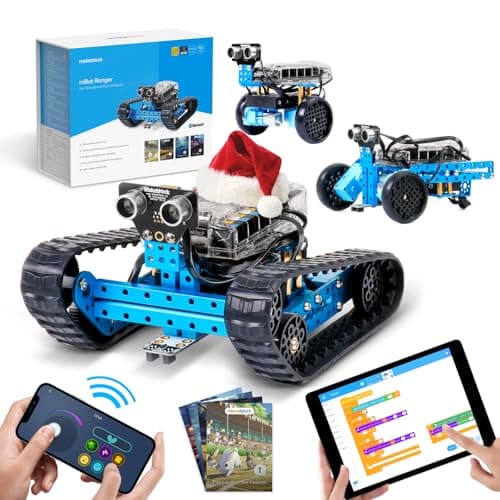 The product Makeblock mBot Ranger About 100 parts, three published builds, and block-to-Arduino programming on the same robot. | Eight to ten and up, for a child who wants to build first | |
| 2 | 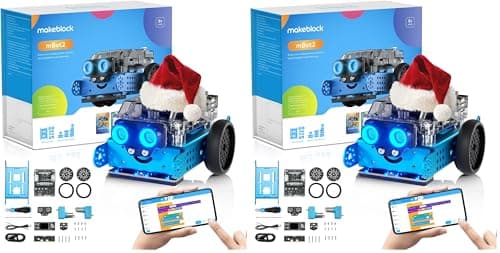 The ready-to-program rival Makeblock mBot Neo (mBot2) Makeblock's CyberPi robot: blocks, Python and Arduino C, a rechargeable battery and 60+ add-on modules. | Eight and up, heading for Python | |
| 3 | 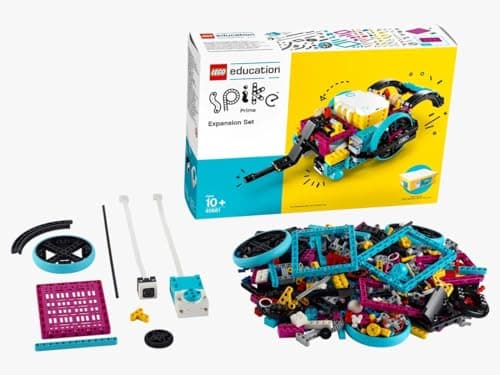 The LEGO alternative LEGO Education SPIKE Essential Set 449 LEGO pieces with two motors, a color sensor and icon-to-word coding. | Six and up, where the build should be LEGO | |
| — | 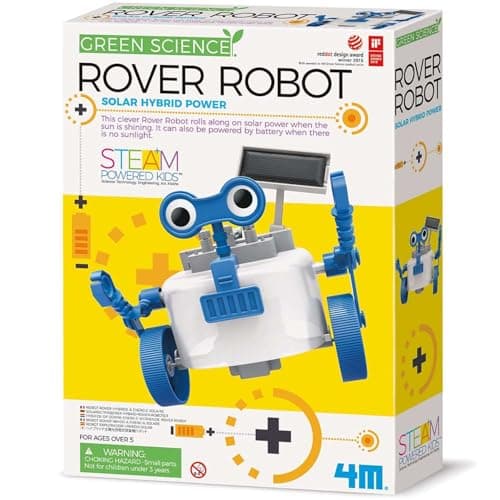 Not a programmable robot 4M Green Science Solar Rover Turns up under 'build a robot kit', and it builds one solar rover with no programming at all. | Five and up, for a first build |
4 picks, including 1 we tell you to skip. Ages shown are the manufacturer’s own rating, not ours.
What we can tell you, and what we cannot
We have not built it. No lab, no samples, no test children, and no star rating on this page or in its structured data.
What Makeblock publishes — the three forms, the part count, the expansion ports, the compatibility, the programming path and the named sensors — we can report and compare. Two things we could not confirm from the maker’s own pages: the battery type, and a single age rating, because the maker’s site and the Amazon listing disagree. Both are flagged below rather than filled in.
The specification that decides it
The arithmetic
Makeblock mBot Ranger, published
| Build forms | 3 — a robot tank, a self-balancing robot, a racing car |
|---|---|
| Parts | “about 100 parts” |
| Expansion | 10 expansion ports |
| Compatibility | “fully compatible with 500+ Makeblock parts, LEGO bricks, and supports Arduino” |
| Programming | mBlock — visual (block) and text-based, up to Arduino |
| Sensors named | Infrared, light and line-following |
| Control | Makeblock remote-control app |
| Stated age | Makeblock's site: Age 8+ | Amazon listing title: Ages 10+ |
| Batteries | Not stated on the Makeblock pages we could read |
What the numbers mean in practice
Building is half the product. About 100 parts is a genuine assembly job, and that is the point. A child who builds the robot knows what the motors, sensors and board are, because they put them there.
Three forms are three different problems. A tank, a racing car and a self-balancing robot move in different ways, so the same program does not simply carry over. The self-balancing form in particular is a harder mechanical and coding problem than a car — which gives an older child somewhere to go.
Blocks to Arduino, on one robot. Makeblock publishes both visual and text-based programming in mBlock. That is the same kind of upgrade path the mBot Neo publishes, and it means the kit is not outgrown when block coding stops being interesting.
LEGO compatibility is a real extension. Makeblock publishes compatibility with LEGO bricks as well as 500+ of its own parts, so the robot can borrow from a LEGO collection the household already owns.
Built to go outside. Makeblock describes the tank form as an all-terrain robot that can “conquer floors, hillsides, sand, and grass”. We have not tested that, and it is the maker’s description, not ours.
The age question
Makeblock’s own site lists the Ranger at Age 8+. The Amazon listing title says Ages 10+. Both are published, and they disagree.
Our reading, stated as advice rather than as a manufacturer claim: treat eight as the floor for a child who has built kits before and has an adult nearby for the first assembly, and ten as the age for building it alone. About 100 parts is the reason for the gap.
Two editions on sale
Makeblock also publishes an “mBot Ranger with Coding Box” edition, which adds four coding projects — sound control, light detection, obstacle avoidance and line following — delivered as foldout instructions. Check which edition a listing is for before buying. For a child who likes being handed the next project, the Coding Box edition is the one to look for.
Who should skip it
A child who wants to program straight away. The mBot Neo puts the emphasis on code, with Python and a rechargeable battery.
A child under eight. Makeblock publishes Age 8+, and the Amazon listing says 10+. For a six- or seven-year-old, LEGO SPIKE Essential is published at 6+.
A child who has never coded. A screen-free robot is a better first step, and the Ranger is a better second one.
Say the unwelcome thing
Do not buy it as a first coding toy
The Ranger asks a child to build a robot and then program it. A child new to sequencing gets more from a simpler first robot — see how to choose a first coding toy — and arrives at a kit like this knowing why they want it.
Where it sits
The Ranger is the build-it-first option alongside robot kits for kids and robot kits for teens. For the LEGO side of the market, see LEGO robotics compared.
In full
Every pick, and what is wrong with it
Published specifications only, each linked back to the page it came from. Where a manufacturer publishes nothing, the row says so — we do not fill blanks in.
1. The product
Makeblock mBot Ranger
Makeblock · mBot Ranger · maker rates it 8+
About 100 parts, three published builds, and block-to-Arduino programming on the same robot.
- Build forms
- 3 — a robot tank, a self-balancing robot and a racing car
- Parts
- “about 100 parts”
- Expansion
- 10 expansion ports
- Compatibility
- “fully compatible with 500+ Makeblock parts, LEGO bricks, and supports Arduino”
Makeblock publishes the mBot Ranger as a “3-in-1 Programmable Robot Building Kit” that can transform into “a robot tank, a self-balancing robot, and a racing car”. It “comes with about 100 parts”, has 10 expansion ports, and is “fully compatible with 500+ Makeblock parts, LEGO bricks, and supports Arduino”. Programming is in Makeblock’s mBlock platform, “offering both visual and text-based programming”, with a remote-control app as well. Makeblock describes it as equipped with sensors including an infrared sensor, a light sensor and a line-following sensor.
Three published builds from one box is what makes this a robot kit rather than a coding robot. The child assembles the machine, takes it apart, and assembles a different machine from the same parts — which is exactly the part of robotics most coding toys skip.
Block coding to Arduino in the same software is the other half. A child starts by dragging blocks and, on the same robot, can move on to the text language used in real embedded electronics.
Replay signal
- Open-ended or one-shot
- Three published builds, then a kit compatible with 500+ Makeblock parts and LEGO bricks
- Does anything run out
- Nothing runs out apart from batteries
- Room to grow
- Block coding first, then Arduino in the same mBlock software, on the same robot
- Adult required
- For the first build at the young end of the range — about 100 parts is a real assembly job
Why we say so: Makeblock publishes three build forms from about 100 parts, 10 expansion ports and compatibility with 500+ Makeblock parts and LEGO bricks, programmed in mBlock from blocks to Arduino. Building the robot before programming it is the published design, and it is what makes this a robot kit rather than a coding robot.
What’s wrong with it
About 100 parts is a real assembly job, and the battery type is not stated on the Makeblock pages we could read.
| Build forms | 3 — a robot tank, a self-balancing robot and a racing car |
|---|---|
| Parts | “about 100 parts” |
| Expansion | 10 expansion ports |
| Compatibility | “fully compatible with 500+ Makeblock parts, LEGO bricks, and supports Arduino” |
| Programming | mBlock, “offering both visual and text-based programming” — blocks up to Arduino |
| Sensors named | Infrared, light and line-following (Makeblock's launch post) |
| Control | Makeblock remote-control app |
| Stated age | Age 8+ on Makeblock's site; the Amazon listing title says Ages 10+ |
| Batteries | Not stated on the Makeblock pages we could read |
Every figure above is from Makeblock, mBot Ranger robot building kit. Blanks are shown as “not published” rather than filled in.
2. The ready-to-program rival
Makeblock mBot Neo (mBot2)
Makeblock · mBot2 · maker rates it 8+
Makeblock's CyberPi robot: blocks, Python and Arduino C, a rechargeable battery and 60+ add-on modules.
- Controller
- CyberPi — Xtensa 32-bit LX6 dual-core at 240 MHz, 8 MB flash, 8 MB PSRAM
- Programming
- Scratch-style blocks, Python in mBlock, and Arduino C/C++ via the Arduino IDE
- Sensors
- On-board light, microphone, gyroscope and accelerometer, plus ultrasonic, quad RGB, temperature and IR modules
- Battery
- Built-in 2500 mAh LiPo, about 1 hour to charge, about 5 hours of play
Makeblock publishes the mBot Neo (mBot2) with the CyberPi controller — programmable in Scratch-style blocks, Python in mBlock and Arduino C/C++ — on-board light, sound, gyroscope and accelerometer sensors, a built-in 2500 mAh battery giving about five hours of play, and 60+ compatible modules, rated 8+.
Same maker, opposite emphasis. The Neo goes further in code, with Python and a rechargeable battery; the Ranger goes further in construction, with three builds and LEGO compatibility. See the mBot Neo review.
Replay signal
- Open-ended or one-shot
- Open-ended at the top of the range — this is the one a child does not outgrow at eleven
- Does anything run out
- Nothing runs out; rechargeable
- Room to grow
- Blocks, then Python, then Arduino C on the same robot, with 60+ add-on modules
- Adult required
- Not for driving it. Probably for the first Python session
Why we say so: Makeblock publishes the processor, the three programming environments on one robot, the 2500 mAh battery figures and the 60+ compatible modules. Blocks-to-Python-to-C on one chassis is the published upgrade path, and it is why this survives the year a child gets bored of pressing buttons.
What’s wrong with it
One fixed chassis — the child programs the robot rather than redesigning it.
| Controller | CyberPi — Xtensa 32-bit LX6 dual-core at 240 MHz, 8 MB flash, 8 MB PSRAM |
|---|---|
| Programming | Scratch-style blocks, Python in mBlock, and Arduino C/C++ via the Arduino IDE |
| Sensors | On-board light, microphone, gyroscope and accelerometer, plus ultrasonic, quad RGB, temperature and IR modules |
| Battery | Built-in 2500 mAh LiPo, about 1 hour to charge, about 5 hours of play |
| Expansion | 60+ compatible modules, up to 10 connected at once, 8 motor and servo ports |
| Stated age | Ages 8+ |
Every figure above is from Makeblock, mBot2 coding robot kit. Blanks are shown as “not published” rather than filled in.
3. The LEGO alternative
LEGO Education SPIKE Essential Set
LEGO Education · 45345 · maker rates it 6+ (grades 1-5)
449 LEGO pieces with two motors, a color sensor and icon-to-word coding.
- Pieces
- 449
- Motors
- 2 small motors
- Sensors
- Color sensor; 6-axis gyro in the hub
- Display
- 3x3 color light matrix
LEGO Education publishes 449 pieces, 2 small motors, a color sensor, a 6-axis gyro in the hub, a rechargeable hub and the SPIKE App with icon-based and word-based coding, rated 6+ for grades 1-5.
It starts two years earlier than the Ranger and builds from pure LEGO. The Ranger publishes LEGO compatibility; SPIKE Essential is LEGO.
Replay signal
- Open-ended or one-shot
- Open-ended — it is a LEGO system with motors, so the build is never fixed
- Does anything run out
- Nothing runs out; the hub is rechargeable rather than battery-fed
- Room to grow
- Icon coding first, then word-based Scratch blocks in the same app, on the same hardware
- Adult required
- For the first build and the app setup; not after that
Why we say so: LEGO Education publishes 449 pieces, two motors, a color sensor and a rechargeable hub, with an app offering both icon-based and word-based coding. Two coding modes on one set is the published progression — a six-year-old starts on icons and moves to Scratch-style words without new hardware.
What’s wrong with it
Coding stops at Scratch-style words, and it is sold through LEGO Education, the classroom line.
| Pieces | 449 |
|---|---|
| Motors | 2 small motors |
| Sensors | Color sensor; 6-axis gyro in the hub |
| Display | 3x3 color light matrix |
| Hub | Small hub, 2 input/output ports, Bluetooth, rechargeable Li-ion with micro USB |
| Software | SPIKE App — icon-based and word-based coding built on Scratch |
| Stated age | 6+, grades 1-5 |
Every figure above is from LEGO Education, SPIKE Essential Set 45345. Blanks are shown as “not published” rather than filled in.
Skip this one
4M Green Science Solar Rover
4M · Green Science Solar Rover · maker rates it 5+
Turns up under 'build a robot kit', and it builds one solar rover with no programming at all.
- Power
- Solar panel in sunlight, battery in its absence — hybrid
- Batteries
- 1 x AAA (not included)
- Build
- One solar-powered rover, assembled by the child
- Stated age
- Ages 5+
4M publishes the Green Science Solar Rover as one rover assembled by the child, with a hybrid solar-and-battery drive needing one AAA battery, rated 5+.
A good first build for a five-year-old. For anyone weighing the Ranger, it is a different product: the Ranger’s point is that the robot you build is then a robot you program.
Replay signal
- Open-ended or one-shot
- One-shot build, then a working toy — the rover survives the assembly
- Does anything run out
- Nothing runs out
- Room to grow
- Little. It builds one thing and that thing then drives around
- Adult required
- For the first assembly at five; not for running it
Why we say so: 4M publishes a hybrid solar-and-battery drive requiring one AAA. The hybrid is the useful detail: a purely solar toy is a disappointment on a cloudy afternoon, and the battery fallback means the thing still moves indoors.
What’s wrong with it
One build, and nothing to code.
| Power | Solar panel in sunlight, battery in its absence — hybrid |
|---|---|
| Batteries | 1 x AAA (not included) |
| Build | One solar-powered rover, assembled by the child |
| Stated age | Ages 5+ |
| Consumables | None beyond the battery |
Every figure above is from 4M, Green Science Solar Rover. Blanks are shown as “not published” rather than filled in.
We are not putting a buy button on this one. It is easy enough to find if you want it anyway — but we would rather send you to something that gets played with twice.
Questions people actually ask
Frequently asked
Is the mBot Ranger worth it?
For a child who wants to build a robot before programming it, yes. Makeblock publishes about 100 parts that build a robot tank, a self-balancing robot or a racing car, with 10 expansion ports and programming in mBlock from blocks up to Arduino.
What age is the mBot Ranger for?
Makeblock's own site lists it at Age 8+, while the Amazon listing title says Ages 10+. We treat eight as the floor with an adult helping on the first build, and ten as the age for building it alone.
What can you build with the mBot Ranger?
Makeblock publishes three forms: a robot tank, a self-balancing robot and a racing car. It also publishes compatibility with 500+ Makeblock parts and LEGO bricks, so builds can go beyond the three.
mBot Ranger or mBot Neo?
The Ranger for building, the Neo for coding. Makeblock publishes the Ranger as a 3-in-1 building kit of about 100 parts, and the mBot Neo with the CyberPi controller, Python support and a rechargeable 2500 mAh battery. The mBot Neo review.
Sources
Where these figures came from
Every specification on this page traces to one of these. If a manufacturer publishes nothing on a point, the page says so rather than filling the gap.
Read next
Where to go from here
Back to Reviews, or read how we pick.