Head to head
mBot Neo vs LEGO SPIKE Essential
One publishes a real programming language. The other publishes a machine whose shape the child decides. Those are different purchases.
By Sawyer V. · Published
The short answer
Choose on what the child wants to make. The mBot Neo publishes blocks, Python and Arduino C on one fixed chassis, rated 8+ — the deeper coding path. LEGO SPIKE Essential publishes 449 pieces, two motors and a sensor, rated 6+ — the machine is whatever the child builds.
Block & Beaker earns a commission when you buy through our links, at no cost to you. It never changes a ranking, and we say so plainly when the right answer is the cheaper set, or nothing at all. Full disclosure · How we pick.
At a glance
The picks, ranked
Tap any row to jump to the full reasoning. Prices come live from Amazon where we have them and read “check price” where we don’t — never a number we cannot stand behind today.
| # | Product | Best for | Price |
|---|---|---|---|
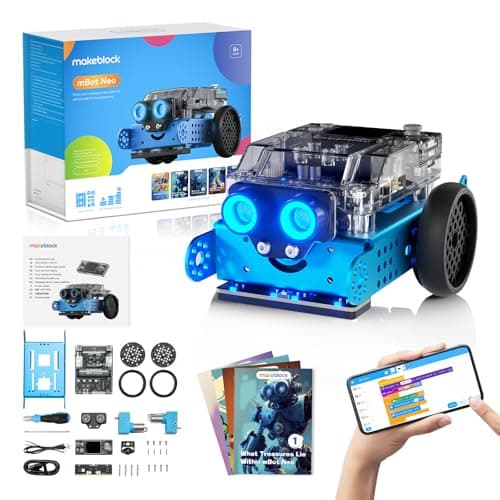
| 1 | Better for coding depth Makeblock mBot Neo (mBot2) Blocks, Python and Arduino C on one published 240 MHz controller, with 60+ compatible modules. | Eight and up, heading for a real language | |
| 2 | 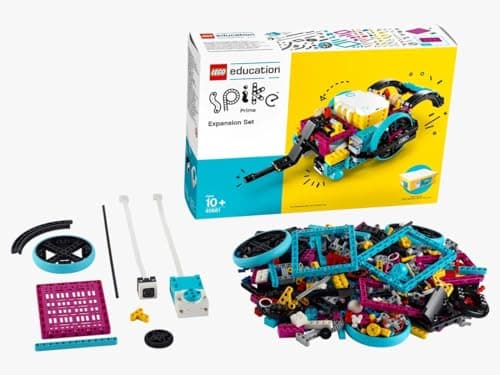 Better for building LEGO Education SPIKE Essential Set 449 LEGO pieces with two motors, a color sensor and a gyro, with icon and word coding in one app. | Six and up, where the machine should be the child's design | |
| 3 | Building without the electronics K'NEX 35 Model Building Set 480 pieces and 35 published models, with nothing to charge and no app. | Seven and up, for mechanisms alone | |
| — | 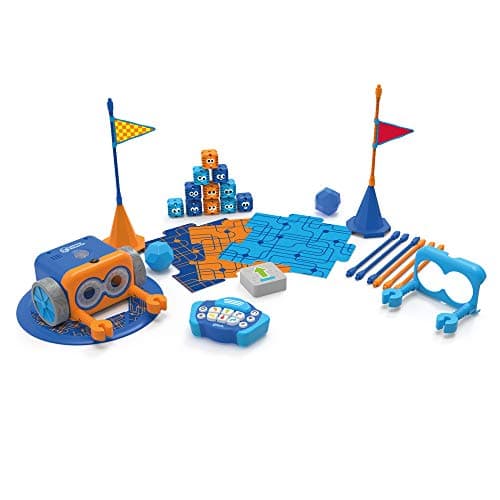 Too young for this comparison Botley 2.0 The Coding Robot Activity Set The best screen-free robot at five, and years below either of these. | Five to eight |
4 picks, including 1 we tell you to skip. Ages shown are the manufacturer’s own rating, not ours.
Side by side
The arithmetic
Published specifications
| Stated age | mBot Neo 8+ | SPIKE Essential 6+ (grades 1-5) |
|---|---|
| Languages | mBot: blocks, Python, Arduino C | SPIKE: icon and word blocks |
| Chassis | mBot: fixed robot | SPIKE: 449 LEGO pieces |
| Motors | mBot: 8 motor/servo ports | SPIKE: 2 small motors |
| Sensors | mBot: light, mic, gyro, accel + add-ons | SPIKE: color sensor, 6-axis gyro |
| Power | mBot: 2500 mAh, ~5 hrs | SPIKE: rechargeable Li-ion hub |
| Expansion | mBot: 60+ modules | SPIKE: any LEGO |
The code question
mBot publishes three environments on one robot, and the third — Arduino C — is the same language used in real embedded electronics. SPIKE publishes two coding modes, both Scratch-based: icons for a six-year-old and words for older children.
For a child whose interest is programming, that difference is decisive. SPIKE stops where Scratch stops. mBot continues into languages used well beyond toys.
The build question
SPIKE is LEGO, so the robot’s shape is never fixed. A child designs a vehicle, a crane, a sorting machine — and then programs it. That is two problems at once, and for a lot of children the building is the half that holds their attention.
mBot is a finished robot. Its modules add capability, but the child is programming a machine rather than inventing one.
The age question
SPIKE publishes 6+ and icon-based coding, so it works two years earlier. The mBot’s 8+ applies to its blocks; Python and Arduino C are the part a child grows into on the same robot.
Worth knowing before you buy
Both use sealed rechargeable cells. Charge with the supplied cable, do not leave either charging unattended overnight, and do not attempt to open or replace the pack.
So which one
The child wants to code: the mBot Neo. The published Python and Arduino path is the whole argument.
The child wants to build things that move: SPIKE Essential. The 449 pieces are the whole argument.
The child is six or seven: SPIKE, on age alone.
Say the unwelcome thing
Do not buy either for a child who has not coded before
Both are the far end of the ladder. A child new to sequencing gets more from a screen-free robot first — and then arrives at either of these knowing why they want it.
Where to go next
The mBot Neo review and the SPIKE Essential review cover each in full. LEGO robotics compared covers the LEGO side of the market.
In full
Every pick, and what is wrong with it
Published specifications only, each linked back to the page it came from. Where a manufacturer publishes nothing, the row says so — we do not fill blanks in.
1. Better for coding depth
Makeblock mBot Neo (mBot2)
Makeblock · mBot2 · maker rates it 8+
Blocks, Python and Arduino C on one published 240 MHz controller, with 60+ compatible modules.
- Controller
- CyberPi — Xtensa 32-bit LX6 dual-core at 240 MHz, 8 MB flash, 8 MB PSRAM
- Programming
- Scratch-style blocks, Python in mBlock, and Arduino C/C++ via the Arduino IDE
- Sensors
- On-board light, microphone, gyroscope and accelerometer, plus ultrasonic, quad RGB, temperature and IR modules
- Battery
- Built-in 2500 mAh LiPo, about 1 hour to charge, about 5 hours of play
Makeblock publishes the CyberPi controller — Xtensa 32-bit LX6 dual-core at 240 MHz, 8 MB flash, 8 MB PSRAM — programmable in Scratch-style blocks, Python in mBlock and Arduino C/C++ via the Arduino IDE, with on-board light, microphone, gyroscope and accelerometer sensors, a 2500 mAh battery giving about five hours from roughly an hour of charging, and 60+ compatible modules with up to 10 connected at once across 8 motor and servo ports, rated 8+.
Python and Arduino C on the same hardware is the specification SPIKE does not match. A child moves from blocks to a real language without the robot changing underneath them.
Replay signal
- Open-ended or one-shot
- Open-ended at the top of the range — this is the one a child does not outgrow at eleven
- Does anything run out
- Nothing runs out; rechargeable
- Room to grow
- Blocks, then Python, then Arduino C on the same robot, with 60+ add-on modules
- Adult required
- Not for driving it. Probably for the first Python session
Why we say so: Makeblock publishes the processor, the three programming environments on one robot, the 2500 mAh battery figures and the 60+ compatible modules. Blocks-to-Python-to-C on one chassis is the published upgrade path, and it is why this survives the year a child gets bored of pressing buttons.
What’s wrong with it
A fixed chassis — the child programs the robot but does not design it.
| Controller | CyberPi — Xtensa 32-bit LX6 dual-core at 240 MHz, 8 MB flash, 8 MB PSRAM |
|---|---|
| Programming | Scratch-style blocks, Python in mBlock, and Arduino C/C++ via the Arduino IDE |
| Sensors | On-board light, microphone, gyroscope and accelerometer, plus ultrasonic, quad RGB, temperature and IR modules |
| Battery | Built-in 2500 mAh LiPo, about 1 hour to charge, about 5 hours of play |
| Expansion | 60+ compatible modules, up to 10 connected at once, 8 motor and servo ports |
| Stated age | Ages 8+ |
Every figure above is from Makeblock, mBot2 coding robot kit. Blanks are shown as “not published” rather than filled in.
2. Better for building
LEGO Education SPIKE Essential Set
LEGO Education · 45345 · maker rates it 6+ (grades 1-5)
449 LEGO pieces with two motors, a color sensor and a gyro, with icon and word coding in one app.
- Pieces
- 449
- Motors
- 2 small motors
- Sensors
- Color sensor; 6-axis gyro in the hub
- Display
- 3x3 color light matrix
LEGO Education publishes 449 pieces, 2 small motors, a color sensor, a 6-axis gyro in the hub, a 3×3 color light matrix and a small hub with 2 input/output ports, Bluetooth and a rechargeable Li-ion cell over micro USB, with the SPIKE App offering icon-based and word-based coding built on Scratch, rated 6+ for grades 1-5.
Four hundred and forty-nine LEGO pieces means the robot has no fixed shape. The mechanical problem is as open as the coding one, which for a child whose real interest is building is the more important half.
Replay signal
- Open-ended or one-shot
- Open-ended — it is a LEGO system with motors, so the build is never fixed
- Does anything run out
- Nothing runs out; the hub is rechargeable rather than battery-fed
- Room to grow
- Icon coding first, then word-based Scratch blocks in the same app, on the same hardware
- Adult required
- For the first build and the app setup; not after that
Why we say so: LEGO Education publishes 449 pieces, two motors, a color sensor and a rechargeable hub, with an app offering both icon-based and word-based coding. Two coding modes on one set is the published progression — a six-year-old starts on icons and moves to Scratch-style words without new hardware.
What’s wrong with it
Coding stops at Scratch-style words, and it is sold through LEGO Education, the classroom line.
| Pieces | 449 |
|---|---|
| Motors | 2 small motors |
| Sensors | Color sensor; 6-axis gyro in the hub |
| Display | 3x3 color light matrix |
| Hub | Small hub, 2 input/output ports, Bluetooth, rechargeable Li-ion with micro USB |
| Software | SPIKE App — icon-based and word-based coding built on Scratch |
| Stated age | 6+, grades 1-5 |
Every figure above is from LEGO Education, SPIKE Essential Set 45345. Blanks are shown as “not published” rather than filled in.
3. Building without the electronics
K'NEX 35 Model Building Set
K'NEX · 35 Model Building Set · maker rates it 7+
480 pieces and 35 published models, with nothing to charge and no app.
- Pieces
- 480, in a mix of classic and micro sizes
- Models in the instruction booklet
- 35
- System
- Rods and connectors that attach in multiple orientations
- Stated age
- Ages 7 and above
K’NEX publishes 480 pieces in classic and micro sizes and 35 models, using rods and connectors at fixed orientations, rated ages 7 and above.
If SPIKE appeals for the building rather than the programming, this delivers the building half with nothing to charge and no app.
Replay signal
- Open-ended or one-shot
- Both: 35 published models to work through, then a rod-and-connector system with no correct answer
- Does anything run out
- Nothing runs out
- Room to grow
- Rods and connectors are a shared standard across the K'NEX range, so later sets combine
Why we say so: K'NEX publishes 480 pieces and 35 models in the booklet. The rod-and-connector geometry is the reason this builds in three dimensions from the start — a connector accepts rods at several fixed angles, so a beginner gets a rigid frame rather than a flat wall.
What’s wrong with it
Nothing moves on its own.
| Pieces | 480, in a mix of classic and micro sizes |
|---|---|
| Models in the instruction booklet | 35 |
| System | Rods and connectors that attach in multiple orientations |
| Stated age | Ages 7 and above |
| Consumables | None |
Every figure above is from Basic Fun, K'NEX 35 Model Building Set. Blanks are shown as “not published” rather than filled in.
Skip this one
Botley 2.0 The Coding Robot Activity Set
Learning Resources · LER2938 · maker rates it 5+
The best screen-free robot at five, and years below either of these.
- Set size
- 78 pieces
- Contents
- Botley 2.0, remote programmer, 2 face plates, 40 coding cards, 6 double-sided boards, 27 obstacle pieces, starter guide
- Maximum program length
- “coding sequences of up to 150 steps”
- Movement
- Six directions, plus 16 coded interactions
Learning Resources publishes 78 pieces, 150-step programs and 27 obstacle pieces, 100% screen-free, rated 5+.
It appears here only because buyers sometimes weigh it against these two. It is a first robot, not a substitute for either of them.
Replay signal
- Open-ended or one-shot
- Open-ended once the cards are understood — the child builds the maze, not just the program
- Does anything run out
- Nothing runs out except batteries
- Room to grow
- A 150-step ceiling means the challenge scales for years past the first week
- Adult required
- Needed for the first session, then not — there is no app account and nothing to log into
Why we say so: Learning Resources publishes the 78-piece contents, the 150-step maximum sequence, the six directions and 16 interactions, and states the set is 100% screen-free with no tablet or app required.
What’s wrong with it
A 150-step button ceiling, which is not programming to an eight-year-old ready for Python.
| Set size | 78 pieces |
|---|---|
| Contents | Botley 2.0, remote programmer, 2 face plates, 40 coding cards, 6 double-sided boards, 27 obstacle pieces, starter guide |
| Maximum program length | “coding sequences of up to 150 steps” |
| Movement | Six directions, plus 16 coded interactions |
| Screen required | None — “100% screen-free play” |
| Batteries | “Requires 5 AAA batteries (not included)” |
| Stated age | 5+ (K-2nd grade) |
Every figure above is from Learning Resources, Botley 2.0 Activity Set. Blanks are shown as “not published” rather than filled in.
We are not putting a buy button on this one. It is easy enough to find if you want it anyway — but we would rather send you to something that gets played with twice.
Questions people actually ask
Frequently asked
Is mBot or LEGO SPIKE better for kids?
It depends whether the child wants to code or to build. Makeblock publishes the mBot Neo with blocks, Python and Arduino C on one fixed robot, rated 8+. LEGO Education publishes SPIKE Essential with 449 pieces, two motors and Scratch-based icon and word coding, rated 6+. mBot goes further in code; SPIKE goes further in construction.
Can LEGO SPIKE Essential be programmed in Python?
Not on the published specification. LEGO Education publishes the SPIKE App with icon-based and word-based coding built on Scratch. The mBot Neo is the one that publishes Python, in mBlock, and Arduino C/C++.
What age is mBot Neo vs SPIKE Essential for?
Makeblock publishes 8+ for the mBot Neo; LEGO Education publishes 6+, grades 1-5, for SPIKE Essential. SPIKE's icon coding is why it works two years earlier; mBot's Python and Arduino C are the part a child grows into.
Which has more motors, mBot Neo or SPIKE Essential?
Makeblock publishes 8 motor and servo ports on the mBot Neo, with up to 10 modules connected at once. LEGO Education publishes 2 small motors in SPIKE Essential, alongside a color sensor and a 6-axis gyro in the hub. Robot kits for teens.
Sources
Where these figures came from
Every specification on this page traces to one of these. If a manufacturer publishes nothing on a point, the page says so rather than filling the gap.
Read next
Where to go from here
Back to Coding & Robotics, or read how we pick.