Single review
LEGO Education SPIKE Essential Review
Reviewed from the manufacturer's published specifications and the arithmetic on them. We have not used it, and we say so.
By Sawyer V. · Published
The short answer
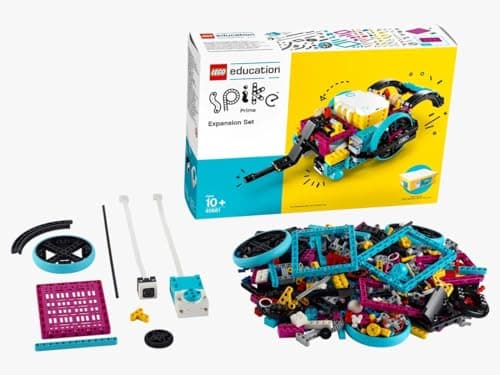
LEGO Education SPIKE Essential publishes 449 pieces, 2 small motors, a color sensor, a 6-axis gyro in the hub, a 3×3 color light matrix, and a small hub with 2 input/output ports, Bluetooth and a rechargeable Li-ion battery over micro USB, with the SPIKE App offering icon-based and word-based coding, rated 6+ for grades 1-5.
Block & Beaker earns a commission when you buy through our links, at no cost to you. It never changes a ranking, and we say so plainly when the right answer is the cheaper set, or nothing at all. Full disclosure · How we pick.
At a glance
The picks, ranked
Tap any row to jump to the full reasoning. Prices come live from Amazon where we have them and read “check price” where we don’t — never a number we cannot stand behind today.
| # | Product | Best for | Price |
|---|---|---|---|
| 1 | The product LEGO Education SPIKE Essential Set Two coding modes in one app on a LEGO chassis, so the machine's shape is never the limit. | Six and up, where building matters as much as coding | |
| 2 | 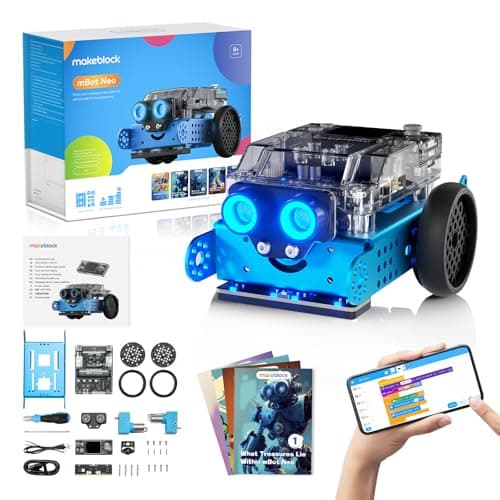 The one that goes further in code Makeblock mBot Neo (mBot2) Blocks, Python and Arduino C on a published 240 MHz controller with 60+ modules. | Eight and up, when the language matters more than the build | |
| 3 | The unpowered alternative K'NEX 35 Model Building Set 480 pieces and 35 published models, with nothing to charge and no app. | Seven and up, for mechanism without electronics | |
| — |  Not a robotics set LEGO Classic Large Creative Brick Box Frequently confused as an entry point to LEGO robotics, and it has no electronics at all. | Four and up, for open-ended building |
4 picks, including 1 we tell you to skip. Ages shown are the manufacturer’s own rating, not ours.
What we can tell you, and what we cannot
We have not built or programmed this set. No lab, no samples, no test children, no star rating here or in the structured data.
Published piece counts, hardware and software modes we can report. How reliable the Bluetooth pairing is, and how well the app runs on an older tablet, we cannot.
The specification that decides it
The arithmetic
LEGO Education SPIKE Essential, published
| Pieces | 449 |
|---|---|
| Motors | 2 small motors |
| Sensors | Color sensor; 6-axis gyro in the hub |
| Display | 3x3 color light matrix |
| Hub | 2 I/O ports, Bluetooth, rechargeable Li-ion, micro USB |
| Software | SPIKE App — icon-based and word-based coding, built on Scratch |
| Stated age | 6+, grades 1-5 |
| Consumables | None — rechargeable hub |
What the numbers mean in practice
Two motors is enough for a vehicle that steers. One motor drives, one turns or actuates. That is the minimum for a machine that does something rather than just moves, and it is why the count matters more than it looks.
A color sensor is the input that makes programs interesting. Without a sensor, a program is a fixed sequence. With one, the robot can respond — which is where conditionals stop being abstract.
Rechargeable removes the AAA problem entirely. No batteries to buy, ever, on a set that will be used in bursts over years.
Grades 1-5 is a classroom framing, and it is honest. This is an education product sold to schools. At home it works, and the buyer should know they are buying an institutional product with institutional pricing.
Who should skip it
A household on a normal toy budget. This is priced for schools. A coding robot with a fixed chassis costs considerably less.
A child who wants text programming now. SPIKE stops at word-based Scratch-style blocks. mBot Neo publishes Python and Arduino C.
A household with no tablet or computer for the app. The SPIKE App is required to program it, which is a real dependency.
Worth knowing before you buy
The hub contains a sealed rechargeable Li-ion cell charged over micro USB. Charge with the supplied cable, and do not attempt to open the hub or replace the cell.
Where it sits
SPIKE Essential leads LEGO robotics compared and appears in from coding toy to real code and coding toys for two or more children.
In full
Every pick, and what is wrong with it
Published specifications only, each linked back to the page it came from. Where a manufacturer publishes nothing, the row says so — we do not fill blanks in.
1. The product
LEGO Education SPIKE Essential Set
LEGO Education · 45345 · maker rates it 6+ (grades 1-5)
Two coding modes in one app on a LEGO chassis, so the machine's shape is never the limit.
- Pieces
- 449
- Motors
- 2 small motors
- Sensors
- Color sensor; 6-axis gyro in the hub
- Display
- 3x3 color light matrix
LEGO Education publishes 449 pieces, 2 small motors, a color sensor and a 6-axis gyro in the hub, a 3×3 color light matrix, a small hub with 2 input/output ports, Bluetooth and a rechargeable Li-ion cell charging over micro USB, and the SPIKE App with icon-based and word-based coding, rated 6+ for grades 1-5.
Two coding modes in one app is the published progression, and it is genuinely well judged. A six-year-old who cannot read fluently uses icons; the same child at nine switches to words in the same software on the same robot. Nothing is rebought and nothing is relearned.
The LEGO chassis is the other half. Unlike a fixed-shape robot, the machine here is whatever the child builds, so the mechanical problem is as open-ended as the coding one.
Replay signal
- Open-ended or one-shot
- Open-ended — it is a LEGO system with motors, so the build is never fixed
- Does anything run out
- Nothing runs out; the hub is rechargeable rather than battery-fed
- Room to grow
- Icon coding first, then word-based Scratch blocks in the same app, on the same hardware
- Adult required
- For the first build and the app setup; not after that
Why we say so: LEGO Education publishes 449 pieces, two motors, a color sensor and a rechargeable hub, with an app offering both icon-based and word-based coding. Two coding modes on one set is the published progression — a six-year-old starts on icons and moves to Scratch-style words without new hardware.
What’s wrong with it
Priced and specified for classrooms, and it requires a device for the app.
| Pieces | 449 |
|---|---|
| Motors | 2 small motors |
| Sensors | Color sensor; 6-axis gyro in the hub |
| Display | 3x3 color light matrix |
| Hub | Small hub, 2 input/output ports, Bluetooth, rechargeable Li-ion with micro USB |
| Software | SPIKE App — icon-based and word-based coding built on Scratch |
| Stated age | 6+, grades 1-5 |
Every figure above is from LEGO Education, SPIKE Essential Set 45345. Blanks are shown as “not published” rather than filled in.
2. The one that goes further in code
Makeblock mBot Neo (mBot2)
Makeblock · mBot2 · maker rates it 8+
Blocks, Python and Arduino C on a published 240 MHz controller with 60+ modules.
- Controller
- CyberPi — Xtensa 32-bit LX6 dual-core at 240 MHz, 8 MB flash, 8 MB PSRAM
- Programming
- Scratch-style blocks, Python in mBlock, and Arduino C/C++ via the Arduino IDE
- Sensors
- On-board light, microphone, gyroscope and accelerometer, plus ultrasonic, quad RGB, temperature and IR modules
- Battery
- Built-in 2500 mAh LiPo, about 1 hour to charge, about 5 hours of play
Makeblock publishes the CyberPi controller at 240 MHz with 8 MB flash and 8 MB PSRAM, three programming environments, a 2500 mAh battery giving about five hours, and 60+ compatible modules, rated 8+.
SPIKE stops at word-based Scratch-style coding. mBot continues into Python and Arduino C. For a child whose interest is programming rather than mechanism, that is the deciding difference.
Replay signal
- Open-ended or one-shot
- Open-ended at the top of the range — this is the one a child does not outgrow at eleven
- Does anything run out
- Nothing runs out; rechargeable
- Room to grow
- Blocks, then Python, then Arduino C on the same robot, with 60+ add-on modules
- Adult required
- Not for driving it. Probably for the first Python session
Why we say so: Makeblock publishes the processor, the three programming environments on one robot, the 2500 mAh battery figures and the 60+ compatible modules. Blocks-to-Python-to-C on one chassis is the published upgrade path, and it is why this survives the year a child gets bored of pressing buttons.
What’s wrong with it
A fixed chassis — you program it, you do not design it.
| Controller | CyberPi — Xtensa 32-bit LX6 dual-core at 240 MHz, 8 MB flash, 8 MB PSRAM |
|---|---|
| Programming | Scratch-style blocks, Python in mBlock, and Arduino C/C++ via the Arduino IDE |
| Sensors | On-board light, microphone, gyroscope and accelerometer, plus ultrasonic, quad RGB, temperature and IR modules |
| Battery | Built-in 2500 mAh LiPo, about 1 hour to charge, about 5 hours of play |
| Expansion | 60+ compatible modules, up to 10 connected at once, 8 motor and servo ports |
| Stated age | Ages 8+ |
Every figure above is from Makeblock, mBot2 coding robot kit. Blanks are shown as “not published” rather than filled in.
3. The unpowered alternative
K'NEX 35 Model Building Set
K'NEX · 35 Model Building Set · maker rates it 7+
480 pieces and 35 published models, with nothing to charge and no app.
- Pieces
- 480, in a mix of classic and micro sizes
- Models in the instruction booklet
- 35
- System
- Rods and connectors that attach in multiple orientations
- Stated age
- Ages 7 and above
K’NEX publishes 480 pieces in classic and micro sizes and 35 models in the booklet, using rods and connectors that attach at multiple fixed orientations, rated ages 7 and above.
If the appeal is how machines work rather than how they are controlled, this delivers it at a fraction of the cost and with no device involved.
Replay signal
- Open-ended or one-shot
- Both: 35 published models to work through, then a rod-and-connector system with no correct answer
- Does anything run out
- Nothing runs out
- Room to grow
- Rods and connectors are a shared standard across the K'NEX range, so later sets combine
Why we say so: K'NEX publishes 480 pieces and 35 models in the booklet. The rod-and-connector geometry is the reason this builds in three dimensions from the start — a connector accepts rods at several fixed angles, so a beginner gets a rigid frame rather than a flat wall.
What’s wrong with it
Nothing moves on its own.
| Pieces | 480, in a mix of classic and micro sizes |
|---|---|
| Models in the instruction booklet | 35 |
| System | Rods and connectors that attach in multiple orientations |
| Stated age | Ages 7 and above |
| Consumables | None |
Every figure above is from Basic Fun, K'NEX 35 Model Building Set. Blanks are shown as “not published” rather than filled in.
Skip this one
LEGO Classic Large Creative Brick Box
LEGO · 10698 · maker rates it 4+
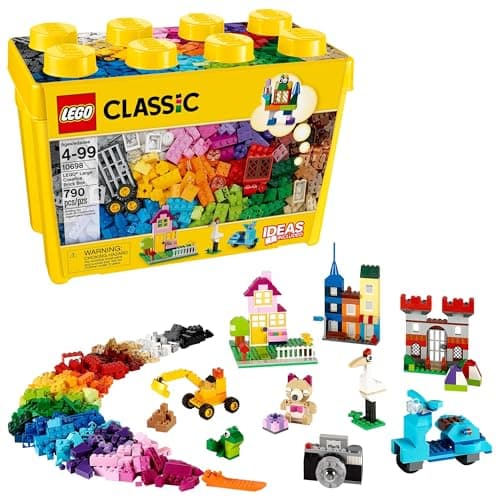
Frequently confused as an entry point to LEGO robotics, and it has no electronics at all.
- Pieces
- 790
- Colors
- 33
- Stated age
- 4 and up
- Includes
- 8 types of windows and doors, 2 green baseplates, 6 tires and wheel rims
LEGO publishes 790 pieces in 33 colors with windows, doors, baseplates and wheels, compatible with all LEGO construction sets, rated 4 and up.
It is an excellent building set and it is not a route into SPIKE. The bricks are compatible, but nothing in the Classic box powers or senses anything, so a household hoping to grow into robotics needs the hub eventually regardless.
Replay signal
- Open-ended or one-shot
- Open-ended — this is the box with no instructions and no finished model
- Does anything run out
- Nothing runs out
- Room to grow
- Every LEGO set the child is ever given pours into the same box
Why we say so: LEGO publishes the 790-piece count, the 33 colors and the box's compatibility with all LEGO construction sets. The absence of a build-this model is the product's stated design, not an omission.
What’s wrong with it
No motors, no sensors, no hub.
| Pieces | 790 |
|---|---|
| Colors | 33 |
| Stated age | 4 and up |
| Includes | 8 types of windows and doors, 2 green baseplates, 6 tires and wheel rims |
| Compatibility | Compatible with all LEGO construction sets |
| Consumables | None |
Every figure above is from LEGO, Large Creative Brick Box 10698. Blanks are shown as “not published” rather than filled in.
We are not putting a buy button on this one. It is easy enough to find if you want it anyway — but we would rather send you to something that gets played with twice.
Questions people actually ask
Frequently asked
What age is LEGO SPIKE Essential for?
LEGO Education publishes 6+, for grades 1-5. It works that early because the SPIKE App offers icon-based coding alongside word-based coding — a six-year-old who cannot read fluently uses icons, and the same child switches to words later in the same app on the same hardware.
What is in the LEGO SPIKE Essential set?
449 pieces, two small motors, a color sensor, a 6-axis gyro in the hub, a 3x3 color light matrix, and a small hub with two input/output ports, Bluetooth and a rechargeable Li-ion battery charged over micro USB.
Does SPIKE Essential need an app?
Yes. The SPIKE App is how it is programmed, offering both icon-based and word-based coding built on Scratch. That means a tablet or computer is a genuine dependency, unlike a screen-free coding robot.
SPIKE Essential or mBot Neo?
SPIKE wins on building — the machine is LEGO, so its shape is the child's design rather than fixed. mBot wins on code, because Makeblock publishes Python and Arduino C alongside blocks, while SPIKE stops at word-based Scratch-style coding. mBot Neo review.
Sources
Where these figures came from
Every specification on this page traces to one of these. If a manufacturer publishes nothing on a point, the page says so rather than filling the gap.
Read next
Where to go from here
Back to Reviews, or read how we pick.