The picks
Programmable Toys for Kids
Half this shelf is not programmable. The published test is whether a child can store a sequence of their own and run it again, and the makers who can say yes say so in a specific way.
By Sawyer V. · Published
The short answer
A toy is programmable if the child can store a sequence the manufacturer did not write and run it again. By that test, the Makeblock mBot Neo is the most programmable toy here — published for Scratch-style blocks, Python and Arduino C on a 240 MHz controller. Sphero BOLT publishes three ways in (Draw, Blocks, and text in JavaScript or Python) plus an 8x8 matrix that shows the program running. Botley 2.0 publishes 150-step sequences with no screen at all. Toys that only respond to a button are pre-programmed, not programmable.
Block & Beaker earns a commission when you buy through our links, at no cost to you. It never changes a ranking, and we say so plainly when the right answer is the cheaper set, or nothing at all. Full disclosure · How we pick.
At a glance
The picks, ranked
Tap any row to jump to the full reasoning. Prices come live from Amazon where we have them and read “check price” where we don’t — never a number we cannot stand behind today.
| # | Product | Best for | Price |
|---|---|---|---|
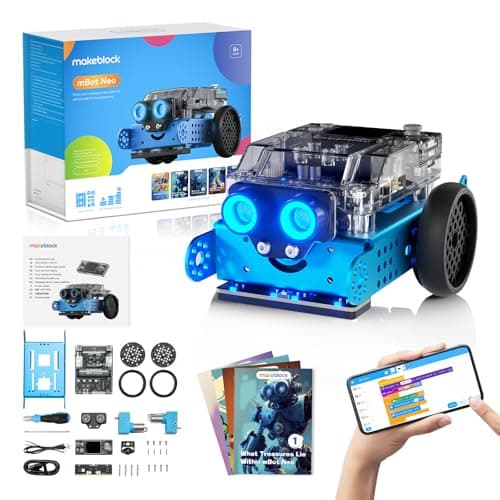
| 1 | Most programmable — blocks, Python and Arduino C Makeblock mBot Neo (mBot2) Three published languages on a 240 MHz dual-core controller with 8 motor ports. | Eight and up, where the code should outlive the robot | |
| 2 | 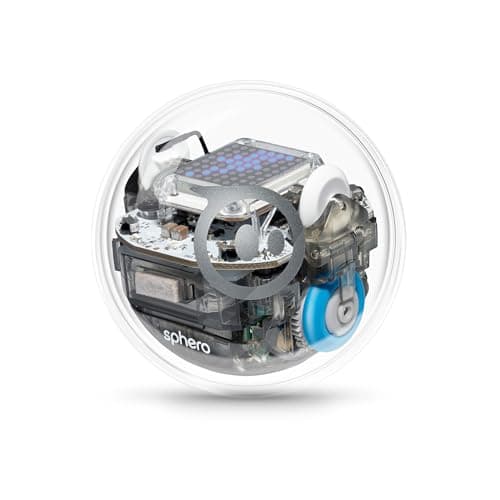 The only one that shows you the program running Sphero BOLT Draw, Blocks, then JavaScript or Python, on a robot with an 8x8 LED matrix. | Eight and up, for a child who needs to see why it went wrong | |
| 3 | 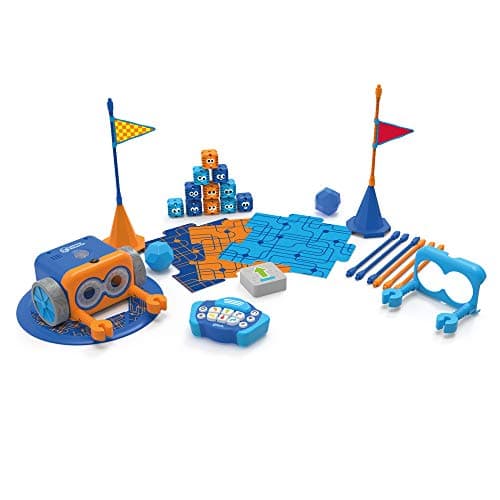 Longest published program with no screen Botley 2.0 The Coding Robot Activity Set 150-step coding sequences, 78 pieces, six directions and 16 coded interactions. | Five and up, in a house with no tablet to hand over | |
| 4 | 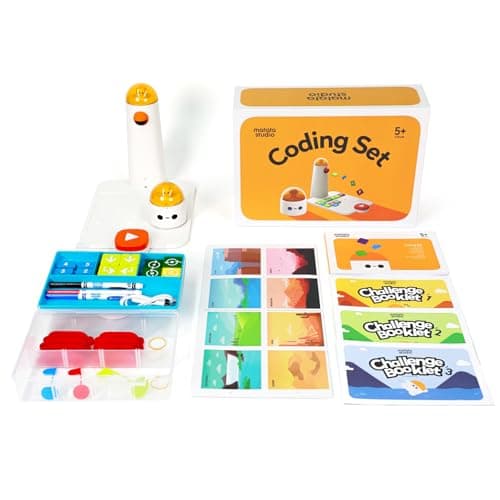 Programmable before reading MatataStudio (Matatalab) Coding Set 37 physical coding blocks laid out on a board — the program is an object. | Four and up, before a child can read a word on a screen | |
| 5 | 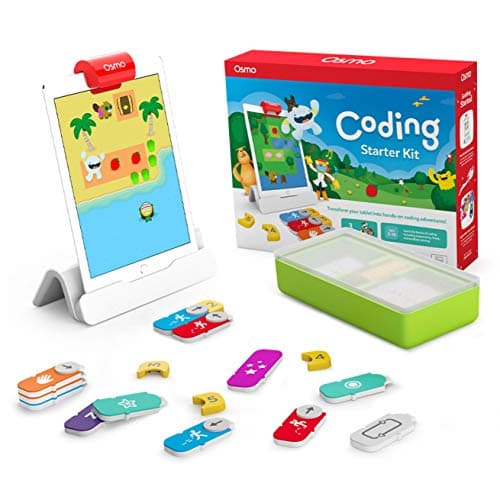 Programmable only if you own an iPad Osmo Coding Starter Kit for iPad Physical coding blocks read by an iPad camera, across three published games. | Five to ten, in a household where an iPad is already free | |
| — | 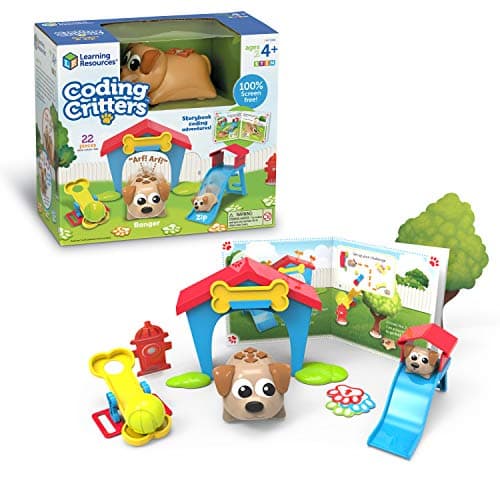 Not programmable Coding Critters Ranger & Zip 22 pieces, an interactive pet, a playset and a storybook of coding activities. | Four and up, as an excellent first logic toy that is not a programmable one |
6 picks, including 1 we tell you to skip. Ages shown are the manufacturer’s own rating, not ours.
The test: can the child store a sequence the maker did not write?
“Programmable” is not a regulated word, so three genuinely different kinds of toy are sold under it. Separating them is most of the value of this page.
Programmable. The child creates a sequence of their own, the toy stores it, and it runs on demand — the same way twice. Botley publishes a 150-step limit; Sphero publishes JavaScript and Python; Makeblock publishes three languages. A published step limit or a named language is the tell.
Pre-programmed. The toy has behaviors the manufacturer wrote, triggered by a button, a card or a sound. Nothing is stored and nothing the child composes survives. The tell is the absence of any published step limit.
Remote-controlled. The child drives it live. Enormous fun, no program at all. The tell is a published controller with directional buttons and nothing about sequences.
What each maker publishes
The arithmetic
Programmable toys: the published evidence
| Makeblock mBot Neo | Blocks + Python + Arduino C/C++ · 240 MHz dual-core controller · ages 8+ |
|---|---|
| Sphero BOLT | Draw + Blocks + JavaScript or Python · 8x8 LED matrix · ages 8+ |
| Makeblock mBot Ranger | mBlock blocks to Arduino · 3 build forms from ~100 parts · ages 8+ |
| Botley 2.0 | “coding sequences of up to 150 steps” · 16 coded interactions · no screen · ages 5+ |
| Code & Go Robot Mouse | 30 double-sided coding cards, 16 maze grids · no screen · ages 4+ |
| Matatalab Coding Set | 37 physical coding blocks read by a tower · no literacy needed · ages 4-9 |
| Osmo Coding Starter Kit | Physical blocks read by an iPad camera · iPad required, not included · ages 5-10 |
| Coding Critters | 22 pieces, interactive pet and storybook · no step limit published · ages 4+ |
Why this distinction is worth money
A stored program is the thing that gets shown to somebody. A child who has made a robot do a specific sequence will drag an adult into the room to watch it. A child who pressed a button on a toy dog will not, because the toy did it, not them.
It is also the only version that can be wrong. Programming is debugging, and a toy with no stored program cannot produce a bug for a child to find. Everything the category claims to teach — sequence, cause, correction — needs a program that can be incorrect.
And it decides how long the toy lasts. A pre-programmed toy is finished when its behaviors have all been seen, which is usually a fortnight. A programmable one is finished when the child runs out of ideas, which is a different timescale entirely. This is the same argument as toys that actually teach, applied to one word on a box.
Not the word on the packaging. Every product on this page says coding somewhere on the box, including the one that is not programmable. The published step limit is the only figure that separates them, and it is usually in the specification table rather than on the front.
Choosing by age, on the published ratings
Four and five. Matatalab publishes 4-9 and no literacy requirement; the Code & Go Robot Mouse publishes 4+ with 30 coding cards; Botley publishes 5+. All three store a sequence. Nothing programmable publishes below four, and our toddler page says so plainly.
Six to nine. Botley’s 150 steps and Osmo’s three games sit here, and this is the band where six and seven and eight and nine split the shelf properly.
Eight and up. Both published text languages appear here: Sphero BOLT with JavaScript or Python, and the mBot Neo with Python and Arduino C. This is where a programmable toy stops being a toy, which is the whole subject of from toy to real code.
Twelve and up. Honestly, a programmable toy is the wrong category. The mBot Neo still works because Arduino C does, but the better purchase is an Arduino kit, where the program runs on hardware with no toy wrapped around it.
Worth knowing before you buy
So which one
One toy, and it has to last to thirteen: the mBot Neo — blocks, Python and Arduino C.
They need to see what the program is doing: Sphero BOLT and its 8x8 matrix.
No tablet is going to be handed over: Botley 2.0, 150 steps, screen-free.
They cannot read yet: the Matatalab Coding Set — 37 blocks on a board.
They want to build the robot first: the mBot Ranger publishes three build forms from about 100 parts and the same blocks-to-Arduino path.
Say the unwelcome thing
Do not buy an interactive pet as a programmable toy
Coding Critters publishes 22 pieces, an interactive pet, a playset and a storybook, and publishes no step limit, no block count and no language. It is a good toy for a four-year-old and it is the single most common mis-buy in this category, because the word coding is on the front and the specification that would contradict it is not printed anywhere. If the child is four and the budget is similar, the Code & Go Robot Mouse publishes 30 coding cards and a stored sequence at the same published age.
Where to go next
Coding robots for kids ranks the rolling robots on published step limits, robot kits covers the ones you build first, how to choose a first coding toy is the decision page, and rechargeable versus battery covers the power question this shelf raises.
In full
Every pick, and what is wrong with it
Published specifications only, each linked back to the page it came from. Where a manufacturer publishes nothing, the row says so — we do not fill blanks in.
1. Most programmable — blocks, Python and Arduino C
Makeblock mBot Neo (mBot2)
Makeblock · mBot2 · maker rates it 8+
Three published languages on a 240 MHz dual-core controller with 8 motor ports.
- Controller
- CyberPi — Xtensa 32-bit LX6 dual-core at 240 MHz, 8 MB flash, 8 MB PSRAM
- Programming
- Scratch-style blocks, Python in mBlock, and Arduino C/C++ via the Arduino IDE
- Sensors
- On-board light, microphone, gyroscope and accelerometer, plus ultrasonic, quad RGB, temperature and IR modules
- Battery
- Built-in 2500 mAh LiPo, about 1 hour to charge, about 5 hours of play
Makeblock publishes the CyberPi controller as an Xtensa 32-bit LX6 dual-core at 240 MHz with 8 MB of flash and 8 MB of PSRAM, programmed with Scratch-style blocks, Python in mBlock, or Arduino C/C++ through the Arduino IDE. It publishes 60+ compatible modules with up to 10 connected at once across 8 motor and servo ports, and a built-in 2500 mAh battery giving about five hours of play from about an hour of charging. Rated ages 8+.
Three published languages on one robot is the specification that wins this. A seven-year-old drags blocks, a ten-year-old writes Python, and a thirteen-year-old compiles Arduino C — all of it on the same hardware, which means the purchase does not expire when the child’s ability does.
The controller spec is the other reason. 240 MHz and 8 MB of PSRAM is not a toy microcontroller; it is a figure Makeblock publishes because the robot runs programs complex enough to need it. Nothing else on this page publishes a clock speed at all.
See the mBot Neo review, from toy to real code, and robot kits for kids.
Replay signal
- Open-ended or one-shot
- Open-ended at the top of the range — this is the one a child does not outgrow at eleven
- Does anything run out
- Nothing runs out; rechargeable
- Room to grow
- Blocks, then Python, then Arduino C on the same robot, with 60+ add-on modules
- Adult required
- Not for driving it. Probably for the first Python session
Why we say so: Makeblock publishes the processor, the three programming environments on one robot, the 2500 mAh battery figures and the 60+ compatible modules. Blocks-to-Python-to-C on one chassis is the published upgrade path, and it is why this survives the year a child gets bored of pressing buttons.
What’s wrong with it
The highest price band on this page, and a real assembly job before any code runs.
| Controller | CyberPi — Xtensa 32-bit LX6 dual-core at 240 MHz, 8 MB flash, 8 MB PSRAM |
|---|---|
| Programming | Scratch-style blocks, Python in mBlock, and Arduino C/C++ via the Arduino IDE |
| Sensors | On-board light, microphone, gyroscope and accelerometer, plus ultrasonic, quad RGB, temperature and IR modules |
| Battery | Built-in 2500 mAh LiPo, about 1 hour to charge, about 5 hours of play |
| Expansion | 60+ compatible modules, up to 10 connected at once, 8 motor and servo ports |
| Stated age | Ages 8+ |
Every figure above is from Makeblock, mBot2 coding robot kit. Blanks are shown as “not published” rather than filled in.
2. The only one that shows you the program running
Sphero BOLT
Sphero · K002ROWFFP · maker rates it 8+
Draw, Blocks, then JavaScript or Python, on a robot with an 8x8 LED matrix.
- Display
- “advanced programmable sensors and 8x8 LED matrix”
- Programming
- “three ways to program (Draw, Blocks, and Text coding with JavaScript or Python)”
- Shell
- “durable and waterproof design”
- Battery
- “all-day battery life”, inductive charging
Sphero publishes “three ways to program (Draw, Blocks, and Text coding with JavaScript or Python)”, “advanced programmable sensors and 8x8 LED matrix”, a waterproof shell, all-day battery life with inductive charging, a magnetometer, and a 360-degree protractor in the box. Rated ages 8+.
The matrix is the thing. Every other programmable toy here gives feedback by moving, which means a wrong program and a flat battery look identical from across a room. A robot that can display a value while it runs lets a child debug by reading rather than by guessing, and debugging is most of what programming actually is.
Draw-to-Blocks-to-text is also the cleanest published ladder in the category: three named stages rather than a block editor and a vague promise of “advanced mode”. The published 360-degree protractor is a small tell that Sphero expects headings to be entered as numbers.
See the BOLT review, coding robot balls compared and BOLT against the mBot Neo.
Replay signal
- Open-ended or one-shot
- Open-ended — a programmable 8x8 display on a rolling robot has no finished state
- Does anything run out
- Nothing runs out; inductive charging rather than cells
- Room to grow
- Draw to Blocks to JavaScript or Python, on the same robot
- Adult required
- Not after the first pairing; the published lesson material is aimed at the child
Why we say so: Sphero publishes an 8x8 LED matrix, a waterproof shell, all-day battery life and text programming in JavaScript or Python. The matrix is the specification that separates this from every other coding ball: the robot can display what the program is doing, so a child debugs by looking at it rather than guessing.
What’s wrong with it
A rolling ball programs on a floor, which means a floor is required.
| Display | “advanced programmable sensors and 8x8 LED matrix” |
|---|---|
| Programming | “three ways to program (Draw, Blocks, and Text coding with JavaScript or Python)” |
| Shell | “durable and waterproof design” |
| Battery | “all-day battery life”, inductive charging |
| In the box | Inductive charging base with USB charging cable, and a 360-degree protractor with heading, directions and clock |
| Sensors named | Magnetometer, plus the programmable sensor set |
| Apps | Sphero Edu (Chrome, Mac, PC, iOS, Android, Kindle) and Sphero Play |
| Stated age | Ages 8+ |
| Consumables | None — rechargeable |
Every figure above is from Sphero, Sphero BOLT. Blanks are shown as “not published” rather than filled in.
3. Longest published program with no screen
Botley 2.0 The Coding Robot Activity Set
Learning Resources · LER2938 · maker rates it 5+
150-step coding sequences, 78 pieces, six directions and 16 coded interactions.
- Set size
- 78 pieces
- Contents
- Botley 2.0, remote programmer, 2 face plates, 40 coding cards, 6 double-sided boards, 27 obstacle pieces, starter guide
- Maximum program length
- “coding sequences of up to 150 steps”
- Movement
- Six directions, plus 16 coded interactions
Learning Resources publishes “coding sequences of up to 150 steps”, a 78-piece activity set, movement in six directions plus 16 coded interactions, and “100% screen-free play”, on 5 AAA batteries. Rated 5+ (K-2nd grade).
A hundred and fifty steps is the published number that settles the screen-free question. The usual objection to a remote-programmed robot is that you can only enter a handful of moves before it stops being programming; Botley publishes a step limit thirty times longer than that, and a 150-step sequence has loops-worth of structure in it whether or not the word loop appears.
It is also the only toy here that stores a program with no account, no pairing and no device. That matters more than it sounds for a five-year-old: the gap between “I want to code” and the robot moving is about four seconds.
See the Botley 2.0 review, screen-free coding toys and Botley against the Robot Mouse.
Replay signal
- Open-ended or one-shot
- Open-ended once the cards are understood — the child builds the maze, not just the program
- Does anything run out
- Nothing runs out except batteries
- Room to grow
- A 150-step ceiling means the challenge scales for years past the first week
- Adult required
- Needed for the first session, then not — there is no app account and nothing to log into
Why we say so: Learning Resources publishes the 78-piece contents, the 150-step maximum sequence, the six directions and 16 interactions, and states the set is 100% screen-free with no tablet or app required.
What’s wrong with it
Five AAA batteries, and 150 steps entered on a remote is slow going at the top end.
| Set size | 78 pieces |
|---|---|
| Contents | Botley 2.0, remote programmer, 2 face plates, 40 coding cards, 6 double-sided boards, 27 obstacle pieces, starter guide |
| Maximum program length | “coding sequences of up to 150 steps” |
| Movement | Six directions, plus 16 coded interactions |
| Screen required | None — “100% screen-free play” |
| Batteries | “Requires 5 AAA batteries (not included)” |
| Stated age | 5+ (K-2nd grade) |
Every figure above is from Learning Resources, Botley 2.0 Activity Set. Blanks are shown as “not published” rather than filled in.
4. Programmable before reading
MatataStudio (Matatalab) Coding Set
MatataStudio · Coding Set · maker rates it 4+
37 physical coding blocks laid out on a board — the program is an object.
- Contents
- Robot car, command tower, control board, 37 coding blocks, 8 obstacles, 3 flags, 3 challenge booklets, nature map
- Screen required
- None — “screen-free, app-free and internet-free”
- Literacy required
- None — blocks use “intuitive graphic symbols” and directional language
- Power
- Rechargeable — 500 mAh cell in the robot, 2000 mAh in the command tower, USB-C
MatataStudio publishes a robot car, a command tower, a control board, 37 coding blocks, 8 obstacles, 3 flags, 3 challenge booklets and a nature map, with “screen-free, app-free and internet-free” operation and no literacy requirement — the blocks use “intuitive graphic symbols”. Rechargeable, with a 500 mAh cell in the robot and 2000 mAh in the tower over USB-C. Rated ages 4 to 9.
This is genuinely programmable and the published mechanism is why: the child lays physical blocks on a board, and the tower reads the board. The program exists as an object on a table, which means a four-year-old can point at the step that went wrong — something no screen-based tool manages at that age.
No literacy requirement is the published figure that puts it below the three above rather than beside them. It is the right first programmable toy and it is not the one that lasts: a seven-year-old has outgrown graphic symbols, and 37 blocks is a hard ceiling.
See the Matatalab review, coding toys for toddlers and Matatalab against Botley.
Replay signal
- Open-ended or one-shot
- Semi-open: three challenge booklets first, then free building on the map
- Does anything run out
- Nothing runs out, and it recharges rather than eating AAAs
- Room to grow
- Add-on sets extend the same command tower into music and drawing
- Adult required
- No reading needed, so a four-year-old can set up a run unaided
Why we say so: MatataStudio publishes the full contents list, the rechargeable cell capacities, and states the blocks use graphic symbols so no literacy is required.
What’s wrong with it
Thirty-seven blocks is a ceiling, and the blocks are the thing that gets lost.
| Contents | Robot car, command tower, control board, 37 coding blocks, 8 obstacles, 3 flags, 3 challenge booklets, nature map |
|---|---|
| Screen required | None — “screen-free, app-free and internet-free” |
| Literacy required | None — blocks use “intuitive graphic symbols” and directional language |
| Power | Rechargeable — 500 mAh cell in the robot, 2000 mAh in the command tower, USB-C |
| Stated age | Ages 4 to 9 |
Every figure above is from MatataStudio, Coding Set. Blanks are shown as “not published” rather than filled in.
5. Programmable only if you own an iPad
Osmo Coding Starter Kit for iPad
Osmo · Coding Starter Kit · maker rates it 5-10
Physical coding blocks read by an iPad camera, across three published games.
- Contents
- Osmo Base and Reflector for iPad, 31 magnetic coding blocks, stackable storage, 3 game apps
- Games
- Coding Awbie, Coding Jam, Coding Duo
- Screen required
- Yes — an iPad is required and is not included
- Compatibility
- All iPads except generations 1-4 and certain newer models; minimum iOS 11
Osmo publishes three games — Coding Awbie, Coding Jam and Coding Duo — physical coding blocks read through an iPad base, compatibility with all iPads except generations 1-4 and certain newer models, and a minimum of iOS 11. It publishes plainly that an iPad is required and not included. Rated ages 5-10.
It belongs on this page because the blocks are real and the sequence is stored: the child builds a program out of plastic and the camera reads it, which is the Matatalab idea with a screen doing the interpreting.
The required iPad is why it is fifth rather than second, and it is not a small asterisk. A programmable toy whose published requirements include a tablet the family may not own, or may not be willing to hand over for an hour, is a toy with a precondition. See coding toys versus coding apps.
Replay signal
- Open-ended or one-shot
- Guided by the three games rather than open-ended; Coding Jam is the one with no ending
- Does anything run out
- Nothing physical runs out
- Room to grow
- Three games at rising difficulty, described by Osmo as beginner to expert
- Adult required
- Only to hand over the iPad — which is precisely the friction: this one competes with screen time rather than replacing it
Why we say so: Osmo publishes the 31-block count, the three named games, the iPad requirement and the compatibility list. The iPad dependency is a published requirement, and it is the fact most likely to decide whether this gets used.
What’s wrong with it
Osmo publishes that an iPad is required and not included. No iPad, no toy.
| Contents | Osmo Base and Reflector for iPad, 31 magnetic coding blocks, stackable storage, 3 game apps |
|---|---|
| Games | Coding Awbie, Coding Jam, Coding Duo |
| Screen required | Yes — an iPad is required and is not included |
| Compatibility | All iPads except generations 1-4 and certain newer models; minimum iOS 11 |
| Stated age | Ages 5-10 |
Every figure above is from Osmo, Coding Starter Kit. Blanks are shown as “not published” rather than filled in.
Skip this one
Coding Critters Ranger & Zip
Learning Resources · LER3081 · maker rates it 4+
22 pieces, an interactive pet, a playset and a storybook of coding activities.
- Set size
- 22 pieces
- Screen required
- None — “100% screen-free coding”
- Format
- Interactive pet plus playset and a storybook of coding activities
- Stated age
- Ages 4+
Learning Resources publishes a 22-piece set comprising an interactive pet, a playset and a storybook of coding activities, with “100% screen-free coding”, rated ages 4+. What it does not publish is a step limit, a sequence length or a stored program of any kind.
That absence is the point of including it here. Coding Critters is a well-made, genuinely loved toy and it is the thing most often bought by a parent searching for a programmable toy. Compare the published figures: Botley publishes 150-step sequences and Matatalab publishes 37 physical blocks on a board, and this publishes neither — because the pet responds to inputs rather than running a list.
Responding is not nothing. Cause and effect at four is real learning, and this site has a whole page on it. It is just a different thing from programming, and the box uses the same word for both.
See the Coding Critters review, where it is treated on its own terms, and the Robot Mouse against Coding Critters.
Replay signal
- Open-ended or one-shot
- Half toy, half coding set — the pretend play carries on long after the programming stops
- Does anything run out
- Nothing runs out
- Room to grow
- Little: the coding ceiling here is low by design
- Adult required
- The storybook is read-aloud at four; the pet is not
Why we say so: Learning Resources publishes the 22-piece count, the screen-free format and the storybook-led activity structure. We call the coding ceiling low because the published format is a storybook sequence rather than a programmable step count — compare Botley's published 150-step maximum.
What’s wrong with it
Nothing the child enters is stored. It responds; it does not run a program.
| Set size | 22 pieces |
|---|---|
| Screen required | None — “100% screen-free coding” |
| Format | Interactive pet plus playset and a storybook of coding activities |
| Stated age | Ages 4+ |
| Consumables | None |
Every figure above is from Learning Resources, Coding Critters. Blanks are shown as “not published” rather than filled in.
We are not putting a buy button on this one. It is easy enough to find if you want it anyway — but we would rather send you to something that gets played with twice.
Questions people actually ask
Frequently asked
What is a programmable toy?
One where the child can store a sequence the manufacturer did not write and run it again. The published tell is a step limit, a block count or a named language: Botley publishes sequences of up to 150 steps, Matatalab publishes 37 physical coding blocks, and Sphero BOLT publishes JavaScript and Python. A toy that only responds to a button is pre-programmed, not programmable.
What is the best programmable toy for kids?
The Makeblock mBot Neo on published capability - Scratch-style blocks, Python in mBlock and Arduino C/C++ through the Arduino IDE, on a 240 MHz dual-core controller with 8 motor and servo ports, rated 8+. For a child who needs to see the program running, Sphero BOLT publishes an 8x8 LED matrix alongside Draw, Blocks and text coding.
Are Coding Critters programmable?
No. Learning Resources publishes a 22-piece set with an interactive pet, a playset and a storybook of coding activities, and publishes no step limit, block count or language. The pet responds to inputs; it does not store and run a sequence. It is a good cause-and-effect toy for a four-year-old under a misleading category name. Toys that teach cause and effect.
What is the best programmable toy that does not need a screen?
Botley 2.0, on the published step limit - Learning Resources publishes coding sequences of up to 150 steps and 100% screen-free play at ages 5+. Matatalab publishes 37 physical coding blocks with no screen, app or internet at ages 4-9, which is the better choice before a child can read. Screen-free coding toys.
What age can a child use a programmable toy?
Four, on published ratings - Matatalab publishes ages 4 to 9 with no literacy requirement and the Code & Go Robot Mouse publishes 4+. Nothing in the category publishes a programmable toy below four, and the two products that publish a real text language (Sphero BOLT, mBot Neo) both publish 8+. Coding toys for toddlers.
Which programmable toys teach a real programming language?
Two, on published figures. Sphero publishes "Text coding with JavaScript or Python" for BOLT, and Makeblock publishes Python in mBlock plus Arduino C/C++ through the Arduino IDE for the mBot Neo and mBot Ranger. Everything else in the category publishes blocks, cards or physical tiles. From toy to real code.
Do programmable toys need an app or an iPad?
It depends on the product and the makers publish it. Osmo publishes that an iPad is required and not included. Matatalab publishes screen-free, app-free and internet-free operation, and Botley publishes 100% screen-free play. Sphero and Makeblock both require a device for the programming app but not for running a stored program. Coding toys vs coding apps.
Sources
Where these figures came from
Every specification on this page traces to one of these. If a manufacturer publishes nothing on a point, the page says so rather than filling the gap.
Read next
Where to go from here
Back to Coding & Robotics, or read how we pick.