The picks
STEM Gifts for Teens
The rule for this age is simple: it has to look like equipment, not like a toy with a teenage age rating.
By Sawyer V. · Published
The short answer
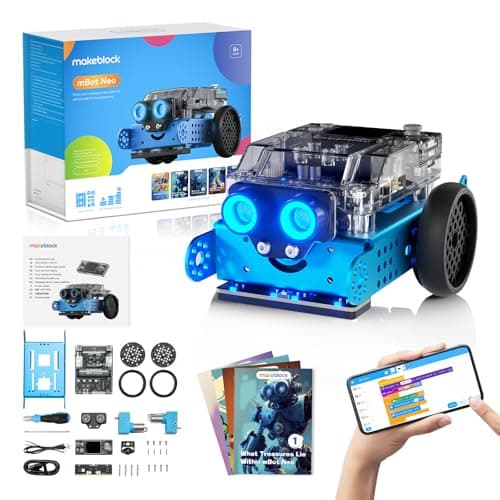
For a teenager, buy equipment rather than a kit. A microscope with a metal frame, a robot that runs Python, a circuit set with a real component tray. Makeblock’s mBot2 publishes three programming environments on one chassis — blocks, Python and Arduino C — which is the difference between a toy and a platform.
Block & Beaker earns a commission when you buy through our links, at no cost to you. It never changes a ranking, and we say so plainly when the right answer is the cheaper set, or nothing at all. Full disclosure · How we pick.
At a glance
The picks, ranked
Tap any row to jump to the full reasoning. Prices come live from Amazon where we have them and read “check price” where we don’t — never a number we cannot stand behind today.
| # | Product | Best for | Price |
|---|---|---|---|
| 1 | Best overall Makeblock mBot Neo (mBot2) Blocks, then Python, then Arduino C on the same robot, with 60-plus modules to add. | Twelve and up, and a teenager who will actually write code | |
| 2 | 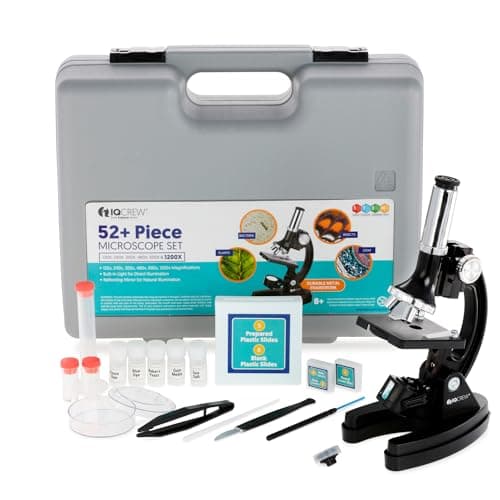 Best optics AmScope 120X-1200X Beginner Microscope Kit A metal frame, a real stage and six magnification levels — an instrument rather than a toy. | A teenager with a genuine biology interest | |
| 3 | 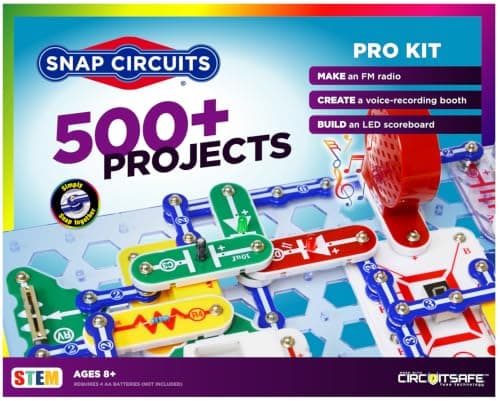 Best electronics Snap Circuits Pro Seventy-three published computer-interfaced experiments — circuits that respond to code. | A teenager who wants circuits without soldering | |
| 4 | 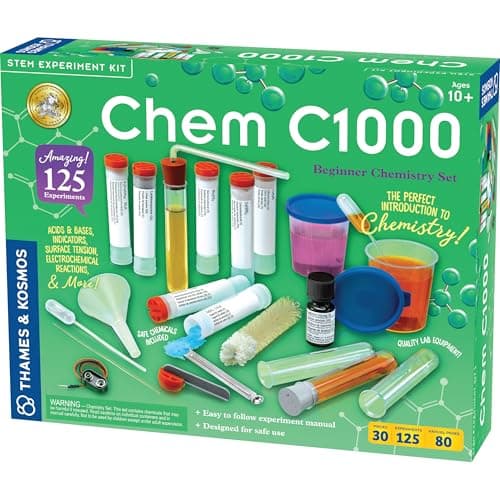 Best chemistry Thames & Kosmos CHEM C1000 Real reagents, a named European safety standard, and a manual published free online. | Ten and up, and squarely appropriate through the teens | |
| — | 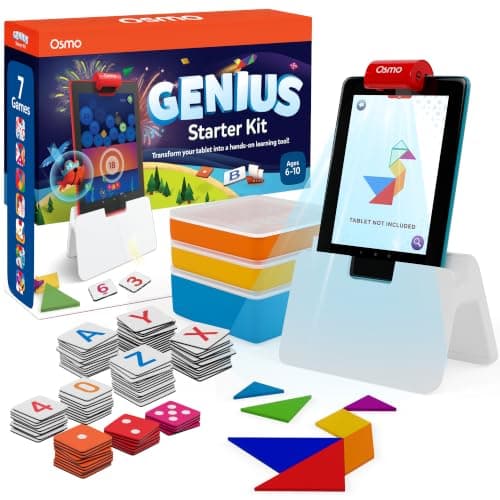 The one to skip Osmo Genius Starter Kit for iPad Five good games, published for ages 6-10, and no teenager will be seen with it. | Six to ten, not thirteen |
5 picks, including 1 we tell you to skip. Ages shown are the manufacturer’s own rating, not ours.
The rule that matters at this age
Buy something that looks like equipment. Not a toy with a teenage rating on the box — actual equipment, with a specification sheet, a metal frame or a real programming language.
This sounds superficial and it is not. A teenager decides whether something is for them in about two seconds, from the packaging, and that decision determines whether it is ever opened. A product published for ages 6-10 will not survive that inspection however good it is.
What separates a teenage purchase
The arithmetic
Equipment signals, published
| mBot2 — programming environments | Blocks, Python, Arduino C |
|---|---|
| mBot2 — controller | 240 MHz dual-core, 8 MB flash |
| AmScope M30 — frame | Metal arm, 70 x 65 mm stage |
| Snap Circuits Pro — computer-interfaced experiments | 73 |
| CHEM C1000 — safety standard named | EN 71-4 |
| Osmo Genius — published age band | 6-10 |
Python is the thing worth paying for
Of everything on this page, the mBot2’s published Python support is the specification most likely to matter in five years.
A teenager learning Python on hardware that moves has a considerably better first experience than one learning it in a browser tutorial, because the feedback is physical and the bugs are visible. And unlike block coding, Python is the actual thing — nothing has to be unlearned later.
The honest caveat: this only pays off if the teenager gets past the block editor. If the interest is casual, a cheaper robot delivers most of the same enjoyment.
Say the unwelcome thing
Do not buy a toy with a teenage age rating
There is a whole shelf of products that are children’s toys with “14+” on the box. They are usually the same product as the 8+ version with more pieces.
The test is whether the published specification would interest an adult. A processor clock speed, an objective lens magnification, a named safety standard — those are equipment specifications. A piece count is not.
What to buy
- Will actually code: mBot2, for the Python path.
- Biology interest: the AmScope, for the metal frame.
- Chemistry interest: CHEM C1000, and read the manual first — it is free.
- Electronics, never tried it: Snap Circuits Pro, sold on the computer interfacing.
For the electronics ladder see Snap Circuits compared, and for robotics, robot kits.
In full
Every pick, and what is wrong with it
Published specifications only, each linked back to the page it came from. Where a manufacturer publishes nothing, the row says so — we do not fill blanks in.
1. Best overall
Makeblock mBot Neo (mBot2)
Makeblock · mBot2 · maker rates it 8+
Blocks, then Python, then Arduino C on the same robot, with 60-plus modules to add.
- Controller
- CyberPi — Xtensa 32-bit LX6 dual-core at 240 MHz, 8 MB flash, 8 MB PSRAM
- Programming
- Scratch-style blocks, Python in mBlock, and Arduino C/C++ via the Arduino IDE
- Sensors
- On-board light, microphone, gyroscope and accelerometer, plus ultrasonic, quad RGB, temperature and IR modules
- Battery
- Built-in 2500 mAh LiPo, about 1 hour to charge, about 5 hours of play
Makeblock publishes a CyberPi controller — Xtensa 32-bit LX6 dual-core at 240 MHz, 8 MB flash, 8 MB PSRAM — with on-board light, microphone, gyroscope and accelerometer sensors plus ultrasonic, quad RGB, temperature and IR modules; Scratch-style blocks, Python in mBlock and Arduino C/C++ via the Arduino IDE; a 2500 mAh LiPo giving about five hours from a one-hour charge; eight motor and servo ports and 60-plus compatible modules, rated 8+.
For a teenager the published detail is itself part of the gift. A spec sheet with a processor clock and a memory figure signals that this is equipment rather than a toy with an age rating on it.
Python is the specific reason to buy this over anything cheaper. It is a real language, on real hardware, with a physical result — which is a considerably better first programming experience than a tutorial in a browser.
Replay signal
- Open-ended or one-shot
- Open-ended at the top of the range — this is the one a child does not outgrow at eleven
- Does anything run out
- Nothing runs out; rechargeable
- Room to grow
- Blocks, then Python, then Arduino C on the same robot, with 60+ add-on modules
- Adult required
- Not for driving it. Probably for the first Python session
Why we say so: Makeblock publishes the processor, the three programming environments on one robot, the 2500 mAh battery figures and the 60+ compatible modules. Blocks-to-Python-to-C on one chassis is the published upgrade path, and it is why this survives the year a child gets bored of pressing buttons.
What’s wrong with it
Expensive, and a teenager who only ever opens the block editor is paying for two-thirds of a product they never use.
| Controller | CyberPi — Xtensa 32-bit LX6 dual-core at 240 MHz, 8 MB flash, 8 MB PSRAM |
|---|---|
| Programming | Scratch-style blocks, Python in mBlock, and Arduino C/C++ via the Arduino IDE |
| Sensors | On-board light, microphone, gyroscope and accelerometer, plus ultrasonic, quad RGB, temperature and IR modules |
| Battery | Built-in 2500 mAh LiPo, about 1 hour to charge, about 5 hours of play |
| Expansion | 60+ compatible modules, up to 10 connected at once, 8 motor and servo ports |
| Stated age | Ages 8+ |
Every figure above is from Makeblock, mBot2 coding robot kit. Blanks are shown as “not published” rather than filled in.
2. Best optics
AmScope 120X-1200X Beginner Microscope Kit
AmScope · M30-ABS-KT2 · maker rates it 8+
A metal frame, a real stage and six magnification levels — an instrument rather than a toy.
- Magnifications
- Six levels — 120x, 240x, 300x, 480x, 600x and 1200x
- Frame
- Metal arm, with stage clips
- Lighting
- Built-in LED plus a reflecting mirror
- Extras
- Rotating color filter wheel; 52-piece accessory kit
AmScope publishes six magnification levels — 120x, 240x, 300x, 480x, 600x and 1200x — with a metal arm and stage clips, a built-in LED and a reflecting mirror, a rotating color filter wheel, a 70 x 65 mm stage and a 52-piece accessory kit, published “For ages 8+”.
The metal frame is the reason this belongs on a teenage page rather than a children’s one. It is heavy, it holds focus, and it does not feel like a toy in the hand.
Treat the top magnification skeptically: at 1200x an entry-level objective gives a large, dim image with no more real detail than the 600x view. The useful range here is the lower half.
Replay signal
- Open-ended or one-shot
- Open-ended — specimens are free and infinite
- Does anything run out
- The prepared slides in the accessory kit run out; blank slides do not
- Room to grow
- 1200x is well past what a child needs and past what the optics comfortably resolve, but the metal frame will outlast the interest
Why we say so: AmScope publishes six magnification levels, a metal arm and a 70 x 65 mm stage. Treat the top magnification with skepticism — at 1200x an entry-level objective delivers a large, dim, blurry image — and buy this for the metal frame and the usable lower range instead.
What’s wrong with it
No top lighting, so everything must be thin and on a slide, and the 1200x headline is optimistic on entry-level optics.
| Magnifications | Six levels — 120x, 240x, 300x, 480x, 600x and 1200x |
|---|---|
| Frame | Metal arm, with stage clips |
| Lighting | Built-in LED plus a reflecting mirror |
| Extras | Rotating color filter wheel; 52-piece accessory kit |
| Stage | 70 x 65 mm |
| Shipping weight | 6 lb — AmScope publishes no product weight |
| Stated age | “For ages 8+” |
Every figure above is from AmScope, M30-ABS-KT2 microscope. Blanks are shown as “not published” rather than filled in.
3. Best electronics
Snap Circuits Pro
Elenco · SC-500 · maker rates it 8+
Seventy-three published computer-interfaced experiments — circuits that respond to code.
- Projects
- “Build over 500 exciting projects”
- Parts
- “Contains over 75 snap-together parts”
- Computer-interfaced experiments
- “Includes 73 computer interfaced experiments”
- Projects per part
- 6.7
Elenco publishes over 500 projects from over 75 snap-together parts, including 73 computer interfaced experiments, rated 8+, requiring four AA batteries.
The computer-interfaced half is what makes this a teenage purchase rather than a child’s one. A circuit that talks to a computer is the meeting point of electronics and programming, and it is the only place in this whole line where that happens.
The presentation problem is real and worth naming: snap-together parts read as a children’s product. For a teenager who has never done electronics it is still the right starting point, but it will need to be sold on the computer-interfacing rather than on being a circuit kit.
Replay signal
- Open-ended or one-shot
- Open-ended, and the computer-interfaced projects give it somewhere to go after the manual
- Does anything run out
- Nothing runs out
- Room to grow
- 73 published computer-interfaced experiments is a second product hiding inside the first
Why we say so: Elenco publishes 500+ projects from 75+ parts and specifically 73 computer-interfaced experiments. That last number is the only thing separating the Pro from the Classic, and it is the only reason to pay the difference.
What’s wrong with it
Snap-together components look juvenile to a teenager, and the proprietary format does not transfer to breadboards.
| Projects | “Build over 500 exciting projects” |
|---|---|
| Parts | “Contains over 75 snap-together parts” |
| Computer-interfaced experiments | “Includes 73 computer interfaced experiments” |
| Projects per part | 6.7 |
| Stated age | “Ages 8+” |
| Batteries | “Requires 4 ‘AA’ batteries (not included)” |
Every figure above is from Elenco, Snap Circuits Pro. Blanks are shown as “not published” rather than filled in.
4. Best chemistry
Thames & Kosmos CHEM C1000
Thames & Kosmos · 640118 · maker rates it 10+
Real reagents, a named European safety standard, and a manual published free online.
- Chemicals included
- Seven, in cylindrical vials
- Manual
- Full experiment manual published free on the manufacturer's own site
- Safety standard
- “EN 71-4, in which the safety requirements for chemistry experimental kits are established”
- Covers
- Lab setup and safe handling, indicators and litmus, invisible ink, gas reactions
Thames & Kosmos publishes seven chemicals in cylindrical vials, a full experiment manual free on its own site, and compliance with EN 71-4, “in which the safety requirements for chemistry experimental kits are established,” rated 10 and up.
For a teenager this is squarely age-appropriate and the published manual is genuinely useful before buying: you can read the exact experiment list and judge whether it is pitched right.
The named standard is the other reason to prefer this line. Almost nothing else in the category names the document it complies with.
Replay signal
- Open-ended or one-shot
- Guided rather than open-ended, but the manual is a term's worth of weekends
- Does anything run out
- Yes — seven finite chemicals, with replacements sold separately
- Room to grow
- The C-series continues into C2000 and C3000, carrying the same equipment forward
- Adult required
- Real chemicals at a 10+ rating: a sit-with-them kit at the lower end of that range
Why we say so: Thames & Kosmos publishes the full manual free on its own site — you can read exactly what your child will be doing before spending anything — and states compliance with EN 71-4, the European chemistry-kit safety standard.
What’s wrong with it
Consumable — seven chemicals, and replacements are sold separately.
| Chemicals included | Seven, in cylindrical vials |
|---|---|
| Manual | Full experiment manual published free on the manufacturer's own site |
| Safety standard | “EN 71-4, in which the safety requirements for chemistry experimental kits are established” |
| Covers | Lab setup and safe handling, indicators and litmus, invisible ink, gas reactions |
| Stated age | 10 and up |
| Consumables | Yes — the seven chemicals are used up |
Every figure above is from Thames & Kosmos, experiment manuals. Blanks are shown as “not published” rather than filled in.
Skip this one
Osmo Genius Starter Kit for iPad
Osmo · Genius Starter Kit · maker rates it 6-10
Five good games, published for ages 6-10, and no teenager will be seen with it.
- Games
- Five — Tangram, Numbers, Words, Newton and Masterpiece
- Contents
- Osmo Base and reflector, 52 Words tiles, 40 Numbers tiles, 7 Tangram pieces, stackable storage
- Screen required
- Yes — an iPad, not included
- Stated age
- Ages 6-10
Osmo publishes five games — Tangram, Numbers, Words, Newton and Masterpiece — with the Base and reflector, 52 Words tiles, 40 Numbers tiles and 7 Tangram pieces, for ages 6-10, requiring an iPad.
It is a good product on the math page, for the age it is published for.
At thirteen, the published age band is the whole problem. Teenagers read the box, and a product stating 6-10 will be politely thanked for and never opened. That is not about capability; it is about how a gift is received.
Replay signal
- Open-ended or one-shot
- Five separate games rather than one, so it degrades gracefully — when one is exhausted, four remain
- Does anything run out
- Nothing physical runs out
- Room to grow
- Numbers and Tangram both scale well past the stated top age; Words does not
- Adult required
- Only to release the iPad, which in most households is the actual constraint
Why we say so: Osmo publishes the five named games and the exact tile counts. Five games in one box is the honest reason this is better value than a single-game Osmo kit, and the iPad requirement is a published dependency rather than an inference.
What’s wrong with it
Rated 6-10. Buying a teenager something published for a ten-year-old is the fastest way to have a gift left in its box.
| Games | Five — Tangram, Numbers, Words, Newton and Masterpiece |
|---|---|
| Contents | Osmo Base and reflector, 52 Words tiles, 40 Numbers tiles, 7 Tangram pieces, stackable storage |
| Screen required | Yes — an iPad, not included |
| Stated age | Ages 6-10 |
| Batteries | None in the physical pieces |
Every figure above is from Osmo, Genius Starter Kit. Blanks are shown as “not published” rather than filled in.
We are not putting a buy button on this one. It is easy enough to find if you want it anyway — but we would rather send you to something that gets played with twice.
Questions people actually ask
Frequently asked
What is the best STEM gift for a teenager?
Makeblock's mBot2, if they will actually write code. It publishes three programming environments on one chassis — Scratch-style blocks, Python in mBlock, and Arduino C — plus 60-plus compatible modules, which makes it a platform rather than a toy.
Why do teenagers not use STEM kits they are given?
Usually because of how the product presents rather than what it does. A teenager decides whether something is for them in about two seconds from the packaging, and anything published for ages 6-10 will not survive that inspection however capable it is.
Is a chemistry set appropriate for a teenager?
Yes. Thames & Kosmos rates its C-series 10 and up, and publishes compliance with EN 71-4, the European standard for chemistry experiment kits. It also publishes its full experiment manuals free online, so you can read the exact contents before buying.
Should I buy a microscope with higher magnification for a teenager?
Up to a point. AmScope publishes six levels to 1200x with a metal frame, and the metal frame is the real upgrade. Treat the top magnification skeptically — at 1200x an entry-level objective gives a large, dim image with no more genuine detail than 600x.
Sources
Where these figures came from
Every specification on this page traces to one of these. If a manufacturer publishes nothing on a point, the page says so rather than filling the gap.
Read next
Where to go from here
Back to Gift Guides, or read how we pick.