The picks
Coding Toys for 6 and 7 Year Olds
Everything in this category is rated four or five. At six the floor is behind you, so the number that decides it is how long a program can get.
By Sawyer V. · Published
The short answer
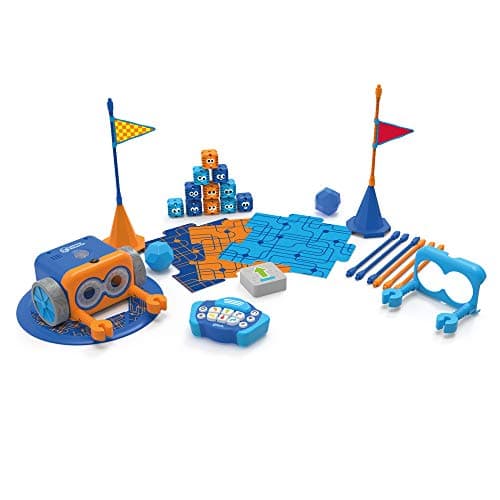
Buy on maximum program length, not on the age label. Learning Resources publishes Botley 2.0 at 5+ with “coding sequences of up to 150 steps” — the longest published program of any screen-free robot here and the reason it still works at seven. If a tablet is already in the house, the Osmo Genius Starter Kit publishes 6-10 and five games.
Block & Beaker earns a commission when you buy through our links, at no cost to you. It never changes a ranking, and we say so plainly when the right answer is the cheaper set, or nothing at all. Full disclosure · How we pick.
At a glance
The picks, ranked
Tap any row to jump to the full reasoning. Prices come live from Amazon where we have them and read “check price” where we don’t — never a number we cannot stand behind today.
| # | Product | Best for | Price |
|---|---|---|---|
| 1 | Longest published program, no screen Botley 2.0 The Coding Robot Activity Set 150-step sequences, 78 pieces and 100% screen-free play. | Six and seven, working without an adult | |
| 2 | 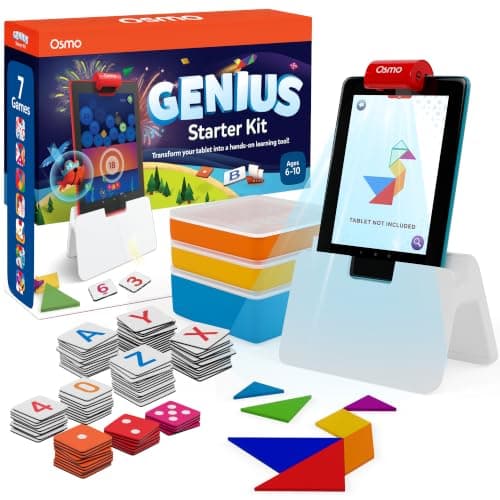 Best published age match Osmo Genius Starter Kit for iPad Five games across tangrams, numbers, words, physics and drawing, published 6-10. | Six to ten, in a house with an iPad already | |
| 3 | 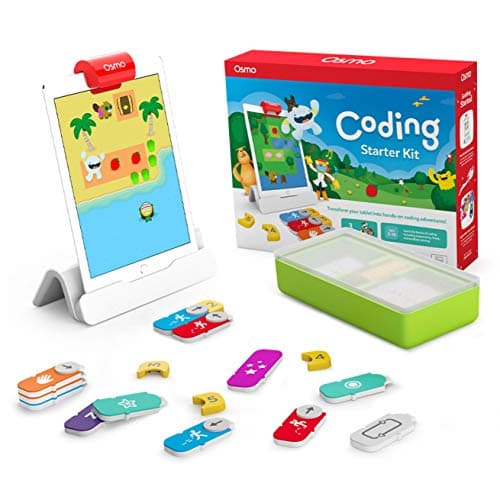 Best bridge to real code Osmo Coding Starter Kit for iPad 31 magnetic coding blocks and three coding games, published 5-10. | Six and seven, when blocks should be the next step | |
| 4 | 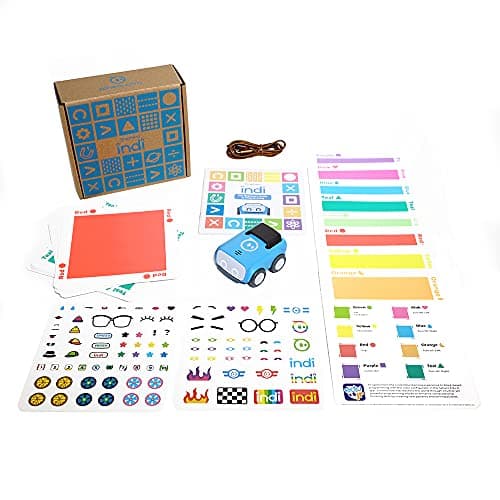 Best for a child who hates waiting Sphero indi At-Home Learning Kit A color-sensing robot coded by laying cards on the floor, with an optional block app. | Six, for immediate cause and effect with a coding path behind it | |
| — | 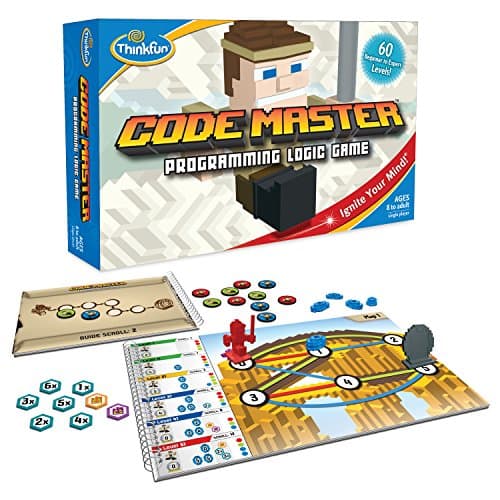 One to two years away ThinkFun Code Master 60 graded levels of real programming logic on paper, for one player. | Eight and up |
5 picks, including 1 we tell you to skip. Ages shown are the manufacturer’s own rating, not ours.
Published floor against published ceiling
The arithmetic
Coding toys: the age on the box and the ceiling behind it
| Code & Go Robot Mouse | Ages 4+ — 30 coding cards, a 20″ x 20″ board |
|---|---|
| Coding Critters | Ages 4+ — 22 pieces, a pet and a storybook |
| MatataLab Coding Set | Ages 4 to 9 — 37 coding blocks, screen-free and app-free |
| Sphero indi | Ages 4 and up — 30 color cards, optional block app |
| Botley 2.0 | 5+ (K-2nd) — up to 150 steps, 16 coded interactions |
| Osmo Coding Starter Kit | Ages 5-10 — 31 magnetic blocks, 3 apps |
| Osmo Genius Starter Kit | Ages 6-10 — 5 games |
| Code Master | Ages 8 and up — 60 graded levels, no robot |
| mBot Neo | Ages 8+ — blocks, Python and Arduino C |
What actually changes at six
Reading arrives, and it changes which toys are worth buying. The 4-and-5 pages on this site are full of products that publish “no reading required”, which is a genuine constraint at four. At six it stops being one, so a toy whose entire design is picture cards has given up an advantage it no longer needed.
Programs get long. This is the real break. A four-year-old makes a four-step route to the cheese; a six-year-old plans around obstacles and then wants to extend the plan. Botley’s published 150-step limit is the only ceiling in the category high enough that a seven-year-old does not hit it.
They want to debug. By six a child will run a program, watch it fail, and look for the step that was wrong — which is the actual skill. Toys where changing one step means re-entering the whole sequence punish that, and toys where the program is laid out physically reward it.
The one specification nobody prints on the front
Maximum program length is published by exactly one maker in this category, and it is the number that predicts whether a coding toy survives to seven. Learning Resources publishes 150 steps for Botley 2.0. Nobody else states a figure, which means that on every other product you are judging the ceiling by the contents list: 30 cards, 37 blocks, 31 blocks.
That is not a criticism of the cards — a physical program a child can see is better at this age than a longer invisible one. It is a warning about which number to read. A set with 83 pieces and a 12-step limit is a smaller toy than its box suggests.
Screen or no screen at six
At four the answer is easy: no screen. At six it is a genuine choice, and the published facts split cleanly.
Screen-free — Botley 2.0 publishes “100% screen-free play”, MatataLab publishes “screen-free, app-free and internet-free”, and indi needs no screen because the sensor reads cards. These work without a household negotiation and without a device being free.
Screen-based — both Osmo kits require an iPad that is not included. What they buy you is a path: 31 magnetic blocks look like the editor a child will use at ten, which a plastic robot does not.
The deciding question is not screen time, it is whether the tablet is actually available when the child wants to use it. A coding toy that competes with a sibling for the family iPad gets used less than a robot with five AAA batteries in it. See rechargeable against battery.
Worth knowing before you buy
So which one
One purchase, no screen, needs to last to eight: Botley 2.0.
There is an iPad and you want the whole subject covered: Osmo Genius Starter Kit.
There is an iPad and coding specifically is the point: Osmo Coding Starter Kit.
They lose patience with setup: Sphero indi, and a clear stretch of floor.
They are nearly eight: skip all of it and buy Code Master on the birthday.
Say the unwelcome thing
Do not buy the 4+ robot because it is cheaper and still rated for them
A 4+ rating at six means the toy is safe and usable, not that it is the right size. The products built for four publish short card decks and short programs because that is what four needs; bought at seven, the deck is finished in a fortnight and the ceiling was never there. Pay for the ceiling instead — it is the only specification on this page that cannot be added later.
Where to go next
How to choose a first coding toy covers the decision from scratch, coding toys for 4 and 5 year olds is the rung below, and coding toys for 8 and 9 year olds is the rung above.
In full
Every pick, and what is wrong with it
Published specifications only, each linked back to the page it came from. Where a manufacturer publishes nothing, the row says so — we do not fill blanks in.
1. Longest published program, no screen
Botley 2.0 The Coding Robot Activity Set
Learning Resources · LER2938 · maker rates it 5+
150-step sequences, 78 pieces and 100% screen-free play.
- Set size
- 78 pieces
- Contents
- Botley 2.0, remote programmer, 2 face plates, 40 coding cards, 6 double-sided boards, 27 obstacle pieces, starter guide
- Maximum program length
- “coding sequences of up to 150 steps”
- Movement
- Six directions, plus 16 coded interactions
Learning Resources publishes a 78-piece set — Botley 2.0, a remote programmer, 2 face plates, 40 coding cards, 6 double-sided boards, 27 obstacle pieces and a starter guide — “coding sequences of up to 150 steps”, six directions plus 16 coded interactions, “100% screen-free play”, 5 AAA batteries required and not included, rated 5+ (K-2nd grade).
One hundred and fifty steps is the specification that matters at this age. A four-year-old’s program is four moves long; a seven-year-old builds a route around 27 obstacle pieces and wants to add to it. A robot that caps out at a dozen steps is finished in a month at six.
Sixteen coded interactions is the second reason: it means the sequence can contain conditions and reactions rather than only directions, which is the first real step towards programming rather than remote control. See the Botley 2.0 review.
Replay signal
- Open-ended or one-shot
- Open-ended once the cards are understood — the child builds the maze, not just the program
- Does anything run out
- Nothing runs out except batteries
- Room to grow
- A 150-step ceiling means the challenge scales for years past the first week
- Adult required
- Needed for the first session, then not — there is no app account and nothing to log into
Why we say so: Learning Resources publishes the 78-piece contents, the 150-step maximum sequence, the six directions and 16 interactions, and states the set is 100% screen-free with no tablet or app required.
What’s wrong with it
Five AAA batteries, not included, and they do not last long.
| Set size | 78 pieces |
|---|---|
| Contents | Botley 2.0, remote programmer, 2 face plates, 40 coding cards, 6 double-sided boards, 27 obstacle pieces, starter guide |
| Maximum program length | “coding sequences of up to 150 steps” |
| Movement | Six directions, plus 16 coded interactions |
| Screen required | None — “100% screen-free play” |
| Batteries | “Requires 5 AAA batteries (not included)” |
| Stated age | 5+ (K-2nd grade) |
Every figure above is from Learning Resources, Botley 2.0 Activity Set. Blanks are shown as “not published” rather than filled in.
2. Best published age match
Osmo Genius Starter Kit for iPad
Osmo · Genius Starter Kit · maker rates it 6-10
Five games across tangrams, numbers, words, physics and drawing, published 6-10.
- Games
- Five — Tangram, Numbers, Words, Newton and Masterpiece
- Contents
- Osmo Base and reflector, 52 Words tiles, 40 Numbers tiles, 7 Tangram pieces, stackable storage
- Screen required
- Yes — an iPad, not included
- Stated age
- Ages 6-10
Osmo publishes five games — Tangram, Numbers, Words, Newton and Masterpiece — with the Osmo Base and reflector, 52 Words tiles, 40 Numbers tiles, 7 Tangram pieces and stackable storage, rated ages 6-10, with an iPad required and not included.
The only product on this page whose published range starts exactly at six, which is worth something on a page about buying at six: the games were designed for this reading and counting level rather than stretched to fit it.
It is physical pieces in front of a screen rather than a screen alone — the camera watches the tiles on the table. See the Genius Starter Kit review and coding toys against apps.
Replay signal
- Open-ended or one-shot
- Five separate games rather than one, so it degrades gracefully — when one is exhausted, four remain
- Does anything run out
- Nothing physical runs out
- Room to grow
- Numbers and Tangram both scale well past the stated top age; Words does not
- Adult required
- Only to release the iPad, which in most households is the actual constraint
Why we say so: Osmo publishes the five named games and the exact tile counts. Five games in one box is the honest reason this is better value than a single-game Osmo kit, and the iPad requirement is a published dependency rather than an inference.
What’s wrong with it
Requires an iPad that is not included. No tablet, no product.
| Games | Five — Tangram, Numbers, Words, Newton and Masterpiece |
|---|---|
| Contents | Osmo Base and reflector, 52 Words tiles, 40 Numbers tiles, 7 Tangram pieces, stackable storage |
| Screen required | Yes — an iPad, not included |
| Stated age | Ages 6-10 |
| Batteries | None in the physical pieces |
Every figure above is from Osmo, Genius Starter Kit. Blanks are shown as “not published” rather than filled in.
3. Best bridge to real code
Osmo Coding Starter Kit for iPad
Osmo · Coding Starter Kit · maker rates it 5-10
31 magnetic coding blocks and three coding games, published 5-10.
- Contents
- Osmo Base and Reflector for iPad, 31 magnetic coding blocks, stackable storage, 3 game apps
- Games
- Coding Awbie, Coding Jam, Coding Duo
- Screen required
- Yes — an iPad is required and is not included
- Compatibility
- All iPads except generations 1-4 and certain newer models; minimum iOS 11
Osmo publishes the Osmo Base and Reflector for iPad, 31 magnetic coding blocks, stackable storage and three game apps — Coding Awbie, Coding Jam and Coding Duo — compatible with all iPads except generations 1-4 and certain newer models, minimum iOS 11, rated ages 5-10.
Thirty-one physical blocks snapped into a sequence is the closest thing at this age to what a block-based editor looks like later. The move from Osmo blocks to Scratch is a change of surface rather than a change of idea, which is the published reason this earns its place over a card-driven robot at seven.
Three apps rather than one also means a loop, a music sequencer and a two-player mode are all covered. See the review and from toy to real code.
Replay signal
- Open-ended or one-shot
- Guided by the three games rather than open-ended; Coding Jam is the one with no ending
- Does anything run out
- Nothing physical runs out
- Room to grow
- Three games at rising difficulty, described by Osmo as beginner to expert
- Adult required
- Only to hand over the iPad — which is precisely the friction: this one competes with screen time rather than replacing it
Why we say so: Osmo publishes the 31-block count, the three named games, the iPad requirement and the compatibility list. The iPad dependency is a published requirement, and it is the fact most likely to decide whether this gets used.
What’s wrong with it
An iPad is required, and the compatibility list excludes older generations.
| Contents | Osmo Base and Reflector for iPad, 31 magnetic coding blocks, stackable storage, 3 game apps |
|---|---|
| Games | Coding Awbie, Coding Jam, Coding Duo |
| Screen required | Yes — an iPad is required and is not included |
| Compatibility | All iPads except generations 1-4 and certain newer models; minimum iOS 11 |
| Stated age | Ages 5-10 |
Every figure above is from Osmo, Coding Starter Kit. Blanks are shown as “not published” rather than filled in.
4. Best for a child who hates waiting
Sphero indi At-Home Learning Kit
Sphero · indi · maker rates it 4+
A color-sensing robot coded by laying cards on the floor, with an optional block app.
- Contents
- 1 indi robot, 30 color cards, charging cable, 2 sticker sheets, activity booklet, tape to fix the cards down
- Card mix
- 5 green, 4 yellow, 3 red, 2 purple, 3 teal, 3 orange, 5 blue, 5 pink
- How it is coded
- An on-board color sensor reads the cards; no screen needed
- Play time
- “2+ hours of play on a full charge”, USB charging
Sphero publishes 1 indi robot, 30 color cards in a stated mix, an on-board color sensor that reads the cards with no screen needed, “2+ hours of play on a full charge” over USB, an optional Sphero Edu Jr drag-and-drop block app, 2 sticker sheets, an activity booklet and tape to fix the cards down, rated ages 4 and up.
The published mechanism is the appeal at six: the program is the floor. A child lays out a route, the robot drives it immediately, and changing the program means moving one card — which removes the retyping that makes a remote-programmed robot tedious.
The optional app is the growth path, and it is genuinely optional rather than required. See the indi review and screen-free coding toys.
Replay signal
- Open-ended or one-shot
- Very open-ended for the age: the child lays the track out across the whole floor
- Does anything run out
- Nothing runs out; recharges by USB
- Room to grow
- Screen-free cards first, then the same robot accepts block coding in the free app when the child is ready
- Adult required
- Not after setup — the program is the floor, and the child builds it
Why we say so: Sphero publishes the 30-card color breakdown, the on-board color sensor as the programming method, the 2+ hours per charge, and the optional step up to drag-and-drop blocks in Sphero Edu Jr.
What’s wrong with it
30 cards and a floor. It needs more space than any other pick here.
| Contents | 1 indi robot, 30 color cards, charging cable, 2 sticker sheets, activity booklet, tape to fix the cards down |
|---|---|
| Card mix | 5 green, 4 yellow, 3 red, 2 purple, 3 teal, 3 orange, 5 blue, 5 pink |
| How it is coded | An on-board color sensor reads the cards; no screen needed |
| Play time | “2+ hours of play on a full charge”, USB charging |
| Optional app | Sphero Edu Jr drag-and-drop blocks |
| Stated age | Ages 4 and up |
Every figure above is from Sphero, indi At-Home Learning Kit. Blanks are shown as “not published” rather than filled in.
Skip this one
ThinkFun Code Master
ThinkFun · 1950 · maker rates it 8+
60 graded levels of real programming logic on paper, for one player.
- Levels
- 60, beginner to expert
- Players
- 1
- Format
- Map-based programming logic — sequence the avatar's moves to collect power crystals
- Batteries
- None
ThinkFun publishes 60 levels from beginner to expert, a single player, map-based programming logic where the player sequences an avatar’s moves to collect power crystals, and no batteries, rated ages 8 and up.
This is the best value in screen-free coding on the whole site and it is the wrong buy at six. The published levels introduce loops and conditionals through difficulty alone, with no robot to make a half-understood program entertaining, so a child who cannot yet do level 8 simply stops.
Buy it on the eighth birthday. See the Code Master review and coding toys for 8 and 9 year olds.
Replay signal
- Open-ended or one-shot
- Finite — 60 levels, and they are worked through in order
- Does anything run out
- Nothing runs out, but the level book does end
- Room to grow
- The later levels introduce conditionals and loops, so the concept ladder is real rather than cosmetic
Why we say so: ThinkFun publishes 60 levels from beginner to expert and a map-and-sequence format. The concepts the later levels introduce — branching and repetition — are the same two ideas that make a real program, which is why this works as preparation for a screen rather than as a substitute for one.
What’s wrong with it
Published 8 and up, and the difficulty curve is the product. Early it reads as a wall.
| Levels | 60, beginner to expert |
|---|---|
| Players | 1 |
| Format | Map-based programming logic — sequence the avatar's moves to collect power crystals |
| Batteries | None |
| Stated age | Ages 8 and up |
Every figure above is from ThinkFun, Code Master. Blanks are shown as “not published” rather than filled in.
We are not putting a buy button on this one. It is easy enough to find if you want it anyway — but we would rather send you to something that gets played with twice.
Questions people actually ask
Frequently asked
What is the best coding toy for a 7 year old?
Botley 2.0. Learning Resources publishes it at 5+ with coding sequences of up to 150 steps, 16 coded interactions and 100% screen-free play - the longest published program length in the category, which is what keeps it working at seven rather than four. Botley 2.0 review.
How do you teach coding to a 6 or 7 year old?
With a toy where the program is visible and changing one step is easy. At six a child will run a sequence, watch it fail and look for the wrong step - that debugging loop is the skill, and physical programs (cards on the floor, magnetic blocks, a remote with 150 steps) support it better than a short invisible one. How to choose a first coding toy.
Is a 4+ coding robot still fine at six?
Safe and usable, but usually too small. Products designed for four publish short card decks and short programs because that is what four needs. At six, read the ceiling - how long a program can get and how many pieces the route can use - rather than the floor.
Do coding toys for this age need a tablet?
Some do. Both Osmo kits publish an iPad as required and not included. Botley 2.0 publishes 100% screen-free play, MatataLab publishes screen-free, app-free and internet-free, and Sphero indi reads color cards with an on-board sensor. Screen-free coding toys.
What coding toy publishes an age of exactly six?
The Osmo Genius Starter Kit, published for ages 6-10 with five games. Most of the category publishes 4 or 5, so this is the one whose content was aimed at a six-year-old's reading and counting rather than stretched to reach it.
When should I buy Code Master instead?
At eight. ThinkFun publishes 60 levels from beginner to expert at ages 8 and up, with no robot and no batteries. The difficulty curve is the product, so at six a child who stalls on an early level has nothing else to enjoy. Code Master review.
Which of these works without a charger or batteries?
Code Master and the physical halves of the Osmo kits publish no batteries. Botley 2.0 publishes 5 AAA batteries required and not included; Sphero indi publishes USB charging with 2+ hours of play; MatataLab publishes rechargeable cells in both the robot and the tower. Battery guide for STEM toys.
Sources
Where these figures came from
Every specification on this page traces to one of these. If a manufacturer publishes nothing on a point, the page says so rather than filling the gap.
Read next
Where to go from here
Back to Coding & Robotics, or read how we pick.