Single review
ThinkFun Code Master Review
Reviewed from the manufacturer's published specifications and the arithmetic on them. We have not used it, and we say so.
By Sawyer V. · Published
The short answer
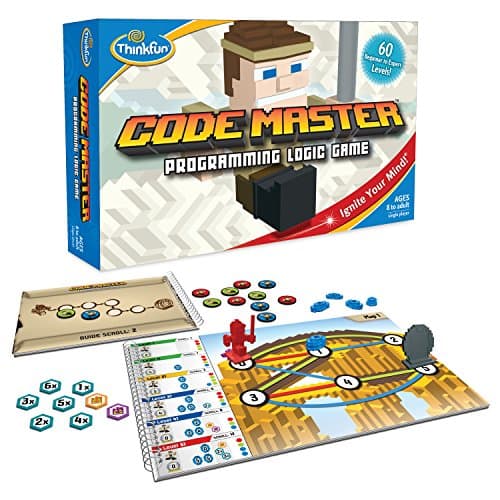
ThinkFun Code Master publishes 60 levels from beginner to expert, a map-based programming logic format where the child sequences an avatar’s moves to collect power crystals, single player, no batteries, rated 8 and up. The later levels introduce conditionals and loops, which is a real concept ladder.
Block & Beaker earns a commission when you buy through our links, at no cost to you. It never changes a ranking, and we say so plainly when the right answer is the cheaper set, or nothing at all. Full disclosure · How we pick.
At a glance
The picks, ranked
Tap any row to jump to the full reasoning. Prices come live from Amazon where we have them and read “check price” where we don’t — never a number we cannot stand behind today.
| # | Product | Best for | Price |
|---|---|---|---|
| 1 | The product ThinkFun Code Master Sixty levels that introduce branching and repetition — the two ideas that make a real program. | Eight and up, as coding practice with no device involved | |
| 2 | The younger, multiplayer version ThinkFun Robot Turtles Published as 2-5 players with an adult acting as the computer. | Four and up, with an adult at the table | |
| 3 | 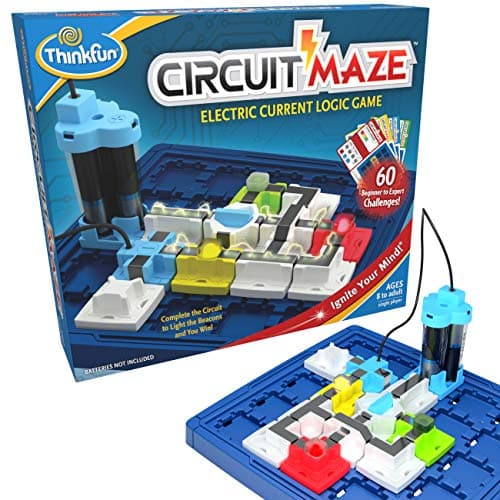 The companion game ThinkFun Circuit Maze 60 challenges of circuit logic with real working LEDs, same age rating. | A child who finished Code Master | |
| — | 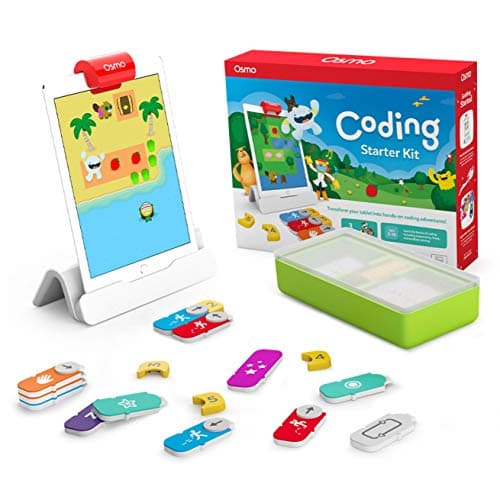 Not screen-free Osmo Coding Starter Kit for iPad Cross-shopped as a coding purchase and it brings a hard device dependency. | Five to ten, with an iPad available |
4 picks, including 1 we tell you to skip. Ages shown are the manufacturer’s own rating, not ours.
What we can tell you, and what we cannot
We have not played it. No lab, no samples, no test children, no star rating here or in the page’s structured data.
Published level counts, format and the concepts the levels introduce we can report. Whether level 52 is a satisfying puzzle we cannot.
The specification that decides it
The arithmetic
ThinkFun Code Master, published
| Levels | 60, beginner to expert |
|---|---|
| Players | 1 |
| Format | Map-based programming logic — sequence moves to collect power crystals |
| Concepts introduced | Conditionals and loops in the later levels |
| Batteries | None |
| Screen | None |
| Stated age | Ages 8 and up |
What the numbers mean in practice
Sixty levels worked in order is a real curriculum. Unlike a challenge deck that can be shuffled, the levels build. That means a child who stops at level 30 has learned the first half properly rather than a random sample.
No screen is the practical advantage. Nothing to unlock, no account, no competing apps a tap away. On a device, a coding game competes with everything else on that device and usually loses.
Single player is why it gets used. Self-checking and solitary, so it works on the afternoons when no adult is free.
It is preparation, not a substitute. Nobody learns a language here. What a child learns is that instructions execute literally and in order, which is the idea every beginner programmer struggles with first.
Say the unwelcome thing
Do not buy this expecting it to replace learning to code
Code Master teaches the ideas behind programming with cardboard. It does not teach a language, and no board game does.
For the hardware path onward, see from coding toy to real code.
Who should skip it
A child under eight. The published rating reflects the abstraction involved. Robot Turtles is rated 4+ and teaches the same idea with an adult playing along.
A child who wants company. Published as single player. STEM strategy games covers the multiplayer options.
A household buying one main present. Sixty levels is a real end, which makes this a second gift.
Where it sits
Code Master appears in coding board games, games for one player and coding toys vs coding apps.
In full
Every pick, and what is wrong with it
Published specifications only, each linked back to the page it came from. Where a manufacturer publishes nothing, the row says so — we do not fill blanks in.
1. The product
ThinkFun Code Master
ThinkFun · 1950 · maker rates it 8+
Sixty levels that introduce branching and repetition — the two ideas that make a real program.
- Levels
- 60, beginner to expert
- Players
- 1
- Format
- Map-based programming logic — sequence the avatar's moves to collect power crystals
- Batteries
- None
ThinkFun publishes 60 levels from beginner to expert, a map-based format where the child sequences an avatar’s moves to collect power crystals, single player, no batteries, rated 8 and up.
The concept ladder is what makes this more than a maze game. The later levels introduce conditionals and loops — branching and repetition — which are the same two ideas that turn a list of instructions into a program. That is a genuine curriculum rather than a theme.
Because the whole thing is physical and visible, a child can see their own program laid out and find the step that was wrong. Debugging with no error message is arguably clearer than debugging with one.
Replay signal
- Open-ended or one-shot
- Finite — 60 levels, and they are worked through in order
- Does anything run out
- Nothing runs out, but the level book does end
- Room to grow
- The later levels introduce conditionals and loops, so the concept ladder is real rather than cosmetic
Why we say so: ThinkFun publishes 60 levels from beginner to expert and a map-and-sequence format. The concepts the later levels introduce — branching and repetition — are the same two ideas that make a real program, which is why this works as preparation for a screen rather than as a substitute for one.
What’s wrong with it
Sixty levels worked through in order, and then the book is finished.
| Levels | 60, beginner to expert |
|---|---|
| Players | 1 |
| Format | Map-based programming logic — sequence the avatar's moves to collect power crystals |
| Batteries | None |
| Stated age | Ages 8 and up |
Every figure above is from ThinkFun, Code Master. Blanks are shown as “not published” rather than filled in.
2. The younger, multiplayer version
ThinkFun Robot Turtles
ThinkFun · 1900 · maker rates it 4+
Published as 2-5 players with an adult acting as the computer.
- Stated age
- Ages 4 and up
- Players
- 2-5, one of whom is an adult acting as “the computer”
- Batteries
- None
- Format
- Board game teaching programming fundamentals
ThinkFun publishes Robot Turtles as a board game for 2-5 players, one of whom is an adult acting as the computer, rated 4 and up, no batteries.
The adult-as-computer mechanic is genuinely clever: the grown-up executes instructions exactly as given, so the child discovers the gap between what they meant and what they said. Same lesson as Code Master, four years earlier, and it needs company.
Replay signal
- Open-ended or one-shot
- Open-ended, because the adult builds the board — difficulty scales with the child rather than with a deck
- Does anything run out
- Nothing runs out
- Room to grow
- The published rules add function cards and obstacles as the child improves
- Adult required
- Yes, always — an adult plays the computer. That is the design, and it is the whole cost
Why we say so: ThinkFun publishes the 4+ rating and the rule that an adult executes the child's program. An adult being structurally required is the single biggest predictor of whether a toy actually gets used, so it belongs in the headline rather than the small print.
What’s wrong with it
Needs a grown-up, so children cannot start it alone.
| Stated age | Ages 4 and up |
|---|---|
| Players | 2-5, one of whom is an adult acting as “the computer” |
| Batteries | None |
| Format | Board game teaching programming fundamentals |
| Consumables | None |
Every figure above is from ThinkFun games. Blanks are shown as “not published” rather than filled in.
3. The companion game
ThinkFun Circuit Maze
ThinkFun · 1008 · maker rates it 8+
60 challenges of circuit logic with real working LEDs, same age rating.
- Stated age
- “age 8 and up”
- Players
- 1
- Format
- Beam-and-token circuit puzzles with real working LEDs
- Batteries
- Required (not included)
ThinkFun publishes 60 challenges, beam-and-token circuit puzzles with real working LEDs, single player, age 8 and up, batteries required and not included.
Buying both gives a child 120 self-checking single-player challenges across two subjects, which is a genuinely good answer to a long winter.
Replay signal
- Open-ended or one-shot
- Finite challenge deck, but the pieces make a real circuit — free building afterward is possible
- Does anything run out
- Nothing runs out
- Room to grow
- Pairs naturally with a Snap Circuits set as the step from puzzle to real components
Why we say so: ThinkFun publishes the 8+ rating, the 60 challenges and the single-player circuit-puzzle format with working LEDs. The pairing with Snap Circuits is our routing advice and is stated as advice, not as a manufacturer claim.
What’s wrong with it
Requires batteries, which Code Master does not.
| Stated age | “age 8 and up” |
|---|---|
| Players | 1 |
| Format | Beam-and-token circuit puzzles with real working LEDs |
| Batteries | Required (not included) |
| Challenges | 60, beginner to expert |
Every figure above is from ThinkFun, Circuit Maze. Blanks are shown as “not published” rather than filled in.
Skip this one
Osmo Coding Starter Kit for iPad
Osmo · Coding Starter Kit · maker rates it 5-10
Cross-shopped as a coding purchase and it brings a hard device dependency.
- Contents
- Osmo Base and Reflector for iPad, 31 magnetic coding blocks, stackable storage, 3 game apps
- Games
- Coding Awbie, Coding Jam, Coding Duo
- Screen required
- Yes — an iPad is required and is not included
- Compatibility
- All iPads except generations 1-4 and certain newer models; minimum iOS 11
Osmo publishes three coding games — Coding Awbie, Coding Jam and Coding Duo — with a hard iPad requirement covering all iPads except generations 1-4 and certain newer models, minimum iOS 11, rated 5-10.
We list it because households often choose between these two. Code Master needs a table; Osmo needs a tablet released from whatever else it is doing, which is the step that tends not to happen.
Replay signal
- Open-ended or one-shot
- Guided by the three games rather than open-ended; Coding Jam is the one with no ending
- Does anything run out
- Nothing physical runs out
- Room to grow
- Three games at rising difficulty, described by Osmo as beginner to expert
- Adult required
- Only to hand over the iPad — which is precisely the friction: this one competes with screen time rather than replacing it
Why we say so: Osmo publishes the 31-block count, the three named games, the iPad requirement and the compatibility list. The iPad dependency is a published requirement, and it is the fact most likely to decide whether this gets used.
What’s wrong with it
Requires an iPad that is not included, with published compatibility limits.
| Contents | Osmo Base and Reflector for iPad, 31 magnetic coding blocks, stackable storage, 3 game apps |
|---|---|
| Games | Coding Awbie, Coding Jam, Coding Duo |
| Screen required | Yes — an iPad is required and is not included |
| Compatibility | All iPads except generations 1-4 and certain newer models; minimum iOS 11 |
| Stated age | Ages 5-10 |
Every figure above is from Osmo, Coding Starter Kit. Blanks are shown as “not published” rather than filled in.
We are not putting a buy button on this one. It is easy enough to find if you want it anyway — but we would rather send you to something that gets played with twice.
Questions people actually ask
Frequently asked
Does Code Master teach real programming?
It teaches the ideas rather than a language. ThinkFun publishes 60 levels whose later stages introduce conditionals and loops — branching and repetition are what turn a list of instructions into a program, and they are the concepts beginners struggle with most.
What age is Code Master for?
ThinkFun publishes Ages 8 and up. The rating reflects the abstraction involved — planning a sequence before running it. For a four-year-old, Robot Turtles teaches the same idea as a board game with an adult acting as the computer.
Does Code Master need batteries or a screen?
Neither. It is entirely physical, which is the practical advantage — nothing to unlock, no account, and no competing apps one tap away. On a device, a coding game competes with everything else on that device.
How long does Code Master last?
Sixty levels, worked through in order. Because the levels build rather than being shuffled, a child who stops halfway has still learned the first half properly. Treat 60 as roughly 30 to 40 real sittings. STEM games for one player.
Sources
Where these figures came from
Every specification on this page traces to one of these. If a manufacturer publishes nothing on a point, the page says so rather than filling the gap.
Read next
Where to go from here
Back to Reviews, or read how we pick.