The picks
Coding Gifts for Kids
Two published facts decide every coding gift: does it need a screen, and does it need an adult.
By Sawyer V. · Published
The short answer
Check two published facts before buying any coding gift. Does it require a screen — Osmo publishes an iPad as a requirement, Botley publishes 100% screen-free. And does it require an adult — Robot Turtles publishes an adult acting as the computer. Both determine whether it gets used at all.
Block & Beaker earns a commission when you buy through our links, at no cost to you. It never changes a ranking, and we say so plainly when the right answer is the cheaper set, or nothing at all. Full disclosure · How we pick.
At a glance
The picks, ranked
Tap any row to jump to the full reasoning. Prices come live from Amazon where we have them and read “check price” where we don’t — never a number we cannot stand behind today.
| # | Product | Best for | Price |
|---|---|---|---|
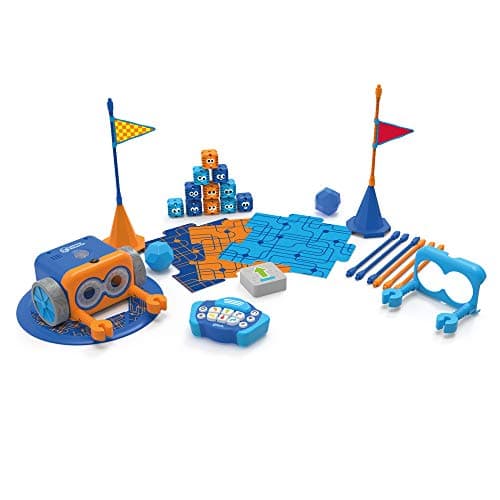
| 1 | Best overall Botley 2.0 The Coding Robot Activity Set A 150-step published ceiling, screen-free, and everything needed is in the box except batteries. | Five and up, and the safest coding gift to buy at distance | |
| 2 | 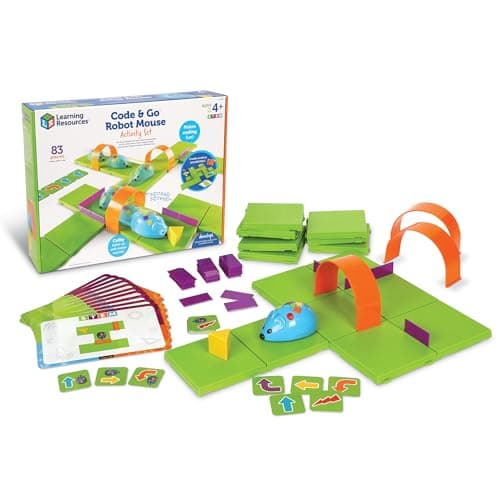 Best under budget Code & Go Robot Mouse Activity Set Eighty-three pieces and picture-based cards, so a pre-reader can use it alone. | Four and five, and the cheapest thing here that genuinely works | |
| 3 | 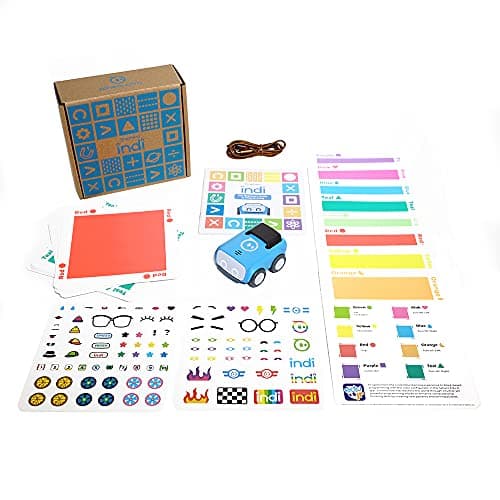 Best long-term gift Sphero indi At-Home Learning Kit Color cards now and block coding in a free app later, on the same robot. | Four and up, where you want the gift to still be used in two years | |
| 4 | Best for the youngest ThinkFun Robot Turtles The only genuine coding game at four, and an adult is structurally required every time. | Four, in a household where an adult will play | |
| — |  The one to check before buying Osmo Coding Starter Kit for iPad Genuinely clever, and it requires a device the recipient may not have. | Households that already own a compatible iPad |
5 picks, including 1 we tell you to skip. Ages shown are the manufacturer’s own rating, not ours.
The two questions that decide a coding gift
The arithmetic
What each one requires
| Botley 2.0 | No screen, no adult, 5 x AAA |
|---|---|
| Code & Go Robot Mouse | No screen, no adult, 3 x AAA |
| Sphero indi | No screen required, rechargeable |
| Robot Turtles | No screen, adult required every time |
| Osmo Coding Starter | iPad required, not included |
What coding gifts actually teach
Sequencing, debugging and precision — that order matters, that a mistake is findable, and that the machine does exactly what it was told rather than what was meant.
What they do not teach is syntax or programming in any literal sense, and no manufacturer above claims otherwise in its own copy. The realistic claim is that a child who has debugged a six-step route will not be frightened by a loop at eleven, which is worth having and worth being accurate about.
Say the unwelcome thing
Do not buy the expensive robot for a five-year-old
At five, a card-driven robot teaches the same sequencing and debugging as one costing five times more. The expensive robots earn their money at nine or ten, when a child wants to write real code.
If you want to spend more on a gift, spend it on a second category rather than a bigger robot — a marble run alongside a cheap coding toy is a better pair than either alone.
What to buy
- Five and up, buying at distance: Botley 2.0.
- Four, and cheap: Code & Go Robot Mouse.
- Want it to last: Sphero indi, for the app upgrade.
- Four, adult will play: Robot Turtles.
For the full category see coding robots and screen-free coding toys.
In full
Every pick, and what is wrong with it
Published specifications only, each linked back to the page it came from. Where a manufacturer publishes nothing, the row says so — we do not fill blanks in.
1. Best overall
Botley 2.0 The Coding Robot Activity Set
Learning Resources · LER2938 · maker rates it 5+
A 150-step published ceiling, screen-free, and everything needed is in the box except batteries.
- Set size
- 78 pieces
- Contents
- Botley 2.0, remote programmer, 2 face plates, 40 coding cards, 6 double-sided boards, 27 obstacle pieces, starter guide
- Maximum program length
- “coding sequences of up to 150 steps”
- Movement
- Six directions, plus 16 coded interactions
Learning Resources publishes 78 pieces, sequences of up to 150 steps, six directions, 16 interactions and 100% screen-free play with no tablet or app required, rated 5+, needing five AAA batteries.
As a gift this is the low-risk choice: it needs no device, no account, no subscription and no adult. A child opens it and can use it, which is not true of half this category.
The 150-step ceiling means it is not outgrown quickly either, which matters when the giver will not be there to see whether it landed.
Replay signal
- Open-ended or one-shot
- Open-ended once the cards are understood — the child builds the maze, not just the program
- Does anything run out
- Nothing runs out except batteries
- Room to grow
- A 150-step ceiling means the challenge scales for years past the first week
- Adult required
- Needed for the first session, then not — there is no app account and nothing to log into
Why we say so: Learning Resources publishes the 78-piece contents, the 150-step maximum sequence, the six directions and 16 interactions, and states the set is 100% screen-free with no tablet or app required.
What’s wrong with it
Five AAA batteries, not included — which for a gift means posting them separately or accepting a flat first morning.
| Set size | 78 pieces |
|---|---|
| Contents | Botley 2.0, remote programmer, 2 face plates, 40 coding cards, 6 double-sided boards, 27 obstacle pieces, starter guide |
| Maximum program length | “coding sequences of up to 150 steps” |
| Movement | Six directions, plus 16 coded interactions |
| Screen required | None — “100% screen-free play” |
| Batteries | “Requires 5 AAA batteries (not included)” |
| Stated age | 5+ (K-2nd grade) |
Every figure above is from Learning Resources, Botley 2.0 Activity Set. Blanks are shown as “not published” rather than filled in.
2. Best under budget
Code & Go Robot Mouse Activity Set
Learning Resources · LER2831 · maker rates it 4+
Eighty-three pieces and picture-based cards, so a pre-reader can use it alone.
- Set size
- 83 pieces
- Contents
- Colby the robot mouse, 16 maze grids, 22 maze walls, 3 tunnels, 30 double-sided coding cards, 10 activity cards, cheese wedge, activity guide
- Maze size
- The 16 grids build a 20″ x 20″ board
- Screen required
- None
Learning Resources publishes 83 pieces including 16 maze grids forming a 20-inch board, 22 walls, 3 tunnels, 30 double-sided coding cards and 10 activity cards, rated 4+, requiring three AAA batteries.
The directional symbol cards are what make it work as a gift for a four-year-old: nothing has to be read to anybody, so the child owns the activity from the first minute.
Sixteen rearrangeable grids is what stops it going stale after the ten activity cards.
Replay signal
- Open-ended or one-shot
- The mouse is fixed, but the maze is not — 16 grids and 22 walls is a new problem every time
- Does anything run out
- Nothing runs out
- Room to grow
- The 10 activity cards are a starting ladder; after that the child sets the puzzles
- Adult required
- Reading is not required — the coding cards use directional symbols, so a four-year-old can work alone
Why we say so: Learning Resources publishes the 83-piece contents including 16 rearrangeable grids and 22 walls, and states the cards are picture-based. A rearrangeable maze is why this does not become a solved puzzle after one weekend.
What’s wrong with it
Simple by design — there is no depth to grow into beyond building harder mazes.
| Set size | 83 pieces |
|---|---|
| Contents | Colby the robot mouse, 16 maze grids, 22 maze walls, 3 tunnels, 30 double-sided coding cards, 10 activity cards, cheese wedge, activity guide |
| Maze size | The 16 grids build a 20″ x 20″ board |
| Screen required | None |
| Batteries | 3 x AAA (not included) |
| Stated age | Ages 4+ |
Every figure above is from Learning Resources, Code & Go Robot Mouse Activity Set. Blanks are shown as “not published” rather than filled in.
3. Best long-term gift
Sphero indi At-Home Learning Kit
Sphero · indi · maker rates it 4+
Color cards now and block coding in a free app later, on the same robot.
- Contents
- 1 indi robot, 30 color cards, charging cable, 2 sticker sheets, activity booklet, tape to fix the cards down
- Card mix
- 5 green, 4 yellow, 3 red, 2 purple, 3 teal, 3 orange, 5 blue, 5 pink
- How it is coded
- An on-board color sensor reads the cards; no screen needed
- Play time
- “2+ hours of play on a full charge”, USB charging
Sphero publishes an on-board color sensor as the programming method, 30 color cards with a published color breakdown, a charging cable, sticker sheets, an activity booklet and tape, with 2+ hours of play per charge and optional drag-and-drop block coding in the free Sphero Edu Jr app, rated 4 and up.
Two stages on one purchase is unusual, and for a gift it means the thing you bought is still relevant when the child has moved on from where they were.
Rechargeable, which for a gift removes the battery problem entirely.
Replay signal
- Open-ended or one-shot
- Very open-ended for the age: the child lays the track out across the whole floor
- Does anything run out
- Nothing runs out; recharges by USB
- Room to grow
- Screen-free cards first, then the same robot accepts block coding in the free app when the child is ready
- Adult required
- Not after setup — the program is the floor, and the child builds it
Why we say so: Sphero publishes the 30-card color breakdown, the on-board color sensor as the programming method, the 2+ hours per charge, and the optional step up to drag-and-drop blocks in Sphero Edu Jr.
What’s wrong with it
The program is taped to the floor, which is a lot of floor and a lot of tape in somebody else's house.
| Contents | 1 indi robot, 30 color cards, charging cable, 2 sticker sheets, activity booklet, tape to fix the cards down |
|---|---|
| Card mix | 5 green, 4 yellow, 3 red, 2 purple, 3 teal, 3 orange, 5 blue, 5 pink |
| How it is coded | An on-board color sensor reads the cards; no screen needed |
| Play time | “2+ hours of play on a full charge”, USB charging |
| Optional app | Sphero Edu Jr drag-and-drop blocks |
| Stated age | Ages 4 and up |
Every figure above is from Sphero, indi At-Home Learning Kit. Blanks are shown as “not published” rather than filled in.
4. Best for the youngest
ThinkFun Robot Turtles
ThinkFun · 1900 · maker rates it 4+
The only genuine coding game at four, and an adult is structurally required every time.
- Stated age
- Ages 4 and up
- Players
- 2-5, one of whom is an adult acting as “the computer”
- Batteries
- None
- Format
- Board game teaching programming fundamentals
ThinkFun publishes it for ages 4 and up, 2-5 players, with an adult acting as the computer executing the child’s program, and no batteries.
The design is genuinely clever: the adult moves the turtle exactly as instructed, so when it goes wrong the child sees the instructions were wrong rather than the executor. That is debugging, at four, with no reading.
We flag the adult requirement in the headline rather than the small print, because as a gift it is the fact most likely to determine whether it gets played.
Replay signal
- Open-ended or one-shot
- Open-ended, because the adult builds the board — difficulty scales with the child rather than with a deck
- Does anything run out
- Nothing runs out
- Room to grow
- The published rules add function cards and obstacles as the child improves
- Adult required
- Yes, always — an adult plays the computer. That is the design, and it is the whole cost
Why we say so: ThinkFun publishes the 4+ rating and the rule that an adult executes the child's program. An adult being structurally required is the single biggest predictor of whether a toy actually gets used, so it belongs in the headline rather than the small print.
What’s wrong with it
The published rules require an adult to act as the computer. In a household where that is not reliable, this game stays in the box.
| Stated age | Ages 4 and up |
|---|---|
| Players | 2-5, one of whom is an adult acting as “the computer” |
| Batteries | None |
| Format | Board game teaching programming fundamentals |
| Consumables | None |
Every figure above is from ThinkFun games. Blanks are shown as “not published” rather than filled in.
Skip this one
Osmo Coding Starter Kit for iPad
Osmo · Coding Starter Kit · maker rates it 5-10
Genuinely clever, and it requires a device the recipient may not have.
- Contents
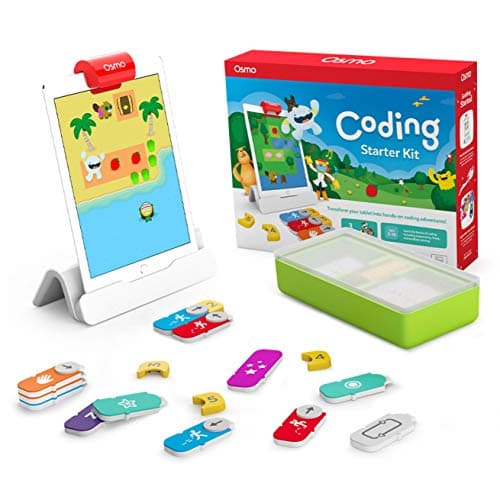
- Osmo Base and Reflector for iPad, 31 magnetic coding blocks, stackable storage, 3 game apps
- Games
- Coding Awbie, Coding Jam, Coding Duo
- Screen required
- Yes — an iPad is required and is not included
- Compatibility
- All iPads except generations 1-4 and certain newer models; minimum iOS 11
Osmo publishes an Osmo Base and reflector, 31 magnetic coding blocks, stackable storage and three game apps — Coding Awbie, Coding Jam and Coding Duo — for ages 5-10, requiring an iPad, compatible with all iPads except generations 1-4 and certain newer models, minimum iOS 11.
The product is good. The gift risk is specific and checkable: the recipient needs an iPad, and it needs to be on the compatibility list.
We mark this as the skip on a gift page rather than on the product pages, because everywhere else the iPad requirement is a household decision. As a present it is a dependency you cannot see from outside.
Replay signal
- Open-ended or one-shot
- Guided by the three games rather than open-ended; Coding Jam is the one with no ending
- Does anything run out
- Nothing physical runs out
- Room to grow
- Three games at rising difficulty, described by Osmo as beginner to expert
- Adult required
- Only to hand over the iPad — which is precisely the friction: this one competes with screen time rather than replacing it
Why we say so: Osmo publishes the 31-block count, the three named games, the iPad requirement and the compatibility list. The iPad dependency is a published requirement, and it is the fact most likely to decide whether this gets used.
What’s wrong with it
An iPad is a published requirement with a published compatibility list. As a gift, that is a dependency you cannot verify from outside the household.
| Contents | Osmo Base and Reflector for iPad, 31 magnetic coding blocks, stackable storage, 3 game apps |
|---|---|
| Games | Coding Awbie, Coding Jam, Coding Duo |
| Screen required | Yes — an iPad is required and is not included |
| Compatibility | All iPads except generations 1-4 and certain newer models; minimum iOS 11 |
| Stated age | Ages 5-10 |
Every figure above is from Osmo, Coding Starter Kit. Blanks are shown as “not published” rather than filled in.
We are not putting a buy button on this one. It is easy enough to find if you want it anyway — but we would rather send you to something that gets played with twice.
Questions people actually ask
Frequently asked
What is the best coding gift for a child?
Botley 2.0 for anyone five or over. Learning Resources publishes 100% screen-free play with no tablet or app required and a 150-step maximum program, which means the child can use it the moment they open it and will not outgrow it quickly.
Which coding toys need a tablet?
Osmo publishes an iPad as a requirement with a specific compatibility list. Botley, the Code & Go Robot Mouse, Matatalab and Robot Turtles are all published as needing no screen at all. Check the manufacturer's statement — retailer listings are inconsistent.
Which coding gift needs an adult to play?
Robot Turtles. ThinkFun publishes rules for 2-5 players in which an adult acts as the computer executing the child's program. That mechanic is what makes it work at four, and it also means it only gets played when a grown-up is free.
Do coding toys come with batteries?
Generally not. Botley 2.0 publishes five AAA cells not included, and the Code & Go Robot Mouse publishes three AAA not included. If you are posting a gift, post the batteries too — a robot that will not move on the day is a bad first impression.
Sources
Where these figures came from
Every specification on this page traces to one of these. If a manufacturer publishes nothing on a point, the page says so rather than filling the gap.
Read next
Where to go from here
Back to Gift Guides, or read how we pick.