Head to head
LEGO Robotics Compared
The LEGO route costs more and gives you a system you already own half of. Whether that is worth it depends on one thing.
By Sawyer V. · Published
The short answer
LEGO robotics is worth the premium if the household already owns bricks, because the robot becomes an extension of a system rather than a separate object. SPIKE Essential publishes 449 pieces, two motors, a color sensor and both icon and word-based Scratch coding. If there are no bricks, a dedicated robot buys more capability per pound.
Block & Beaker earns a commission when you buy through our links, at no cost to you. It never changes a ranking, and we say so plainly when the right answer is the cheaper set, or nothing at all. Full disclosure · How we pick.
At a glance
The picks, ranked
Tap any row to jump to the full reasoning. Prices come live from Amazon where we have them and read “check price” where we don’t — never a number we cannot stand behind today.
| # | Product | Best for | Price |
|---|---|---|---|
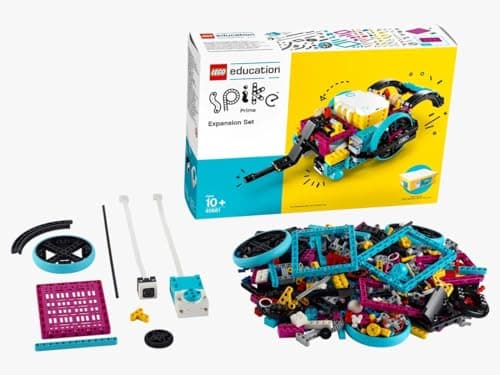
| 1 | Best LEGO option LEGO Education SPIKE Essential Set Two motors, a color sensor and a rechargeable hub that drop into a system the child already knows. | Six to ten, in a household that already has bricks | |
| 2 | 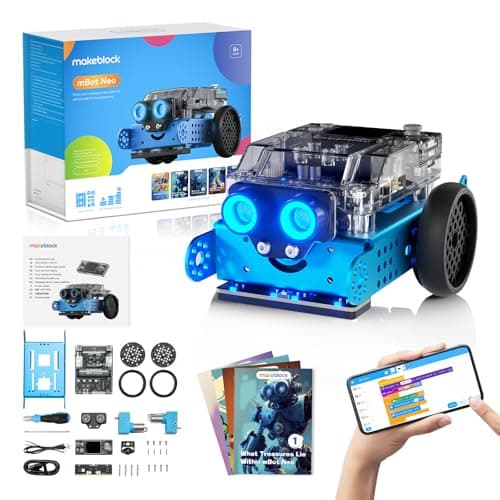 Best non-LEGO alternative Makeblock mBot Neo (mBot2) Three programming environments and 60-plus modules — more capability per pound than any brick-based option. | Eight and up, where coding depth matters more than the bricks | |
| 3 | 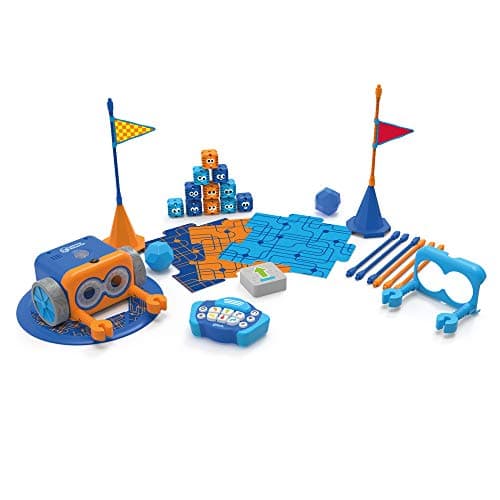 Best before either Botley 2.0 The Coding Robot Activity Set A 150-step program ceiling with no screen, no app and no build — the concepts without the assembly. | Five to eight, well before a robotics set makes sense | |
| — | 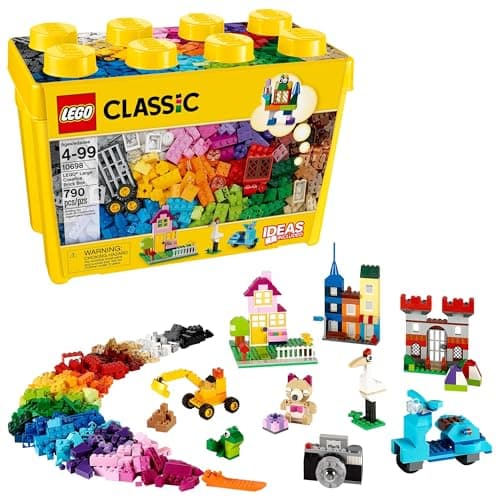 The one to skip for this LEGO Classic Large Creative Brick Box The bricks that make LEGO robotics worth it — and no robotics in the box whatsoever. | Construction, on a different page |
4 picks, including 1 we tell you to skip. Ages shown are the manufacturer’s own rating, not ours.
The one question that decides this
Does the household already own a meaningful quantity of bricks?
If yes, LEGO robotics is buying a hub, motors and sensors that turn an existing collection into something that moves. The 449 pieces in the box become a small fraction of what the child can actually build with.
If no, you are paying LEGO Education pricing for a robot with a fixed parts list, and a dedicated robot gives more capability for the money.
Side by side
| Published detail | LEGO SPIKE Essential | Makeblock mBot2 |
|---|---|---|
| Pieces in the box | 449 | Fixed chassis plus modules |
| Motors | 2 small motors | 8 motor and servo ports |
| Sensors published | Color sensor, 6-axis gyro in hub | Light, microphone, gyro, accelerometer, plus ultrasonic, quad RGB, temperature, IR |
| Coding environments | Icon-based and word-based, Scratch-derived | Scratch blocks, Python, Arduino C/C++ |
| Power | Rechargeable Li-ion, micro USB | 2500 mAh LiPo, ~5 hours |
| Expansion | Every LEGO brick you own | 60+ compatible modules |
| Stated age | 6+, grades 1-5 | 8+ |
Read the expansion row carefully, because it is where the two philosophies diverge completely. LEGO expands through bricks the family already has; Makeblock expands through modules you buy from Makeblock.
Coding depth versus construction freedom
The arithmetic
What each one lets a child change
| SPIKE Essential — the robot's shape | Anything LEGO can build |
|---|---|
| SPIKE Essential — the code | Icons, then Scratch-style words |
| mBot2 — the robot's shape | Fixed chassis plus bolt-on modules |
| mBot2 — the code | Blocks, then Python, then Arduino C |
The practical guidance follows the child. One who spends hours building and then wants it to move should have SPIKE. One who wants to write something that makes a machine behave differently should have the mBot2.
The education-channel caveat
SPIKE Essential is a LEGO Education product, and that matters practically. It is designed for classroom sets, priced for institutional purchasing, and sold through education channels alongside curriculum material a household will not use.
None of that makes it a bad home purchase — the hardware is genuinely good and the app is well made. But you are paying for a product designed around a teacher managing thirty children, and roughly a third of what comes with it is aimed at that context.
Worth knowing before you buy
Both hubs here use rechargeable lithium batteries charged over USB. The practical rules are the usual ones: charge on a hard surface rather than a bed, use the supplied cable, and stop using a hub whose case has cracked or swollen.
Small parts are the more mundane risk. A 449-piece LEGO set in a household with a toddler needs a rule about where it gets built, and the answer is a table.
Say the unwelcome thing
Do not buy robotics for a six-year-old who has not sequenced yet
A robotics set asks a child to build a machine, set up an app and write a program. If they have never done the third thing, they will be doing it badly while an adult does the first two.
Spend a year with a screen-free robot first. Sequencing, debugging and the idea that a machine does exactly what it was told are the transferable parts, and they cost a fraction as much to learn.
What to buy
- Bricks already in the house, child 6-10: SPIKE Essential.
- No bricks, child 8+, wants to code: the mBot2.
- Under eight, no coding experience: Botley 2.0 first.
- Two-step plan: a big brick box now, a robotics hub in two years.
See also robot kits, robot kits for teens and coding robots.
In full
Every pick, and what is wrong with it
Published specifications only, each linked back to the page it came from. Where a manufacturer publishes nothing, the row says so — we do not fill blanks in.
1. Best LEGO option
LEGO Education SPIKE Essential Set
LEGO Education · 45345 · maker rates it 6+ (grades 1-5)
Two motors, a color sensor and a rechargeable hub that drop into a system the child already knows.
- Pieces
- 449
- Motors
- 2 small motors
- Sensors
- Color sensor; 6-axis gyro in the hub
- Display
- 3x3 color light matrix
LEGO Education publishes 449 pieces, two small motors, a color sensor, a 3x3 color light matrix and a small hub with two input/output ports, Bluetooth, a 6-axis gyro and a rechargeable Li-ion battery charged over micro USB, with a SPIKE App offering both icon-based and word-based coding built on Scratch, for ages 6+ and grades 1-5.
The two coding modes on one set is the published progression that makes this work across a wide age band. A six-year-old drives it with icons; a nine-year-old uses word blocks, on the same hardware and in the same app.
The real argument is compatibility. Every brick in the house becomes robot chassis, which is a genuinely different proposition from a robot that arrives as a finished shape.
Replay signal
- Open-ended or one-shot
- Open-ended — it is a LEGO system with motors, so the build is never fixed
- Does anything run out
- Nothing runs out; the hub is rechargeable rather than battery-fed
- Room to grow
- Icon coding first, then word-based Scratch blocks in the same app, on the same hardware
- Adult required
- For the first build and the app setup; not after that
Why we say so: LEGO Education publishes 449 pieces, two motors, a color sensor and a rechargeable hub, with an app offering both icon-based and word-based coding. Two coding modes on one set is the published progression — a six-year-old starts on icons and moves to Scratch-style words without new hardware.
What’s wrong with it
Expensive for the part count, and it is an education-line product — sold through education channels with pricing to match.
| Pieces | 449 |
|---|---|
| Motors | 2 small motors |
| Sensors | Color sensor; 6-axis gyro in the hub |
| Display | 3x3 color light matrix |
| Hub | Small hub, 2 input/output ports, Bluetooth, rechargeable Li-ion with micro USB |
| Software | SPIKE App — icon-based and word-based coding built on Scratch |
| Stated age | 6+, grades 1-5 |
Every figure above is from LEGO Education, SPIKE Essential Set 45345. Blanks are shown as “not published” rather than filled in.
2. Best non-LEGO alternative
Makeblock mBot Neo (mBot2)
Makeblock · mBot2 · maker rates it 8+
Three programming environments and 60-plus modules — more capability per pound than any brick-based option.
- Controller
- CyberPi — Xtensa 32-bit LX6 dual-core at 240 MHz, 8 MB flash, 8 MB PSRAM
- Programming
- Scratch-style blocks, Python in mBlock, and Arduino C/C++ via the Arduino IDE
- Sensors
- On-board light, microphone, gyroscope and accelerometer, plus ultrasonic, quad RGB, temperature and IR modules
- Battery
- Built-in 2500 mAh LiPo, about 1 hour to charge, about 5 hours of play
Makeblock publishes a CyberPi controller with Scratch-style blocks, Python in mBlock and Arduino C/C++, on-board light, microphone, gyroscope and accelerometer sensors plus ultrasonic, quad RGB, temperature and IR modules, a 2500 mAh LiPo giving about five hours, eight motor and servo ports and 60-plus compatible modules, rated 8+.
Three environments against SPIKE's two, and one of them is Python — a real language rather than a block editor. For a child heading toward actual programming this is the better ladder.
The tradeoff is honest and worth stating: you are buying a robot rather than a construction system. Nothing here becomes a castle.
Replay signal
- Open-ended or one-shot
- Open-ended at the top of the range — this is the one a child does not outgrow at eleven
- Does anything run out
- Nothing runs out; rechargeable
- Room to grow
- Blocks, then Python, then Arduino C on the same robot, with 60+ add-on modules
- Adult required
- Not for driving it. Probably for the first Python session
Why we say so: Makeblock publishes the processor, the three programming environments on one robot, the 2500 mAh battery figures and the 60+ compatible modules. Blocks-to-Python-to-C on one chassis is the published upgrade path, and it is why this survives the year a child gets bored of pressing buttons.
What’s wrong with it
It is a fixed chassis. What you can build is what Makeblock designed, plus modules; the creative construction is gone.
| Controller | CyberPi — Xtensa 32-bit LX6 dual-core at 240 MHz, 8 MB flash, 8 MB PSRAM |
|---|---|
| Programming | Scratch-style blocks, Python in mBlock, and Arduino C/C++ via the Arduino IDE |
| Sensors | On-board light, microphone, gyroscope and accelerometer, plus ultrasonic, quad RGB, temperature and IR modules |
| Battery | Built-in 2500 mAh LiPo, about 1 hour to charge, about 5 hours of play |
| Expansion | 60+ compatible modules, up to 10 connected at once, 8 motor and servo ports |
| Stated age | Ages 8+ |
Every figure above is from Makeblock, mBot2 coding robot kit. Blanks are shown as “not published” rather than filled in.
3. Best before either
Botley 2.0 The Coding Robot Activity Set
Learning Resources · LER2938 · maker rates it 5+
A 150-step program ceiling with no screen, no app and no build — the concepts without the assembly.
- Set size
- 78 pieces
- Contents
- Botley 2.0, remote programmer, 2 face plates, 40 coding cards, 6 double-sided boards, 27 obstacle pieces, starter guide
- Maximum program length
- “coding sequences of up to 150 steps”
- Movement
- Six directions, plus 16 coded interactions
Learning Resources publishes a 78-piece set with coding sequences of up to 150 steps, six directions, 16 interactions and 100% screen-free play, rated 5+, requiring five AAA batteries.
Included because most people arriving at "LEGO robotics" for a six-year-old are early. Assembly plus app setup plus coding is three things at once, and a six-year-old who has not sequenced before will be doing the third badly.
Get sequencing and debugging established here first. The robotics set lands far better a couple of years later.
Replay signal
- Open-ended or one-shot
- Open-ended once the cards are understood — the child builds the maze, not just the program
- Does anything run out
- Nothing runs out except batteries
- Room to grow
- A 150-step ceiling means the challenge scales for years past the first week
- Adult required
- Needed for the first session, then not — there is no app account and nothing to log into
Why we say so: Learning Resources publishes the 78-piece contents, the 150-step maximum sequence, the six directions and 16 interactions, and states the set is 100% screen-free with no tablet or app required.
What’s wrong with it
Nothing is built and nothing is modified. When a child starts asking what is inside, this robot has no answer.
| Set size | 78 pieces |
|---|---|
| Contents | Botley 2.0, remote programmer, 2 face plates, 40 coding cards, 6 double-sided boards, 27 obstacle pieces, starter guide |
| Maximum program length | “coding sequences of up to 150 steps” |
| Movement | Six directions, plus 16 coded interactions |
| Screen required | None — “100% screen-free play” |
| Batteries | “Requires 5 AAA batteries (not included)” |
| Stated age | 5+ (K-2nd grade) |
Every figure above is from Learning Resources, Botley 2.0 Activity Set. Blanks are shown as “not published” rather than filled in.
Skip this one
LEGO Classic Large Creative Brick Box
LEGO · 10698 · maker rates it 4+
The bricks that make LEGO robotics worth it — and no robotics in the box whatsoever.
- Pieces
- 790
- Colors
- 33
- Stated age
- 4 and up
- Includes
- 8 types of windows and doors, 2 green baseplates, 6 tires and wheel rims
LEGO publishes 790 pieces in 33 colors, 8 window and door types, 2 baseplates and 6 tires and wheel rims, compatible with all LEGO sets, rated 4+, with no model in the box.
It appears in LEGO robotics searches constantly because the brand matches, and it contains nothing programmable at all.
Where it genuinely belongs in this decision: buying a big brick box first and a robotics hub later is a reasonable two-step plan, because the bricks are what make the robotics set worth its premium.
Replay signal
- Open-ended or one-shot
- Open-ended — this is the box with no instructions and no finished model
- Does anything run out
- Nothing runs out
- Room to grow
- Every LEGO set the child is ever given pours into the same box
Why we say so: LEGO publishes the 790-piece count, the 33 colors and the box's compatibility with all LEGO construction sets. The absence of a build-this model is the product's stated design, not an omission.
What’s wrong with it
No motors, no sensors, no hub, no coding. It is the substrate rather than the system.
| Pieces | 790 |
|---|---|
| Colors | 33 |
| Stated age | 4 and up |
| Includes | 8 types of windows and doors, 2 green baseplates, 6 tires and wheel rims |
| Compatibility | Compatible with all LEGO construction sets |
| Consumables | None |
Every figure above is from LEGO, Large Creative Brick Box 10698. Blanks are shown as “not published” rather than filled in.
We are not putting a buy button on this one. It is easy enough to find if you want it anyway — but we would rather send you to something that gets played with twice.
Questions people actually ask
Frequently asked
Is LEGO robotics worth the extra money?
If the household already owns bricks, yes — you are buying a hub, motors and sensors that turn an existing collection into something that moves, and every brick in the house becomes chassis. If there are no bricks, you are paying education-channel pricing for a fixed parts list, and a dedicated robot gives more per pound.
What is the difference between SPIKE Essential and a robot like mBot2?
Opposite bets. LEGO publishes 449 pieces with two coding modes — icon and word-based Scratch — so the body is free and the code stops at blocks. Makeblock publishes a fixed chassis with three environments including Python and Arduino C, so the body is fixed and the code goes all the way.
What age is LEGO SPIKE Essential for?
LEGO Education publishes 6+, grades 1-5. The two coding modes are what make that band work — a six-year-old uses icons and a nine-year-old uses word blocks on the same hardware.
Should I buy robotics for a 6 year old?
Only if they have already done some sequencing. A robotics set asks a child to build a machine, set up an app and write a program at once — and a child who has never done the third will do it badly while an adult does the first two. A screen-free robot first is cheaper and lands better. Screen-free coding robots.
Sources
Where these figures came from
Every specification on this page traces to one of these. If a manufacturer publishes nothing on a point, the page says so rather than filling the gap.
Read next
Where to go from here
Back to Coding & Robotics, or read how we pick.