The picks
Coding Robots for Classrooms
Buying six of something changes the question. Charging, logins and floor space decide a class set long before the coding does.
By Sawyer V. · Published
The short answer
For a class set, buy on power and dependencies. MatataStudio publishes its Coding Set as screen-free, app-free and internet-free with rechargeable cells; Sphero publishes indi as rechargeable with an optional app; LEGO Education publishes SPIKE Essential for grades 1-5 with a rechargeable hub. Botley needs five AAA batteries per robot.
Block & Beaker earns a commission when you buy through our links, at no cost to you. It never changes a ranking, and we say so plainly when the right answer is the cheaper set, or nothing at all. Full disclosure · How we pick.
At a glance
The picks, ranked
Tap any row to jump to the full reasoning. Prices come live from Amazon where we have them and read “check price” where we don’t — never a number we cannot stand behind today.
| # | Product | Best for | Price |
|---|---|---|---|
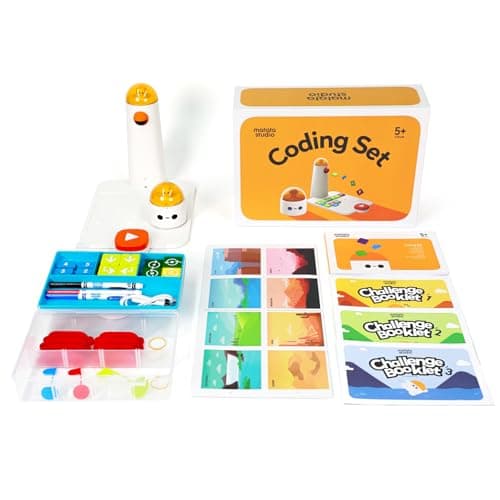
| 1 | Fewest dependencies MatataStudio (Matatalab) Coding Set Published as screen-free, app-free and internet-free, and rechargeable over USB-C. | Ages 4 to 9, where no device is available | |
| 2 | 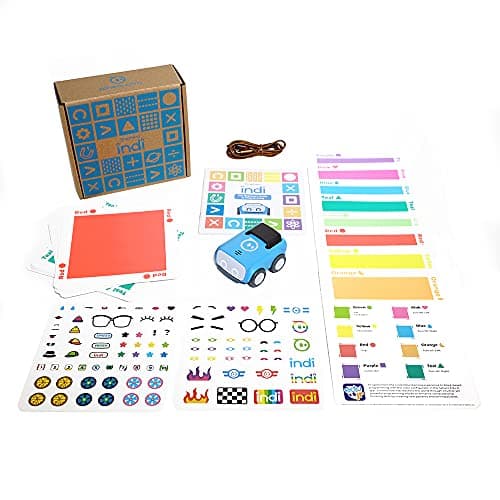 Best for a wide age range Sphero indi At-Home Learning Kit Color cards read by an on-board sensor, rechargeable over USB, with optional block coding later. | Four and up, with a device path for older groups | |
| 3 | 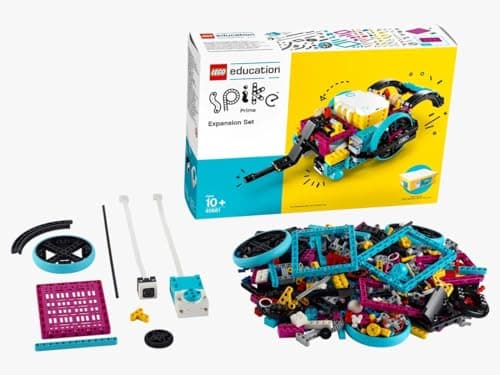 Built for the classroom LEGO Education SPIKE Essential Set 449 pieces, two motors, a color sensor and a rechargeable hub, with icon and word coding in one app. | Grades 1-5 | |
| 4 | 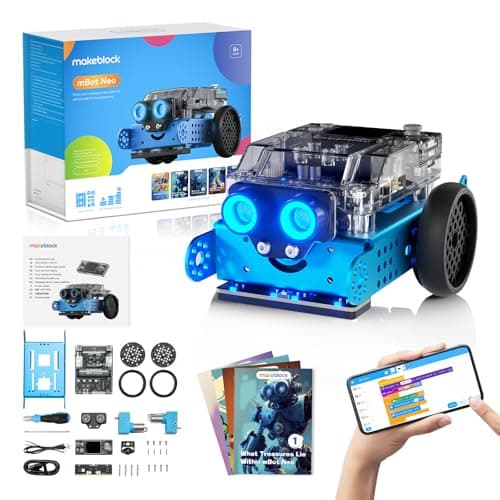 Best for older students Makeblock mBot Neo (mBot2) Blocks, Python and Arduino C on one robot, with a 2500 mAh rechargeable battery. | Eight and up, for clubs and upper grades | |
| — | 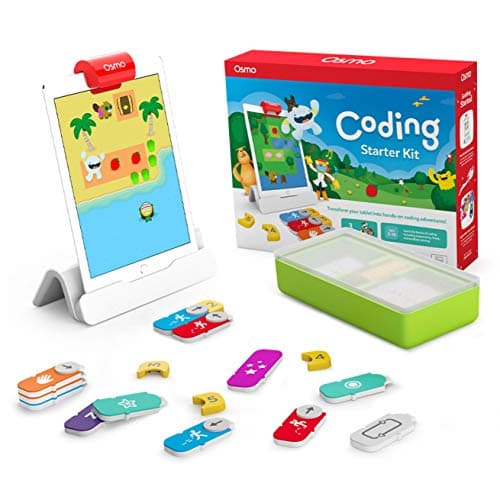 Hardest to scale Osmo Coding Starter Kit for iPad Every station needs its own iPad, which is not included. | Five to ten, one station at a time |
5 picks, including 1 we tell you to skip. Ages shown are the manufacturer’s own rating, not ours.
Three specifications decide a class set
Power. Disposable cells are the hidden cost of a class set. Learning Resources publishes five AAA batteries per Botley and three per Robot Mouse; MatataStudio, Sphero, LEGO Education and Makeblock all publish rechargeable cells.
Dependencies. Every login, install and network permission is another thing that can fail in a 40-minute lesson. MatataStudio publishes its set as app-free and internet-free; Osmo publishes an iPad as required.
Recovery time. Cards and blocks have to be collected and counted between groups. Fewer, larger pieces survive a class better than 30 cards taped to a floor.
The arithmetic
Published specifications, as they matter to a class set
| Matatalab Coding Set | Rechargeable USB-C · no app, no internet · 4-9 |
|---|---|
| Sphero indi | Rechargeable, 2+ hrs · app optional · 4+ |
| LEGO Education SPIKE Essential | Rechargeable hub · app required · grades 1-5 |
| mBot Neo | 2500 mAh, ~5 hrs · blocks to Python · 8+ |
| Botley 2.0 | 5 x AAA per robot, not included · no device · 5+ |
| Osmo Coding Starter Kit | iPad required per station · 5-10 |
What we cannot tell you
We have not run a classroom set of any of these, and we do not publish per-student pricing: prices move, and the buy links on this page show today’s live figure rather than a number we typed. Volume and education pricing are published by the makers, not by us.
Worth knowing before you buy
Every product here is rated for small parts as well as ability. In a mixed-age school, storage between lessons matters as much as the rating: coding blocks, flags and obstacle pieces belong in a closed box.
Charging a class set, on published figures
Sphero indi publishes 2+ hours of play on a full charge, over USB. For a carousel of 30-minute lessons that is a day, provided the trolley is plugged in overnight.
Matatalab publishes a 500 mAh cell in the robot and 2000 mAh in the command tower, charged over USB-C — two things to charge per station rather than one.
mBot Neo publishes a 2500 mAh LiPo, about an hour to charge and about five hours of play, which is the most forgiving figure here.
LEGO Education SPIKE Essential publishes a small hub with a rechargeable Li-ion battery over micro USB, 2 input/output ports and Bluetooth.
Botley 2.0 publishes 5 AAA batteries, not included. Multiply that by a class set and by a term, and it becomes a line in a budget rather than a footnote.
What each one costs you in devices
Matatalab publishes itself as screen-free, app-free and internet-free, with 37 coding blocks and graphic-symbol instructions that need no reading. In a school that is the lowest-dependency option on this page: no tablets, no logins, no network.
Sphero indi is read by an on-board color sensor, so the robot works with no device at all, with the Sphero Edu Jr app published as optional. LEGO publishes the SPIKE App with both icon-based and word-based coding built on Scratch. Makeblock publishes mBlock.
Osmo is the exception: an iPad is required and is not included, one per station, with published compatibility for all iPads except generations 1-4 and certain newer models and a minimum of iOS 11. That is a device procurement decision, not a toy purchase.
One room, several ages
The published ranges rarely line up with a school’s year groups, so it is worth laying them side by side. MatataStudio publishes ages 4 to 9. Sphero publishes indi at 4 and up. Osmo publishes 5-10. LEGO Education publishes SPIKE Essential at 6+, grades 1-5. Makeblock publishes mBot Neo at 8+.
Only two of those — Matatalab and indi — start early enough for a reception or kindergarten class, and only one of them, Matatalab, publishes explicitly that no reading is required, using graphic-symbol blocks and directional language.
At the other end, mBot Neo’s published path from Scratch-style blocks to Python to Arduino C/C++ is the only one on this page that a secondary-school department can keep using for years. A primary school buying one set for the whole building is really buying two, and it is better to say that at the quotation stage.
So which one
No devices, youngest grades: the Matatalab Coding Set.
One set across several year groups: Sphero indi.
A club that runs for years: the mBot Neo.
Say the unwelcome thing
Do not buy a battery-powered class set
Five AAA cells per robot, times a class set, times a term, is a budget line and a job nobody wants. Where the same lesson can be taught with a rechargeable robot, it should be.
Where to go next
Coding toys for two or more children covers sharing at home, and rechargeable vs battery coding toys lists every published power requirement on the site.
In full
Every pick, and what is wrong with it
Published specifications only, each linked back to the page it came from. Where a manufacturer publishes nothing, the row says so — we do not fill blanks in.
1. Fewest dependencies
MatataStudio (Matatalab) Coding Set
MatataStudio · Coding Set · maker rates it 4+
Published as screen-free, app-free and internet-free, and rechargeable over USB-C.
- Contents
- Robot car, command tower, control board, 37 coding blocks, 8 obstacles, 3 flags, 3 challenge booklets, nature map
- Screen required
- None — “screen-free, app-free and internet-free”
- Literacy required
- None — blocks use “intuitive graphic symbols” and directional language
- Power
- Rechargeable — 500 mAh cell in the robot, 2000 mAh in the command tower, USB-C
MatataStudio publishes a robot car, command tower, control board, 37 coding blocks, 8 obstacles, 3 flags, 3 challenge booklets and a nature map, with blocks using “intuitive graphic symbols” so no literacy is required, and rechargeable cells — 500 mAh in the robot, 2000 mAh in the tower, over USB-C — for ages 4 to 9.
Nothing to log into and nothing to install is what makes this work in a room with no devices and a filtered network. The program is on the board, so a teacher can see what a group did from across the room.
Replay signal
- Open-ended or one-shot
- Semi-open: three challenge booklets first, then free building on the map
- Does anything run out
- Nothing runs out, and it recharges rather than eating AAAs
- Room to grow
- Add-on sets extend the same command tower into music and drawing
- Adult required
- No reading needed, so a four-year-old can set up a run unaided
Why we say so: MatataStudio publishes the full contents list, the rechargeable cell capacities, and states the blocks use graphic symbols so no literacy is required.
What’s wrong with it
Blocks, flags and obstacles are small parts to collect at the end of a lesson.
| Contents | Robot car, command tower, control board, 37 coding blocks, 8 obstacles, 3 flags, 3 challenge booklets, nature map |
|---|---|
| Screen required | None — “screen-free, app-free and internet-free” |
| Literacy required | None — blocks use “intuitive graphic symbols” and directional language |
| Power | Rechargeable — 500 mAh cell in the robot, 2000 mAh in the command tower, USB-C |
| Stated age | Ages 4 to 9 |
Every figure above is from MatataStudio, Coding Set. Blanks are shown as “not published” rather than filled in.
2. Best for a wide age range
Sphero indi At-Home Learning Kit
Sphero · indi · maker rates it 4+
Color cards read by an on-board sensor, rechargeable over USB, with optional block coding later.
- Contents
- 1 indi robot, 30 color cards, charging cable, 2 sticker sheets, activity booklet, tape to fix the cards down
- Card mix
- 5 green, 4 yellow, 3 red, 2 purple, 3 teal, 3 orange, 5 blue, 5 pink
- How it is coded
- An on-board color sensor reads the cards; no screen needed
- Play time
- “2+ hours of play on a full charge”, USB charging
Sphero publishes one indi robot, 30 color cards with an exact breakdown, a charging cable, sticker sheets, an activity booklet and tape, with 2+ hours of play per charge and optional drag-and-drop coding in the free Sphero Edu Jr app, rated 4 and up.
The same robot serves a kindergarten group with cards and an older group with blocks, which matters when one purchase has to cover several year groups.
Replay signal
- Open-ended or one-shot
- Very open-ended for the age: the child lays the track out across the whole floor
- Does anything run out
- Nothing runs out; recharges by USB
- Room to grow
- Screen-free cards first, then the same robot accepts block coding in the free app when the child is ready
- Adult required
- Not after setup — the program is the floor, and the child builds it
Why we say so: Sphero publishes the 30-card color breakdown, the on-board color sensor as the programming method, the 2+ hours per charge, and the optional step up to drag-and-drop blocks in Sphero Edu Jr.
What’s wrong with it
Thirty cards per robot to lay out, tape down and collect.
| Contents | 1 indi robot, 30 color cards, charging cable, 2 sticker sheets, activity booklet, tape to fix the cards down |
|---|---|
| Card mix | 5 green, 4 yellow, 3 red, 2 purple, 3 teal, 3 orange, 5 blue, 5 pink |
| How it is coded | An on-board color sensor reads the cards; no screen needed |
| Play time | “2+ hours of play on a full charge”, USB charging |
| Optional app | Sphero Edu Jr drag-and-drop blocks |
| Stated age | Ages 4 and up |
Every figure above is from Sphero, indi At-Home Learning Kit. Blanks are shown as “not published” rather than filled in.
3. Built for the classroom
LEGO Education SPIKE Essential Set
LEGO Education · 45345 · maker rates it 6+ (grades 1-5)
449 pieces, two motors, a color sensor and a rechargeable hub, with icon and word coding in one app.
- Pieces
- 449
- Motors
- 2 small motors
- Sensors
- Color sensor; 6-axis gyro in the hub
- Display
- 3x3 color light matrix
LEGO Education publishes 449 pieces, 2 small motors, a color sensor, a 6-axis gyro in the hub, a 3×3 color light matrix and a small hub with two input/output ports, Bluetooth and a rechargeable Li-ion cell over micro USB, with the SPIKE App offering icon-based and word-based coding, rated 6+ for grades 1-5.
Two coding modes in one app is the reason it fits a mixed class: the same set serves a child on icons and a child on words in the same lesson.
Replay signal
- Open-ended or one-shot
- Open-ended — it is a LEGO system with motors, so the build is never fixed
- Does anything run out
- Nothing runs out; the hub is rechargeable rather than battery-fed
- Room to grow
- Icon coding first, then word-based Scratch blocks in the same app, on the same hardware
- Adult required
- For the first build and the app setup; not after that
Why we say so: LEGO Education publishes 449 pieces, two motors, a color sensor and a rechargeable hub, with an app offering both icon-based and word-based coding. Two coding modes on one set is the published progression — a six-year-old starts on icons and moves to Scratch-style words without new hardware.
What’s wrong with it
An app and a device are required, and it is the classroom line, priced for it.
| Pieces | 449 |
|---|---|
| Motors | 2 small motors |
| Sensors | Color sensor; 6-axis gyro in the hub |
| Display | 3x3 color light matrix |
| Hub | Small hub, 2 input/output ports, Bluetooth, rechargeable Li-ion with micro USB |
| Software | SPIKE App — icon-based and word-based coding built on Scratch |
| Stated age | 6+, grades 1-5 |
Every figure above is from LEGO Education, SPIKE Essential Set 45345. Blanks are shown as “not published” rather than filled in.
4. Best for older students
Makeblock mBot Neo (mBot2)
Makeblock · mBot2 · maker rates it 8+
Blocks, Python and Arduino C on one robot, with a 2500 mAh rechargeable battery.
- Controller
- CyberPi — Xtensa 32-bit LX6 dual-core at 240 MHz, 8 MB flash, 8 MB PSRAM
- Programming
- Scratch-style blocks, Python in mBlock, and Arduino C/C++ via the Arduino IDE
- Sensors
- On-board light, microphone, gyroscope and accelerometer, plus ultrasonic, quad RGB, temperature and IR modules
- Battery
- Built-in 2500 mAh LiPo, about 1 hour to charge, about 5 hours of play
Makeblock publishes the CyberPi controller with Scratch-style blocks, Python in mBlock and Arduino C/C++, on-board sensors, about five hours of play per charge and 60+ compatible modules with up to 10 connected at once, rated 8+.
For a coding club that runs for years, one platform that covers blocks through text saves re-teaching the tool every September.
Replay signal
- Open-ended or one-shot
- Open-ended at the top of the range — this is the one a child does not outgrow at eleven
- Does anything run out
- Nothing runs out; rechargeable
- Room to grow
- Blocks, then Python, then Arduino C on the same robot, with 60+ add-on modules
- Adult required
- Not for driving it. Probably for the first Python session
Why we say so: Makeblock publishes the processor, the three programming environments on one robot, the 2500 mAh battery figures and the 60+ compatible modules. Blocks-to-Python-to-C on one chassis is the published upgrade path, and it is why this survives the year a child gets bored of pressing buttons.
What’s wrong with it
8+, and its depth is wasted on a first-grade group.
| Controller | CyberPi — Xtensa 32-bit LX6 dual-core at 240 MHz, 8 MB flash, 8 MB PSRAM |
|---|---|
| Programming | Scratch-style blocks, Python in mBlock, and Arduino C/C++ via the Arduino IDE |
| Sensors | On-board light, microphone, gyroscope and accelerometer, plus ultrasonic, quad RGB, temperature and IR modules |
| Battery | Built-in 2500 mAh LiPo, about 1 hour to charge, about 5 hours of play |
| Expansion | 60+ compatible modules, up to 10 connected at once, 8 motor and servo ports |
| Stated age | Ages 8+ |
Every figure above is from Makeblock, mBot2 coding robot kit. Blanks are shown as “not published” rather than filled in.
Skip this one
Osmo Coding Starter Kit for iPad
Osmo · Coding Starter Kit · maker rates it 5-10
Every station needs its own iPad, which is not included.
- Contents
- Osmo Base and Reflector for iPad, 31 magnetic coding blocks, stackable storage, 3 game apps
- Games
- Coding Awbie, Coding Jam, Coding Duo
- Screen required
- Yes — an iPad is required and is not included
- Compatibility
- All iPads except generations 1-4 and certain newer models; minimum iOS 11
Osmo publishes an Osmo Base and Reflector for iPad, 31 magnetic coding blocks and three coding games, rated 5-10, with an iPad required and not included, and compatibility limited to certain iPad generations with a minimum of iOS 11.
In a school with a tablet cart it can work. As a class set bought from scratch, the device requirement multiplies by every station.
Replay signal
- Open-ended or one-shot
- Guided by the three games rather than open-ended; Coding Jam is the one with no ending
- Does anything run out
- Nothing physical runs out
- Room to grow
- Three games at rising difficulty, described by Osmo as beginner to expert
- Adult required
- Only to hand over the iPad — which is precisely the friction: this one competes with screen time rather than replacing it
Why we say so: Osmo publishes the 31-block count, the three named games, the iPad requirement and the compatibility list. The iPad dependency is a published requirement, and it is the fact most likely to decide whether this gets used.
What’s wrong with it
A device per group, plus published compatibility limits on older iPads.
| Contents | Osmo Base and Reflector for iPad, 31 magnetic coding blocks, stackable storage, 3 game apps |
|---|---|
| Games | Coding Awbie, Coding Jam, Coding Duo |
| Screen required | Yes — an iPad is required and is not included |
| Compatibility | All iPads except generations 1-4 and certain newer models; minimum iOS 11 |
| Stated age | Ages 5-10 |
Every figure above is from Osmo, Coding Starter Kit. Blanks are shown as “not published” rather than filled in.
We are not putting a buy button on this one. It is easy enough to find if you want it anyway — but we would rather send you to something that gets played with twice.
Questions people actually ask
Frequently asked
What is the best coding robot for a classroom?
The one with fewest dependencies for your room. MatataStudio publishes its Coding Set as screen-free, app-free and internet-free with rechargeable cells for ages 4 to 9; LEGO Education publishes SPIKE Essential for grades 1-5 with a rechargeable hub and an app.
Do classroom coding robots need tablets?
Not all of them. Matatalab is published as app-free and internet-free, and Botley 2.0 as 100% screen-free. LEGO SPIKE Essential requires its app, and Osmo's Coding Starter Kit requires an iPad per station.
Rechargeable or battery robots for a school?
Rechargeable, at class-set scale. Learning Resources publishes five AAA cells per Botley 2.0 and three per Robot Mouse, none included; MatataStudio, Sphero, LEGO Education and Makeblock publish rechargeable cells. Rechargeable vs battery coding toys.
What age are classroom coding robots for?
Published ranges: Matatalab 4 to 9, Sphero indi 4 and up, Botley 2.0 5+ (K-2), LEGO SPIKE Essential 6+ for grades 1-5, and Makeblock mBot Neo 8+.
Which classroom coding robot needs no devices at all?
Matatalab publishes itself as screen-free, app-free and internet-free, using 37 physical coding blocks with graphic symbols. Sphero indi also works device-free, using an on-board color sensor to read its 30 cards, with its app published as optional.
Which classroom robots are rechargeable?
Sphero indi (2+ hours per charge, USB), Matatalab (500 mAh robot and 2000 mAh tower over USB-C), mBot Neo (2500 mAh LiPo, about 1 hour to charge, about 5 hours of play) and LEGO SPIKE Essential (rechargeable Li-ion hub over micro USB). Botley 2.0 is the outlier at 5 AAA batteries, not included.
Which classroom robot covers the widest published age range?
MatataStudio publishes ages 4 to 9 for the Coding Set, and Osmo publishes 5-10. LEGO Education publishes SPIKE Essential at 6+, grades 1-5, and Makeblock publishes mBot Neo at 8+, so no single set covers a whole primary school.
Can one coding robot serve a whole school?
Not on the published ranges. A set that starts at 4 tops out around 9 or 10, and the sets that carry older students - mBot Neo with Scratch blocks, Python and Arduino C/C++ - start at 8. Budget for two sets rather than one.
Sources
Where these figures came from
Every specification on this page traces to one of these. If a manufacturer publishes nothing on a point, the page says so rather than filling the gap.
Read next
Where to go from here
Back to Coding & Robotics, or read how we pick.