The picks
Arduino Kits for Kids
Almost nothing in this category is sold as a children's product, so almost nothing publishes a children's age. One kit does, and it is the one with a curriculum attached.
By Sawyer V. · Published
The short answer
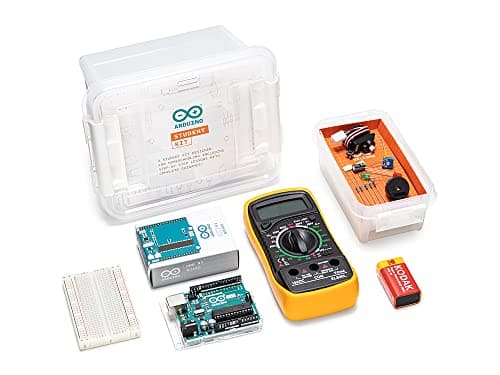
For one child learning alone, buy the Arduino Student Kit: Arduino publishes it for “ages 11+” with nine 90-minute lessons, two open-ended projects, a logbook and “enough content for an entire semester” — the only kit in the category whose own maker states a child’s age. The Arduino Starter Kit R4 publishes 13 projects on the UNO R4 WiFi with a certification voucher. SunFounder’s Elite Explorer Kit publishes 300+ components and 100+ video lessons at 8+. Do not buy the classroom kit for one child.
Block & Beaker earns a commission when you buy through our links, at no cost to you. It never changes a ranking, and we say so plainly when the right answer is the cheaper set, or nothing at all. Full disclosure · How we pick.
At a glance
The picks, ranked
Tap any row to jump to the full reasoning. Prices come live from Amazon where we have them and read “check price” where we don’t — never a number we cannot stand behind today.
| # | Product | Best for | Price |
|---|---|---|---|
| 1 | The only kit with a published child age and a course Arduino Student Kit Nine 90-minute lessons, two open-ended projects and a logbook, for one learner. | Eleven and up, working alone, with an adult who knows nothing about electronics | |
| 2 | 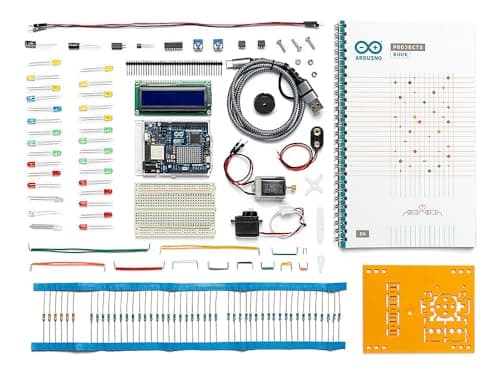 Best official kit with a target to aim at Arduino Starter Kit R4 13 projects in a printed book on the UNO R4 WiFi, plus a certification voucher. | A teenager who already finished a block-coding robot | |
| 3 | 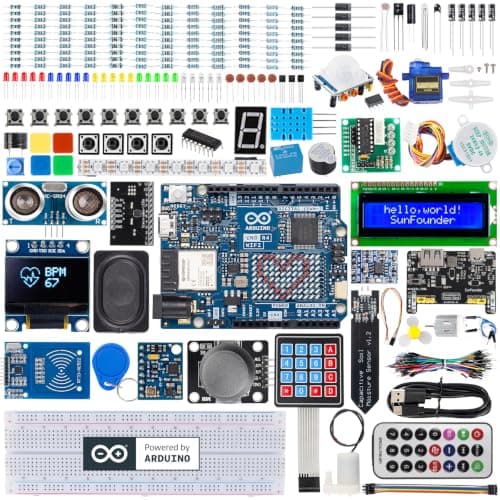 Lowest published age in the category — 8+ SunFounder Elite Explorer Kit 300+ components, 50+ projects and 100+ free video lessons on an original UNO R4 WiFi. | Eight and up, with an adult alongside, and a child who learns from video | |
| 4 | 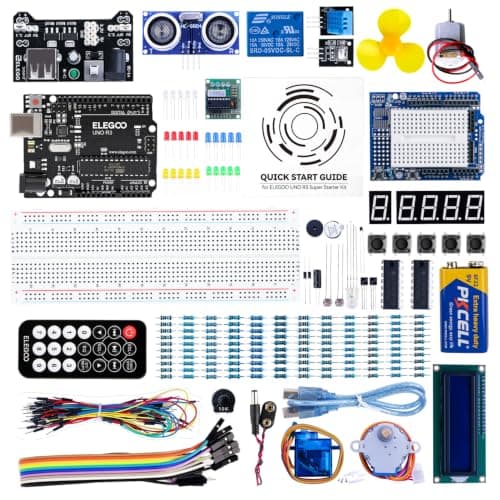 Cheapest way in, with the maker's own warning attached ELEGOO UNO R3 Project Super Starter Kit 22+ guided lessons and a named component list, with no soldering required. | Ten and up, as a low-risk test of whether the interest is real | |
| 5 | 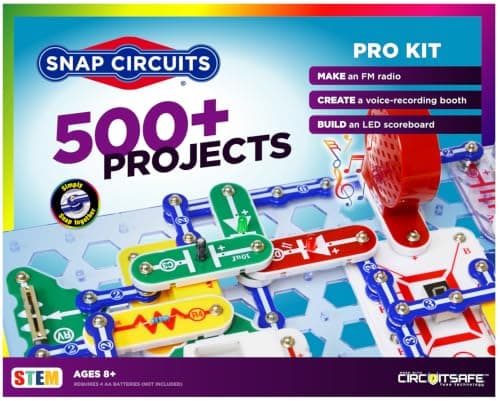 The rung below — circuits before code Snap Circuits Pro 500+ projects from 75+ snap-together parts, including 73 computer-interfaced ones. | Eight and up, where a breadboard is still a year away | |
| — | 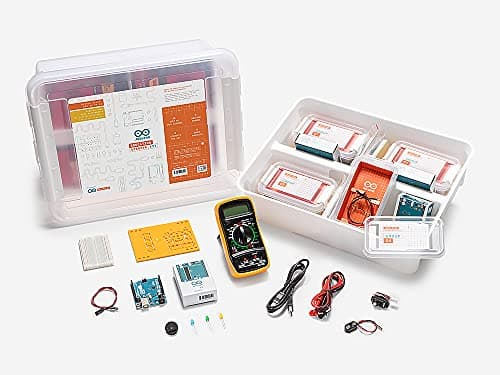 A classroom kit — not for one child Arduino Education Starter Kit for Middle School The same nine 90-minute lessons, plus teacher guides and eight engineering logbooks. | A teacher with eight students working in pairs |
6 picks, including 1 we tell you to skip. Ages shown are the manufacturer’s own rating, not ours.
What each maker actually publishes
The arithmetic
Arduino kits: published age, lessons and seats
| Arduino Student Kit (AKX00025) | Ages 11+ · nine 90-minute lessons + 2 open projects · 1 seat · logbook included |
|---|---|
| Arduino Starter Kit R4 (K000007_R4) | Age not published · 13 printed-book projects · UNO R4 WiFi · certification voucher |
| SunFounder Elite Explorer | Ages 8+ · 50+ projects (30 basic / 13 fun / 8 IoT) · 300+ components · 100+ videos |
| ELEGOO UNO R3 Super Starter | Age not published · 22+ PDF lessons · “younger learners should work with an experienced adult” |
| Arduino Education Starter Kit (AKX00023) | “Middle School”, no numeric age · same nine lessons · 8 seats · teacher guides |
| Snap Circuits Pro SC-500 | Ages 8+ · 500+ projects, 73 computer-interfaced · no code, no breadboard |
| Makey Makey Classic | “Ages 8 to infinity” · “No programing knowledge needed” · computer required |
| Makeblock mBot Neo | Ages 8+ · blocks, Python and Arduino C/C++ on a 240 MHz controller |
What Arduino is, in one paragraph
An Arduino is a small circuit board with a programmable chip on it. You write code on a computer, send it down a USB cable, and the board runs that code forever afterwards — reading sensors, lighting LEDs, turning motors. The board is not a toy and nothing about it is age-rated: it is the same hardware used in university labs and in commercial products, which is both the appeal and the problem when buying for a child.
A “kit” is the board plus components plus, in the good cases, a course. The components are what varies least between kits — everyone includes LEDs, resistors, a servo and some sensors — and the course is what varies most. That is why this page ranks on published lessons rather than on component count.
When a child is ready, on published evidence
Arduino says eleven. That is the only published children’s age from the company that makes the board, and its course notes narrow it to 11-14. We would not argue with it.
The prerequisite is reading, not math. Arduino publishes that no prior knowledge is necessary, and the lessons teach current, voltage and digital logic from scratch. What a child does need is the patience to read an instruction precisely, because a wire in the wrong breadboard row produces silence rather than an error message.
Coming from a block-coding robot is the ideal path. A child who has programmed a programmable toy already understands sequence and loops, and arrives needing only the wiring. The mBot Neo publishes Arduino C/C++ support specifically so that transition can happen on hardware they already own.
Coming from Snap Circuits is the other half. Elenco publishes 73 computer-interfaced experiments for the Pro set, which teaches what a circuit is without any code. A child who has done both halves — blocks and circuits — is genuinely ready at ten.
The cheap kit question
Third-party kits cost a fraction of the official ones and contain more components. ELEGOO publishes 22+ lessons and names a longer parts list than the Student Kit; SunFounder publishes 300+ components and 50+ projects. Both are real products from established makers and neither is a trap.
What you give up is published explicitly if you read for it. Arduino publishes nine structured 90-minute lessons, a logbook, a semester of content and an age rating. ELEGOO publishes a PDF, no age, and a sentence advising adult supervision for younger learners. Both of those are honest descriptions of what is in the box, and the difference between them is a curriculum.
Our recommendation is simple. If the child is self-directed and there is an adult who can help when a circuit does nothing, the cheap kit is fine and the money saved buys the next project’s parts. If the child is working alone, or the adult in the house is not an engineer, the published nine lessons are the thing you are actually buying and they are worth the difference.
Worth knowing before you buy
So which one
One child, learning alone, no engineer in the house: the Arduino Student Kit — 11+, nine lessons, a logbook.
A teenager who wants something to pass: the Arduino Starter Kit R4, with its certification voucher.
They learn from video and the budget is mid-range: the SunFounder Elite Explorer Kit, 50+ projects and 100+ lessons.
Testing whether the interest is real: the ELEGOO UNO R3 Super Starter Kit, lowest price band here.
Not ready for a breadboard yet: Snap Circuits Pro — 500+ projects, 73 of them computer-interfaced.
Say the unwelcome thing
Do not buy the Education kit for one child
Arduino publishes the Education Starter Kit for Middle School as hardware and software for eight students working in pairs, with teacher guides and eight engineering logbooks. It contains the same nine 90-minute lessons as the Student Kit. For one child at home you are paying for seven extra seats, and the more official product name is the reason it keeps happening. The Student Kit is the single-seat version of exactly the same course.
Where to go next
Electronics starter kits covers the snap-together end, electronics for teens covers the bigger Snap sets, from toy to real code is the progression page, and programmable toys covers what comes before a board.
In full
Every pick, and what is wrong with it
Published specifications only, each linked back to the page it came from. Where a manufacturer publishes nothing, the row says so — we do not fill blanks in.
1. The only kit with a published child age and a course
Arduino Student Kit
Arduino · AKX00025 · maker rates it 11+
Nine 90-minute lessons, two open-ended projects and a logbook, for one learner.
- Stated age
- “a hands-on, step-by-step remote learning tool for ages 11+”; the course notes say “ages 11 to 14”
- Lessons
- “nine 90-minute lessons, and two open-ended projects”
- Course length
- “there's enough content for an entire semester”
- Seats
- “all the hardware and software you need for one person”
Arduino publishes this as “a hands-on, step-by-step remote learning tool for ages 11+”, with nine 90-minute lessons and two open-ended projects on an online platform, a logbook to complete, all the hardware and software needed for one person, and “enough content for an entire semester”. It publishes that “no prior knowledge or experience is necessary” and that a parent does not need any either. Model AKX00025.
The published age is the whole reason this leads. Every other kit in the category is a general-purpose electronics product that happens to be bought for children; Arduino states eleven, and in its own course notes narrows that to “ages 11 to 14”. On a shelf where the usual answer is silence, a maker committing to a band is the most useful fact available.
Nine 90-minute lessons is also a real structure rather than a project list. Thirteen and a half hours of guided content with a logbook is the difference between a child who builds a traffic light and a child who understands digital logic, which Arduino publishes as part of what the lessons cover alongside current and voltage.
And the parent line matters. Arduino publishes that “as a parent, you don’t need any prior knowledge or experience” — this is the only kit here that says so, and it is the one claim that decides whether the box gets opened in a house with no engineer in it. See from toy to real code and STEM toys for homeschool.
Replay signal
- Open-ended or one-shot
- Nine structured lessons first, then two open-ended projects and an unrestricted board
- Does anything run out
- Nothing runs out
- Room to grow
- The board and components outlive the course — an UNO is still an UNO in ten years
- Adult required
- Published as not needed: “As a parent, you don't need any prior knowledge or experience”
Why we say so: Arduino publishes an 11+ rating, nine 90-minute lessons, two open-ended projects, a logbook, and a semester of content for one learner working alone. The stated age is the whole reason this kit is on a children's site at all: it is the only Arduino product whose own maker publishes a child's age, and the only one with a curriculum instead of a parts list.
What’s wrong with it
Nine lessons and then the course is over. The board carries on; the curriculum does not.
| Stated age | “a hands-on, step-by-step remote learning tool for ages 11+”; the course notes say “ages 11 to 14” |
|---|---|
| Lessons | “nine 90-minute lessons, and two open-ended projects” |
| Course length | “there's enough content for an entire semester” |
| Seats | “all the hardware and software you need for one person” |
| Logbook | Included — “a logbook to complete as they work through the lessons” |
| Language | Arduino IDE (C++). Published as teaching “current, voltage, and digital logic” |
| Prior knowledge | “No prior knowledge or experience is necessary” |
| Consumables | None |
Every figure above is from Arduino, Student Kit. Blanks are shown as “not published” rather than filled in.
2. Best official kit with a target to aim at
Arduino Starter Kit R4
Arduino · K000007_R4 · maker rates it Not published
13 projects in a printed book on the UNO R4 WiFi, plus a certification voucher.
- Projects
- 13 — “a printed project book and all components for 13 hands-on tutorials”
- Board
- Arduino UNO R4 WiFi — “built-in Wi-Fi and Bluetooth”
- Certification
- “take the official Arduino Fundamentals certification exam with the voucher that comes with your kit”
- Extra content
- “Register your kit online to unlock extra projects, multilingual lessons (Italian, German, French)”
Arduino publishes a printed project book and all components for 13 hands-on tutorials, the UNO R4 WiFi board with built-in Wi-Fi and Bluetooth, an official Arduino Fundamentals certification exam voucher, and registration-unlocked extra projects with lessons in Italian, German and French. Model K000007_R4. No age published.
The certification voucher is what distinguishes this from a bag of parts. There is an external standard to pass, set by the people who make the board, which is a different kind of motivation from finishing a project book — and for a fifteen-year-old it is the first thing in this whole category that goes on a CV.
A printed book rather than an online platform also changes how it gets used: the tutorials sit next to the breadboard instead of competing with it for screen space. The R4 WiFi board is the current generation, so projects that need a network connection work without an add-on shield.
The missing age rating is why it sits second. See how to read a toy box for why we treat that as information rather than an oversight.
Replay signal
- Open-ended or one-shot
- Thirteen tutorials, then a Wi-Fi-capable board with no ceiling on it
- Does anything run out
- Nothing runs out
- Room to grow
- A certification exam and a growing online project repository are both published as included
- Adult required
- Not published either way, and the absence of an age rating is the reason to read that carefully
Why we say so: Arduino publishes 13 tutorials in a printed book, the UNO R4 WiFi board with Wi-Fi and Bluetooth, and a certification voucher. The voucher is the detail that distinguishes this from a bag of parts: there is a published external standard to aim at, which is a different kind of motivation from finishing a project book.
What’s wrong with it
Arduino publishes no age for this one, and the projects assume more initiative.
| Projects | 13 — “a printed project book and all components for 13 hands-on tutorials” |
|---|---|
| Board | Arduino UNO R4 WiFi — “built-in Wi-Fi and Bluetooth” |
| Certification | “take the official Arduino Fundamentals certification exam with the voucher that comes with your kit” |
| Extra content | “Register your kit online to unlock extra projects, multilingual lessons (Italian, German, French)” |
| Stated age | Not published — Arduino markets this kit by skill level, not by age |
| Consumables | None |
Every figure above is from Arduino, Starter Kit R4 (K000007_R4) — published listing copy. Blanks are shown as “not published” rather than filled in.
3. Lowest published age in the category — 8+
SunFounder Elite Explorer Kit
SunFounder · Elite Explorer Kit · maker rates it 8+
300+ components, 50+ projects and 100+ free video lessons on an original UNO R4 WiFi.
- Stated age
- “Designed for beginners ages 8+”
- Components
- “300+ high-quality components”
- Projects
- “50+ hands-on projects (30 basic, 13 fun, and 8 IoT)”
- Video lessons
- “100+ free video lessons co-created with renowned educator Paul McWhorter”
SunFounder publishes “designed for beginners ages 8+”, 300+ components, “50+ hands-on projects (30 basic, 13 fun, and 8 IoT)”, 100+ free video lessons co-created with educator Paul McWhorter, an original Arduino UNO R4 WiFi board, membership of the Powered by Arduino program, and RoHS compliance.
Fifty published projects split into three named tiers is the most project content here by a wide margin, and the 100+ video lessons are the reason an 8+ claim is not ridiculous: a child who can follow a video can wire a circuit well before they can read a schematic.
We would still treat the 8+ as optimistic. The projects are jumper wires in a breadboard, and a mis-seated wire produces a circuit that does nothing with no explanation — the exact situation where an eight-year-old needs an adult and a twelve-year-old does not. The published rating is a floor set by the maker; the honest floor is the one in your house.
Thirty basic, thirteen fun and eight IoT is also a sensible ladder. See what electronics kits teach.
Replay signal
- Open-ended or one-shot
- Fifty published projects, then 300+ components and an unrestricted board
- Does anything run out
- Nothing runs out
- Room to grow
- Published as compatible with “other Arduino boards like Uno R3 and Nano”
- Adult required
- An 8+ rating on a breadboard kit should be read as “with an adult” whatever the box says
Why we say so: SunFounder publishes an 8+ rating, 300+ components, 50+ projects split 30 basic / 13 fun / 8 IoT, and 100+ video lessons. The 8+ is the lowest published age on any Arduino-based kit we can find and it is the figure to treat most carefully: the projects are real breadboard wiring, and the video course rather than the age rating is what makes it approachable.
What’s wrong with it
An 8+ rating on real breadboard wiring. Read that as “with an adult” whatever the box says.
| Stated age | “Designed for beginners ages 8+” |
|---|---|
| Components | “300+ high-quality components” |
| Projects | “50+ hands-on projects (30 basic, 13 fun, and 8 IoT)” |
| Video lessons | “100+ free video lessons co-created with renowned educator Paul McWhorter” |
| Board | “an original Arduino UNO R4 WiFi” — 32-bit processor, Wi-Fi and Bluetooth |
| Program | “Part of the Powered by Arduino program” |
| Compliance | “RoHS compliant” |
| Consumables | None |
Every figure above is from SunFounder, Elite Explorer Kit — published listing copy. Blanks are shown as “not published” rather than filled in.
4. Cheapest way in, with the maker's own warning attached
ELEGOO UNO R3 Project Super Starter Kit
ELEGOO · EL-KIT-003 · maker rates it Not published
22+ guided lessons and a named component list, with no soldering required.
- Lessons
- “22+ guided lessons”, supplied as a downloadable PDF tutorial
- Named components
- “the UNO R3 controller, LCD1602 with pre-soldered header, breadboard power module, ultrasonic and DHT11 sensors, joystick, IR receiver and remote, SG90 servo, stepper motor, relay, DC motor, fan blade, displays, LEDs, buttons, resistors and jumper wires”
- Soldering
- “START WITHOUT SOLDERING” — solderless breadboard and a pre-soldered LCD
- Compatibility
- Published as “Compatible with Arduino”, not as an Arduino board
ELEGOO publishes “22+ guided lessons” as a downloadable PDF tutorial and names the components: the UNO R3 controller, an LCD1602 with pre-soldered header, a breadboard power module, ultrasonic and DHT11 sensors, a joystick, an IR receiver and remote, an SG90 servo, a stepper motor, a relay, a DC motor, a fan blade, displays, LEDs, buttons, resistors and jumper wires. It publishes “start without soldering”, a 9V input limit on the power module, and that “younger learners should work with an experienced adult”. Model EL-KIT-003. No age published.
It is here for the price band and for one unusually honest published sentence. Makers in this category do not normally print supervision advice, and ELEGOO doing so is worth more to a parent than any project count.
The component list is also genuinely complete for a first kit: a stepper motor, a servo, an ultrasonic sensor and an LCD cover every category of thing an Arduino can do. What is missing against the official kits is the curriculum — 22 lessons in a PDF is not nine structured 90-minute sessions with a logbook.
Note that ELEGOO publishes this as “compatible with Arduino” rather than as an Arduino board. That is accurate and it matters: the software and the community are the same, and the hardware is a third-party clone.
Replay signal
- Open-ended or one-shot
- Open-ended once the 22 lessons are done — ELEGOO publishes “then change thresholds, speeds and sequences”
- Does anything run out
- Nothing runs out
- Room to grow
- The components are standard parts; anything an UNO can do, this kit can do
- Adult required
- Published: “younger learners should work with an experienced adult”
Why we say so: ELEGOO publishes 22+ lessons, a named component list including an ultrasonic sensor, a stepper motor and a pre-soldered LCD, and states plainly that younger learners should work with an experienced adult. That last line is published by the maker, not inferred by us, and it is the single most useful sentence on the listing for a parent buying for a ten-year-old.
What’s wrong with it
ELEGOO publishes no age, and publishes that younger learners need an experienced adult.
| Lessons | “22+ guided lessons”, supplied as a downloadable PDF tutorial |
|---|---|
| Named components | “the UNO R3 controller, LCD1602 with pre-soldered header, breadboard power module, ultrasonic and DHT11 sensors, joystick, IR receiver and remote, SG90 servo, stepper motor, relay, DC motor, fan blade, displays, LEDs, buttons, resistors and jumper wires” |
| Soldering | “START WITHOUT SOLDERING” — solderless breadboard and a pre-soldered LCD |
| Compatibility | Published as “Compatible with Arduino”, not as an Arduino board |
| Supervision | “younger learners should work with an experienced adult”, published by ELEGOO |
| Power limit | “keep power-module input at 9V or below” |
| Stated age | Not published |
| Consumables | None |
Every figure above is from ELEGOO, UNO R3 Project Super Starter Kit (EL-KIT-003) — published listing copy. Blanks are shown as “not published” rather than filled in.
5. The rung below — circuits before code
Snap Circuits Pro
Elenco · SC-500 · maker rates it 8+
500+ projects from 75+ snap-together parts, including 73 computer-interfaced ones.
- Projects
- “Build over 500 exciting projects”
- Parts
- “Contains over 75 snap-together parts”
- Computer-interfaced experiments
- “Includes 73 computer interfaced experiments”
- Projects per part
- 6.7
Elenco publishes “over 500 exciting projects” from “over 75 snap-together parts”, including “73 computer interfaced experiments”, on 4 AA batteries, rated ages 8+.
Included because buying an Arduino kit too early is the most expensive mistake available on this shelf, and 73 computer-interfaced projects is the published bridge. The child gets a circuit that talks to a machine without needing to write a line of code or seat a single jumper wire.
The honest distinction: Snap Circuits teaches what a circuit is, and Arduino teaches how to control one. A child who cannot yet say what a resistor does will not get value from a breadboard, and 500 published projects is a lot of runway before they need one.
See the Snap Circuits Pro review, Snap Circuits: every set compared and electronics kits by age.
Replay signal
- Open-ended or one-shot
- Open-ended, and the computer-interfaced projects give it somewhere to go after the manual
- Does anything run out
- Nothing runs out
- Room to grow
- 73 published computer-interfaced experiments is a second product hiding inside the first
Why we say so: Elenco publishes 500+ projects from 75+ parts and specifically 73 computer-interfaced experiments. That last number is the only thing separating the Pro from the Classic, and it is the only reason to pay the difference.
What’s wrong with it
No programming at all. The computer-interfaced projects use the PC as an instrument.
| Projects | “Build over 500 exciting projects” |
|---|---|
| Parts | “Contains over 75 snap-together parts” |
| Computer-interfaced experiments | “Includes 73 computer interfaced experiments” |
| Projects per part | 6.7 |
| Stated age | “Ages 8+” |
| Batteries | “Requires 4 ‘AA’ batteries (not included)” |
Every figure above is from Elenco, Snap Circuits Pro. Blanks are shown as “not published” rather than filled in.
Skip this one
Arduino Education Starter Kit for Middle School
Arduino · AKX00023 · maker rates it Middle school — no numeric age published
The same nine 90-minute lessons, plus teacher guides and eight engineering logbooks.
- Seats
- “all necessary hardware and software for eight students (working in pairs)”
- Lessons
- “nine 90-minute lessons and two open-ended group projects”
- Teacher material
- “detailed teacher guides, estimated completion times, and clear learning objectives for each lesson”
- Logbooks
- “Each student receives an engineering logbook”
Arduino publishes “all necessary hardware and software for eight students (working in pairs)”, nine 90-minute lessons and two open-ended group projects, detailed teacher guides with estimated completion times and learning objectives, and an engineering logbook for each student. Published as Middle School, with no numeric age. Model AKX00023.
It is the skip on this page for the simplest possible reason: it is the same nine lessons as the Student Kit, multiplied by eight seats, at the price you would expect from that. A parent who searches for an Arduino kit, sorts by the most official-looking result and buys this has bought seven extra sets of hardware.
For a teacher it is the right product and the teacher guides are the reason — this is the only kit on the page with published lesson timings and learning objectives for somebody delivering a class. Our classroom coding page treats that buyer properly.
For one child at home, the Student Kit publishes identical content for one seat. That is the entire comparison.
Replay signal
- Open-ended or one-shot
- Nine lessons and two open-ended group projects, designed to be re-run with a new class
- Does anything run out
- Nothing runs out
- Room to grow
- Published as reusable across classes; that is the whole point of a classroom kit
- Adult required
- Yes, by design — the published curriculum is written for a teacher to deliver
Why we say so: Arduino publishes hardware for eight students working in pairs, nine 90-minute lessons, teacher guides and per-student logbooks. Every one of those figures describes a classroom. For one child at home the same nine lessons arrive in the Student Kit at a fraction of the price, which is why this kit appears here as the mis-buy rather than the premium option.
What’s wrong with it
Priced for eight students. For one child it is the Student Kit at several times the cost.
| Seats | “all necessary hardware and software for eight students (working in pairs)” |
|---|---|
| Lessons | “nine 90-minute lessons and two open-ended group projects” |
| Teacher material | “detailed teacher guides, estimated completion times, and clear learning objectives for each lesson” |
| Logbooks | “Each student receives an engineering logbook” |
| Stated age | Published as “Middle School”; no numeric rating |
| Buyer | A classroom — the published unit is eight students, not one child |
| Consumables | None |
Every figure above is from Arduino, Education Starter Kit for Middle School (AKX00023) — published listing copy. Blanks are shown as “not published” rather than filled in.
We are not putting a buy button on this one. It is easy enough to find if you want it anyway — but we would rather send you to something that gets played with twice.
Questions people actually ask
Frequently asked
What is the best Arduino kit for kids?
The Arduino Student Kit (AKX00025). Arduino publishes it for ages 11+ with nine 90-minute lessons, two open-ended projects, a logbook, hardware and software for one person and "enough content for an entire semester". It is the only kit in the category whose own maker publishes a child's age and a structured course.
What age can a child start Arduino?
Eleven, on Arduino's own published figure - its Student Kit is "a hands-on, step-by-step remote learning tool for ages 11+", narrowed to ages 11 to 14 in the course notes. SunFounder publishes 8+ for its Elite Explorer Kit, which is the lowest published age in the category and assumes an adult alongside. Buying above the age rating.
Do I need to know electronics to help my child with Arduino?
Arduino publishes that you do not: "As a parent, you don't need any prior knowledge or experience as you are guided through step-by-step." That claim is specific to the Student Kit with its nine guided lessons. ELEGOO publishes the opposite advice for its kit - "younger learners should work with an experienced adult".
Is a cheap ELEGOO or SunFounder kit as good as an official Arduino one?
For components, yes - ELEGOO names a longer parts list than the Student Kit and SunFounder publishes 300+ components. What you give up is the curriculum: Arduino publishes nine structured 90-minute lessons, a logbook and an age rating, where ELEGOO publishes a PDF of 22+ lessons and no age. Both are honest products; the difference is the course.
What should my child do before an Arduino kit?
Either half of the groundwork. A programmable robot teaches sequence and loops - Makeblock publishes Arduino C/C++ support on the mBot Neo so the transition happens on the same hardware. Snap Circuits Pro publishes 500+ projects including 73 computer-interfaced ones, which teaches what a circuit is with no code at all. Programmable toys for kids.
Which Arduino kit comes with a certification?
The Arduino Starter Kit R4 (K000007_R4). Arduino publishes 13 printed-book projects on the UNO R4 WiFi board plus a voucher for "the official Arduino Fundamentals certification exam". It publishes no age rating, so treat it as the kit for a teenager rather than a first purchase for a younger child.
Is the Arduino Education Starter Kit better than the Student Kit?
Not for one child. Arduino publishes the Education kit as hardware for eight students working in pairs with teacher guides and eight logbooks - and the same nine 90-minute lessons as the Student Kit. For a classroom it is the right product; for one child at home it is seven extra seats. Coding robots for classrooms.
Sources
Where these figures came from
Every specification on this page traces to one of these. If a manufacturer publishes nothing on a point, the page says so rather than filling the gap.
Read next
Where to go from here
Back to Electronics, or read how we pick.