The picks
Coding Toys for 8 and 9 Year Olds
Eight is the year the published ratings open and a real language becomes possible. Whether you need one yet is the actual question.
By Sawyer V. · Published
The short answer
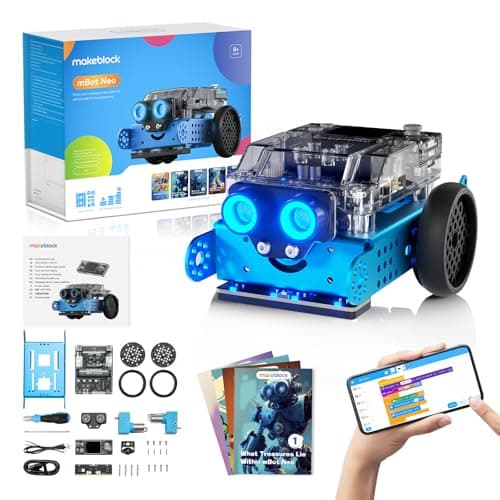
Eight is the first age where makers publish a real language. Makeblock publishes mBot Neo at 8+ with Scratch-style blocks, Python in mBlock and Arduino C/C++ — one robot that covers the next four years. If no computer is reliably free, Code Master publishes 60 graded levels of the same logic at 8 and up with no screen at all.
Block & Beaker earns a commission when you buy through our links, at no cost to you. It never changes a ranking, and we say so plainly when the right answer is the cheaper set, or nothing at all. Full disclosure · How we pick.
At a glance
The picks, ranked
Tap any row to jump to the full reasoning. Prices come live from Amazon where we have them and read “check price” where we don’t — never a number we cannot stand behind today.
| # | Product | Best for | Price |
|---|---|---|---|
| 1 | Best published language path Makeblock mBot Neo (mBot2) Blocks, Python and Arduino C on a published 240 MHz controller with four on-board sensors. | Eight and nine, where the code should outlive the robot | |
| 2 | 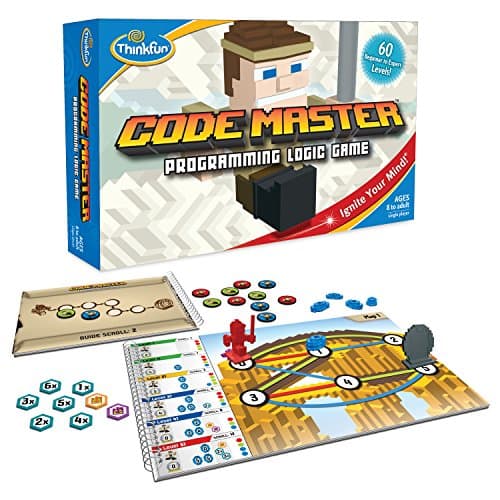 Best value in the category, screen-free ThinkFun Code Master 60 graded levels of real programming logic — loops and conditionals, on cardboard. | Eight and nine, with no device free | |
| 3 | 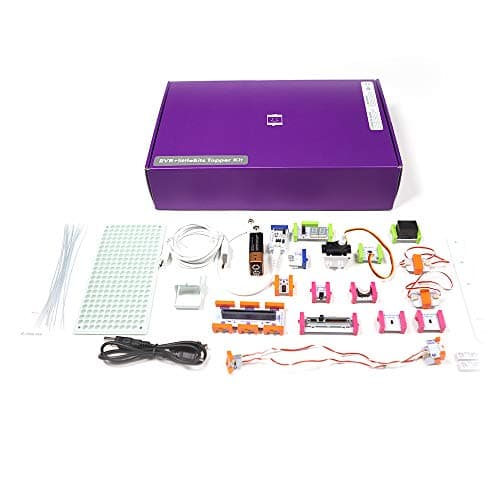 Best for building rather than driving littleBits Invention Kit 29 Bits — 12 inputs and 8 outputs, including proximity, temperature, light and sound sensors. | Eight and nine, for a child who wants to make a thing, not move a robot | |
| 4 | 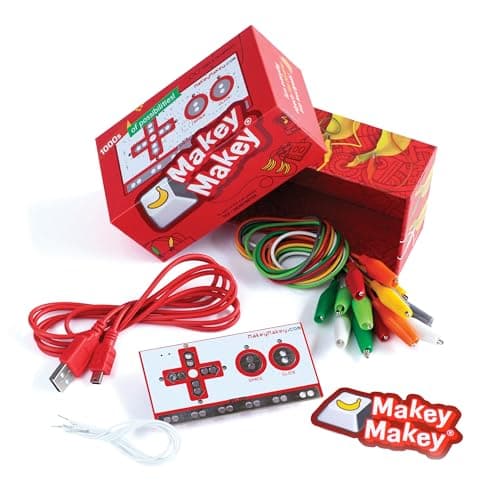 Best first week, cheapest route to a computer Makey Makey Classic A board that registers as a keyboard, so anything conductive becomes a key. | Eight and up, on a computer that already exists | |
| — | 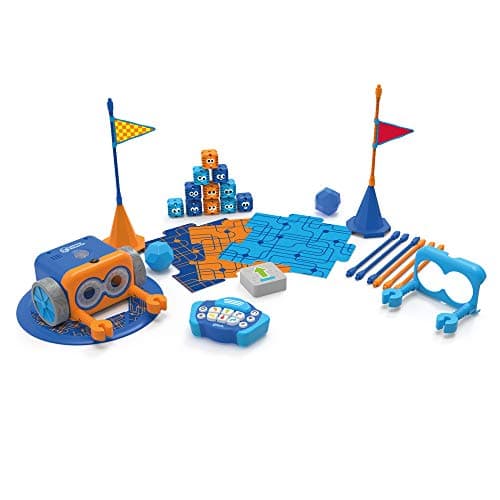 Behind them now Botley 2.0 The Coding Robot Activity Set 150-step sequences and 78 pieces, published at 5+ — the right robot two years ago. | Five to seven |
5 picks, including 1 we tell you to skip. Ages shown are the manufacturer’s own rating, not ours.
What each product publishes as its language
The arithmetic
Coding toys at 8 and 9: the published programming surface
| mBot Neo | Ages 8+ — Scratch-style blocks, Python in mBlock, Arduino C/C++ in the Arduino IDE |
|---|---|
| mBot Ranger | Age 8+ on Makeblock's site — mBlock, visual and text-based, Arduino |
| Code Master | Ages 8 and up — no language; the logic itself, on 60 graded levels |
| littleBits Invention Kit | Grades 2-7 — no language; 12 inputs driving 8 outputs |
| Makey Makey Classic | “Ages 8 to infinity” — none required; the board is a keyboard |
| Osmo Coding Starter Kit | Ages 5-10 — physical blocks in three apps |
| Botley 2.0 | 5+ — a 150-step sequence of directions, no named language |
The two questions that decide it
Is a computer reliably free? This is the fork at eight. mBot Neo’s value is its three published environments, and two of them need a computer the child can use for an hour without negotiation. If the only machine is a shared work laptop, the robot becomes a remote-control car and you have paid for a 240 MHz controller to drive it.
Do they want to drive something or build something? A robot and an invention kit teach the same logic through different objects. mBot is for a child who wants the thing to move; littleBits is for a child who wants to make a gadget that reacts. Neither is more advanced — they fail with different children.
Why eight is the real break
The ratings stop capping. Below eight, almost everything publishes 4 or 5 and the content is built to that. At eight the makers start publishing 8+ on products with genuine ceilings — Makeblock, ThinkFun, Elenco and Sphero all land here.
Reading becomes fluent enough for documentation. Code Master’s 60 levels, mBlock’s interface and littleBits’ 10 challenge cards all assume a child reads instructions unaided. That is the practical difference between eight and six, more than any cognitive leap.
They start wanting to keep things. A nine-year-old asks whether the program is saved. That single question is why a named language matters from here: blocks in mBlock are a file, and a 150-step sequence in a robot’s memory is not.
What not to pay for yet
Module bundles. mBot Neo publishes 60+ compatible modules and 8 motor and servo ports. Four sensors are already on the board; buy the robot, spend a year on it, and add modules when the child names the one they want.
A second robot. The upgrade path at this age is software, not hardware. A child who has finished the blocks does not need a new robot — they need Python on the one they own.
A coding subscription. Nothing on this page needs one, and all five publish their learning material as included. See kits against subscriptions.
Worth knowing before you buy
So which one
A computer is free and you want this to last to twelve: mBot Neo.
No device is free, and the budget is tight: Code Master.
They build and tinker rather than drive: the littleBits Invention Kit.
You want the first evening to go well: Makey Makey Classic, on a computer they already use.
They want to build the robot as well as code it: mBot Ranger publishes three build forms from about 100 parts.
Say the unwelcome thing
Do not buy a block-only robot at nine to save money
The saving is real and it lasts about eight months. A robot with no published language has a fixed expressive ceiling, and a nine-year-old reaches it, asks to save their program, and finds there is nothing to save. The cheaper purchase that genuinely works at this age is Code Master, not a smaller robot — it teaches the same logic and does not pretend to be a platform.
Where to go next
Coding toys for 6 and 7 year olds is the rung below, coding toys for tweens covers 10 to 12, and from toy to real code maps the whole progression.
In full
Every pick, and what is wrong with it
Published specifications only, each linked back to the page it came from. Where a manufacturer publishes nothing, the row says so — we do not fill blanks in.
1. Best published language path
Makeblock mBot Neo (mBot2)
Makeblock · mBot2 · maker rates it 8+
Blocks, Python and Arduino C on a published 240 MHz controller with four on-board sensors.
- Controller
- CyberPi — Xtensa 32-bit LX6 dual-core at 240 MHz, 8 MB flash, 8 MB PSRAM
- Programming
- Scratch-style blocks, Python in mBlock, and Arduino C/C++ via the Arduino IDE
- Sensors
- On-board light, microphone, gyroscope and accelerometer, plus ultrasonic, quad RGB, temperature and IR modules
- Battery
- Built-in 2500 mAh LiPo, about 1 hour to charge, about 5 hours of play
Makeblock publishes the CyberPi controller as an Xtensa 32-bit LX6 dual-core at 240 MHz with 8 MB flash and 8 MB PSRAM, three programming environments — Scratch-style blocks, Python in mBlock and Arduino C/C++ via the Arduino IDE — on-board light, microphone, gyroscope and accelerometer sensors plus ultrasonic, quad RGB, temperature and IR modules, a built-in 2500 mAh LiPo giving about five hours of play from about an hour of charging, 60+ compatible modules with up to 10 connected at once and 8 motor and servo ports, rated ages 8+.
Three published environments on one robot is the reason this leads at eight. The child starts in blocks, and when they outgrow them in a year or two the hardware does not change — the same robot answers to Python. Almost every other coding toy requires a second purchase at that point.
Four sensors on the board rather than in a bag of add-ons also matters: it means programs can react to the room on day one. See the mBot Neo review and from toy to real code.
Replay signal
- Open-ended or one-shot
- Open-ended at the top of the range — this is the one a child does not outgrow at eleven
- Does anything run out
- Nothing runs out; rechargeable
- Room to grow
- Blocks, then Python, then Arduino C on the same robot, with 60+ add-on modules
- Adult required
- Not for driving it. Probably for the first Python session
Why we say so: Makeblock publishes the processor, the three programming environments on one robot, the 2500 mAh battery figures and the 60+ compatible modules. Blocks-to-Python-to-C on one chassis is the published upgrade path, and it is why this survives the year a child gets bored of pressing buttons.
What’s wrong with it
The module ecosystem will absorb as much money as you give it.
| Controller | CyberPi — Xtensa 32-bit LX6 dual-core at 240 MHz, 8 MB flash, 8 MB PSRAM |
|---|---|
| Programming | Scratch-style blocks, Python in mBlock, and Arduino C/C++ via the Arduino IDE |
| Sensors | On-board light, microphone, gyroscope and accelerometer, plus ultrasonic, quad RGB, temperature and IR modules |
| Battery | Built-in 2500 mAh LiPo, about 1 hour to charge, about 5 hours of play |
| Expansion | 60+ compatible modules, up to 10 connected at once, 8 motor and servo ports |
| Stated age | Ages 8+ |
Every figure above is from Makeblock, mBot2 coding robot kit. Blanks are shown as “not published” rather than filled in.
2. Best value in the category, screen-free
ThinkFun Code Master
ThinkFun · 1950 · maker rates it 8+
60 graded levels of real programming logic — loops and conditionals, on cardboard.
- Levels
- 60, beginner to expert
- Players
- 1
- Format
- Map-based programming logic — sequence the avatar's moves to collect power crystals
- Batteries
- None
ThinkFun publishes 60 levels from beginner to expert, a single player, map-based programming logic in which the player sequences an avatar’s moves to collect power crystals, and no batteries, rated ages 8 and up.
Eight is the published floor and it is also the right age, which is unusual. The sixty levels introduce sequencing, then loops, then conditionals by difficulty rather than by explanation, and a child who can read can work through them unaided.
It is the cheapest honest coding purchase on this site and the only one that needs no charger, no tablet and no adult. The limit is that it ends. See the review and coding board games.
Replay signal
- Open-ended or one-shot
- Finite — 60 levels, and they are worked through in order
- Does anything run out
- Nothing runs out, but the level book does end
- Room to grow
- The later levels introduce conditionals and loops, so the concept ladder is real rather than cosmetic
Why we say so: ThinkFun publishes 60 levels from beginner to expert and a map-and-sequence format. The concepts the later levels introduce — branching and repetition — are the same two ideas that make a real program, which is why this works as preparation for a screen rather than as a substitute for one.
What’s wrong with it
Single player and finite. Sixty levels is the whole product.
| Levels | 60, beginner to expert |
|---|---|
| Players | 1 |
| Format | Map-based programming logic — sequence the avatar's moves to collect power crystals |
| Batteries | None |
| Stated age | Ages 8 and up |
Every figure above is from ThinkFun, Code Master. Blanks are shown as “not published” rather than filled in.
3. Best for building rather than driving
littleBits Invention Kit
Sphero · Invention Kit · maker rates it Grades 2-7
29 Bits — 12 inputs and 8 outputs, including proximity, temperature, light and sound sensors.
- Bits
- 29 in total — 2 power, 7 wire, 12 input and 8 output Bits
- Inputs
- Toggle switch, 2 buttons, 2 slide dimmers, remote trigger, pulse, threshold, and proximity, temperature, light and sound sensors
- Outputs
- LED, buzzer, bargraph, servo, RGB LED, number display, 2 DC motors
- Power
- 1 x 9V battery; a USB power Bit is also included
Sphero publishes 29 Bits in total — 2 power, 7 wire, 12 input and 8 output — with a toggle switch, 2 buttons, 2 slide dimmers, a remote trigger, pulse, threshold, and proximity, temperature, light and sound sensors on the input side, and an LED, buzzer, bargraph, servo, RGB LED, number display and 2 DC motors on the output side, run from 1 x 9V battery with a USB power Bit also included, published as screen-free, with 10 challenge cards, for grades 2-7.
Twelve inputs against eight outputs is the published shape that makes this different from a robot. Any sensor can drive any actuator, so the child designs the behavior by choosing the chain — proximity sensor to motor, sound sensor to number display — which is the logic of a program expressed in hardware.
Grades 2-7 covers eight and nine squarely. See the littleBits review and invention kits.
Replay signal
- Open-ended or one-shot
- Open-ended — any input can drive any output, so the gadget is the child's design
- Does anything run out
- Nothing runs out apart from the 9V battery
- Room to grow
- Twelve inputs and eight outputs is enough to build working gadgets rather than demonstrations
Why we say so: Sphero publishes 29 Bits including proximity, temperature, light and sound sensors, a servo and two DC motors, run from a 9V battery and published as screen-free. Real sensors driving real motors is what separates an invention kit from a circuit tutorial.
What’s wrong with it
A 9V battery, and published as screen-free, so there is no code to keep.
| Bits | 29 in total — 2 power, 7 wire, 12 input and 8 output Bits |
|---|---|
| Inputs | Toggle switch, 2 buttons, 2 slide dimmers, remote trigger, pulse, threshold, and proximity, temperature, light and sound sensors |
| Outputs | LED, buzzer, bargraph, servo, RGB LED, number display, 2 DC motors |
| Power | 1 x 9V battery; a USB power Bit is also included |
| Screen | Published as screen-free |
| Challenges | 10 challenge cards, with further lessons via Sphero Central |
| Stated grade | Grades 2-7 |
Every figure above is from Sphero, littleBits Invention Kit. Blanks are shown as “not published” rather than filled in.
4. Best first week, cheapest route to a computer
Makey Makey Classic
JoyLabz · Classic · maker rates it 8+
A board that registers as a keyboard, so anything conductive becomes a key.
- Contents
- Makey Makey board, USB cable, 7 alligator clips, 6 connector wires, visual project start guide, sticker
- Computer
- Required — Mac, Windows, Chromebook or Linux; any device that supports a USB keyboard or mouse
- Software
- “No programing knowledge needed. No software to install.”
- Stated age
- “Ages 8 to infinity”
JoyLabz publishes the Makey Makey board with a USB cable, 7 alligator clips, 6 connector wires, a visual project start guide and a sticker; a computer requirement of Mac, Windows, Chromebook or Linux — any device supporting a USB keyboard or mouse; “No programing knowledge needed. No software to install.”; and a stated age of “Ages 8 to infinity”.
No install and no programming knowledge is the published reason this works at eight. The board appears to the computer as a keyboard, so bananas, pencil lines and foil become keys within a minute of unboxing — and a child who has just made a banana play a piano note will then ask what else the computer can be told to do.
It is the gateway rather than the destination, and it pairs naturally with Scratch on the same machine. See the Makey Makey review.
Replay signal
- Open-ended or one-shot
- Genuinely open-ended — any conductive object can be wired in as a control
- Does anything run out
- Nothing runs out
- Adult required
- Not after the first connection; nothing needs installing
Why we say so: JoyLabz publishes that no software install and no programming are needed, and that the board works on any device supporting a USB keyboard or mouse. That compatibility statement is the mechanism: the board registers as a keyboard, so whatever the child clips to it becomes a key.
What’s wrong with it
Needs a computer, and it is an input device rather than a coding environment.
| Contents | Makey Makey board, USB cable, 7 alligator clips, 6 connector wires, visual project start guide, sticker |
|---|---|
| Computer | Required — Mac, Windows, Chromebook or Linux; any device that supports a USB keyboard or mouse |
| Software | “No programing knowledge needed. No software to install.” |
| Stated age | “Ages 8 to infinity” |
| Consumables | None |
Every figure above is from JoyLabz, Makey Makey Classic. Blanks are shown as “not published” rather than filled in.
Skip this one
Botley 2.0 The Coding Robot Activity Set
Learning Resources · LER2938 · maker rates it 5+
150-step sequences and 78 pieces, published at 5+ — the right robot two years ago.
- Set size
- 78 pieces
- Contents
- Botley 2.0, remote programmer, 2 face plates, 40 coding cards, 6 double-sided boards, 27 obstacle pieces, starter guide
- Maximum program length
- “coding sequences of up to 150 steps”
- Movement
- Six directions, plus 16 coded interactions
Learning Resources publishes a 78-piece set with coding sequences of up to 150 steps, six directions plus 16 coded interactions, 100% screen-free play and 5 AAA batteries required, rated 5+ (K-2nd grade).
The best screen-free robot for six and seven, and the common mis-buy at nine. The published ceiling is a 150-step sequence of directions, which contains no variables, no named language and nothing a child can save and come back to — so a nine-year-old reaches the end of what it can express in weeks.
Hand it to a younger sibling. See coding toys for 6 and 7 year olds.
Replay signal
- Open-ended or one-shot
- Open-ended once the cards are understood — the child builds the maze, not just the program
- Does anything run out
- Nothing runs out except batteries
- Room to grow
- A 150-step ceiling means the challenge scales for years past the first week
- Adult required
- Needed for the first session, then not — there is no app account and nothing to log into
Why we say so: Learning Resources publishes the 78-piece contents, the 150-step maximum sequence, the six directions and 16 interactions, and states the set is 100% screen-free with no tablet or app required.
What’s wrong with it
No language to learn and nothing to type. At nine it is a remote control.
| Set size | 78 pieces |
|---|---|
| Contents | Botley 2.0, remote programmer, 2 face plates, 40 coding cards, 6 double-sided boards, 27 obstacle pieces, starter guide |
| Maximum program length | “coding sequences of up to 150 steps” |
| Movement | Six directions, plus 16 coded interactions |
| Screen required | None — “100% screen-free play” |
| Batteries | “Requires 5 AAA batteries (not included)” |
| Stated age | 5+ (K-2nd grade) |
Every figure above is from Learning Resources, Botley 2.0 Activity Set. Blanks are shown as “not published” rather than filled in.
We are not putting a buy button on this one. It is easy enough to find if you want it anyway — but we would rather send you to something that gets played with twice.
Questions people actually ask
Frequently asked
What is the best coding toy for an 8 year old?
mBot Neo, if a computer is reliably available. Makeblock publishes it at 8+ with three programming environments - Scratch-style blocks, Python in mBlock and Arduino C/C++ - on a 240 MHz CyberPi controller, so the same robot carries a child from blocks to text. mBot Neo review.
What coding toy works for a 9 year old with no computer?
Code Master. ThinkFun publishes 60 graded levels at ages 8 and up, single player, no batteries - sequencing, loops and conditionals taught by difficulty rather than by a screen. Code Master review.
Is my child too old for Botley at nine?
Usually. Learning Resources publishes Botley 2.0 at 5+ with up to 150 steps, but the sequence is directions rather than a named language, so there is nothing to save and a fixed ceiling. It is the right robot at six and seven. Coding toys for 6 and 7 year olds.
Which coding toys at this age teach a real programming language?
Only the mBot line among the picks here. Makeblock publishes Scratch-style blocks, Python in mBlock and Arduino C/C++ for mBot Neo, and mBlock visual and text-based programming plus Arduino support for mBot Ranger.
Is littleBits coding?
Not in the typing sense - Sphero publishes it as screen-free. What it teaches is the same logic in hardware: 12 inputs including proximity, temperature, light and sound sensors driving 8 outputs including a servo and two DC motors, so the child designs behavior by choosing the chain. Invention kits.
Do I need to buy extra modules for mBot Neo?
Not at eight or nine. Makeblock publishes four sensors on the CyberPi board itself - light, microphone, gyroscope and accelerometer - plus ultrasonic, quad RGB, temperature and IR modules. The 60+ module catalog is a later decision, best made when the child names what they want.
What happens after block coding?
Python, on the same hardware if you chose it. That is the argument for a robot that publishes more than one environment: the upgrade at ten or eleven is software, not another robot. From toy to real code.
Sources
Where these figures came from
Every specification on this page traces to one of these. If a manufacturer publishes nothing on a point, the page says so rather than filling the gap.
Read next
Where to go from here
Back to Coding & Robotics, or read how we pick.