Single review
littleBits Invention Kit Review
Reviewed from Sphero's published specifications and the arithmetic on them. We have not used it, and we say so.
By Sawyer V. · Published
The short answer
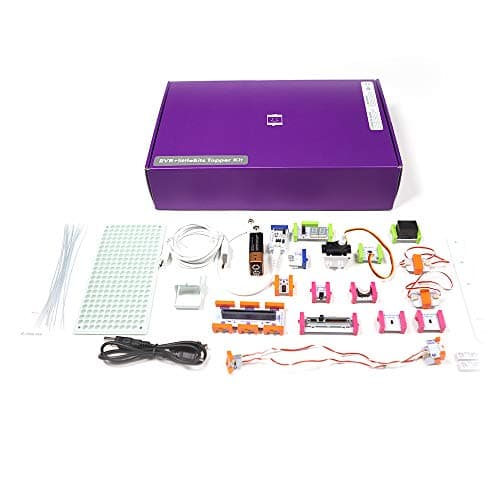
The littleBits Invention Kit is worth it for a child who wants to invent rather than follow. Sphero publishes 29 Bits — 12 inputs including four sensors, and 8 outputs including a servo and two DC motors — screen-free, on a 9V battery, for grades 2-7. The guided part is short: 10 challenge cards.
Block & Beaker earns a commission when you buy through our links, at no cost to you. It never changes a ranking, and we say so plainly when the right answer is the cheaper set, or nothing at all. Full disclosure · How we pick.
At a glance
The picks, ranked
Tap any row to jump to the full reasoning. Prices come live from Amazon where we have them and read “check price” where we don’t — never a number we cannot stand behind today.
| # | Product | Best for | Price |
|---|---|---|---|
| 1 | The product littleBits Invention Kit Real sensors driving real motors, with any input able to drive any output. | Grades 2-7, for a child who wants to build gadgets | |
| 2 | 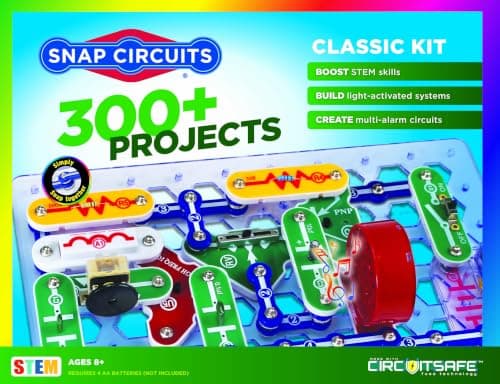 The guided rival Snap Circuits Classic 305 numbered projects from 60+ parts — the long guided ladder littleBits does not have. | Eight and up, for a child who likes a numbered manual | |
| 3 | 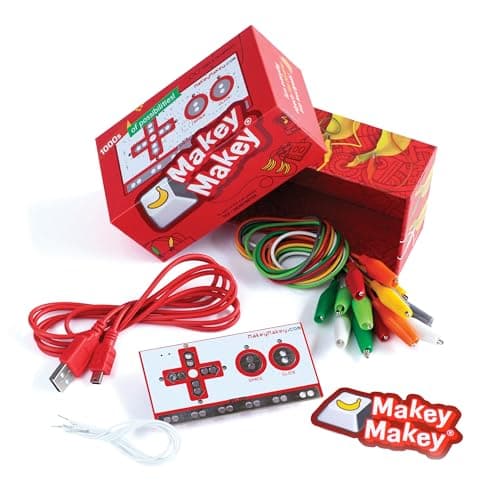 The computer-based alternative Makey Makey Classic Turns conductive objects into keyboard keys — invention through a computer. | Eight and up, with a computer | |
| — | 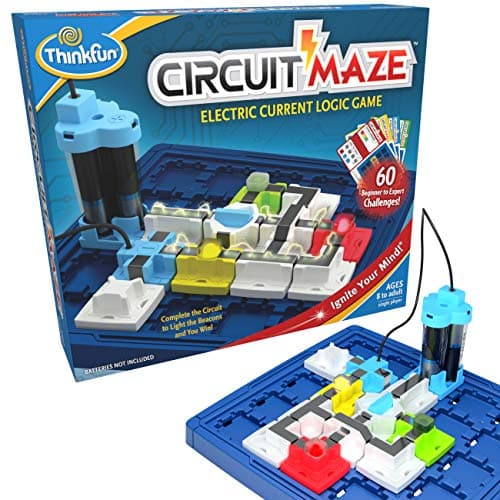 Not an invention kit ThinkFun Circuit Maze 60 fixed challenges — a puzzle about circuits rather than a kit for inventing. | Eight and up, for solo puzzles |
4 picks, including 1 we tell you to skip. Ages shown are the manufacturer’s own rating, not ours.
What we can tell you, and what we cannot
We have not used it. No lab, no samples, no test children, and no star rating anywhere on this page or in its structured data.
What Sphero publishes — the Bit counts, the named sensors and outputs, the power, the grade range — we can compare across the category. How well the Bits hold together after a year in a toy box, we cannot.
The specification that decides it
The arithmetic
littleBits Invention Kit, published
| Bits | 29 — 2 power, 7 wire, 12 input, 8 output |
|---|---|
| Sensors | Proximity, temperature, light, sound |
| Other inputs | Toggle switch, 2 buttons, 2 slide dimmers, remote trigger, pulse, threshold |
| Outputs | LED, buzzer, bargraph, servo, RGB LED, number display, 2 DC motors |
| Power | 1 x 9V battery, plus a USB power Bit |
| Screen | Published as screen-free |
| Guided content | 10 challenge cards; more lessons through Sphero Central |
| Stated grade | Grades 2-7 |
What the numbers mean in practice
The sensors are the product. Most first-circuit kits publish switches and lights. Four environmental sensors is what lets a child build something that reacts.
Motion is included, not an upgrade. A servo and two DC motors in the base kit mean the first gadget can move.
Screen-free, genuinely. Sphero publishes the kit as screen-free. The lessons on Sphero Central are online, but nothing in the box depends on them.
The ladder in the box is short. Ten challenge cards is enough to learn the system. After that, the ideas have to come from the child — which is the point, and also the risk.
Who should skip it
A child who needs a next step handed to them. Snap Circuits Classic publishes 305.
A child below grade 2. Sphero publishes grades 2-7, which in US terms starts around seven.
A household that wants every instruction in the box. The further lessons live online at Sphero Central.
Say the unwelcome thing
Do not buy it expecting 300 projects
littleBits and Snap Circuits are often bought as if they were the same kind of product. They are not: one publishes 10 challenge cards and an open system, the other publishes 305 numbered projects. Buy the one whose shape matches the child.
Where it sits
littleBits leads invention kits for kids and is compared head to head in littleBits vs Snap Circuits and Makey Makey vs littleBits.
In full
Every pick, and what is wrong with it
Published specifications only, each linked back to the page it came from. Where a manufacturer publishes nothing, the row says so — we do not fill blanks in.
1. The product
littleBits Invention Kit
Sphero · Invention Kit · maker rates it Grades 2-7
Real sensors driving real motors, with any input able to drive any output.
- Bits
- 29 in total — 2 power, 7 wire, 12 input and 8 output Bits
- Inputs
- Toggle switch, 2 buttons, 2 slide dimmers, remote trigger, pulse, threshold, and proximity, temperature, light and sound sensors
- Outputs
- LED, buzzer, bargraph, servo, RGB LED, number display, 2 DC motors
- Power
- 1 x 9V battery; a USB power Bit is also included
Sphero publishes 29 Bits in total — 2 power, 7 wire, 12 input and 8 output. The inputs are a toggle switch, two buttons, two slide dimmers, a remote trigger, pulse and threshold Bits, and proximity, temperature, light and sound sensors. The outputs are an LED, a buzzer, a bargraph, a servo, an RGB LED, a number display and two DC motors. Power is one 9V battery, with a USB power Bit also included. It is published as screen-free, with 10 challenge cards and further lessons through Sphero Central, for grades 2-7.
Four sensors is the specification that makes it an invention kit. A circuit that can notice light, sound, heat or something approaching can respond to the room — which is what turns a lamp into a night-light and a buzzer into an alarm.
Two DC motors and a servo mean things move. For many children, that is the moment electronics stops being a lesson and starts being a gadget.
Replay signal
- Open-ended or one-shot
- Open-ended — any input can drive any output, so the gadget is the child's design
- Does anything run out
- Nothing runs out apart from the 9V battery
- Room to grow
- Twelve inputs and eight outputs is enough to build working gadgets rather than demonstrations
Why we say so: Sphero publishes 29 Bits including proximity, temperature, light and sound sensors, a servo and two DC motors, run from a 9V battery and published as screen-free. Real sensors driving real motors is what separates an invention kit from a circuit tutorial.
What’s wrong with it
One 9V battery, and 29 Bits is a lot of small parts to keep together.
| Bits | 29 in total — 2 power, 7 wire, 12 input and 8 output Bits |
|---|---|
| Inputs | Toggle switch, 2 buttons, 2 slide dimmers, remote trigger, pulse, threshold, and proximity, temperature, light and sound sensors |
| Outputs | LED, buzzer, bargraph, servo, RGB LED, number display, 2 DC motors |
| Power | 1 x 9V battery; a USB power Bit is also included |
| Screen | Published as screen-free |
| Challenges | 10 challenge cards, with further lessons via Sphero Central |
| Stated grade | Grades 2-7 |
Every figure above is from Sphero, littleBits Invention Kit. Blanks are shown as “not published” rather than filled in.
2. The guided rival
Snap Circuits Classic
Elenco · SC-300 · maker rates it 8+
305 numbered projects from 60+ parts — the long guided ladder littleBits does not have.
- Projects
- “Build over 300 exciting projects” — manual covers projects 1-305
- Parts
- “Contains over 60 Snap-Together parts”
- Projects per part
- 5.1 — the highest ratio in the line
- Stated age
- “Ages 8+” and “Not for Children under 3 yrs.”
Elenco publishes “Build over 300 exciting projects” with a manual covering projects 1-305, “over 60 Snap-Together parts”, rated 8+, with four AA batteries not included.
If the child wants to be handed the next project, this is the better buy. See littleBits vs Snap Circuits.
Replay signal
- Open-ended or one-shot
- The sweet spot of the line — enough parts to invent with, cheap enough not to be an event
- Does anything run out
- Nothing runs out
- Room to grow
- 305 published projects is years of Sunday afternoons at one a week
Why we say so: Elenco publishes 305 numbered projects against 60+ parts. Five projects per part is the highest ratio anywhere in the Snap Circuits line, which is the arithmetic reason this is the set to buy rather than the cheap one or the big one.
What’s wrong with it
Four AA batteries, not included, and fewer chances to invent until the manual is done.
| Projects | “Build over 300 exciting projects” — manual covers projects 1-305 |
|---|---|
| Parts | “Contains over 60 Snap-Together parts” |
| Projects per part | 5.1 — the highest ratio in the line |
| Stated age | “Ages 8+” and “Not for Children under 3 yrs.” |
| Batteries | “Requires 4 ‘AA’ batteries (not included)” |
| Relationship to SC-100 | Manual includes all SC-100 projects plus 200 new ones |
Every figure above is from Elenco, Snap Circuits Classic. Blanks are shown as “not published” rather than filled in.
3. The computer-based alternative
Makey Makey Classic
JoyLabz · Classic · maker rates it 8+
Turns conductive objects into keyboard keys — invention through a computer.
- Contents
- Makey Makey board, USB cable, 7 alligator clips, 6 connector wires, visual project start guide, sticker
- Computer
- Required — Mac, Windows, Chromebook or Linux; any device that supports a USB keyboard or mouse
- Software
- “No programing knowledge needed. No software to install.”
- Stated age
- “Ages 8 to infinity”
JoyLabz publishes a board, a USB cable, 7 alligator clips and 6 connector wires, working with any device that supports a USB keyboard or mouse, for ages 8 to infinity.
A different kind of invention: the gadget controls software rather than working on its own. Excellent where a computer is free; useless where it is not.
Replay signal
- Open-ended or one-shot
- Genuinely open-ended — any conductive object can be wired in as a control
- Does anything run out
- Nothing runs out
- Adult required
- Not after the first connection; nothing needs installing
Why we say so: JoyLabz publishes that no software install and no programming are needed, and that the board works on any device supporting a USB keyboard or mouse. That compatibility statement is the mechanism: the board registers as a keyboard, so whatever the child clips to it becomes a key.
What’s wrong with it
A computer is required.
| Contents | Makey Makey board, USB cable, 7 alligator clips, 6 connector wires, visual project start guide, sticker |
|---|---|
| Computer | Required — Mac, Windows, Chromebook or Linux; any device that supports a USB keyboard or mouse |
| Software | “No programing knowledge needed. No software to install.” |
| Stated age | “Ages 8 to infinity” |
| Consumables | None |
Every figure above is from JoyLabz, Makey Makey Classic. Blanks are shown as “not published” rather than filled in.
Skip this one
ThinkFun Circuit Maze
ThinkFun · 1008 · maker rates it 8+
60 fixed challenges — a puzzle about circuits rather than a kit for inventing.
- Stated age
- “age 8 and up”
- Players
- 1
- Format
- Beam-and-token circuit puzzles with real working LEDs
- Batteries
- Required (not included)
ThinkFun publishes Circuit Maze as 60 single-player beam-and-token challenges with real working LEDs, rated 8+, batteries required and not included.
A very good puzzle, and the opposite of what a littleBits buyer wants. Every Circuit Maze challenge has one answer; the point of littleBits is that the answer is the child’s own.
Replay signal
- Open-ended or one-shot
- Finite challenge deck, but the pieces make a real circuit — free building afterward is possible
- Does anything run out
- Nothing runs out
- Room to grow
- Pairs naturally with a Snap Circuits set as the step from puzzle to real components
Why we say so: ThinkFun publishes the 8+ rating, the 60 challenges and the single-player circuit-puzzle format with working LEDs. The pairing with Snap Circuits is our routing advice and is stated as advice, not as a manufacturer claim.
What’s wrong with it
Batteries required, not included, and 60 challenges is a real end.
| Stated age | “age 8 and up” |
|---|---|
| Players | 1 |
| Format | Beam-and-token circuit puzzles with real working LEDs |
| Batteries | Required (not included) |
| Challenges | 60, beginner to expert |
Every figure above is from ThinkFun, Circuit Maze. Blanks are shown as “not published” rather than filled in.
We are not putting a buy button on this one. It is easy enough to find if you want it anyway — but we would rather send you to something that gets played with twice.
Questions people actually ask
Frequently asked
Is littleBits worth it?
For a child who wants to invent, yes. Sphero publishes 29 Bits including proximity, temperature, light and sound sensors, a servo and two DC motors, screen-free, for grades 2-7. For a child who wants a long guided manual, Snap Circuits Classic publishes 305 projects.
What comes in the littleBits Invention Kit?
Sphero publishes 29 Bits — 2 power, 7 wire, 12 input and 8 output — plus 10 challenge cards. Power is one 9V battery, with a USB power Bit included, and further lessons are available through Sphero Central.
What age is littleBits for?
Sphero publishes grades 2-7, which in US terms is roughly seven- to thirteen-year-olds.
Does littleBits need a computer or an app?
No. Sphero publishes the Invention Kit as screen-free. Extra lessons are online at Sphero Central, but the kit works without them. Makey Makey vs littleBits.
Sources
Where these figures came from
Every specification on this page traces to one of these. If a manufacturer publishes nothing on a point, the page says so rather than filling the gap.
Read next
Where to go from here
Back to Reviews, or read how we pick.