Head to head
Sphero Mini vs indi
Same maker, same app family, four published years apart. The deciding question is not age — it is whether a screen is available.
By Sawyer V. · Published
The short answer
Sphero indi for four to seven: Sphero publishes 30 color cards read by an on-board sensor, with no screen required and “2+ hours of play on a full charge”. Sphero Mini for eight and up, where the three app canvases — Draw, Blocks and Text — become the point. They are not rival purchases; they are consecutive ones.
Block & Beaker earns a commission when you buy through our links, at no cost to you. It never changes a ranking, and we say so plainly when the right answer is the cheaper set, or nothing at all. Full disclosure · How we pick.
At a glance
The picks, ranked
Tap any row to jump to the full reasoning. Prices come live from Amazon where we have them and read “check price” where we don’t — never a number we cannot stand behind today.
| # | Product | Best for | Price |
|---|---|---|---|
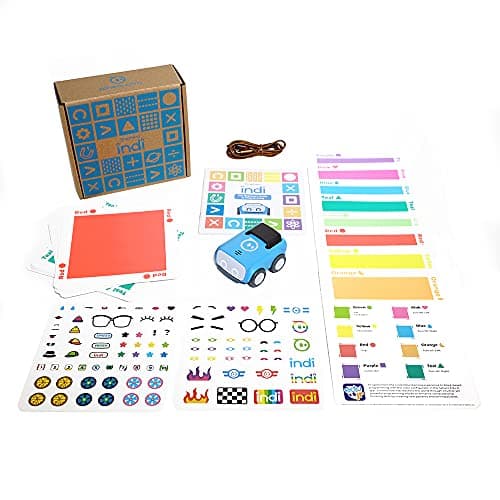
| 1 | Best under eight Sphero indi At-Home Learning Kit A color-sensing car programmed by laying cards down — the program is visible on the floor. | Four to seven, on a clear floor, with no device needed | |
| 2 | 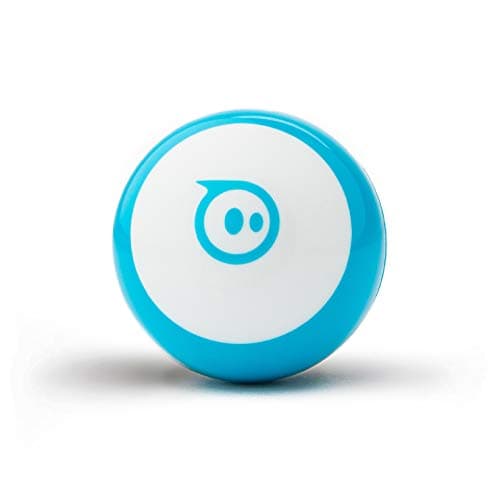 Best from eight Sphero Mini Three programming canvases — Draw, Blocks, Text — on a ping-pong-ball-sized robot. | Eight and up, with a device available | |
| 3 | 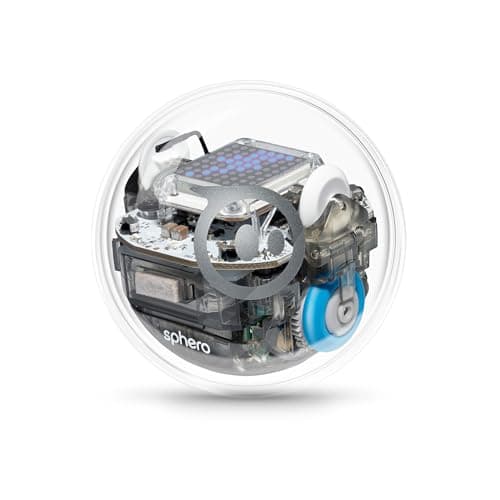 The rung above Mini Sphero BOLT An 8x8 programmable LED matrix, Python, waterproofing and all-day battery. | Eight to fourteen, where Python and a display matter | |
| — | 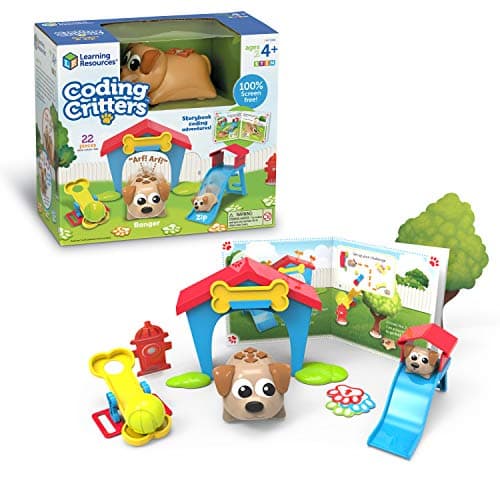 Not the same thing Coding Critters Ranger & Zip An interactive pet with a playset and a storybook, published as screen-free. | Four and up, as a toy rather than a tool |
4 picks, including 1 we tell you to skip. Ages shown are the manufacturer’s own rating, not ours.
Published side by side
The arithmetic
indi against Mini, as Sphero publishes them
| Stated age | indi: ages 4 and up · Mini: ages 8+ |
|---|---|
| Screen | indi: none required · Mini: Sphero Edu or Play app |
| How it is programmed | indi: 30 color cards read by an on-board sensor · Mini: Draw, Blocks, Text |
| Battery | indi: “2+ hours of play on a full charge” · Mini: “45 Min Playtime” |
| Form | indi: a small car · Mini: a sealed ball about ping-pong size |
| In the box | indi: cards, stickers, booklet, tape · Mini: 3 cones, 6 bowling pins, USB cable |
| Growth path | indi: optional Sphero Edu Jr blocks · Mini: Text canvas, then BOLT for Python |
The question that actually decides it
It is not the child’s age, because the published ages barely overlap. It is whether a device is reliably free.
Mini cannot be used without an app. In a house where the tablet is shared, contested or time-limited, a robot that needs it competes for the same slot as everything else, and the 45-minute battery means the two have to line up. indi has no such dependency: the cards are the program, so the robot is available whenever the floor is.
That is why an eight-year-old in a screen-restricted household is sometimes better served by indi than by Mini, published ages notwithstanding. Sphero publishes indi as 4 and up — a floor, not a ceiling.
What each one teaches
indi teaches that instructions are objects. A route is a physical row of cards; changing the program means moving one. There is no syntax to get wrong and nothing hidden.
Mini teaches that instructions can be abstract. Draw becomes Blocks becomes Text — three representations of the same path, which is the single most useful idea in the whole category and the reason the three canvases matter more than the robot.
Both teach that the machine does exactly what it was told. That is the part neither age can skip, and it is why a child who did indi at five is not starting over at eight.
Worth knowing before you buy
So which one
Four to seven: Sphero indi.
Eight or nine, device available: Sphero Mini.
Eight or nine, no device free: indi still, and Mini when a device is.
They already code: BOLT, for Python and the matrix.
Say the unwelcome thing
Do not buy Mini for a five-year-old because it is the cheaper ball
The published floor is eight, and the reason is not difficulty alone — Sphero also publishes a supervision note about the shell opening. A five-year-old handed Mini needs an adult holding a phone for every session, which is exactly the dependency indi was designed to remove.
Where to go next
Coding robot balls covers the class, coding toys for 4 and 5 year olds covers indi’s age, and coding toys for 8 and 9 year olds covers Mini’s.
In full
Every pick, and what is wrong with it
Published specifications only, each linked back to the page it came from. Where a manufacturer publishes nothing, the row says so — we do not fill blanks in.
1. Best under eight
Sphero indi At-Home Learning Kit
Sphero · indi · maker rates it 4+
A color-sensing car programmed by laying cards down — the program is visible on the floor.
- Contents
- 1 indi robot, 30 color cards, charging cable, 2 sticker sheets, activity booklet, tape to fix the cards down
- Card mix
- 5 green, 4 yellow, 3 red, 2 purple, 3 teal, 3 orange, 5 blue, 5 pink
- How it is coded
- An on-board color sensor reads the cards; no screen needed
- Play time
- “2+ hours of play on a full charge”, USB charging
Sphero publishes 1 indi robot, 30 color cards in a stated mix, an on-board color sensor that reads the cards with no screen needed, “2+ hours of play on a full charge” over USB, an optional Sphero Edu Jr drag-and-drop block app, 2 sticker sheets, an activity booklet and tape to fix the cards down, rated ages 4 and up.
No screen required is the whole reason this exists. At four a child cannot hold a program in an app, but they can lay a green card down and watch the car speed up — which is the same idea in a form their hands can edit.
The optional app is a genuine growth path rather than a requirement. See the indi review.
Replay signal
- Open-ended or one-shot
- Very open-ended for the age: the child lays the track out across the whole floor
- Does anything run out
- Nothing runs out; recharges by USB
- Room to grow
- Screen-free cards first, then the same robot accepts block coding in the free app when the child is ready
- Adult required
- Not after setup — the program is the floor, and the child builds it
Why we say so: Sphero publishes the 30-card color breakdown, the on-board color sensor as the programming method, the 2+ hours per charge, and the optional step up to drag-and-drop blocks in Sphero Edu Jr.
What’s wrong with it
30 loose cards, and it needs a smooth floor with room for a route.
| Contents | 1 indi robot, 30 color cards, charging cable, 2 sticker sheets, activity booklet, tape to fix the cards down |
|---|---|
| Card mix | 5 green, 4 yellow, 3 red, 2 purple, 3 teal, 3 orange, 5 blue, 5 pink |
| How it is coded | An on-board color sensor reads the cards; no screen needed |
| Play time | “2+ hours of play on a full charge”, USB charging |
| Optional app | Sphero Edu Jr drag-and-drop blocks |
| Stated age | Ages 4 and up |
Every figure above is from Sphero, indi At-Home Learning Kit. Blanks are shown as “not published” rather than filled in.
2. Best from eight
Sphero Mini
Sphero · M001BRW-049 (Mini Blue) · maker rates it 8+
Three programming canvases — Draw, Blocks, Text — on a ping-pong-ball-sized robot.
- Size
- “about the same size as a ping pong ball”
- Programming
- “three programming canvases: Draw, Blocks, and Text” in the Sphero Edu app
- Sensors
- “a gyroscope, motor encoders, and accelerometer”, plus a codeable LED
- Playtime
- “45 Min Playtime”, charged over micro USB
Sphero publishes a robot “about the same size as a ping pong ball”, three programming canvases in the Sphero Edu app, a gyroscope, motor encoders and an accelerometer, a codeable LED, “45 Min Playtime”, and 3 cones and 6 bowling pins, rated ages 8+.
Four published years above indi, and the four years buy abstraction: the program leaves the floor and lives in an app, where it can be saved, edited and made longer than a row of cards.
That is a gain and a loss. A program on a screen is more powerful and less visible. See the Sphero Mini review.
Replay signal
- Open-ended or one-shot
- Open-ended once the activity library opens up — the robot is a controller, a game piece and a programming target
- Does anything run out
- Nothing runs out; rechargeable
- Room to grow
- Draw, then Blocks, then text — the same three canvases the larger Sphero robots publish
- Adult required
- A phone or tablet has to be free, and Sphero publishes adult supervision under eight
Why we say so: Sphero publishes three programming canvases — Draw, Blocks and Text — on a robot the size of a ping pong ball, and a 45-minute playtime. Read those two figures together: the canvases are the same ladder the $179 BOLT publishes, and the 45 minutes is the honest reason this is the cheap one.
What’s wrong with it
Needs an app, and Sphero publishes only 45 minutes of playtime.
| Size | “about the same size as a ping pong ball” |
|---|---|
| Programming | “three programming canvases: Draw, Blocks, and Text” in the Sphero Edu app |
| Sensors | “a gyroscope, motor encoders, and accelerometer”, plus a codeable LED |
| Playtime | “45 Min Playtime”, charged over micro USB |
| In the box | Robot, micro USB charging cable, 3 Mini Traffic Cones and 6 Mini Bowling Pins |
| Apps | Sphero Edu (iOS, Android, Amazon Fire OS, macOS, Windows, Chrome OS) and Sphero Play (iOS, Android, Fire OS) |
| Shell | Interchangeable — published as designed to open up |
| Stated age | Ages 8+ |
| Consumables | None — rechargeable |
Every figure above is from Sphero, Sphero Mini. Blanks are shown as “not published” rather than filled in.
3. The rung above Mini
Sphero BOLT
Sphero · K002ROWFFP · maker rates it 8+
An 8x8 programmable LED matrix, Python, waterproofing and all-day battery.
- Display
- “advanced programmable sensors and 8x8 LED matrix”
- Programming
- “three ways to program (Draw, Blocks, and Text coding with JavaScript or Python)”
- Shell
- “durable and waterproof design”
- Battery
- “all-day battery life”, inductive charging
Sphero publishes an 8x8 programmable LED matrix, Draw/Blocks/Text with JavaScript or Python, a durable waterproof design, all-day battery life with inductive charging, and a 360-degree protractor, rated ages 8+.
Included because the honest answer to “Mini or indi” for an eight-year-old who already codes is sometimes neither. See Mini against BOLT.
Replay signal
- Open-ended or one-shot
- Open-ended — a programmable 8x8 display on a rolling robot has no finished state
- Does anything run out
- Nothing runs out; inductive charging rather than cells
- Room to grow
- Draw to Blocks to JavaScript or Python, on the same robot
- Adult required
- Not after the first pairing; the published lesson material is aimed at the child
Why we say so: Sphero publishes an 8x8 LED matrix, a waterproof shell, all-day battery life and text programming in JavaScript or Python. The matrix is the specification that separates this from every other coding ball: the robot can display what the program is doing, so a child debugs by looking at it rather than guessing.
What’s wrong with it
Three and a half times Mini's price for the same three canvases.
| Display | “advanced programmable sensors and 8x8 LED matrix” |
|---|---|
| Programming | “three ways to program (Draw, Blocks, and Text coding with JavaScript or Python)” |
| Shell | “durable and waterproof design” |
| Battery | “all-day battery life”, inductive charging |
| In the box | Inductive charging base with USB charging cable, and a 360-degree protractor with heading, directions and clock |
| Sensors named | Magnetometer, plus the programmable sensor set |
| Apps | Sphero Edu (Chrome, Mac, PC, iOS, Android, Kindle) and Sphero Play |
| Stated age | Ages 8+ |
| Consumables | None — rechargeable |
Every figure above is from Sphero, Sphero BOLT. Blanks are shown as “not published” rather than filled in.
Skip this one
Coding Critters Ranger & Zip
Learning Resources · LER3081 · maker rates it 4+
An interactive pet with a playset and a storybook, published as screen-free.
- Set size
- 22 pieces
- Screen required
- None — “100% screen-free coding”
- Format
- Interactive pet plus playset and a storybook of coding activities
- Stated age
- Ages 4+
Learning Resources publishes Coding Critters as 22 pieces — an interactive pet plus a playset and a storybook of coding activities — described as “100% screen-free coding”, rated ages 4+.
It is the product most often bought instead of indi at this age, and the difference is worth stating. indi publishes a sensor that reads a program the child laid out; Coding Critters publishes a story a child follows. Only one of those is editable.
Replay signal
- Open-ended or one-shot
- Half toy, half coding set — the pretend play carries on long after the programming stops
- Does anything run out
- Nothing runs out
- Room to grow
- Little: the coding ceiling here is low by design
- Adult required
- The storybook is read-aloud at four; the pet is not
Why we say so: Learning Resources publishes the 22-piece count, the screen-free format and the storybook-led activity structure. We call the coding ceiling low because the published format is a storybook sequence rather than a programmable step count — compare Botley's published 150-step maximum.
What’s wrong with it
Published 4+ like indi, but the pet performs rather than being programmed.
| Set size | 22 pieces |
|---|---|
| Screen required | None — “100% screen-free coding” |
| Format | Interactive pet plus playset and a storybook of coding activities |
| Stated age | Ages 4+ |
| Consumables | None |
Every figure above is from Learning Resources, Coding Critters. Blanks are shown as “not published” rather than filled in.
We are not putting a buy button on this one. It is easy enough to find if you want it anyway — but we would rather send you to something that gets played with twice.
Questions people actually ask
Frequently asked
Sphero Mini or indi for a 6 year old?
indi. Sphero publishes it at ages 4 and up with 30 color cards read by an on-board sensor and no screen required; Mini publishes 8+ and needs the Sphero Edu or Play app for every session.
What is the difference between Sphero indi and Sphero Mini?
How the program is expressed. indi is programmed by laying physical color cards on the floor, with no screen. Mini is programmed in an app through three canvases - Draw, Blocks and Text. indi publishes 2+ hours of play per charge, Mini publishes 45 minutes.
Does Sphero indi need a tablet?
No. Sphero publishes an on-board color sensor that reads the cards, so no screen is needed. There is an optional Sphero Edu Jr drag-and-drop block app, published as optional rather than required. Screen-free coding toys.
Can an 8 year old use Sphero indi?
Yes - 4 and up is a floor, not a ceiling, and in a household where a device is not reliably free indi is often the better buy at eight because it has no app dependency at all. Buying above the age rating.
Which has the better battery?
indi, by a wide margin on the published figures: "2+ hours of play on a full charge" against Mini's "45 Min Playtime". The toy for the younger child publishes nearly three times the playtime.
Do indi and Mini work together?
They share the maker and the app family - Sphero publishes Sphero Edu Jr for indi and Sphero Edu for Mini - but they are separate robots with separate programming methods. A child who used indi at five is not starting over with Mini at eight; the idea carries, the interface changes. Sphero Mini vs BOLT.
Sources
Where these figures came from
Every specification on this page traces to one of these. If a manufacturer publishes nothing on a point, the page says so rather than filling the gap.
Read next
Where to go from here
Back to Coding & Robotics, or read how we pick.