Single review
Sphero Mini Review
Reviewed from Sphero's published specifications. We have not driven it, and the review turns on two numbers: three canvases and forty-five minutes.
By Sawyer V. · Published
The short answer
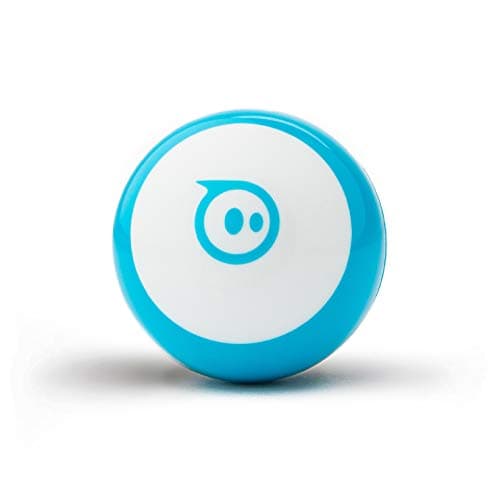
Sphero Mini is the best-value coding robot on this site. Sphero publishes “three programming canvases: Draw, Blocks, and Text” in the Sphero Edu app — the same three the $179 BOLT publishes — on a robot “about the same size as a ping pong ball”, with a gyroscope, motor encoders and an accelerometer, rated ages 8+. The honest cost is the published “45 Min Playtime”.
Block & Beaker earns a commission when you buy through our links, at no cost to you. It never changes a ranking, and we say so plainly when the right answer is the cheaper set, or nothing at all. Full disclosure · How we pick.
At a glance
The picks, ranked
Tap any row to jump to the full reasoning. Prices come live from Amazon where we have them and read “check price” where we don’t — never a number we cannot stand behind today.
| # | Product | Best for | Price |
|---|---|---|---|
| 1 | The product Sphero Mini Draw, Blocks and Text on a ping-pong-ball-sized robot, with cones and pins in the box. | Eight and up, with a phone or tablet free for a session at a time | |
| 2 | 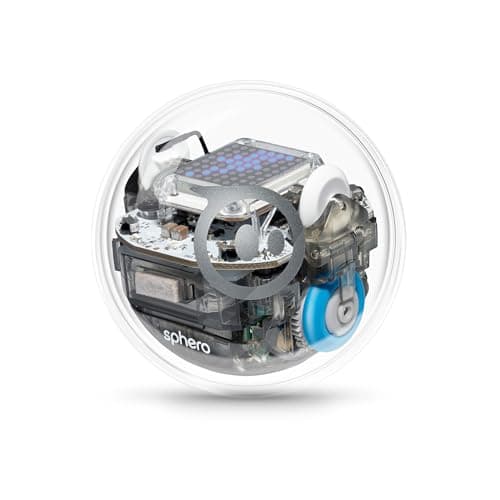 The same canvases, four times the price Sphero BOLT An 8x8 programmable LED matrix, waterproof shell, all-day battery and Python. | Eight to fourteen, where Python and a display matter | |
| 3 | 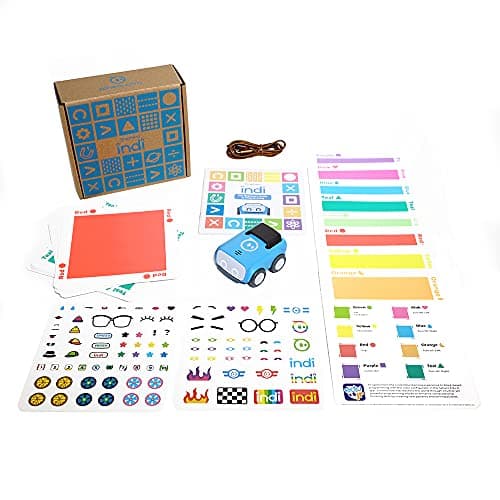 Four published years earlier Sphero indi At-Home Learning Kit A color-sensing car programmed with cards on the floor — no screen at all. | Four to seven, with no device | |
| — |  Buy this instead if there is no device Botley 2.0 The Coding Robot Activity Set 150-step sequences, 78 pieces, and 100% screen-free play. | Five to seven, screen-free |
4 picks, including 1 we tell you to skip. Ages shown are the manufacturer’s own rating, not ours.
What we can tell you, and what we cannot
We have not driven it. No lab, no samples, no test children, and no star rating on this page or in its structured data. Everything below is Sphero’s own published information plus arithmetic.
Two absences worth naming. Sphero publishes no top speed for Mini on the page we read, and no dimensions beyond the ping-pong-ball comparison. If either matters to you, treat them as unpublished rather than inferring them from the larger robots.
The specification that decides it
The arithmetic
Sphero Mini, published
| Size | “about the same size as a ping pong ball” |
|---|---|
| Programming | “three programming canvases: Draw, Blocks, and Text” (Sphero Edu) |
| Sensors | “a gyroscope, motor encoders, and accelerometer” |
| Light | A “bright, colorful” codeable LED |
| Playtime | “45 Min Playtime”, micro USB charging |
| In the box | Robot, micro USB cable, 3 Mini Traffic Cones, 6 Mini Bowling Pins |
| Shell | Interchangeable, and published as designed to open up |
| Apps | Edu: iOS, Android, Fire OS, macOS, Windows, Chrome OS · Play: iOS, Android, Fire OS |
| Stated age | Ages 8+ |
| Top speed and dimensions | Not published on the page we read |
| Consumables | None — rechargeable |
| Price band | The least expensive three-canvas coding robot on this site |
What the numbers mean in practice
Forty-five minutes is one session, and that is the real limit. It is enough for a sitting and not enough for an afternoon. The practical consequence is that Mini wants to live on its cable between uses, which in turn means it wants a spot on a desk rather than a toy box.
Three canvases is a genuine ladder, not three skins. Draw asks for a shape, Blocks asks for a structure, Text asks for syntax. A child can be on a different rung in different weeks, and the robot does not need replacing when they move.
Motor encoders make distances mean something. Published alongside the gyroscope and accelerometer, they are why a program that says “roll, turn 90, roll the same distance” closes a square instead of drifting. On a robot without them the same program produces a different shape every run, which teaches a child that code is unreliable — the opposite of the lesson.
The app list is unusually long, and that is a feature. Sphero publishes Edu for six platforms including Windows and Chrome OS, which means a school Chromebook or a parent’s laptop works. Most coding toys at this price publish iOS and Android only.
What the three canvases actually teach
The idea the whole Sphero line is built on is that a program can be written down more than one way. That sounds abstract and it is the most practical thing a child learns here.
On the Draw canvas a path is a line a finger makes. In Blocks the same path is a stack of instructions with numbers in them. In Text it is characters. Nothing about the robot’s behavior changes, which is exactly the point: the child discovers that the notation is a choice and the instruction is the thing.
That is why the published canvas count matters more here than the sensor list. A robot with one input method teaches that method. A robot with three teaches translation, and translation is what makes the next language easy.
The honest limit is output. Mini publishes one codeable LED, so a program can report essentially one thing at a time through color. A child debugging a long sequence has to read it from how the robot moved, which is harder than reading it off an 8x8 display.
Worth knowing before you buy
Who should skip it
Anyone without a device to spare. Every canvas lives in an app. A robot that cannot be used when the tablet is in use gets used less than a screen-free one.
Children under eight. The published floor is 8+ and the supervision note is about the shell, not just the difficulty. indi publishes 4 and up.
Anyone who wants the program to be visible. One LED against BOLT’s 8x8 matrix is the single biggest functional gap in the line.
A child who wants to build a robot. This is a sealed ball. Makeblock publishes about 100 parts for mBot Neo at the same published age.
Say the unwelcome thing
Do not buy a second Mini instead of one BOLT
It is tempting for two siblings and it usually disappoints. Two 45-minute batteries is still 45 minutes, two single LEDs still cannot display a number, and neither robot reaches Python. If the budget stretches to two Minis, the better question is whether one child is ready for the robot with the display and the all-day battery.
Where it sits
Sphero Mini appears in coding robot balls alongside BOLT and indi, and in the two comparisons that decide most purchases — Mini against BOLT and Mini against indi. For the age it publishes, see coding toys for 8 and 9 year olds.
In full
Every pick, and what is wrong with it
Published specifications only, each linked back to the page it came from. Where a manufacturer publishes nothing, the row says so — we do not fill blanks in.
1. The product
Sphero Mini
Sphero · M001BRW-049 (Mini Blue) · maker rates it 8+
Draw, Blocks and Text on a ping-pong-ball-sized robot, with cones and pins in the box.
- Size
- “about the same size as a ping pong ball”
- Programming
- “three programming canvases: Draw, Blocks, and Text” in the Sphero Edu app
- Sensors
- “a gyroscope, motor encoders, and accelerometer”, plus a codeable LED
- Playtime
- “45 Min Playtime”, charged over micro USB
Sphero publishes a robot “about the same size as a ping pong ball”, “three programming canvases: Draw, Blocks, and Text” in the Sphero Edu app, “a gyroscope, motor encoders, and accelerometer” plus a “bright, colorful LED”, “45 Min Playtime” charged over micro USB, an interchangeable shell, and 3 Mini Traffic Cones and 6 Mini Bowling Pins in the box. Sphero Edu is published for iOS, Android, Amazon Fire OS, macOS, Windows and Chrome OS; Sphero Play for iOS, Android and Fire OS. Rated ages 8+.
Three canvases is the specification that makes this worth buying, and it is easy to skim past because it sounds like marketing. It is not: Draw, Blocks and Text are three representations of the same program, and moving between them is the single most transferable idea in this category. A child traces a square with a finger, then builds the same square from blocks, then types it — and discovers the three are the same instruction.
Motor encoders deserve a mention because almost nothing at this price publishes them. An encoder is what lets the robot know how far it actually turned, which is why “go forward 50 centimeters” means something here and is a guess on a cheaper robot.
The cones and pins are the difference between a toy and a problem. A rolling robot with nothing to navigate is a remote-control ball; six pins make it a bowling game you have to program, which is a target a child sets for themselves.
Replay signal
- Open-ended or one-shot
- Open-ended once the activity library opens up — the robot is a controller, a game piece and a programming target
- Does anything run out
- Nothing runs out; rechargeable
- Room to grow
- Draw, then Blocks, then text — the same three canvases the larger Sphero robots publish
- Adult required
- A phone or tablet has to be free, and Sphero publishes adult supervision under eight
Why we say so: Sphero publishes three programming canvases — Draw, Blocks and Text — on a robot the size of a ping pong ball, and a 45-minute playtime. Read those two figures together: the canvases are the same ladder the $179 BOLT publishes, and the 45 minutes is the honest reason this is the cheap one.
What’s wrong with it
45 published minutes per charge, and a single codeable LED where BOLT has an 8x8 matrix.
| Size | “about the same size as a ping pong ball” |
|---|---|
| Programming | “three programming canvases: Draw, Blocks, and Text” in the Sphero Edu app |
| Sensors | “a gyroscope, motor encoders, and accelerometer”, plus a codeable LED |
| Playtime | “45 Min Playtime”, charged over micro USB |
| In the box | Robot, micro USB charging cable, 3 Mini Traffic Cones and 6 Mini Bowling Pins |
| Apps | Sphero Edu (iOS, Android, Amazon Fire OS, macOS, Windows, Chrome OS) and Sphero Play (iOS, Android, Fire OS) |
| Shell | Interchangeable — published as designed to open up |
| Stated age | Ages 8+ |
| Consumables | None — rechargeable |
Every figure above is from Sphero, Sphero Mini. Blanks are shown as “not published” rather than filled in.
2. The same canvases, four times the price
Sphero BOLT
Sphero · K002ROWFFP · maker rates it 8+
An 8x8 programmable LED matrix, waterproof shell, all-day battery and Python.
- Display
- “advanced programmable sensors and 8x8 LED matrix”
- Programming
- “three ways to program (Draw, Blocks, and Text coding with JavaScript or Python)”
- Shell
- “durable and waterproof design”
- Battery
- “all-day battery life”, inductive charging
Sphero publishes “advanced programmable sensors and 8x8 LED matrix”, “three ways to program (Draw, Blocks, and Text coding with JavaScript or Python)”, a “durable and waterproof design” and “all-day battery life” with inductive charging, rated ages 8+.
The useful way to read this pair: BOLT is not a better teacher, it is a better instrument. The matrix gives a program somewhere to print, and all-day battery means the robot is available rather than charging.
See Mini against BOLT for the four published specs that differ.
Replay signal
- Open-ended or one-shot
- Open-ended — a programmable 8x8 display on a rolling robot has no finished state
- Does anything run out
- Nothing runs out; inductive charging rather than cells
- Room to grow
- Draw to Blocks to JavaScript or Python, on the same robot
- Adult required
- Not after the first pairing; the published lesson material is aimed at the child
Why we say so: Sphero publishes an 8x8 LED matrix, a waterproof shell, all-day battery life and text programming in JavaScript or Python. The matrix is the specification that separates this from every other coding ball: the robot can display what the program is doing, so a child debugs by looking at it rather than guessing.
What’s wrong with it
Nothing in the coding path is new — the premium is display, battery and shell.
| Display | “advanced programmable sensors and 8x8 LED matrix” |
|---|---|
| Programming | “three ways to program (Draw, Blocks, and Text coding with JavaScript or Python)” |
| Shell | “durable and waterproof design” |
| Battery | “all-day battery life”, inductive charging |
| In the box | Inductive charging base with USB charging cable, and a 360-degree protractor with heading, directions and clock |
| Sensors named | Magnetometer, plus the programmable sensor set |
| Apps | Sphero Edu (Chrome, Mac, PC, iOS, Android, Kindle) and Sphero Play |
| Stated age | Ages 8+ |
| Consumables | None — rechargeable |
Every figure above is from Sphero, Sphero BOLT. Blanks are shown as “not published” rather than filled in.
3. Four published years earlier
Sphero indi At-Home Learning Kit
Sphero · indi · maker rates it 4+
A color-sensing car programmed with cards on the floor — no screen at all.
- Contents
- 1 indi robot, 30 color cards, charging cable, 2 sticker sheets, activity booklet, tape to fix the cards down
- Card mix
- 5 green, 4 yellow, 3 red, 2 purple, 3 teal, 3 orange, 5 blue, 5 pink
- How it is coded
- An on-board color sensor reads the cards; no screen needed
- Play time
- “2+ hours of play on a full charge”, USB charging
Sphero publishes 1 indi robot, 30 color cards, an on-board color sensor needing no screen, “2+ hours of play on a full charge”, and an optional Sphero Edu Jr block app, rated ages 4 and up.
Worth naming here because Mini’s published floor is eight and plenty of people find this review looking for a younger child. indi also publishes nearly three times the playtime.
See Mini against indi.
Replay signal
- Open-ended or one-shot
- Very open-ended for the age: the child lays the track out across the whole floor
- Does anything run out
- Nothing runs out; recharges by USB
- Room to grow
- Screen-free cards first, then the same robot accepts block coding in the free app when the child is ready
- Adult required
- Not after setup — the program is the floor, and the child builds it
Why we say so: Sphero publishes the 30-card color breakdown, the on-board color sensor as the programming method, the 2+ hours per charge, and the optional step up to drag-and-drop blocks in Sphero Edu Jr.
What’s wrong with it
30 loose cards and a clear floor, and it is a car rather than a ball.
| Contents | 1 indi robot, 30 color cards, charging cable, 2 sticker sheets, activity booklet, tape to fix the cards down |
|---|---|
| Card mix | 5 green, 4 yellow, 3 red, 2 purple, 3 teal, 3 orange, 5 blue, 5 pink |
| How it is coded | An on-board color sensor reads the cards; no screen needed |
| Play time | “2+ hours of play on a full charge”, USB charging |
| Optional app | Sphero Edu Jr drag-and-drop blocks |
| Stated age | Ages 4 and up |
Every figure above is from Sphero, indi At-Home Learning Kit. Blanks are shown as “not published” rather than filled in.
Skip this one
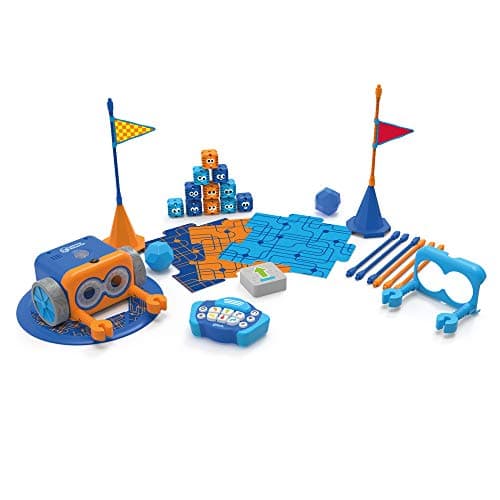
Botley 2.0 The Coding Robot Activity Set
Learning Resources · LER2938 · maker rates it 5+
150-step sequences, 78 pieces, and 100% screen-free play.
- Set size
- 78 pieces
- Contents
- Botley 2.0, remote programmer, 2 face plates, 40 coding cards, 6 double-sided boards, 27 obstacle pieces, starter guide
- Maximum program length
- “coding sequences of up to 150 steps”
- Movement
- Six directions, plus 16 coded interactions
Learning Resources publishes a 78-piece set, “coding sequences of up to 150 steps”, six directions plus 16 coded interactions, “100% screen-free play” and 5 AAA batteries required and not included, rated 5+ (K-2nd grade).
Marked as the skip for a specific reader: if the household has no device free, Mini cannot be used at all, and Botley can. It is not a better robot — there is no named language and no saved program — but a robot that works beats one that waits for a tablet.
Replay signal
- Open-ended or one-shot
- Open-ended once the cards are understood — the child builds the maze, not just the program
- Does anything run out
- Nothing runs out except batteries
- Room to grow
- A 150-step ceiling means the challenge scales for years past the first week
- Adult required
- Needed for the first session, then not — there is no app account and nothing to log into
Why we say so: Learning Resources publishes the 78-piece contents, the 150-step maximum sequence, the six directions and 16 interactions, and states the set is 100% screen-free with no tablet or app required.
What’s wrong with it
Published 5+ with no named language and nothing to save. The ceiling is fixed.
| Set size | 78 pieces |
|---|---|
| Contents | Botley 2.0, remote programmer, 2 face plates, 40 coding cards, 6 double-sided boards, 27 obstacle pieces, starter guide |
| Maximum program length | “coding sequences of up to 150 steps” |
| Movement | Six directions, plus 16 coded interactions |
| Screen required | None — “100% screen-free play” |
| Batteries | “Requires 5 AAA batteries (not included)” |
| Stated age | 5+ (K-2nd grade) |
Every figure above is from Learning Resources, Botley 2.0 Activity Set. Blanks are shown as “not published” rather than filled in.
We are not putting a buy button on this one. It is easy enough to find if you want it anyway — but we would rather send you to something that gets played with twice.
Questions people actually ask
Frequently asked
Is Sphero Mini worth it?
Yes, as a first coding robot. Sphero publishes the same three programming canvases - Draw, Blocks and Text - that the $179 BOLT publishes, on a robot the size of a ping pong ball, with a gyroscope, motor encoders and an accelerometer. The trade is the published 45-minute playtime and a single LED instead of a display.
What age is Sphero Mini for?
Sphero publishes ages 8+, and also publishes a supervision note under eight because the shell is designed to open up and exposes smaller parts. For a younger child, Sphero indi publishes 4 and up and needs no screen. Sphero Mini vs indi.
How long does Sphero Mini last on a charge?
Sphero publishes "45 Min Playtime", charged over micro USB. That is one session rather than an afternoon, and it is the main reason to consider BOLT, which publishes all-day battery life with inductive charging.
Does Sphero Mini need an app?
Yes. All three canvases live in the Sphero Edu app, published for iOS, Android, Amazon Fire OS, macOS, Windows and Chrome OS, with Sphero Play as the home alternative. If no device is reliably free, a screen-free robot is the better buy. Screen-free coding toys.
Can you code Sphero Mini in Python?
Sphero publishes a Text canvas for Mini in Sphero Edu. It publishes BOLT specifically as "Text coding with JavaScript or Python", so BOLT is the one that names Python. From toy to real code.
What comes in the box?
Sphero publishes the robot, a micro USB charging cable, 3 Mini Traffic Cones and 6 Mini Bowling Pins. The cones and pins matter more than they sound - they turn a rolling robot into a route to program.
Sphero Mini or BOLT?
Mini unless one of four published specs decides it: BOLT adds an 8x8 programmable LED matrix, Python alongside JavaScript, a waterproof shell and all-day battery life. The three programming canvases are identical on both. Sphero Mini vs BOLT.
Sources
Where these figures came from
Every specification on this page traces to one of these. If a manufacturer publishes nothing on a point, the page says so rather than filling the gap.
Read next
Where to go from here
Back to Reviews, or read how we pick.