Head to head
Osmo Coding vs Botley 2.0
This is really a decision about screens, dressed as a decision about coding toys. The published requirements make it explicit.
By Sawyer V. · Published
The short answer
Choose on the iPad. Osmo publishes three coding games that need an iPad, which is not included, rated 5-10. Botley publishes a 150-step screen-free robot rated 5+. If a tablet is free and welcome, Osmo brings structure; if it is shared or unwelcome, Botley is the only one that will get used.
Block & Beaker earns a commission when you buy through our links, at no cost to you. It never changes a ranking, and we say so plainly when the right answer is the cheaper set, or nothing at all. Full disclosure · How we pick.
At a glance
The picks, ranked
Tap any row to jump to the full reasoning. Prices come live from Amazon where we have them and read “check price” where we don’t — never a number we cannot stand behind today.
| # | Product | Best for | Price |
|---|---|---|---|
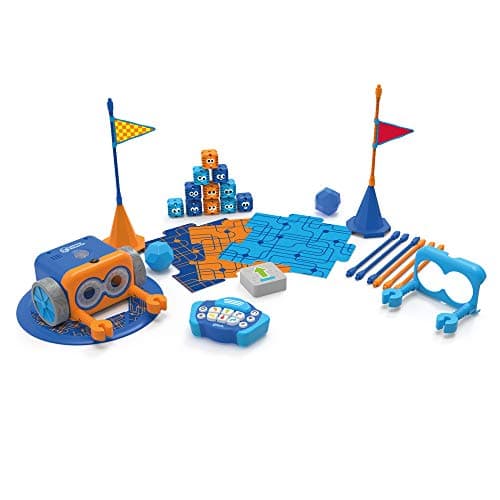
| 1 | Better in most households Botley 2.0 The Coding Robot Activity Set A published 150-step ceiling and no screen at all, so it is picked up rather than scheduled. | Five to eight, with no device to negotiate for | |
| 2 | 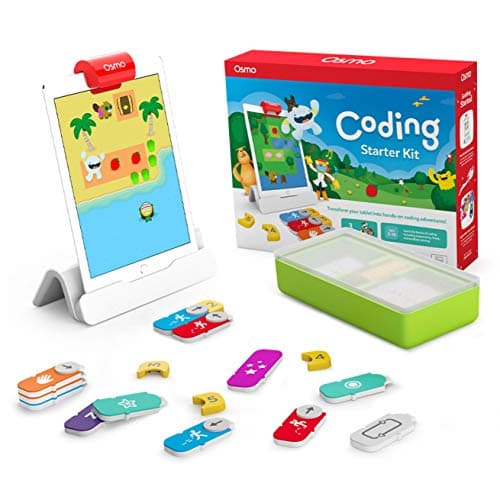 Better with a spare iPad Osmo Coding Starter Kit for iPad Three coding games driven by physical blocks, with software supplying the difficulty curve. | Five to ten, where a tablet is available and welcome | |
| 3 | 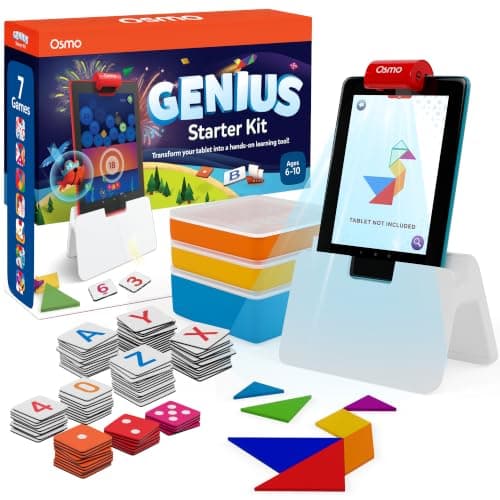 Better Osmo if you are buying Osmo Osmo Genius Starter Kit for iPad Five games instead of three, across five subjects, on the same base. | Six to ten, for breadth over coding | |
| — | 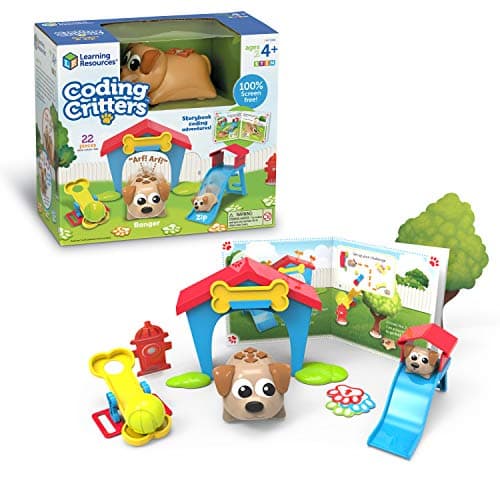 Not a middle ground Coding Critters Ranger & Zip Sometimes suggested as the compromise, and it has no published programming ceiling. | Four, as pretend play |
4 picks, including 1 we tell you to skip. Ages shown are the manufacturer’s own rating, not ours.
Side by side
The arithmetic
Published specifications
| Stated age | Osmo Coding 5-10 | Botley 5+ (K-2) |
|---|---|
| Device | Osmo: iPad required, not included | Botley: none |
| Content | Osmo: 3 games | Botley: 150-step programs, 27 obstacles |
| Difficulty curve | Osmo: supplied by software | Botley: set by the child |
| Power | Osmo: the iPad | Botley: 5 x AAA, not included |
| Compatibility limits | Osmo: iPad gens 1-4 excluded, min iOS 11 | Botley: none |
The shared-device problem
This is the practical issue that decides most households, and it is rarely said plainly.
A device-dependent toy competes with everything else on that device and with everyone else who wants it. In a household with one iPad and two children, a coding kit is third in a queue before it has done anything.
A screen-free robot competes with nothing. That asymmetry, not any philosophy about screens, is why Botley wins in most homes.
Where Osmo genuinely wins
Structure. The software sets the next challenge and tells the child whether they were right. Botley relies on the child, or an adult, to invent the next problem.
Physical pieces with a screen, not instead of one. The blocks are real objects on a real table, which is a different activity from tapping glass.
No batteries in the pieces. The iPad supplies the power.
Worth knowing before you buy
A device requirement is also a supervision requirement in most households. A kit that unlocks a tablet unlocks everything else on it, which is worth weighing alongside the published age rating.
So which one
One shared iPad, or screens being reduced: Botley, clearly.
A spare iPad that the child can use freely: Osmo Coding is a genuine option, and the Genius kit is the broader buy.
Unsure: Botley. It cannot fail on the device question, and a 150-step ceiling gives it years.
Say the unwelcome thing
Do not buy Osmo without checking the iPad model first
Osmo publishes that iPad generations 1-4 and certain newer models are excluded, with a minimum of iOS 11. An older household tablet may simply not qualify, and that is discovered on the morning it is opened.
Where to go next
STEM toys and screen time covers the device question across the site. Coding toys vs coding apps covers whether hardware is needed at all, and the Osmo Genius review covers the broader Osmo kit.
In full
Every pick, and what is wrong with it
Published specifications only, each linked back to the page it came from. Where a manufacturer publishes nothing, the row says so — we do not fill blanks in.
1. Better in most households
Botley 2.0 The Coding Robot Activity Set
Learning Resources · LER2938 · maker rates it 5+
A published 150-step ceiling and no screen at all, so it is picked up rather than scheduled.
- Set size
- 78 pieces
- Contents
- Botley 2.0, remote programmer, 2 face plates, 40 coding cards, 6 double-sided boards, 27 obstacle pieces, starter guide
- Maximum program length
- “coding sequences of up to 150 steps”
- Movement
- Six directions, plus 16 coded interactions
Learning Resources publishes 78 pieces including a remote programmer, 40 coding cards, six double-sided boards and 27 obstacle pieces, with sequences up to 150 steps, six directions of movement and 16 coded interactions, 100% screen-free, rated 5+.
No device means no negotiation. A robot sitting on a shelf is used whenever the child thinks of it; a kit that needs the family iPad is used when the iPad is free.
Replay signal
- Open-ended or one-shot
- Open-ended once the cards are understood — the child builds the maze, not just the program
- Does anything run out
- Nothing runs out except batteries
- Room to grow
- A 150-step ceiling means the challenge scales for years past the first week
- Adult required
- Needed for the first session, then not — there is no app account and nothing to log into
Why we say so: Learning Resources publishes the 78-piece contents, the 150-step maximum sequence, the six directions and 16 interactions, and states the set is 100% screen-free with no tablet or app required.
What’s wrong with it
Five AAA batteries, not included, and no published path onto block coding.
| Set size | 78 pieces |
|---|---|
| Contents | Botley 2.0, remote programmer, 2 face plates, 40 coding cards, 6 double-sided boards, 27 obstacle pieces, starter guide |
| Maximum program length | “coding sequences of up to 150 steps” |
| Movement | Six directions, plus 16 coded interactions |
| Screen required | None — “100% screen-free play” |
| Batteries | “Requires 5 AAA batteries (not included)” |
| Stated age | 5+ (K-2nd grade) |
Every figure above is from Learning Resources, Botley 2.0 Activity Set. Blanks are shown as “not published” rather than filled in.
2. Better with a spare iPad
Osmo Coding Starter Kit for iPad
Osmo · Coding Starter Kit · maker rates it 5-10
Three coding games driven by physical blocks, with software supplying the difficulty curve.
- Contents
- Osmo Base and Reflector for iPad, 31 magnetic coding blocks, stackable storage, 3 game apps
- Games
- Coding Awbie, Coding Jam, Coding Duo
- Screen required
- Yes — an iPad is required and is not included
- Compatibility
- All iPads except generations 1-4 and certain newer models; minimum iOS 11
Osmo publishes three coding games — Coding Awbie, Coding Jam and Coding Duo — played with 31 physical coding blocks on the Osmo Base and Reflector, with an iPad required and not included, compatible with all iPads except generations 1-4 and certain newer models, minimum iOS 11, rated 5-10.
The honest strength is structure. The software supplies escalating challenges and feedback, which Botley leaves to the child and whoever is helping.
The honest weakness is the dependency. Three games on one subject, and none of them runs without a device you may not be able to free up.
Replay signal
- Open-ended or one-shot
- Guided by the three games rather than open-ended; Coding Jam is the one with no ending
- Does anything run out
- Nothing physical runs out
- Room to grow
- Three games at rising difficulty, described by Osmo as beginner to expert
- Adult required
- Only to hand over the iPad — which is precisely the friction: this one competes with screen time rather than replacing it
Why we say so: Osmo publishes the 31-block count, the three named games, the iPad requirement and the compatibility list. The iPad dependency is a published requirement, and it is the fact most likely to decide whether this gets used.
What’s wrong with it
Published as requiring an iPad, not included, with compatibility limits.
| Contents | Osmo Base and Reflector for iPad, 31 magnetic coding blocks, stackable storage, 3 game apps |
|---|---|
| Games | Coding Awbie, Coding Jam, Coding Duo |
| Screen required | Yes — an iPad is required and is not included |
| Compatibility | All iPads except generations 1-4 and certain newer models; minimum iOS 11 |
| Stated age | Ages 5-10 |
Every figure above is from Osmo, Coding Starter Kit. Blanks are shown as “not published” rather than filled in.
3. Better Osmo if you are buying Osmo
Osmo Genius Starter Kit for iPad
Osmo · Genius Starter Kit · maker rates it 6-10
Five games instead of three, across five subjects, on the same base.
- Games
- Five — Tangram, Numbers, Words, Newton and Masterpiece
- Contents
- Osmo Base and reflector, 52 Words tiles, 40 Numbers tiles, 7 Tangram pieces, stackable storage
- Screen required
- Yes — an iPad, not included
- Stated age
- Ages 6-10
Osmo publishes five games — Tangram, Numbers, Words, Newton and Masterpiece — with an Osmo Base and reflector, 52 Words tiles, 40 Numbers tiles and 7 Tangram pieces, rated 6-10.
If the iPad is available and the goal is educational play generally rather than coding specifically, five games degrade more gracefully than three.
Replay signal
- Open-ended or one-shot
- Five separate games rather than one, so it degrades gracefully — when one is exhausted, four remain
- Does anything run out
- Nothing physical runs out
- Room to grow
- Numbers and Tangram both scale well past the stated top age; Words does not
- Adult required
- Only to release the iPad, which in most households is the actual constraint
Why we say so: Osmo publishes the five named games and the exact tile counts. Five games in one box is the honest reason this is better value than a single-game Osmo kit, and the iPad requirement is a published dependency rather than an inference.
What’s wrong with it
Still an iPad, not included, and less coding than the Coding kit.
| Games | Five — Tangram, Numbers, Words, Newton and Masterpiece |
|---|---|
| Contents | Osmo Base and reflector, 52 Words tiles, 40 Numbers tiles, 7 Tangram pieces, stackable storage |
| Screen required | Yes — an iPad, not included |
| Stated age | Ages 6-10 |
| Batteries | None in the physical pieces |
Every figure above is from Osmo, Genius Starter Kit. Blanks are shown as “not published” rather than filled in.
Skip this one
Coding Critters Ranger & Zip
Learning Resources · LER3081 · maker rates it 4+
Sometimes suggested as the compromise, and it has no published programming ceiling.
- Set size
- 22 pieces
- Screen required
- None — “100% screen-free coding”
- Format
- Interactive pet plus playset and a storybook of coding activities
- Stated age
- Ages 4+
Learning Resources publishes a 22-piece screen-free set with an interactive pet, a playset and a storybook of coding activities, rated 4+.
It is screen-free, which is why it gets suggested, and it is not a coding robot in the sense Botley is. There is no step count to push against.
Replay signal
- Open-ended or one-shot
- Half toy, half coding set — the pretend play carries on long after the programming stops
- Does anything run out
- Nothing runs out
- Room to grow
- Little: the coding ceiling here is low by design
- Adult required
- The storybook is read-aloud at four; the pet is not
Why we say so: Learning Resources publishes the 22-piece count, the screen-free format and the storybook-led activity structure. We call the coding ceiling low because the published format is a storybook sequence rather than a programmable step count — compare Botley's published 150-step maximum.
What’s wrong with it
A storybook format rather than a programmable one.
| Set size | 22 pieces |
|---|---|
| Screen required | None — “100% screen-free coding” |
| Format | Interactive pet plus playset and a storybook of coding activities |
| Stated age | Ages 4+ |
| Consumables | None |
Every figure above is from Learning Resources, Coding Critters. Blanks are shown as “not published” rather than filled in.
We are not putting a buy button on this one. It is easy enough to find if you want it anyway — but we would rather send you to something that gets played with twice.
Questions people actually ask
Frequently asked
Is Osmo Coding or Botley better?
It depends on the iPad. Osmo publishes three coding games that require an iPad, not included, rated 5-10. Botley 2.0 publishes a screen-free robot with a 150-step maximum program, rated 5+. In a household with one shared tablet, Botley is the one that gets used.
Does Osmo Coding work without an iPad?
No. Osmo publishes an iPad as required and not included — the physical blocks work through the Osmo Base and Reflector on the iPad, so the device is the mechanism. It also publishes compatibility limits: iPad generations 1-4 and certain newer models are excluded, with a minimum of iOS 11.
Is a screen-free coding robot better than an app?
Not on principle — on logistics. A device-dependent toy competes with everything else on that device and everyone else who wants it. A screen-free robot competes with nothing, which is why it tends to be picked up far more often. STEM toys and screen time.
Which Osmo kit should I buy if I choose Osmo?
For breadth, the Genius Starter Kit — Osmo publishes five games across five subjects against the Coding kit's three games on one. Choose the Coding kit only if coding is specifically what the child has asked for.
Sources
Where these figures came from
Every specification on this page traces to one of these. If a manufacturer publishes nothing on a point, the page says so rather than filling the gap.
Read next
Where to go from here
Back to Coding & Robotics, or read how we pick.