The picks
Coding Toys for Teens
At thirteen the question stops being which robot and becomes which language. We rank these on the programming path each maker publishes.
By Sawyer V. · Published
The short answer
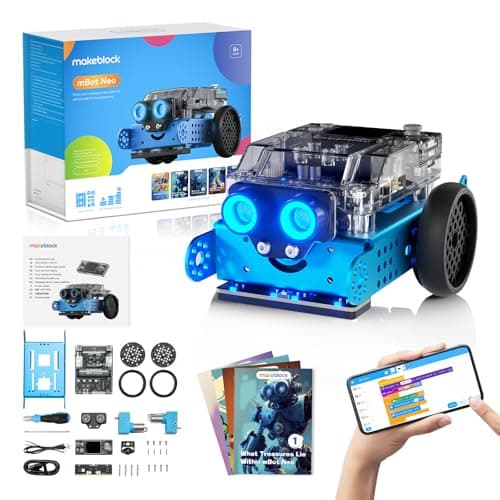
Buy for the language, not the robot. Makeblock publishes mBot Neo with three published routes on one machine — Scratch-style blocks, Python in mBlock and Arduino C/C++ via the Arduino IDE — on a 240 MHz dual-core controller. That is the one kit here a thirteen-year-old cannot outgrow in a year.
Block & Beaker earns a commission when you buy through our links, at no cost to you. It never changes a ranking, and we say so plainly when the right answer is the cheaper set, or nothing at all. Full disclosure · How we pick.
At a glance
The picks, ranked
Tap any row to jump to the full reasoning. Prices come live from Amazon where we have them and read “check price” where we don’t — never a number we cannot stand behind today.
| # | Product | Best for | Price |
|---|---|---|---|
| 1 | Best overall for a teenager Makeblock mBot Neo (mBot2) Blocks to Python to Arduino C/C++ on the same hardware, with real sensors. | Thirteen and up, and years after | |
| 2 | 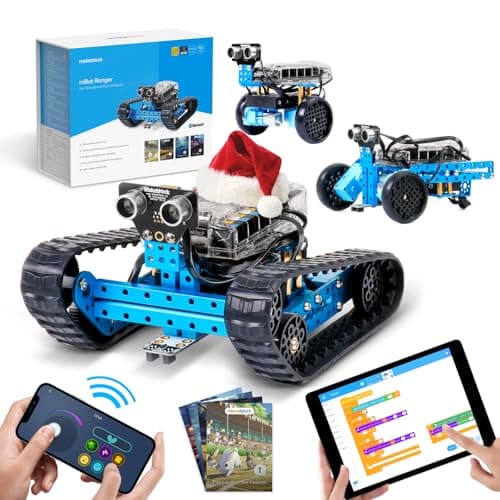 Best if they want to build the machine Makeblock mBot Ranger Three published build forms from about 100 parts, with Arduino support and LEGO compatibility. | Teens who would rather assemble than type | |
| 3 | 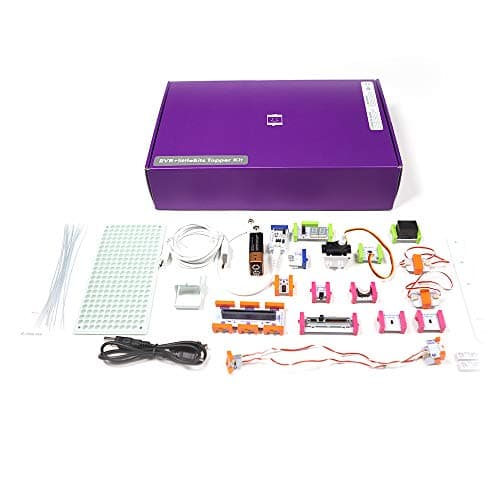 Best for inventing rather than coding littleBits Invention Kit 29 Bits with 12 inputs and 8 outputs, published as screen-free. | Roughly seven to thirteen, on the published grade range | |
| 4 | 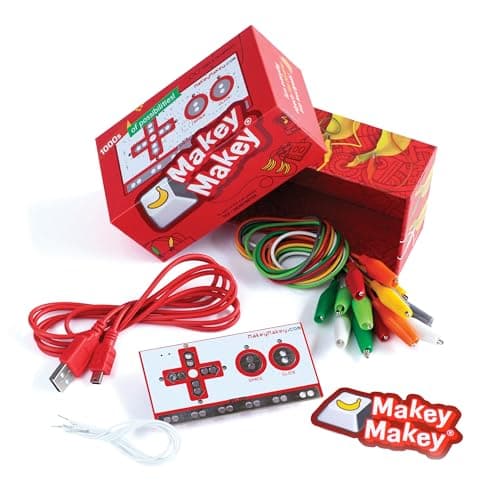 Best cheap way in with a laptop Makey Makey Classic Turns any conductive object into a key, with no software to install. | Eight and up, where a computer is available | |
| 5 | 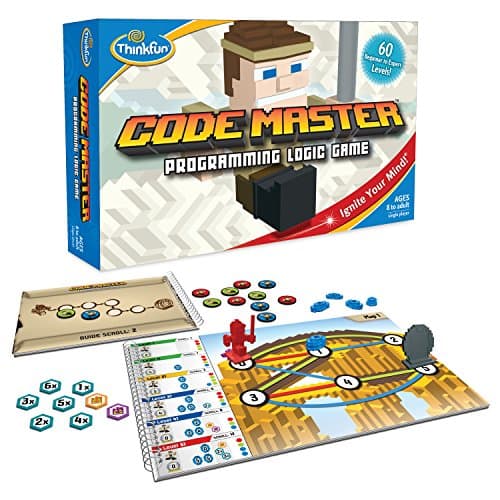 Best screen-free option ThinkFun Code Master 60 levels of programming logic from beginner to expert, one player, no batteries. | Eight and up, alone | |
| — | 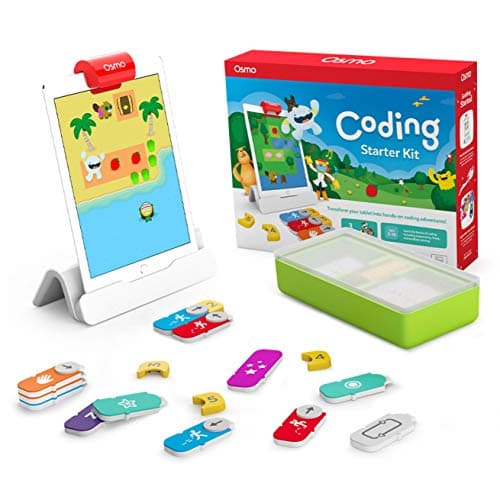 Not for this age Osmo Coding Starter Kit for iPad 31 magnetic coding blocks and three apps, on an iPad. | Five to ten |
6 picks, including 1 we tell you to skip. Ages shown are the manufacturer’s own rating, not ours.
The specification that matters at thirteen
The arithmetic
Published programming paths
| mBot Neo | Scratch-style blocks, Python in mBlock, Arduino C/C++ via the Arduino IDE |
|---|---|
| mBot Ranger | mBlock — “both visual and text-based programming” |
| LEGO SPIKE Essential | SPIKE App — icon-based and word-based coding built on Scratch |
| littleBits Inventor Kit | None — published as screen-free, wired rather than coded |
| Makey Makey Classic | None required — “No programing knowledge needed”, works with anything that reads a keypress |
| Code Master | None — programming logic on paper, 60 levels |
| Osmo Coding Starter Kit | Block-based, in-app only, ages 5-10 |
Why the language is the right criterion
A block-only toy has a ceiling you will hit. Drag-and-drop coding is a good on-ramp and a bad destination. A teenager who enjoys it will want to type within months, and a kit with no text option means buying again.
Published hardware tells you whether that is possible. The mBot Neo’s CyberPi is published as a 240 MHz dual-core with 8 MB of flash — a real microcontroller, not a sealed toy brain. That is why Python and C++ are on the same box.
Sensors are what make the code worth writing. Makeblock publishes on-board light, microphone, gyroscope and accelerometer plus ultrasonic, quad RGB, temperature and IR modules. A loop is boring until it is reading a distance and stopping before a wall.
Expandability sets the horizon. 60+ compatible modules, up to 10 at once, and 8 motor and servo ports is a published invitation to build something the manual does not contain.
What changes between ten and thirteen
Two things change, and both are about identity rather than ability.
The first is that a teenager reads packaging. A robot with cartoon eyes and a published 8+ rating gets judged before it is switched on, which is why the box matters even when the controller inside is genuinely capable.
The second is that the project has to be theirs. A ten-year-old will happily complete the manual; a fifteen-year-old wants to make something the manual has not thought of. That is why published expansion ports and language options matter more than project counts at this age.
If school already uses Scratch or Python
Most secondary curricula start in Scratch and move to Python, which maps exactly onto what Makeblock publishes for the mBot Neo: Scratch-style blocks, then Python in mBlock, then Arduino C/C++.
That alignment is worth more than it sounds. Homework and hobby reinforce each other, and a robot that runs the same language as a class assignment turns revision into something that moves across a floor.
If school has gone further — a microcontroller unit, a robotics club — the Ranger’s published Arduino compatibility and 500+ part ecosystem is the better fit, because the limit becomes the student rather than the kit.
The screen-free case at this age
It still exists, and it is not a compromise. ThinkFun publishes Code Master as 60 levels of map-based programming logic with no batteries, and littleBits publishes its Inventor Kit as screen-free with 29 Bits.
For a household already negotiating screen time, a kit whose whole surface is physical avoids the argument entirely. The logic in Code Master’s later levels — sequencing, branching, repeating — is the same logic a text language expresses, learned without a device.
The trade is ceiling. Sixty levels ends; a microcontroller does not.
Worth knowing before you buy
So which one
Thirteen and likely to stay interested: mBot Neo. Three published languages on one board.
Prefers building to typing: mBot Ranger, for the self-balancing build.
Wants to invent rather than program: littleBits Electronics Inventor Kit.
Has a laptop and a sense of humour: Makey Makey.
No screens: Code Master.
Say the unwelcome thing
Do not buy a coding toy for a teenager who codes
If a teenager is already writing Python at school, a block-based robot is a step backwards and they will say so. The move at that point is hardware — a microcontroller they can program in a real language — or nothing at all. A kit’s published language path is the only thing that separates those two outcomes.
Where to go next
Robot kits for teens covers the build-it-yourself end, coding toys for tweens is the rung below this one, and from toy to real code covers the handover to a text language.
In full
Every pick, and what is wrong with it
Published specifications only, each linked back to the page it came from. Where a manufacturer publishes nothing, the row says so — we do not fill blanks in.
1. Best overall for a teenager
Makeblock mBot Neo (mBot2)
Makeblock · mBot2 · maker rates it 8+
Blocks to Python to Arduino C/C++ on the same hardware, with real sensors.
- Controller
- CyberPi — Xtensa 32-bit LX6 dual-core at 240 MHz, 8 MB flash, 8 MB PSRAM
- Programming
- Scratch-style blocks, Python in mBlock, and Arduino C/C++ via the Arduino IDE
- Sensors
- On-board light, microphone, gyroscope and accelerometer, plus ultrasonic, quad RGB, temperature and IR modules
- Battery
- Built-in 2500 mAh LiPo, about 1 hour to charge, about 5 hours of play
Makeblock publishes the CyberPi controller as an Xtensa 32-bit LX6 dual-core at 240 MHz with 8 MB of flash and 8 MB of PSRAM, programmable with Scratch-style blocks, Python in mBlock and Arduino C/C++ through the Arduino IDE. Sensors published on-board are light, microphone, gyroscope and accelerometer, plus ultrasonic, quad RGB, temperature and IR modules. The battery is a built-in 2500 mAh LiPo — about an hour to charge, about five hours of play — with 60+ compatible modules, up to 10 connected at once and 8 motor and servo ports. Stated age 8+.
Three published languages on one board is the whole case. A teenager who starts in blocks because it is quick can move to Python without buying anything, and to C++ after that. Nothing else here publishes that ladder.
The honest drawback is the box. Published at 8+, it is marketed to a younger child, and a fifteen-year-old may need to be told what the controller actually is before they take it seriously.
Replay signal
- Open-ended or one-shot
- Open-ended at the top of the range — this is the one a child does not outgrow at eleven
- Does anything run out
- Nothing runs out; rechargeable
- Room to grow
- Blocks, then Python, then Arduino C on the same robot, with 60+ add-on modules
- Adult required
- Not for driving it. Probably for the first Python session
Why we say so: Makeblock publishes the processor, the three programming environments on one robot, the 2500 mAh battery figures and the 60+ compatible modules. Blocks-to-Python-to-C on one chassis is the published upgrade path, and it is why this survives the year a child gets bored of pressing buttons.
What’s wrong with it
Published from 8, so the box looks younger than the buyer.
| Controller | CyberPi — Xtensa 32-bit LX6 dual-core at 240 MHz, 8 MB flash, 8 MB PSRAM |
|---|---|
| Programming | Scratch-style blocks, Python in mBlock, and Arduino C/C++ via the Arduino IDE |
| Sensors | On-board light, microphone, gyroscope and accelerometer, plus ultrasonic, quad RGB, temperature and IR modules |
| Battery | Built-in 2500 mAh LiPo, about 1 hour to charge, about 5 hours of play |
| Expansion | 60+ compatible modules, up to 10 connected at once, 8 motor and servo ports |
| Stated age | Ages 8+ |
Every figure above is from Makeblock, mBot2 coding robot kit. Blanks are shown as “not published” rather than filled in.
2. Best if they want to build the machine
Makeblock mBot Ranger
Makeblock · mBot Ranger · maker rates it 8+
Three published build forms from about 100 parts, with Arduino support and LEGO compatibility.
- Build forms
- 3 — a robot tank, a self-balancing robot and a racing car
- Parts
- “about 100 parts”
- Expansion
- 10 expansion ports
- Compatibility
- “fully compatible with 500+ Makeblock parts, LEGO bricks, and supports Arduino”
Makeblock publishes three build forms — a robot tank, a self-balancing robot and a racing car — from about 100 parts, with 10 expansion ports, published compatibility with 500+ Makeblock parts, LEGO bricks and Arduino, mBlock offering both visual and text-based programming, and infrared, light and line-following sensors named in Makeblock’s launch post. Its stated age is 8+ on Makeblock’s site while the Amazon listing title says ages 10+; batteries are not stated on the Makeblock pages we could read.
The self-balancing build is the one that earns this a place on a teen list. Getting a two-wheeled robot to stay upright is a real control problem, and it is the kind of thing a sixteen-year-old can talk about in a college application.
We report both published ages rather than choosing the convenient one. See the mBot Ranger review.
Replay signal
- Open-ended or one-shot
- Three published builds, then a kit compatible with 500+ Makeblock parts and LEGO bricks
- Does anything run out
- Nothing runs out apart from batteries
- Room to grow
- Block coding first, then Arduino in the same mBlock software, on the same robot
- Adult required
- For the first build at the young end of the range — about 100 parts is a real assembly job
Why we say so: Makeblock publishes three build forms from about 100 parts, 10 expansion ports and compatibility with 500+ Makeblock parts and LEGO bricks, programmed in mBlock from blocks to Arduino. Building the robot before programming it is the published design, and it is what makes this a robot kit rather than a coding robot.
What’s wrong with it
Makeblock publishes 8+ while the Amazon listing title says 10+, and no battery spec is published.
| Build forms | 3 — a robot tank, a self-balancing robot and a racing car |
|---|---|
| Parts | “about 100 parts” |
| Expansion | 10 expansion ports |
| Compatibility | “fully compatible with 500+ Makeblock parts, LEGO bricks, and supports Arduino” |
| Programming | mBlock, “offering both visual and text-based programming” — blocks up to Arduino |
| Sensors named | Infrared, light and line-following (Makeblock's launch post) |
| Control | Makeblock remote-control app |
| Stated age | Age 8+ on Makeblock's site; the Amazon listing title says Ages 10+ |
| Batteries | Not stated on the Makeblock pages we could read |
Every figure above is from Makeblock, mBot Ranger robot building kit. Blanks are shown as “not published” rather than filled in.
3. Best for inventing rather than coding
littleBits Invention Kit
Sphero · Invention Kit · maker rates it Grades 2-7
29 Bits with 12 inputs and 8 outputs, published as screen-free.
- Bits
- 29 in total — 2 power, 7 wire, 12 input and 8 output Bits
- Inputs
- Toggle switch, 2 buttons, 2 slide dimmers, remote trigger, pulse, threshold, and proximity, temperature, light and sound sensors
- Outputs
- LED, buzzer, bargraph, servo, RGB LED, number display, 2 DC motors
- Power
- 1 x 9V battery; a USB power Bit is also included
Sphero publishes 29 Bits in total — 2 power, 7 wire, 12 input and 8 output — with inputs including a toggle switch, two buttons, two slide dimmers, a remote trigger, pulse, threshold, and proximity, temperature, light and sound sensors, and outputs including an LED, buzzer, bargraph, servo, RGB LED, number display and two DC motors. Power is 1 x 9V battery with a USB power Bit also included, 10 challenge cards, published as screen-free, grades 2-7.
Twelve inputs and eight outputs is a genuine invention surface: a proximity sensor driving a servo is a working machine with no code at all. For a teenager whose interest is making things rather than programming them, this beats a robot.
The published grade ceiling of 7 is the caveat — this is the younger end of a teen list, and a fifteen-year-old may find it thin. See the littleBits review.
Replay signal
- Open-ended or one-shot
- Open-ended — any input can drive any output, so the gadget is the child's design
- Does anything run out
- Nothing runs out apart from the 9V battery
- Room to grow
- Twelve inputs and eight outputs is enough to build working gadgets rather than demonstrations
Why we say so: Sphero publishes 29 Bits including proximity, temperature, light and sound sensors, a servo and two DC motors, run from a 9V battery and published as screen-free. Real sensors driving real motors is what separates an invention kit from a circuit tutorial.
What’s wrong with it
Published grades 2-7, so the top of the range is where a teen starts.
| Bits | 29 in total — 2 power, 7 wire, 12 input and 8 output Bits |
|---|---|
| Inputs | Toggle switch, 2 buttons, 2 slide dimmers, remote trigger, pulse, threshold, and proximity, temperature, light and sound sensors |
| Outputs | LED, buzzer, bargraph, servo, RGB LED, number display, 2 DC motors |
| Power | 1 x 9V battery; a USB power Bit is also included |
| Screen | Published as screen-free |
| Challenges | 10 challenge cards, with further lessons via Sphero Central |
| Stated grade | Grades 2-7 |
Every figure above is from Sphero, littleBits Invention Kit. Blanks are shown as “not published” rather than filled in.
4. Best cheap way in with a laptop
Makey Makey Classic
JoyLabz · Classic · maker rates it 8+
Turns any conductive object into a key, with no software to install.
- Contents
- Makey Makey board, USB cable, 7 alligator clips, 6 connector wires, visual project start guide, sticker
- Computer
- Required — Mac, Windows, Chromebook or Linux; any device that supports a USB keyboard or mouse
- Software
- “No programing knowledge needed. No software to install.”
- Stated age
- “Ages 8 to infinity”
JoyLabz publishes the Makey Makey board, a USB cable, 7 alligator clips, 6 connector wires, a visual project start guide and a sticker, requiring a computer — Mac, Windows, Chromebook or Linux, or any device supporting a USB keyboard or mouse — with “No programing knowledge needed. No software to install.” Stated age “Ages 8 to infinity”, no consumables.
For a teenager this is the most creatively open board here, because the project is whatever they wire it to: a drum kit of saucepans, a game controller of pencil drawings, a piano of fruit.
It also pairs naturally with code they already write at school — anything that reads a keypress can be driven by it, including Scratch and Python.
Replay signal
- Open-ended or one-shot
- Genuinely open-ended — any conductive object can be wired in as a control
- Does anything run out
- Nothing runs out
- Adult required
- Not after the first connection; nothing needs installing
Why we say so: JoyLabz publishes that no software install and no programming are needed, and that the board works on any device supporting a USB keyboard or mouse. That compatibility statement is the mechanism: the board registers as a keyboard, so whatever the child clips to it becomes a key.
What’s wrong with it
A computer is required and is not included.
| Contents | Makey Makey board, USB cable, 7 alligator clips, 6 connector wires, visual project start guide, sticker |
|---|---|
| Computer | Required — Mac, Windows, Chromebook or Linux; any device that supports a USB keyboard or mouse |
| Software | “No programing knowledge needed. No software to install.” |
| Stated age | “Ages 8 to infinity” |
| Consumables | None |
Every figure above is from JoyLabz, Makey Makey Classic. Blanks are shown as “not published” rather than filled in.
5. Best screen-free option
ThinkFun Code Master
ThinkFun · 1950 · maker rates it 8+
60 levels of programming logic from beginner to expert, one player, no batteries.
- Levels
- 60, beginner to expert
- Players
- 1
- Format
- Map-based programming logic — sequence the avatar's moves to collect power crystals
- Batteries
- None
ThinkFun publishes Code Master as 60 levels from beginner to expert, single player, map-based programming logic where the avatar’s moves are sequenced to collect power crystals, with no batteries.
The logic here — sequence, conditionals, loops — is the part of programming that transfers. A teenager who finds Code Master’s later levels hard is learning something a robot with an app can hide.
Replay signal
- Open-ended or one-shot
- Finite — 60 levels, and they are worked through in order
- Does anything run out
- Nothing runs out, but the level book does end
- Room to grow
- The later levels introduce conditionals and loops, so the concept ladder is real rather than cosmetic
Why we say so: ThinkFun publishes 60 levels from beginner to expert and a map-and-sequence format. The concepts the later levels introduce — branching and repetition — are the same two ideas that make a real program, which is why this works as preparation for a screen rather than as a substitute for one.
What’s wrong with it
Sixty levels is finite, and it is a board game rather than a machine.
| Levels | 60, beginner to expert |
|---|---|
| Players | 1 |
| Format | Map-based programming logic — sequence the avatar's moves to collect power crystals |
| Batteries | None |
| Stated age | Ages 8 and up |
Every figure above is from ThinkFun, Code Master. Blanks are shown as “not published” rather than filled in.
Skip this one
Osmo Coding Starter Kit for iPad
Osmo · Coding Starter Kit · maker rates it 5-10
31 magnetic coding blocks and three apps, on an iPad.
- Contents
- Osmo Base and Reflector for iPad, 31 magnetic coding blocks, stackable storage, 3 game apps
- Games
- Coding Awbie, Coding Jam, Coding Duo
- Screen required
- Yes — an iPad is required and is not included
- Compatibility
- All iPads except generations 1-4 and certain newer models; minimum iOS 11
Osmo publishes the Base and Reflector for iPad, 31 magnetic coding blocks, stackable storage and 3 game apps — Coding Awbie, Coding Jam and Coding Duo — with an iPad required and not included, compatibility for all iPads except generations 1-4 and certain newer models, minimum iOS 11, stated age 5-10.
Named here because it appears in teen gift lists constantly. The published ceiling is 10, and a thirteen-year-old handed Coding Awbie will read it as a toy for children.
Replay signal
- Open-ended or one-shot
- Guided by the three games rather than open-ended; Coding Jam is the one with no ending
- Does anything run out
- Nothing physical runs out
- Room to grow
- Three games at rising difficulty, described by Osmo as beginner to expert
- Adult required
- Only to hand over the iPad — which is precisely the friction: this one competes with screen time rather than replacing it
Why we say so: Osmo publishes the 31-block count, the three named games, the iPad requirement and the compatibility list. The iPad dependency is a published requirement, and it is the fact most likely to decide whether this gets used.
What’s wrong with it
Published 5-10, and an iPad is required and not included.
| Contents | Osmo Base and Reflector for iPad, 31 magnetic coding blocks, stackable storage, 3 game apps |
|---|---|
| Games | Coding Awbie, Coding Jam, Coding Duo |
| Screen required | Yes — an iPad is required and is not included |
| Compatibility | All iPads except generations 1-4 and certain newer models; minimum iOS 11 |
| Stated age | Ages 5-10 |
Every figure above is from Osmo, Coding Starter Kit. Blanks are shown as “not published” rather than filled in.
We are not putting a buy button on this one. It is easy enough to find if you want it anyway — but we would rather send you to something that gets played with twice.
Questions people actually ask
Frequently asked
What is the best coding toy for a teenager?
The mBot Neo, judged on its published programming path: Makeblock publishes Scratch-style blocks, Python in mBlock and Arduino C/C++ via the Arduino IDE on the same 240 MHz dual-core controller, so a teenager can move from blocks to a text language without buying again.
Are coding toys worth it for teens who already code?
Only if they add hardware. A block-only toy is a step backwards for a teenager already writing Python; a kit with published sensors, expansion ports and a text-language route gives them something their laptop cannot do on its own. From toy to real code.
Is there a screen-free coding toy for teenagers?
Two. ThinkFun publishes Code Master as 60 levels of map-based programming logic, single player with no batteries, and Sphero publishes the littleBits Electronics Inventor Kit as screen-free with 29 Bits across 12 inputs and 8 outputs.
What age do these publish?
Makeblock publishes 8+ for mBot Neo and 8+ for the Ranger on its own site (the Amazon listing title says 10+). ThinkFun publishes 8 and up for Code Master, JoyLabz publishes 'Ages 8 to infinity', and Sphero publishes grades 2-7 for littleBits. None publish an upper limit.
Is Osmo Coding suitable for a teenager?
No. Osmo publishes ages 5-10 for the Coding Starter Kit, and it requires an iPad that is not included. It appears in teen gift lists often, but the published ceiling is 10. Coding toys for tweens.
Sources
Where these figures came from
Every specification on this page traces to one of these. If a manufacturer publishes nothing on a point, the page says so rather than filling the gap.
Read next
Where to go from here
Back to Coding & Robotics, or read how we pick.