The picks
Best Coding Robots Under $100
Under a hundred dollars every coding robot does the first lesson well. What separates them is where the programming stops, and that is the figure a box never prints.
By Sawyer V. · Published
The short answer
The Makeblock mBot is the pick under $100, because its published path runs “From Scratch to Arduino” — a real language at the end rather than the end of an app. For a five-year-old, Ozobot Ozo at Home publishes 27 ordered activities, and Botley 2.0 remains the best fully screen-free robot at this price.
Block & Beaker earns a commission when you buy through our links, at no cost to you. It never changes a ranking, and we say so plainly when the right answer is the cheaper set, or nothing at all. Full disclosure · How we pick.
At a glance
The picks, ranked
Tap any row to jump to the full reasoning. Prices come live from Amazon where we have them and read “check price” where we don’t — never a number we cannot stand behind today.
| # | Product | Best for | Price |
|---|---|---|---|
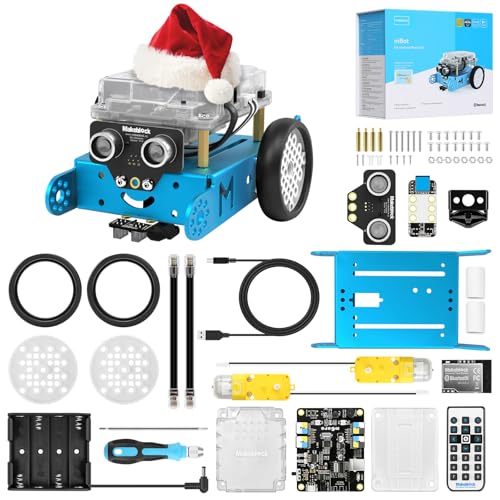
| 1 | Best overall — the only one with a real language at the end Makeblock mBot A 15-minute metal build, Scratch to Arduino, and 500+ compatible parts published. | Eight to twelve, for a child who will still be at it in a year | |
| 2 | 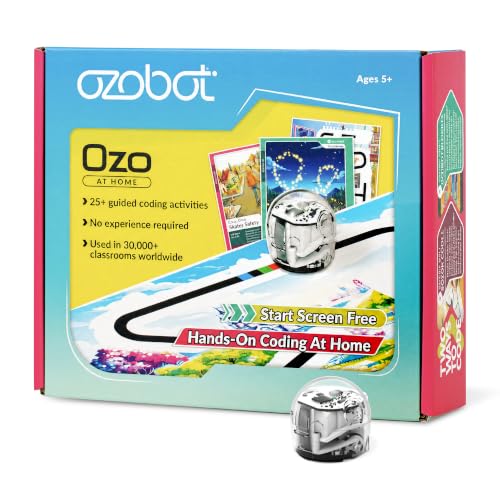 Best for a household with no coding experience Ozobot Ozo at Home Coding Robot Kit 27 published activities in a stated order, from drawn color codes to Blockly. | Five and up, where an adult needs to know what comes next | |
| 3 | 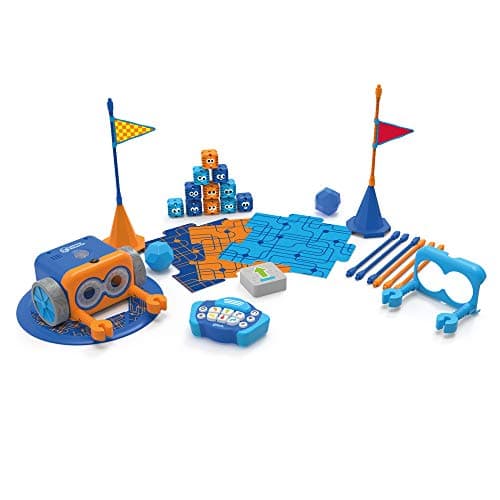 Best fully screen-free robot Botley 2.0 The Coding Robot Activity Set Programmed entirely on a remote, with no app and no account anywhere. | Five to eight, in a household that will not add another device | |
| 4 | 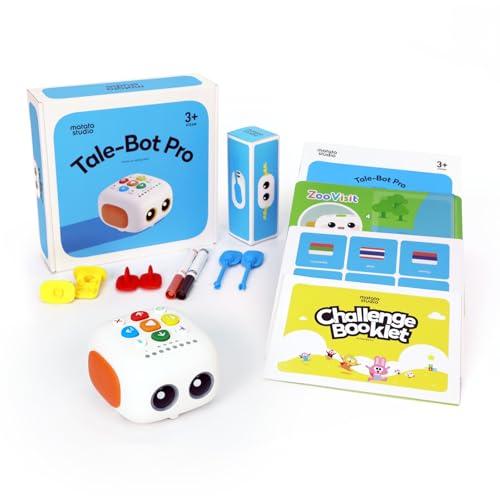 Best for under five MatataStudio Tale-Bot Pro Coding Robot 256 published commands, 14 missions and a double-sided map, with no app required. | Three to five, where the commands have to be buttons on the robot | |
| 5 | 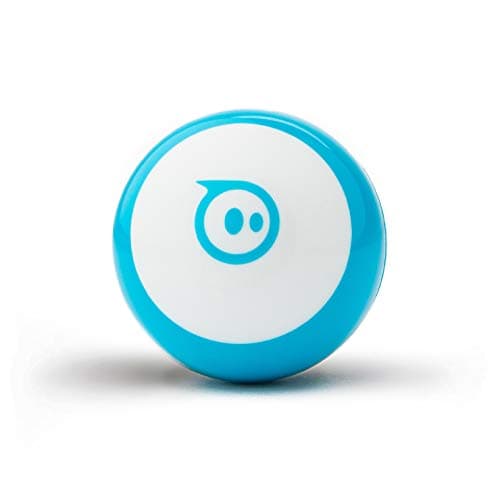 Best for a child who wants it to be a toy first Sphero Mini A programmable ball with a real block editor, at the exact top of this price band. | Eight and up, where the robot has to be fun before it is educational | |
| — | 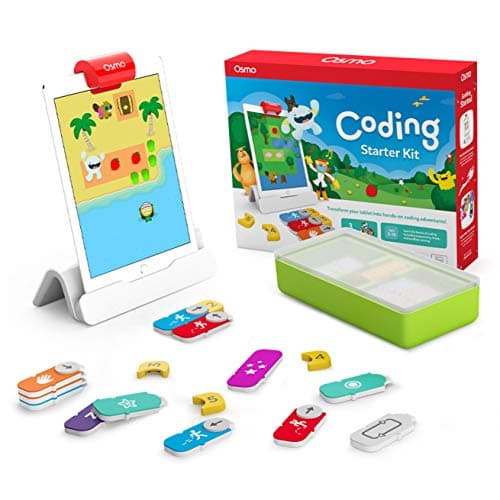 The one to skip on a coding-robot page Osmo Coding Starter Kit for iPad A good coding product, and not a robot - the hundred dollars does not include the iPad it needs. | A household that already owns an iPad and wants coding on it |
6 picks, including 1 we tell you to skip. Ages shown are the manufacturer’s own rating, not ours.
Where the programming stops
The arithmetic
Coding robots under $100: the published ceiling of each one
| Makeblock mBot | Scratch, then Arduino. 100+ modules, 500+ parts |
|---|---|
| Ozobot Ozo at Home | Color codes, then Ozobot Blockly. 27 activities |
| Botley 2.0 | Remote only. No app, no account. Fixed command set |
| Tale-Bot Pro | 256 commands on the robot. Sequences and loops. Ages 3-5 |
| Sphero Mini | Sphero Edu block editor. App required |
| Osmo Coding Starter | Blocks controlling a screen character. iPad required |
The three questions that decide this purchase
Does it need a device, and do you have one? Sphero and Osmo require a phone or tablet; Botley and the Tale-Bot require nothing; mBot and Ozobot start without one and can use one later. A hundred-dollar robot that needs a four-hundred-dollar tablet is not a hundred-dollar robot.
How far does the programming go? A remote teaches sequences. A block editor teaches loops and conditionals. Only mBot publishes a path into text code, and that is the ceiling that decides how long this lasts.
Is there a published list of things to do? Ozobot publishes 27 activities in order with stated lengths; MatataStudio publishes 14 missions. The others publish a capability and leave the planning to you, which is where most of these end up unused. See how to choose a first coding toy.
What a hundred dollars does not buy
It does not buy a humanoid robot. The things that walk and talk in this price band are remote-control toys with a coding app bolted on, and the coding is usually a sequence of preset tricks.
It does not buy rechargeable in every case. Ozobot publishes a charging cable; mBot publishes 4 AA cells and a CR2025, neither included. Check before Christmas morning — rechargeable versus battery coding toys has the longer version.
And it does not buy a classroom robot. The sets built for groups start above this band; see coding robots for classrooms.
Worth knowing before you buy
Say the unwelcome thing
Do not buy an app-only robot if the aim was less screen time
Half of this category is programmed from a tablet, and for a household already arguing about screens that converts a coding lesson into a device negotiation. If that is the situation, the robots that publish no screen requirement at all — Botley, the Tale-Bot — are a different and better purchase, even though their ceilings are lower. A robot that gets used beats a robot with a better editor.
Where to go next
Coding robots for kids is the category without a price cap, screen-free coding toys sorts the same shelf on whether a device is needed, and robot kits is for the child who wants to build the robot as well as program it.
In full
Every pick, and what is wrong with it
Published specifications only, each linked back to the page it came from. Where a manufacturer publishes nothing, the row says so — we do not fill blanks in.
1. Best overall — the only one with a real language at the end
Makeblock mBot
Makeblock · 90053 · maker rates it 8-12
A 15-minute metal build, Scratch to Arduino, and 500+ compatible parts published.
- Build
- “this building kit can be easily built within 15 minutes”
- Programming
- “From Scratch to Arduino”, via “3 free Makeblock apps and mBlock software”
- Built-in modes
- “remote control car with its multi-functions: line-follow, obstacle-avoidance and so on”
- Expansion
- “can be connected to 100+ electronic modules and 500+ parts from the Makeblock platform, compatible with LEGO parts”
Makeblock publishes a build “easily built within 15 minutes” in “metal material”, a programming route “From Scratch to Arduino” through “3 free Makeblock apps and mBlock software”, built-in line-follow and obstacle-avoidance modes, and compatibility with “100+ electronic modules and 500+ parts from the Makeblock platform, compatible with LEGO parts”.
The published ceiling is why this leads. Almost every coding robot under $100 ends at a block editor; this one ends at Arduino, which is the language a teenager uses for an actual project. A toy with a real language behind it stops being a toy at some point, which is the best outcome available in this category.
It is also the cheapest buildable robot here. Assembling it teaches what a motor, a sensor and a controller are before a line of code is written — see from toy to real code and robot kits.
Replay signal
- Open-ended or one-shot
- The child builds it first, then programs it, then rebuilds it with add-on parts
- Does anything run out
- Nothing runs out; it takes AA cells and a CR2025
- Room to grow
- Published as compatible with 100+ modules, 500+ Makeblock parts and LEGO parts, with a published path from Scratch to Arduino
- Adult required
- A 15-minute build is published as the whole assembly job
Why we say so: Makeblock publishes a metal chassis assembled in 15 minutes, a programming path that runs from Scratch blocks to Arduino text, and compatibility with 100+ modules and 500+ parts. That published path is the reason this outlasts a sealed robot: the ceiling is a real programming language rather than the end of an app.
What’s wrong with it
The child has to build it before anything happens, and it needs 4 AA cells and a CR2025.
| Build | “this building kit can be easily built within 15 minutes” |
|---|---|
| Programming | “From Scratch to Arduino”, via “3 free Makeblock apps and mBlock software” |
| Built-in modes | “remote control car with its multi-functions: line-follow, obstacle-avoidance and so on” |
| Expansion | “can be connected to 100+ electronic modules and 500+ parts from the Makeblock platform, compatible with LEGO parts” |
| Chassis | “metal material” |
| Batteries | “the remote controller needs a CR2025 battery(NOT INCLUDED), and the robot kit needs 4 AA batteries (NOT INCLUDED)” |
| Stated age | “ages 8-12”, and 8+ in the title |
Every figure above is from Makeblock, mBot (90053) — published listing copy. Blanks are shown as “not published” rather than filled in.
2. Best for a household with no coding experience
Ozobot Ozo at Home Coding Robot Kit
Ozobot · 70101KIT · maker rates it 5+
27 published activities in a stated order, from drawn color codes to Blockly.
- Activities
- “27 guided activities across five learning formats: Mystical Forest Mat, Blank Magnetic Board, Color Codes, Ozobot Blockly, and Engineering challenges”
- Session length
- “Many activities are estimated at 10, 15, 25, or 30 minutes” and are “designed to be completed in order”
- Screen requirement
- Starts screen-free with Color Code Markers, then “build toward block-based programming with Ozobot Blockly on a computer or tablet”
- Included
- “Charging Cable & Protective Case”, color code markers and a two-sided magnetic board
Ozobot publishes “27 guided activities across five learning formats: Mystical Forest Mat, Blank Magnetic Board, Color Codes, Ozobot Blockly, and Engineering challenges”, with lengths of “10, 15, 25, or 30 minutes”, designed to be completed in order, and explicitly for families where adults are “brand new to coding”.
A counted, ordered activity set is the thing that most often keeps a coding robot out of the cupboard in week three. The usual failure is not the child losing interest — it is that nobody knows what to do next after the demo.
The progression from drawing color codes on paper to Blockly on a screen is the other strength: the first lesson needs no device at all. See screen-free coding toys.
Replay signal
- Open-ended or one-shot
- Twenty-seven published activities is a curriculum rather than an open field — but Blockly at the end is open
- Does anything run out
- The color-code markers are the only consumable
- Room to grow
- Published progression from drawn color codes to Blockly on a computer
- Adult required
- Published as needing none: “even if adults are brand new to coding”
Why we say so: Ozobot publishes 27 activities in a stated order with stated lengths, and a published route from drawing lines on paper to Blockly on a screen. A counted, ordered activity set is the thing that most often keeps a coding robot out of the cupboard in week three — the parent always knows what comes next.
What’s wrong with it
A curriculum rather than an open field - and it is finished when the 27 are done.
| Activities | “27 guided activities across five learning formats: Mystical Forest Mat, Blank Magnetic Board, Color Codes, Ozobot Blockly, and Engineering challenges” |
|---|---|
| Session length | “Many activities are estimated at 10, 15, 25, or 30 minutes” and are “designed to be completed in order” |
| Screen requirement | Starts screen-free with Color Code Markers, then “build toward block-based programming with Ozobot Blockly on a computer or tablet” |
| Included | “Charging Cable & Protective Case”, color code markers and a two-sided magnetic board |
| Power | Rechargeable — a charging cable is published as included |
| Stated age | “Ages 5+” |
| Consumables | The markers; the mats and board are reusable |
Every figure above is from Ozobot, Ozo at Home (70101KIT) — published listing copy. Blanks are shown as “not published” rather than filled in.
3. Best fully screen-free robot
Botley 2.0 The Coding Robot Activity Set
Learning Resources · LER2938 · maker rates it 5+
Programmed entirely on a remote, with no app and no account anywhere.
- Set size
- 78 pieces
- Contents
- Botley 2.0, remote programmer, 2 face plates, 40 coding cards, 6 double-sided boards, 27 obstacle pieces, starter guide
- Maximum program length
- “coding sequences of up to 150 steps”
- Movement
- Six directions, plus 16 coded interactions
Learning Resources publish Botley 2.0 as a fully screen-free coding robot programmed from its own remote. The review has the published figures and it is a pick on our general coding robots page.
No screen is a real specification rather than a marketing line. There is no app to update, no tablet to negotiate over and no account to make, which is why this is the robot that gets used on a weekday evening.
Accept the ceiling when you buy it. A remote with a fixed command set cannot grow, so budget on about two years and then move on — coding toys for 8 and 9 year olds is the next rung.
Replay signal
- Open-ended or one-shot
- Open-ended once the cards are understood — the child builds the maze, not just the program
- Does anything run out
- Nothing runs out except batteries
- Room to grow
- A 150-step ceiling means the challenge scales for years past the first week
- Adult required
- Needed for the first session, then not — there is no app account and nothing to log into
Why we say so: Learning Resources publishes the 78-piece contents, the 150-step maximum sequence, the six directions and 16 interactions, and states the set is 100% screen-free with no tablet or app required.
What’s wrong with it
The ceiling is low - when the sequences stop being a challenge, there is nowhere to go.
| Set size | 78 pieces |
|---|---|
| Contents | Botley 2.0, remote programmer, 2 face plates, 40 coding cards, 6 double-sided boards, 27 obstacle pieces, starter guide |
| Maximum program length | “coding sequences of up to 150 steps” |
| Movement | Six directions, plus 16 coded interactions |
| Screen required | None — “100% screen-free play” |
| Batteries | “Requires 5 AAA batteries (not included)” |
| Stated age | 5+ (K-2nd grade) |
Every figure above is from Learning Resources, Botley 2.0 Activity Set. Blanks are shown as “not published” rather than filled in.
4. Best for under five
MatataStudio Tale-Bot Pro Coding Robot
MatataStudio · Tale-Bot Pro · maker rates it 3-5
256 published commands, 14 missions and a double-sided map, with no app required.
- Commands
- “Up to 256 commands to learn coding concepts including commands, sequences, loops”
- Screen requirement
- “Screen-free Learning while playing” — the command buttons are on the robot itself
- Included
- “1*Tale-Bot Pro learning robot, 1*Double-sided interactive map, 1*Challenge booklet with 14 Missions, 1*Configuration card, 2*Washable markers”
- Recording
- “allows kids to record their voice commands and imaginative tales”
MatataStudio publishes “Up to 256 commands to learn coding concepts including commands, sequences, loops”, with a double-sided interactive map, a “Challenge booklet with 14 Missions”, two washable markers, voice recording, ten languages and LEGO compatibility — all screen-free.
Buttons on the robot is the only design that works at three. A coding toy needing a tablet to issue a command is a tablet the child wanted anyway, and the lesson gets lost in the negotiation about the tablet.
Read the band honestly: 3-5 is a short window. It is the right robot for a preschooler and the wrong one for a seven-year-old — see coding toys for toddlers.
Replay signal
- Open-ended or one-shot
- Semi-open — 14 published missions, plus a drawing pen and a recordable voice track
- Does anything run out
- The washable markers; nothing else
- Room to grow
- 256 commands and LEGO compatibility, but the published band stops at five
- Adult required
- None published — the controls are buttons on the robot itself
Why we say so: MatataStudio publishes 256 commands, a 14-mission booklet and buttons on the robot rather than an app. For a three-year-old that is the only design that works: a coding toy needing a tablet to issue a command is a tablet the child wanted anyway.
What’s wrong with it
The published age band stops at five, so this is a two-year toy at most.
| Commands | “Up to 256 commands to learn coding concepts including commands, sequences, loops” |
|---|---|
| Screen requirement | “Screen-free Learning while playing” — the command buttons are on the robot itself |
| Included | “1*Tale-Bot Pro learning robot, 1*Double-sided interactive map, 1*Challenge booklet with 14 Missions, 1*Configuration card, 2*Washable markers” |
| Recording | “allows kids to record their voice commands and imaginative tales” |
| Languages | “10 languages are supported including English, French, German, Czech, Swedish, Spanish, Russian, Chinese, Bulgarian and Thai” |
| Compatibility | “compatible with Lego blocks to build more shapes” |
| Stated age | “Kids 3-5” |
Every figure above is from MatataStudio (Matatalab), Tale-Bot Pro — published listing copy. Blanks are shown as “not published” rather than filled in.
5. Best for a child who wants it to be a toy first
Sphero Mini
Sphero · M001BRW-049 (Mini Blue) · maker rates it 8+
A programmable ball with a real block editor, at the exact top of this price band.
- Size
- “about the same size as a ping pong ball”
- Programming
- “three programming canvases: Draw, Blocks, and Text” in the Sphero Edu app
- Sensors
- “a gyroscope, motor encoders, and accelerometer”, plus a codeable LED
- Playtime
- “45 Min Playtime”, charged over micro USB
Sphero publishes the Mini as an app-controlled programmable ball with block-based coding in the Sphero Edu app. The review has the specification, and Sphero Mini vs BOLT covers where it sits in the range.
It earns a place because it is the one on this page that a child plays with for its own sake. Driving it is genuinely fun, which means it comes out of the box on days nobody intended to do any coding, and that is how programming actually gets practiced.
Be clear that it depends on a device entirely. If the aim was to reduce screens, this is the wrong purchase and Botley is the right one.
Replay signal
- Open-ended or one-shot
- Open-ended once the activity library opens up — the robot is a controller, a game piece and a programming target
- Does anything run out
- Nothing runs out; rechargeable
- Room to grow
- Draw, then Blocks, then text — the same three canvases the larger Sphero robots publish
- Adult required
- A phone or tablet has to be free, and Sphero publishes adult supervision under eight
Why we say so: Sphero publishes three programming canvases — Draw, Blocks and Text — on a robot the size of a ping pong ball, and a 45-minute playtime. Read those two figures together: the canvases are the same ladder the $179 BOLT publishes, and the 45 minutes is the honest reason this is the cheap one.
What’s wrong with it
An app-only robot - no app, no robot - and it is a ball, so it goes under furniture.
| Size | “about the same size as a ping pong ball” |
|---|---|
| Programming | “three programming canvases: Draw, Blocks, and Text” in the Sphero Edu app |
| Sensors | “a gyroscope, motor encoders, and accelerometer”, plus a codeable LED |
| Playtime | “45 Min Playtime”, charged over micro USB |
| In the box | Robot, micro USB charging cable, 3 Mini Traffic Cones and 6 Mini Bowling Pins |
| Apps | Sphero Edu (iOS, Android, Amazon Fire OS, macOS, Windows, Chrome OS) and Sphero Play (iOS, Android, Fire OS) |
| Shell | Interchangeable — published as designed to open up |
| Stated age | Ages 8+ |
| Consumables | None — rechargeable |
Every figure above is from Sphero, Sphero Mini. Blanks are shown as “not published” rather than filled in.
Skip this one
Osmo Coding Starter Kit for iPad
Osmo · Coding Starter Kit · maker rates it 5-10
A good coding product, and not a robot - the hundred dollars does not include the iPad it needs.
- Contents
- Osmo Base and Reflector for iPad, 31 magnetic coding blocks, stackable storage, 3 game apps
- Games
- Coding Awbie, Coding Jam, Coding Duo
- Screen required
- Yes — an iPad is required and is not included
- Compatibility
- All iPads except generations 1-4 and certain newer models; minimum iOS 11
Osmo publishes the Coding Starter Kit as physical blocks that control an on-screen character, requiring an iPad. The review has the published requirements and it is a legitimate pick on screen-free coding toys, where the question being asked is different.
It is the skip here purely because of this page’s question. Somebody searching for a coding robot under $100 is budgeting one hundred dollars for an object that moves; this is eighty-nine dollars plus a tablet, and nothing drives across the floor.
As a coding product it is good, and the tangible blocks are a real idea. Buy it knowing what it is — Osmo Coding vs Botley is the comparison that matters here.
Replay signal
- Open-ended or one-shot
- Guided by the three games rather than open-ended; Coding Jam is the one with no ending
- Does anything run out
- Nothing physical runs out
- Room to grow
- Three games at rising difficulty, described by Osmo as beginner to expert
- Adult required
- Only to hand over the iPad — which is precisely the friction: this one competes with screen time rather than replacing it
Why we say so: Osmo publishes the 31-block count, the three named games, the iPad requirement and the compatibility list. The iPad dependency is a published requirement, and it is the fact most likely to decide whether this gets used.
What’s wrong with it
There is no robot. The character is on a screen you have to supply.
| Contents | Osmo Base and Reflector for iPad, 31 magnetic coding blocks, stackable storage, 3 game apps |
|---|---|
| Games | Coding Awbie, Coding Jam, Coding Duo |
| Screen required | Yes — an iPad is required and is not included |
| Compatibility | All iPads except generations 1-4 and certain newer models; minimum iOS 11 |
| Stated age | Ages 5-10 |
Every figure above is from Osmo, Coding Starter Kit. Blanks are shown as “not published” rather than filled in.
We are not putting a buy button on this one. It is easy enough to find if you want it anyway — but we would rather send you to something that gets played with twice.
Questions people actually ask
Frequently asked
What is the best coding robot under $100?
The Makeblock mBot. Makeblock publishes a programming path from Scratch to Arduino and compatibility with 100+ modules and 500+ parts, so it is the only robot in this band whose ceiling is a real text language rather than the end of an app. Robot kits for kids.
Do coding robots need a tablet?
Some do and some do not, and it is worth checking before buying. Sphero Mini and Osmo need a device entirely; Botley 2.0 and the Tale-Bot Pro publish no screen requirement at all; Ozobot and mBot start screen-free and add a block editor later. Screen-free coding toys.
What age is a coding robot for?
The published bands in this price range run from 3-5 for the Tale-Bot Pro up to 8-12 for the mBot. The real divide is at about seven: below it the commands need to be physical buttons or cards, and above it a block editor on a screen starts to make sense.
Is a coding robot worth it under $100?
Yes, if you check where the programming stops. Every robot in this band teaches sequencing well. The ones worth a hundred dollars rather than fifty are the ones that publish somewhere to go next - a block editor, a text language or a counted list of activities.
What is the best coding robot for a 5 year old?
Ozobot Ozo at Home, which Ozobot publishes from age 5 with 27 guided activities in a stated order. The ordered activity list matters more at that age than the robot does, because the usual reason one of these stops being used is that nobody knows what to do next. Coding toys for 4 and 5 year olds.
Sources
Where these figures came from
Every specification on this page traces to one of these. If a manufacturer publishes nothing on a point, the page says so rather than filling the gap.
Read next
Where to go from here
Back to Coding & Robotics, or read how we pick.